Track customer spend
Use one application API key for your customers. Pass the customer's organization alias and member ID with each request. LiteLLM resolves the member's team and organization, checks their budgets, and records spend, tokens, and requests at all three levels.
This guide imports Acme, its Support team, and two members. You then send an LLM request for Alice and fetch usage and budgets to display in your product.
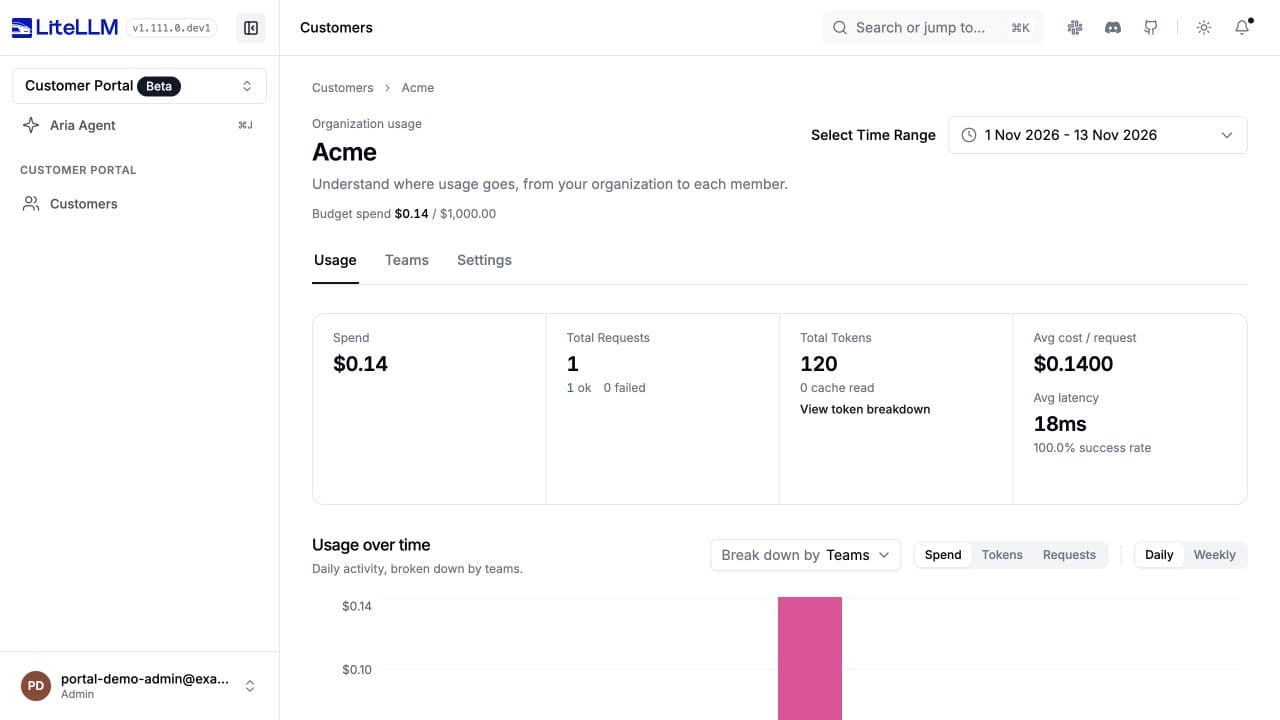
Local Customer Portal after one controlled-provider request, with usage read from the accounting ledger.
Use a build containing the customer hierarchy APIs, identity headers, usage routes, and database migrations on main. Check /openapi.json for /management/v1/customer_members. Preview requirements appear beside the steps that need them; see the availability reference for the required changes.
Before you start
You need a running LiteLLM Gateway, a connected PostgreSQL database with the customer migrations, your existing application API key, and a proxy admin key for management and usage reads.
Make these values available in your application's environment and the terminal where you run curl:
| Variable | Value |
|---|---|
LITELLM_BASE_URL | Gateway URL without /v1, for example http://localhost:4000. |
LITELLM_MODEL | An existing gateway model alias your application key can use. |
LITELLM_API_KEY | Your existing application API key. The same key serves every customer. |
LITELLM_ADMIN_KEY | Proxy admin key for customer management, usage, and log reads. |
START_DATE, END_DATE | Inclusive UTC dates in YYYY-MM-DD format. Use the current UTC date for both on your first run. |
Keep keys on your server. Your backend authenticates the customer and selects the identity headers from that customer's session before it calls LiteLLM. It also authorizes customer access before it returns usage to your product.
Keep the spend accounting ledger enabled in the gateway configuration:
general_settings:
  use_spend_logs_ledger: true
1. Import a customer
Create the organization first, then its team and members. Use IDs from your application, or save the IDs LiteLLM returns when you omit them.
Create the organization and default member budget
Acme has a $1,000 budget. Its default member template gives each member a $50 budget, a $40 soft threshold, and rate limits.
curl --request POST "$LITELLM_BASE_URL/management/v1/customer_organizations" \
  --header "Authorization: Bearer $LITELLM_ADMIN_KEY" \
  --header "Content-Type: application/json" \
  --data '{
    "customer_org_id": "org-acme",
    "alias": "Acme",
    "budget": {
      "max_budget": 1000,
      "budget_duration": "30d"
    },
    "default_budgets": [
      {
        "name": "standard",
        "is_default": true,
        "max_budget": 50,
        "soft_budget": 40,
        "budget_duration": "30d",
        "rpm_limit": 60,
        "tpm_limit": 100000
      }
    ]
  }'
Expect 201 Created. A soft budget is a notification threshold and does not block requests. Webhook delivery requires the customer budget callback.
Create the team
curl --request POST "$LITELLM_BASE_URL/management/v1/customer_teams" \
  --header "Authorization: Bearer $LITELLM_ADMIN_KEY" \
  --header "Content-Type: application/json" \
  --data '{
    "customer_team_id": "acme-support",
    "parent_org_id": "org-acme",
    "alias": "Support",
    "budget": {
      "max_budget": 250,
      "budget_duration": "30d"
    }
  }'
Expect 201 with parent_org_id: "org-acme".
Create Alice and Bob
Create each member with the Support team's ID. Omitting budget_id selects Acme's default member template.
curl --request POST "$LITELLM_BASE_URL/management/v1/customer_members" \
  --header "Authorization: Bearer $LITELLM_ADMIN_KEY" \
  --header "Content-Type: application/json" \
  --data '{
    "customer_member_id": "acme-alice",
    "parent_team_id": "acme-support",
    "alias": "Alice"
  }'
curl --request POST "$LITELLM_BASE_URL/management/v1/customer_members" \
  --header "Authorization: Bearer $LITELLM_ADMIN_KEY" \
  --header "Content-Type: application/json" \
  --data '{
    "customer_member_id": "acme-bob",
    "parent_team_id": "acme-support",
    "alias": "Bob"
  }'
Expect 201 for each member. Read effective_budget in the response to verify the inherited $50 cap. Use budget_id to select another template or budget_override to customize a member. The current API rejects the old budget_template_id field.
Add an email (preview)
The email field requires #51617. On a build containing that change, add Alice's email:
curl --request PATCH "$LITELLM_BASE_URL/management/v1/customer_members/acme-alice" \
  --header "Authorization: Bearer $LITELLM_ADMIN_KEY" \
  --header "Content-Type: application/json" \
  --data '{
    "email": "alice@acme.example"
  }'
Repeat an import
A repeated create returns 409 for an existing ID. Retrieve that ID, confirm its parent, then patch the fields you need to change. This gives your backend an upsert flow with the existing APIs.
curl "$LITELLM_BASE_URL/management/v1/customer_members/acme-alice" \
  --header "Authorization: Bearer $LITELLM_ADMIN_KEY"
After confirming parent_team_id is acme-support, update Alice:
curl --request PATCH "$LITELLM_BASE_URL/management/v1/customer_members/acme-alice" \
  --header "Authorization: Bearer $LITELLM_ADMIN_KEY" \
  --header "Content-Type: application/json" \
  --data '{
    "alias": "Alice"
  }'
Use the same create, retrieve, and update flow for organizations and teams. Native upserts and automatic organization creation remain under review in #51607.
2. Send a request for Alice
Use your existing application key and pass Alice's identity in request headers:
x-litellm-customer-org-alias: Acme
x-litellm-customer-member-id: acme-alice
LiteLLM resolves acme-alice to acme-support, then org-acme. The same identity headers work with Responses, Chat Completions, and Anthropic Messages.
OpenAI Responses SDK
Run pip install openai in your application project. The raw response exposes x-litellm-call-id, which you use to find this request in spend logs.
import os

from openai import OpenAI

client = OpenAI(
    api_key=os.environ["LITELLM_API_KEY"],
    base_url=f"{os.environ['LITELLM_BASE_URL'].rstrip('/')}/v1",
)
raw_response = client.responses.with_raw_response.create(
    model=os.environ["LITELLM_MODEL"],
    input="Write a short welcome message.",
    max_output_tokens=128,
    extra_headers={
        "x-litellm-customer-org-alias": "Acme",
        "x-litellm-customer-member-id": "acme-alice",
    },
)
response = raw_response.parse()
print(response.output_text)
print("LiteLLM call ID:", raw_response.headers.get("x-litellm-call-id"))
Expect a successful Responses result. LiteLLM checks the organization, team, and member budgets, model access, and rate limits, then attributes usage to all three records.
LangChain Deep Agents
Run pip install deepagents langchain-openai. Use a model alias that supports tool calling. Configure the model for the authenticated customer's request:
import os

from deepagents import create_deep_agent
from langchain_openai import ChatOpenAI

model = ChatOpenAI(
    model=os.environ["LITELLM_MODEL"],
    base_url=f"{os.environ['LITELLM_BASE_URL'].rstrip('/')}/v1",
    api_key=os.environ["LITELLM_API_KEY"],
    use_responses_api=True,
    default_headers={
        "x-litellm-customer-org-alias": "Acme",
        "x-litellm-customer-member-id": "acme-alice",
    },
)
agent = create_deep_agent(model=model)
result = agent.invoke({"messages": [{"role": "user", "content": "Say hello to Alice."}]})
print(result["messages"][-1].text)
Select the customer's headers for each authenticated request. Do not change a shared model instance's headers while it serves other customers.
An existing member ID can resolve its parents without the organization header. With an existing organization alias and a new member ID, LiteLLM registers the member under org-acme:default and assigns the organization's default member template. An alias alone attributes usage to the organization.
With #51617, replace the member-ID header with x-litellm-customer-member-email: alice@acme.example; keep the organization alias header. An email string in the member-ID header is an ID, not an email lookup.
3. Check budget enforcement
Create a separate customer with a zero budget to check rejection without changing Acme's settings:
curl --request POST "$LITELLM_BASE_URL/management/v1/customer_organizations" \
  --header "Authorization: Bearer $LITELLM_ADMIN_KEY" \
  --header "Content-Type: application/json" \
  --data '{
    "customer_org_id": "org-budget-check",
    "alias": "Budget check",
    "budget": {
      "max_budget": 0
    }
  }'
Use the client from step 2 with the same application key and model, and this customer's alias:
from openai import APIStatusError

try:
    client.responses.create(
        model=os.environ["LITELLM_MODEL"],
        input="Budget check",
        extra_headers={"x-litellm-customer-org-alias": "Budget check"},
    )
except APIStatusError as error:
    print(error.status_code)
Expect 422 and a budget error naming customer_org=org-budget-check, before a provider request. A deployment can customize the budget error status.
To check admission after changing the budget, set the test cap to $1, rerun that SDK call, then restore the cap to zero. A successful request can incur provider cost.
curl --request PATCH "$LITELLM_BASE_URL/management/v1/customer_organizations/org-budget-check" \
  --header "Authorization: Bearer $LITELLM_ADMIN_KEY" \
  --header "Content-Type: application/json" \
  --data '{
    "budget": {
      "max_budget": 1
    }
  }'
curl --request PATCH "$LITELLM_BASE_URL/management/v1/customer_organizations/org-budget-check" \
  --header "Authorization: Bearer $LITELLM_ADMIN_KEY" \
  --header "Content-Type: application/json" \
  --data '{
    "budget": {
      "max_budget": 0
    }
  }'
The first exhausted scope rejects a request: organization, then team, then member. Fresh customer spend counters across workers require #51568. Without that change, admission can use cached spend until refresh. Allow for requests already in flight and background accounting when you show balances.
4. Fetch usage for your product
The organization aggregated endpoint returns complete spend, token, and request totals for the date range, without pagination. It accepts up to 100 customer organization IDs.
curl --get "$LITELLM_BASE_URL/management/v1/customer_organizations/daily/activity/aggregated" \
  --header "Authorization: Bearer $LITELLM_ADMIN_KEY" \
  --data-urlencode "customer_org_ids=org-acme" \
  --data-urlencode "start_date=$START_DATE" \
  --data-urlencode "end_date=$END_DATE"
Read the response's top-level metadata:
{
  "metadata": {
    "total_spend": 0.14,
    "total_tokens": 120,
    "total_api_requests": 1
  }
}
Dates are inclusive UTC days, with at most a 400-day difference between start and end. total_spend is cost in USD. You can use it in your product's pricing or chargeback calculation; this API does not create invoices or collect payment. The key breakdown shows the top key, while totals include every key.
Team and member usage
curl --get "$LITELLM_BASE_URL/management/v1/customer_teams/daily/activity" \
  --header "Authorization: Bearer $LITELLM_ADMIN_KEY" \
  --data-urlencode "customer_team_ids=acme-support" \
  --data-urlencode "start_date=$START_DATE" \
  --data-urlencode "end_date=$END_DATE" \
  --data-urlencode "page=1" \
  --data-urlencode "page_size=100"
curl --get "$LITELLM_BASE_URL/management/v1/customer_members/daily/activity" \
  --header "Authorization: Bearer $LITELLM_ADMIN_KEY" \
  --data-urlencode "customer_member_ids=acme-alice" \
  --data-urlencode "start_date=$START_DATE" \
  --data-urlencode "end_date=$END_DATE" \
  --data-urlencode "page=1" \
  --data-urlencode "page_size=100"
These endpoints paginate stored rows. Follow metadata.has_more and increment page until it is false. Sum each page's totals once; the same date can occur on several pages. See the pagination contract. Do not add organization, team, and member totals together: they include the same requests.
Accounting runs in the background. If usage has not appeared after a successful request, check accounting completion, the UTC dates, and the identity headers. Zero-cost models can report requests and tokens with $0 spend.
5. Fetch budgets and caps
Retrieve Acme's running budget spend and organization cap:
curl "$LITELLM_BASE_URL/management/v1/customer_organizations/org-acme" \
  --header "Authorization: Bearer $LITELLM_ADMIN_KEY"
Retrieve the Support team's running spend and cap:
curl "$LITELLM_BASE_URL/management/v1/customer_teams/acme-support" \
  --header "Authorization: Bearer $LITELLM_ADMIN_KEY"
Retrieve Alice's inherited budget and active overrides:
curl "$LITELLM_BASE_URL/management/v1/customer_members/acme-alice" \
  --header "Authorization: Bearer $LITELLM_ADMIN_KEY"
Read budget.max_budget for an organization or team and effective_budget.max_budget for a member. The same objects contain rpm_limit, tpm_limit, model limits, and allowed models. A member's effective budget combines the selected template with active overrides; an expired override no longer applies.
spend is the running budget counter. budget_reset_at records the next reset. Use date-range usage for historical costs because a reset changes the counter without erasing historical usage. To resolve a member's parents in your product, read its parent_team_id, then retrieve that team and read parent_org_id.
Open Customer Portal → Customers, select Acme, and choose Select Time Range to include your requests. The usage page shows spend, requests, tokens, and the member caps. Choose Teams in Break down by to inspect Support.
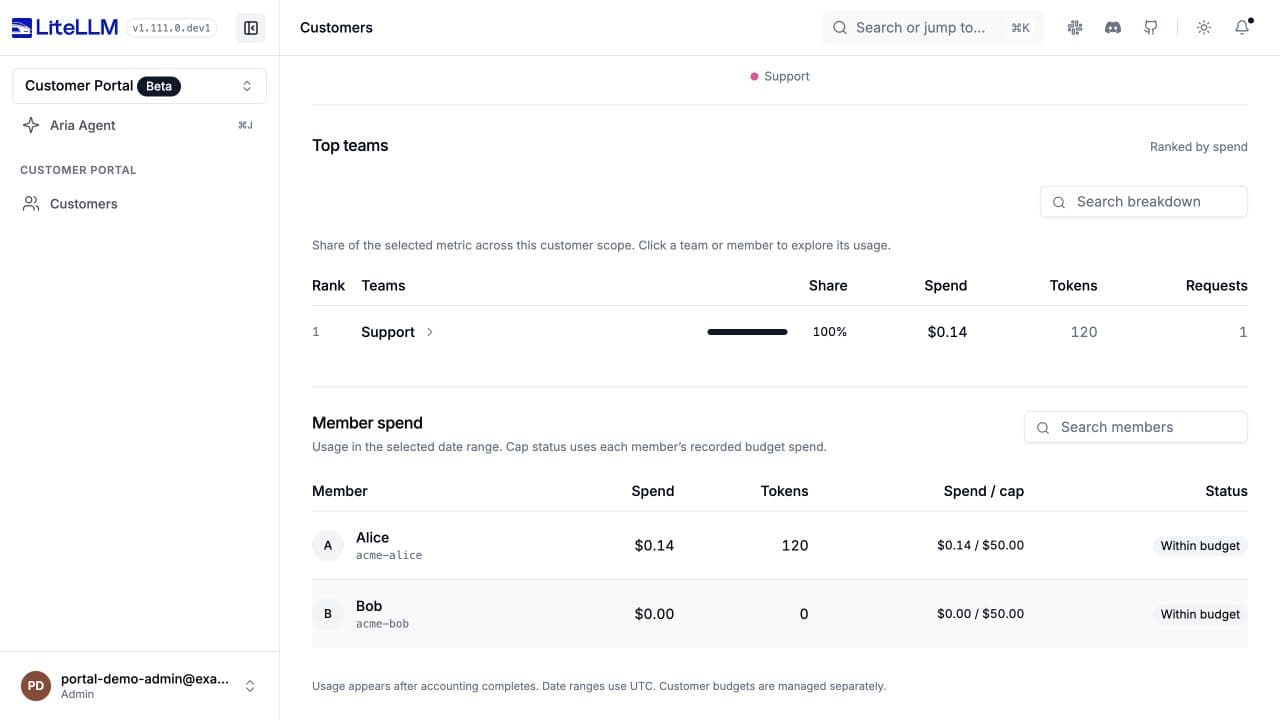
Actual customer records and accounting data in the local Customer Portal. Alice's controlled-provider request records $0.14 and 120 tokens.
6. Debug a request in spend logs
Use the x-litellm-call-id printed by the Responses SDK. Make that value available as LITELLM_CALL_ID in the environment where you run curl.
curl --get "$LITELLM_BASE_URL/spend/logs/v2" \
  --header "Authorization: Bearer $LITELLM_ADMIN_KEY" \
  --data-urlencode "request_id=$LITELLM_CALL_ID" \
  --data-urlencode "start_date=$START_DATE 00:00:00" \
  --data-urlencode "end_date=$END_DATE 23:59:59"
This API requires a date range even with a request ID. Customer identity fields require #51596. Check the saved metadata to verify Alice → Support → Acme:
{
  "metadata": {
    "user_api_key_customer_member_id": "acme-alice",
    "user_api_key_customer_member_alias": "Alice",
    "user_api_key_customer_team_id": "acme-support",
    "user_api_key_customer_team_alias": "Support",
    "user_api_key_customer_org_id": "org-acme",
    "user_api_key_customer_org_alias": "Acme"
  }
}
Compare spend and total_tokens with usage. A metadata.status of "failure" identifies a failed request; an absent or null status follows the default success behavior.
Open /ui/logs/?log_id=<x-litellm-call-id>. In the request details, check Customer for the resolved hierarchy and Metrics for cost and tokens:
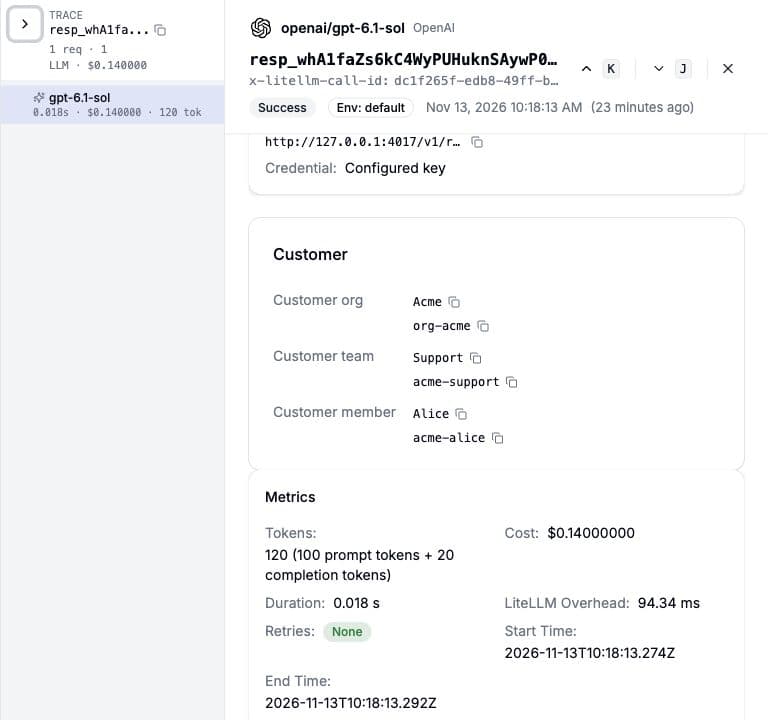
Actual saved request in the local gateway, using a controlled provider and the accounting ledger. The Customer section requires #51596.
The log API has no customer organization, team, or member filter. user_id, team_id, and end_user refer to separate LiteLLM entities. Find an individual request by its call ID and use the customer usage APIs for customer totals.
7. Receive budget events (preview)
This setup requires #51579, verified at commit a129fa7. Add the callback and restart the gateway:
litellm_settings:
  callbacks: [customer_budget_webhook]

callback_settings:
  customer_budget_webhook:
    endpoint: https://billing.example.com/litellm/customer-budget
    headers:
      X-Source: litellm
Merge these entries with existing callback settings. For values supplied through your secret store, use CUSTOMER_BUDGET_WEBHOOK_URL and CUSTOMER_BUDGET_WEBHOOK_HEADERS; see configuration precedence.
After a positive spend update commits, LiteLLM checks the affected organization, team, and member. Spend at or above soft_budget produces soft_budget_crossed; spend at or above max_budget produces budget_crossed. One update can produce both events at several levels. Free requests and requests rejected before inference do not produce a customer budget spend event.
{
  "event": "soft_budget_crossed",
  "scope": "customer_member",
  "entity_id": "acme-alice",
  "customer_org_id": "org-acme",
  "customer_org_alias": "Acme",
  "customer_team_id": "acme-support",
  "customer_team_alias": "Support",
  "customer_member_id": "acme-alice",
  "customer_member_alias": "Alice",
  "spend": 41.25,
  "budget": 40,
  "period": "2026-12-13T12:00:00+00:00",
  "timestamp": "2026-11-13T12:00:00Z"
}
budget is the triggering threshold. period is the recorded next reset timestamp, or "lifetime" if no reset is recorded. Route the event with customer_org_id to update the customer's balance in your product.
Return a successful 2xx response within 10 seconds. Delivery is best effort: a cache claim suppresses the same event, scope, entity, and period for 24 hours, including after failure. Cross-worker deduplication needs shared Redis; a local fallback can produce duplicates. The HTTP client retries a connection error once, but there is no durable retry queue or schedule for timeouts or unsuccessful HTTP responses. Reconcile through the usage APIs to recover missed events.
Fail-open handling (pending)
Fail-open identity handling remains under review in #51604. Main rejects identities it cannot resolve or register, and identities that conflict. A validated configuration that preserves asserted customer IDs in logs is required before this guide can provide a setup.
Troubleshooting
| Result | Check |
|---|---|
409 during import | Retrieve the existing ID, verify its parent, then patch mutable fields. |
422 during member creation | Use budget_id. Supply a template or override if the organization has no default template. |
401 on inference | Check the organization alias and member ID. A new member needs an existing organization alias and default template for registration. |
403 on inference | Confirm that the organization alias matches the member's organization. |
Budget 422 | Read organization, team, and member spend and caps to find the first exhausted scope. |
429 | Check the scope's RPM, TPM, and model limits. |
| Missing customer IDs in logs | Check whether your build includes #51596. |