Connect a client to LiteLLM
These guides assume a running LiteLLM gateway. Each client authenticates with a virtual key or a sign-in token, depending on the client, and each page in this section walks through its setup.
LLM routing points the client's model traffic at LiteLLM. The client keeps its normal interface, but every request flows through the gateway, so you get one API surface for 100+ models plus spend tracking, budgets, and guardrails. Set the gateway base URL and a model_name from your config, then use the credential supported by that client
MCP connects the client to LiteLLM's MCP gateway so it can call the tools you expose there. The client reaches LiteLLM at an MCP endpoint and authenticates with a virtual key; LiteLLM fans out to the upstream MCP servers you registered and applies access control, cost tracking, and guardrails on the way.
Choose a harness
Expand your harness under Client Setup in the sidebar, choose the client, then select SSO or Virtual keys.
| Harness | Client | SSO | Virtual keys |
|---|---|---|---|
| Claude | Desktop & Cowork | SSO | Virtual keys |
| Claude | Code | SSO | Virtual keys |
| Codex | Desktop | SSO | Virtual keys |
| Codex | CLI | SSO | Virtual keys |
| Hermes | CLI | SSO | Virtual keys |
The Desktop & Cowork guides use one shared gateway configuration, including Code sessions and Chat when enabled. See Claude's official deployment overview. Other harness dropdowns link to their setup guides: Cursor, Gemini CLI, GitHub Copilot, OpenClaw, OpenCode, and Qwen Code.
What each client supports
| Client | Surface | LLM routing | MCP |
|---|---|---|---|
| Claude Code | CLI | Yes | Yes |
| Claude Desktop & Cowork | GUI | Yes | Yes |
| Codex (CLI) | CLI | Yes, through /v1/responses | Yes |
| Codex (ChatGPT Desktop) | GUI | Yes, through /v1/responses | Yes |
| Hermes | CLI | Yes, through /v1/chat/completions | Not covered here |
| Regular ChatGPT chats (ChatGPT Desktop) | GUI | No, they stay on your ChatGPT workspace | Not covered here |
Two credentials, two hops
A request through LiteLLM is authenticated twice. The client authenticates to LiteLLM with a virtual key or a sign-in token, which identifies the user and team and decides which models, budgets, and guardrails apply. LiteLLM then calls the provider with the credentials in its own model_list, so developers never hold OpenAI or Anthropic keys and their personal Claude or ChatGPT subscriptions are not used
Billing a user's own subscription is a separate, opt-in setup: Claude Code Max and BYOK forward the user's Anthropic credential upstream, and the ChatGPT subscription provider routes models through a ChatGPT login on the proxy
Choose how users sign in
| Client | Static key | Sign-in, no manually issued long-lived key | License | One-command setup |
|---|---|---|---|---|
| Claude Code | Virtual key in ANTHROPIC_AUTH_TOKEN | Claude apps gateway SSO, Lite CLI SSO, or Claude subscription | SSO through an IdP: free up to 5 users, Enterprise beyond | lite configure claude |
| Claude Desktop & Cowork | Gateway API key | Interactive OIDC | Enterprise (JWT auth) | None |
| Codex CLI | Virtual key via env_key | lite auth print-token as the provider auth command | lite login through an IdP: free up to 5 SSO users, Enterprise beyond | lite configure codex |
| Codex in ChatGPT Desktop | Virtual key via env_key and ~/.codex/.env | Same auth command, since the app reads the same config.toml | lite login through an IdP: free up to 5 SSO users, Enterprise beyond | Same as Codex CLI |
| Hermes CLI | Virtual key via key_env | lite auth print-token as key_cmd | lite login through an IdP: free up to 5 SSO users, Enterprise beyond | None |
Each sign-in flow uses a short-lived token associated with the user's LiteLLM identity and team. These flows remove the long-lived virtual key an admin would otherwise have to issue, hand out, and rotate
For large rollouts, every sign-in path needs an Enterprise license. SSO through an identity provider is free for up to 5 users, and JWT authentication is Enterprise at any size. An unlicensed proxy rejects JWT auth with 403 JWT Auth is an enterprise only feature. See Enterprise
lite configure writes the supplied credential into the client's config file. For Codex, it goes in config.toml as a plaintext Authorization: Bearer header under http_headers, with no env_key, so use the sign-in options above when long-lived keys should not sit on disk
Feature tradeoffs
| Client | Protocol to LiteLLM | Best fit | Main limitations |
|---|---|---|---|
| Claude Code | Anthropic Messages, /v1/messages | Claude models on Anthropic, Bedrock, Vertex AI, or Azure Foundry | Other providers are translated, and per-provider feature support is in the compatibility matrix. Claude Code runs gateway sessions with server-side WebSearch off and a 5-minute prompt cache TTL (known limits). A model allowlist must include the model name Claude Code sends |
| Claude Desktop & Cowork | Anthropic Messages, /v1/messages, with models from /v1/models | Claude models | A model's model_name must contain claude or anthropic to appear in the picker. Non-Claude models need drop_params: true, and Claude for Teams or Enterprise organizations must allowlist gateway model names (Claude's model configuration) |
| Regular ChatGPT chats | Not routed | n/a | They stay on your ChatGPT workspace, so LiteLLM does not track or govern them |
| Codex (CLI and desktop) | OpenAI Responses, /v1/responses | OpenAI models, which use the Responses API natively | A custom model_name needs a model catalog entry; without one, Codex uses generic model metadata. In testing, shell tool calls and follow-up turns worked on both an OpenAI route and a translated Anthropic route, and Codex web search ran on the Anthropic route. There is no Codex compatibility matrix yet, so check other features on your route before rollout |
The values you will reuse everywhere
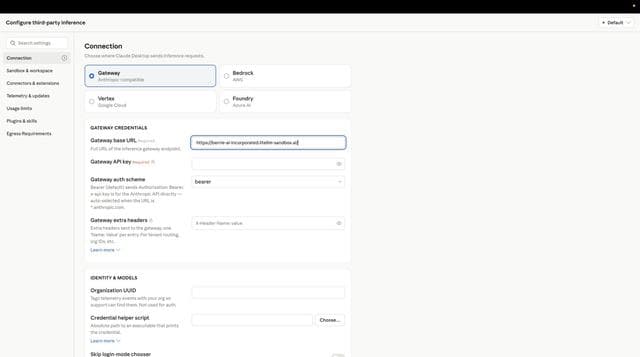
Create a virtual key from the Admin UI under Virtual Keys -> + Create New Key, or with POST /key/generate.
| Value | Where it comes from | Example |
|---|---|---|
| Gateway base URL | Where your proxy listens | http://localhost:4000 |
| Virtual key | Admin UI: Virtual Keys -> + Create New Key, or POST /key/generate | sk-<your-virtual-key> |
| Model name | A model_name under model_list in your config | claude-sonnet-5 |
| MCP endpoint | <base URL>/mcp for every server the key can see, or <base URL>/<server_name>/mcp for one | http://localhost:4000/my_mcp_server/mcp |
| MCP auth header | Your virtual key as a bearer token, in Authorization or x-litellm-api-key | Authorization: Bearer sk-<your-virtual-key> |
LiteLLM accepts the virtual key on the MCP endpoint in either Authorization: Bearer <key> or x-litellm-api-key: Bearer <key>. When configuring a bearer token setting, use your virtual key; the client sends it in Authorization. When configuring custom headers, prefer x-litellm-api-key, which leaves Authorization free for an upstream server's own OAuth token. See the MCP configuration reference for endpoint and header selection.
Your gateway administrator must register the MCP server and grant your key or team access before you connect a client.

