Agent Gateway (A2A Protocol) - Overview
Add A2A Agents on LiteLLM AI Gateway, Invoke agents in A2A Protocol, track request/response logs in LiteLLM Logs. Manage which Teams, Keys can access which Agents onboarded.

 LiteLLM






| Feature | Supported |
|---|---|
| Supported Agent Providers | A2A, Vertex AI Agent Engine, LangGraph, Azure AI Foundry, Bedrock AgentCore, Pydantic AI |
| Logging | ✅ |
| Load Balancing | ✅ |
| Streaming | ✅ |
| Iteration Budgets | ✅ |
LiteLLM follows the A2A (Agent-to-Agent) Protocol for invoking agents.
Adding your Agent
Add A2A Agents
You can add A2A-compatible agents through the LiteLLM Admin UI.
- Navigate to Agentic > Agents
- Click Add New Agent
- In the Configure step, enter the agent name (e.g.,
ij-local) and the URL of your A2A agent - Choose a Protocol Version (
1.0or0.3) - the wire format LiteLLM serves to clients for this agent - Continue through the remaining steps and save the agent
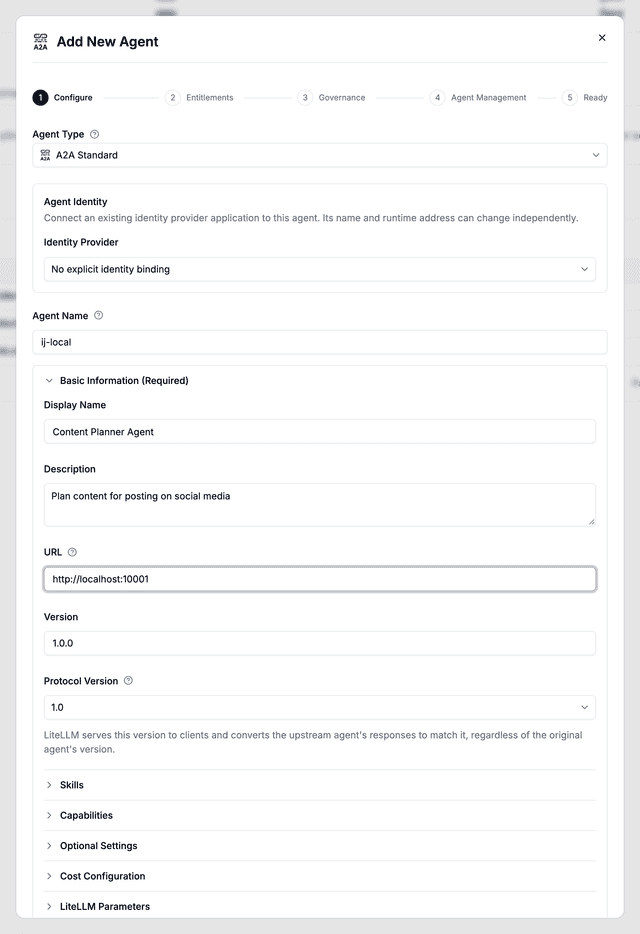
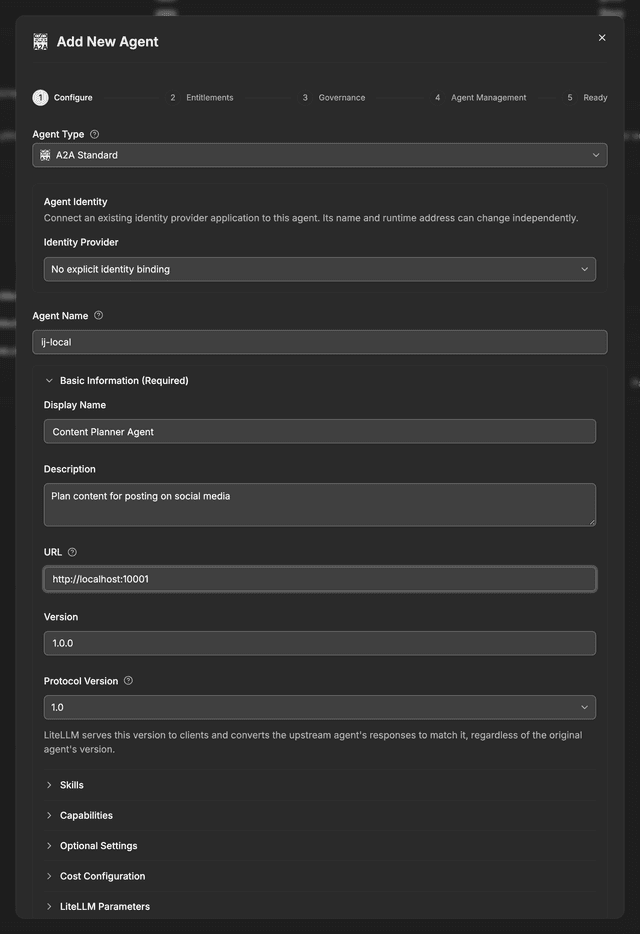
The URL should be the invocation URL for your A2A agent (e.g., http://localhost:10001).
Define agents in config.yaml
Agents can also be declared in config.yaml under the top-level agents key, which is useful when the gateway is deployed from a ConfigMap or another read-only source. agent_name and agent_card_params are both required; entries missing either one are skipped at startup.
agents:
  - agent_name: my-agent
    agent_card_params:
      name: "My Agent"
      url: "http://localhost:10001"
      protocolVersion: "1.0"  # or "0.3"
protocolVersion can be set the same way when registering through the API.
An optional litellm_params block carries per-agent settings such as api_key, headers, agent_card_path, and Microsoft Entra credentials; Foundry agents over A2A shows a full entry
Config-defined agents show up in the Agents tab and in GET /v1/agents alongside agents created in the UI, and they survive the periodic reload from the database. Verify them with:
curl -s http://localhost:4000/v1/agents \
  -H "Authorization: Bearer $LITELLM_MASTER_KEY"
If an agent created in the UI already uses a name you then declare in config.yaml, the database record wins and the config entry with that name is skipped, so the name always resolves to the record you can edit. Delete the database agent and the config entry takes the name back on the next reload.
Agents declared in config.yaml are not stored in the database, so they cannot be edited or deleted from the Admin UI. Change the config file and restart the gateway instead.
The agents key is read correctly starting in the next release (after v1.95.0). On earlier versions, use agent_list, and note that config-defined agents are dropped on gateways that have a database attached.
Add Azure AI Foundry Agents
Follow this guide, to add your azure ai foundry agent to LiteLLM Agent Gateway
Agents created in the current Foundry portal expose an A2A endpoint instead of the Assistants API; register those under agents: with Entra credentials as shown in Foundry agents over A2A
Add Vertex AI Agent Engine
Follow this guide, to add your Vertex AI Agent Engine to LiteLLM Agent Gateway
Add Bedrock AgentCore Agents
Follow this guide, to add your bedrock agentcore agent to LiteLLM Agent Gateway
Add LangGraph Agents
Follow this guide to register a LangGraph agent and configure its agent card
Add Pydantic AI Agents
Follow this guide, to add your pydantic ai agent to LiteLLM Agent Gateway
Protocol versioning
LiteLLM proxy routes A2A agents using a2a-sdk 1.x and can serve either A2A 0.3 or 1.0 wire format to clients per agent. Upstream agents may speak either version; LiteLLM normalizes message/send, message/stream, and extended-card responses to the version you pin.
| Version | Wire shape | Example send result |
|---|---|---|
| 0.3 | Objects discriminated by kind (message, task, status-update, …) | {"kind": "message", "role": "user", "parts": [{"kind": "text", "text": "..."}]} |
| 1.0 | Protobuf JSON envelopes (message, task, statusUpdate, artifactUpdate) | {"message": {"role": "ROLE_USER", "parts": [{"text": "..."}]}} |
Pinning a version
Set agent_card_params.protocolVersion to "0.3" or "1.0" when registering an agent (UI dropdown or API). LiteLLM serves that version on the proxied agent card and converts upstream responses to match.
Only "0.3" and "1.0" are accepted; other values return HTTP 400 at registration.
When protocolVersion is not pinned
If an agent has no pinned version, LiteLLM infers the served version from the client request:
| Client signal | Served version |
|---|---|
JSON-RPC method SendMessage or SendStreamingMessage | 1.0 |
Request header a2a-version: 1.x | 1.0 |
Otherwise (e.g. message/send with no header) | 0.3 |
protocolVersionThe proxied agent card defaults to 1.0 when unset, but legacy message/send callers without an a2a-version header receive 0.3-shaped responses. Pin protocolVersion explicitly so your card and responses always match.
Task methods (tasks/get, tasks/list, …) are forwarded to the upstream agent unchanged. Version conversion applies to LiteLLM-integrated messaging paths only.
Dependency
LiteLLM proxy A2A routes require a2a-sdk >= 1.1.0 (included in the proxy / proxy-dev dependency groups). If you call agents from your own code, install the matching SDK version:
pip install "a2a-sdk>=1.1.0,<2.0"
Invoking your Agents
See the Invoking A2A Agents guide to learn how to call your agents using:
- A2A SDK - Native A2A protocol with full support for tasks and artifacts
- OpenAI SDK - Familiar
/chat/completionsinterface witha2a/model prefix
Tracking Agent Logs
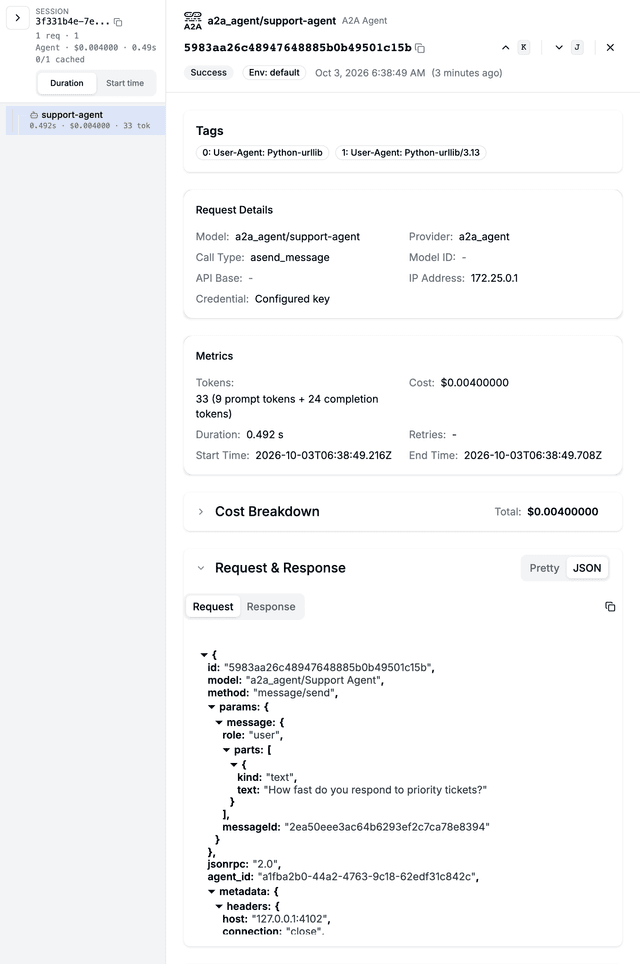
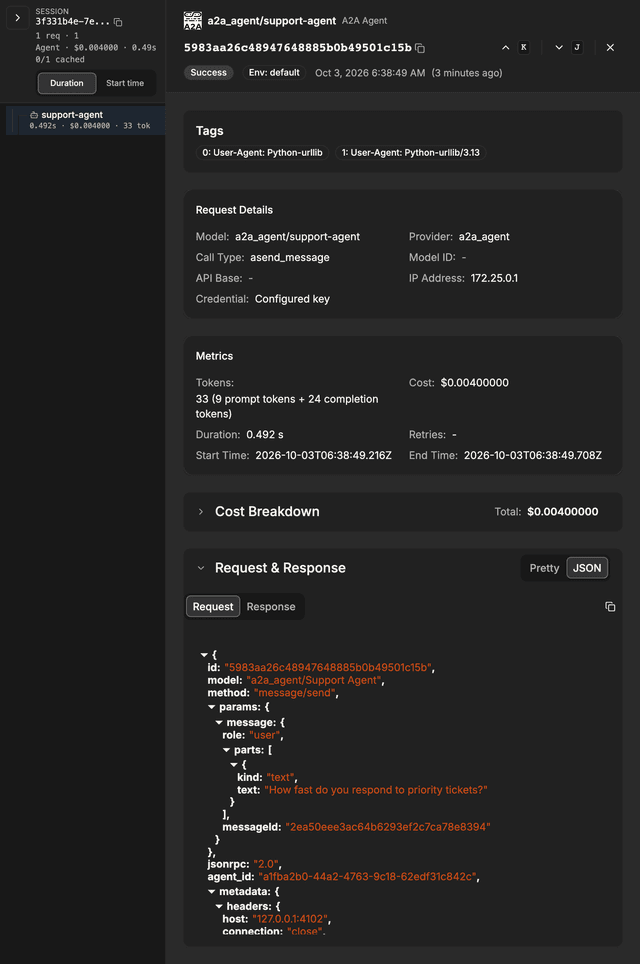
After invoking an agent, you can view the request logs in the LiteLLM Logs tab.
The logs show:
- Request/Response content sent to and received from the agent (open a row, then switch the Request & Response section to JSON; requires
store_prompts_in_spend_logs: true) - User, Key, Team information for tracking who made the request
- Latency and cost metrics
Forwarding LiteLLM Context Headers
When LiteLLM invokes your A2A agent, it sends special headers that enable:
- Trace Grouping: All LLM calls from the same agent execution appear under one trace
- Agent Spend Tracking: Costs are attributed to the specific agent
| Header | Purpose |
|---|---|
X-LiteLLM-Trace-Id | Links all LLM calls to the same execution flow |
X-LiteLLM-Agent-Id | Attributes spend to the correct agent |
To enable these features, your A2A server must forward these headers to any LLM calls it makes back to LiteLLM.
Implementation Steps
Step 1: Extract headers from incoming A2A request
def get_litellm_headers(request) -> dict:
    """Extract X-LiteLLM-* headers from incoming A2A request."""
    all_headers = request.call_context.state.get('headers', {})
    return {
        k: v for k, v in all_headers.items()
        if k.lower().startswith('x-litellm-')
    }
Step 2: Forward headers to your LLM calls Pass the extracted headers when making calls back to LiteLLM:
- OpenAI SDK
- LangChain
- LiteLLM SDK
- HTTP (requests/httpx)
from openai import OpenAI

headers = get_litellm_headers(request)

client = OpenAI(
    api_key="sk-your-litellm-key",
    base_url="http://localhost:4000",
    default_headers=headers,  # Forward headers
)

response = client.chat.completions.create(
    model="gpt-5.6-terra",
    messages=[{"role": "user", "content": "Hello"}]
)
from langchain_openai import ChatOpenAI

headers = get_litellm_headers(request)

llm = ChatOpenAI(
    model="gpt-5.6-terra",
    openai_api_key="sk-your-litellm-key",
    base_url="http://localhost:4000",
    default_headers=headers,  # Forward headers
)
import litellm

headers = get_litellm_headers(request)

response = litellm.completion(
    model="gpt-5.6-terra",
    messages=[{"role": "user", "content": "Hello"}],
    api_base="http://localhost:4000",
    extra_headers=headers,  # Forward headers
)
import httpx

headers = get_litellm_headers(request)
headers["Authorization"] = "Bearer sk-your-litellm-key"

response = httpx.post(
    "http://localhost:4000/v1/chat/completions",
    headers=headers,
    json={"model": "gpt-5.6-terra", "messages": [{"role": "user", "content": "Hello"}]}
)
Result
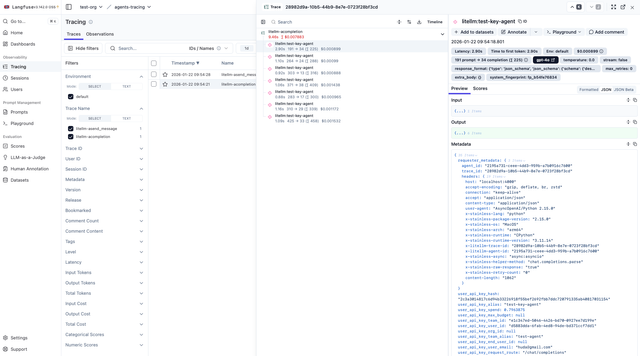
With header forwarding enabled, you'll see:
Trace Grouping in Langfuse:
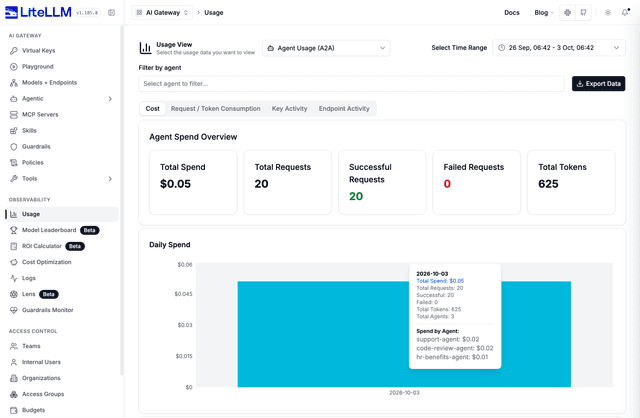
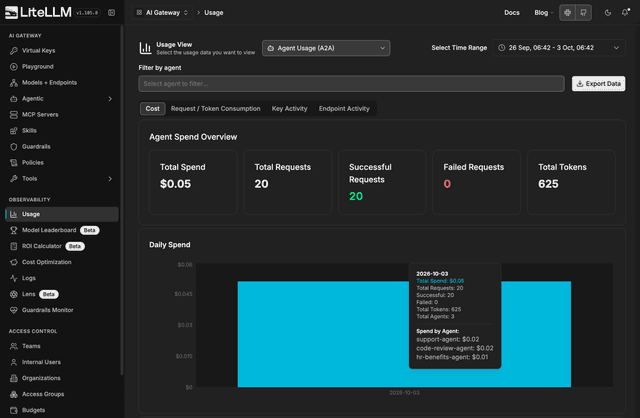
Agent Spend Attribution:
Open Usage, choose Agent Usage (A2A) and stay on the Cost tab to see spend per agent.
API Reference
Endpoints
| Endpoint | Method | Purpose |
|---|---|---|
POST /a2a/{agent_id} | JSON-RPC 2.0 | Primary — all A2A methods (see table below) |
POST /a2a/{agent_id}/message/send | JSON-RPC | Alias for message/send only |
POST /v1/a2a/{agent_id}/message/send | JSON-RPC | Alias for message/send only |
GET /a2a/{agent_id}/.well-known/agent.json | Agent card | Discovery (proxy URL in url field) |
GET /a2a/{agent_id}/.well-known/agent-card.json | Agent card | Discovery (standard path) |
{agent_id} may be the agent UUID or the registered agent name.
Supported JSON-RPC methods
Send any of these in the method field of POST /a2a/{agent_id}:
| Method | Description |
|---|---|
message/send | Send a message; returns a task or message (LiteLLM-integrated path) |
message/stream | Streaming variant (NDJSON/SSE) |
tasks/get | Get task status by params.id |
tasks/list | List tasks (optional params.contextId) |
tasks/cancel | Cancel task by params.id |
tasks/resubscribe | Subscribe to task updates (streaming) |
tasks/pushNotificationConfig/set | Register push notification config |
tasks/pushNotificationConfig/get | Get push config |
tasks/pushNotificationConfig/list | List push configs for a task |
tasks/pushNotificationConfig/delete | Delete push config |
agent/getAuthenticatedExtendedCard | Extended agent card |
Routing: message/send and message/stream go through LiteLLM's A2A client (logging, guardrails, spend). All other methods are forwarded to the upstream URL in agent_card_params.url. Task APIs require that URL; completion-bridge-only agents support messaging methods only.
See Supported A2A methods for examples, aliases, and limitations.
Authentication
Include your LiteLLM Virtual Key in either of two headers. x-litellm-api-key is preferred when the inbound Authorization header may carry a token destined for the backend agent (e.g. when using the convention-based passthrough to forward the caller's identity).
Authorization: Bearer sk-your-litellm-key
# or
x-litellm-api-key: Bearer sk-your-litellm-key
Per-agent permission check
After the virtual key is authenticated, LiteLLM checks whether the calling key (and its team) is allowed to invoke the requested agent. If not, the response is HTTP 403. See Agent Permission Management for the full intersection model and access groups.
Trace ID enforcement (optional, per-agent)
An agent can require every inbound request to carry a trace ID for cross-system audit threading. Set require_trace_id_on_calls_to_agent: true in the agent's litellm_params. When set, requests missing x-litellm-trace-id (or x-litellm-session-id) are rejected with HTTP 400.
curl -X POST http://localhost:4000/v1/agents \
  -H "Authorization: Bearer sk-master-key" \
  -H "Content-Type: application/json" \
  -d '{
    "agent_name": "audit-critical-agent",
    "agent_card_params": { ... },
    "litellm_params": {
      "require_trace_id_on_calls_to_agent": true
    }
  }'
Enforcing a trace ID on outbound calls made by a key owned by an agent is controlled by require_trace_id_on_calls_by_agent on the same litellm_params block.
Sub-agent identity propagation
When the backend agent itself calls LiteLLM (for chat completions or to invoke a sub-agent), LiteLLM forwards two headers to maintain trace continuity:
X-LiteLLM-Trace-Id— links all calls in the chain to a single traceX-LiteLLM-Agent-Id— attributes spend to the originating agent
The caller's virtual key and end-user ID are not automatically forwarded. If the downstream agent needs the user's identity, propagate it explicitly via extra_headers or the x-a2a-{agent_name_or_id}-{header} convention.
Request Format
LiteLLM follows the A2A JSON-RPC 2.0 specification. The message body shape depends on the agent's pinned protocolVersion (or the client signals above when unpinned).
- 0.3 wire format
- 1.0 wire format
{
  "jsonrpc": "2.0",
  "id": "unique-request-id",
  "method": "message/send",
  "params": {
    "message": {
      "role": "user",
      "parts": [{"kind": "text", "text": "Your message here"}],
      "messageId": "unique-message-id"
    }
  }
}
Use the a2a-sdk 1.x client (recommended) or send JSON-RPC with PascalCase methods / an a2a-version: 1.0 header when the agent is pinned to 1.0.
// Build with a2a.types.Message, Part, Role, then wrap in SendMessageRequest
Response Format
- 0.3 response
- 1.0 response
{
  "jsonrpc": "2.0",
  "id": "unique-request-id",
  "result": {
    "kind": "task",
    "id": "task-id",
    "contextId": "context-id",
    "status": {"state": "completed", "timestamp": "2025-01-01T00:00:00Z"},
    "artifacts": [
      {
        "artifactId": "artifact-id",
        "name": "response",
        "parts": [{"kind": "text", "text": "Agent response here"}]
      }
    ]
  }
}
{
  "jsonrpc": "2.0",
  "id": "unique-request-id",
  "result": {
    "message": {
      "role": "ROLE_AGENT",
      "messageId": "msg-abc",
      "parts": [{"text": "Agent response here"}]
    }
  }
}
Streaming events use statusUpdate / artifactUpdate keys instead of kind: "status-update".
Agent JSON-RPC errors are returned in the error field with the same id as the request when possible. Poll long-running work with tasks/get after message/send returns a submitted task.
Example: tasks/get
curl -X POST "http://localhost:4000/a2a/my-agent" \
  -H "Authorization: Bearer $LITELLM_API_KEY" \
  -H "Content-Type: application/json" \
  -d '{
    "jsonrpc": "2.0",
    "id": "req-2",
    "method": "tasks/get",
    "params": {"id": "task-id-from-send-response"}
  }'
Agent Registry
Want to create a central registry so your team can discover what agents are available within your company?
Use the AI Hub to make agents public and discoverable across your organization. This allows developers to browse available agents without needing to rebuild them.
Search the registry
GET /v1/agents lists every agent the key can reach. Add query=<task> to rank those same agents by semantic similarity between the task and each agent's name, description, and skills. Pick the embedding model first:
model_list:
  - model_name: text-embedding-3-small
    litellm_params:
      model: openai/text-embedding-3-small
      api_key: os.environ/OPENAI_API_KEY

litellm_settings:
  agent_search_embedding_model: text-embedding-3-small
$ curl -s "http://localhost:4000/v1/agents?query=translate+a+pdf+document&top_k=3" \
    -H "Authorization: Bearer $LITELLM_KEY" | jq -c '.[] | {agent_name, search_score}'
{"agent_name":"document-translator","search_score":0.6732403392080719}
{"agent_name":"trip-planner","search_score":0.1121043964671429}
{"agent_name":"warehouse-sql-analyst","search_score":0.0946962275274791}
top_k defaults to 5 and caps at 100. Each result is the normal agent object plus a search_score (cosine similarity, higher is better). Ranking only ever covers agents the key is allowed to see, so a key restricted to two agents gets those two back whatever the query. Without agent_search_embedding_model a query returns 400 agent_search_not_configured; if the embedding call fails, the request returns 503 agent_search_unavailable. Agent embeddings are computed once per process and reused until the agent card changes.
MCP clients get the same search as a virtual tool. A key with mcp_tool_search_enabled: true on its object_permission sees agent_search(query, top_k) next to mcp_tool_search and mcp_tool_call on tools/list, over both /mcp/ and /mcp-rest:
$ curl -s -X POST http://localhost:4000/mcp-rest/tools/call \
    -H "Authorization: Bearer $KEY" \
    -d '{"name":"agent_search","arguments":{"query":"check how many units are left in stock","top_k":1}}' \
  | jq -r '.content[0].text | fromjson'
[
  {
    "agent_id": "b21b8787-8b9e-4c5f-a45c-3f5e4061d70e",
    "agent_name": "warehouse-sql-analyst",
    "description": "Answers questions about stock by running SQL queries against the inventory database",
    "skills": [{"name": "Query stock levels", "description": "Run a SQL query against the inventory database and summarize the stock levels it returns", "tags": ["sql", "analytics"]}],
    "score": 0.37912064119364597
  }
]
See MCP Tool Search for how to enable the virtual tools on a key.