Custom LLM Pricing
Overview
LiteLLM provides flexible cost tracking and pricing customization for all LLM providers:
- Custom Pricing - Override default model costs or set pricing for custom models
- Cost Per Token - Track costs based on input/output tokens (most common)
- Cost Per Second - Track costs based on runtime (e.g., Sagemaker)
- Zero-Cost Models - Bypass budget checks for free/on-premises models by setting costs to 0
- Provider Discounts - Apply percentage-based discounts to specific providers
- Provider Margins - Add fees/margins to LLM costs for internal billing
- Base Model Mapping - Ensure accurate cost tracking for Azure deployments
By default, the response cost is accessible in the logging object via kwargs["response_cost"] on success (sync + async). Learn More
LiteLLM already has pricing for 100+ models in our model cost map.
Cost Per Second (e.g. Sagemaker)
For chat, completion, embedding and responses models, set cost_per_second. LiteLLM multiplies it by the full request
duration, including streaming until the last chunk, and ignores it when per-token pricing is configured
For chat, completion, embedding and responses, input_cost_per_second and output_cost_per_second remain accepted as
legacy aliases. cost_per_second takes precedence, followed by input_cost_per_second and then
output_cost_per_second; the resolved rate is charged once, not added. Transcription, speech and video continue to use
input_cost_per_second and output_cost_per_second
cost_per_second works Since v1.105.0. On earlier versions, use input_cost_per_second
Usage with LiteLLM Proxy Server
Step 1: Add pricing to config.yaml
model_list:
  - model_name: sagemaker-completion-model
    litellm_params:
      model: sagemaker/berri-benchmarking-Llama-2-70b-chat-hf-4
    model_info:
      cost_per_second: 0.000420
  - model_name: sagemaker-embedding-model
    litellm_params:
      model: sagemaker/berri-benchmarking-gpt-j-6b-fp16
    model_info:
      cost_per_second: 0.000420
Step 2: Start proxy
litellm --config /path/to/config.yaml
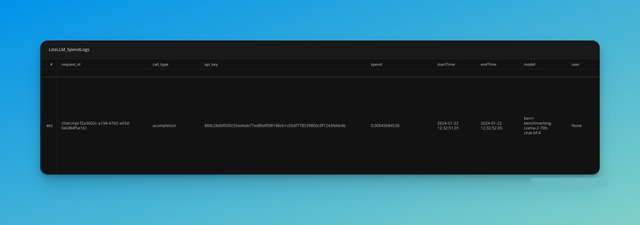
Step 3: View Spend Logs
Cost Per Token (e.g. Azure)
Usage with LiteLLM Proxy Server
model_list:
  - model_name: azure-model
    litellm_params:
      model: azure/<your_deployment_name>
      api_key: os.environ/AZURE_API_KEY
      api_base: os.environ/AZURE_API_BASE
      api_version: os.environ/AZURE_API_VERSION
    model_info:
      input_cost_per_token: 0.000421 # ONLY to track cost per token
      output_cost_per_token: 0.000520 # ONLY to track cost per token
Override Model Cost Map
You can override our model cost map with your own custom pricing for a mapped model.
Just add a model_info key to your model in the config, and override the desired keys.
Example: Override Anthropic's model cost map for the prod/claude-sonnet-5 model.
model_list:
  - model_name: "prod/claude-sonnet-5"
    litellm_params:
      model: "anthropic/claude-sonnet-5"
      api_key: os.environ/ANTHROPIC_PROD_API_KEY
    model_info:
      input_cost_per_token: 0.000006
      output_cost_per_token: 0.00003
      cache_creation_input_token_cost: 0.0000075
      cache_read_input_token_cost: 0.0000006
Additional Cost Keys
There are other keys you can use to specify costs for different scenarios and modalities:
input_cost_per_token_above_200k_tokens- Cost for input tokens when context exceeds 200k tokensoutput_cost_per_token_above_200k_tokens- Cost for output tokens when context exceeds 200k tokenscache_creation_input_token_cost_above_200k_tokens- Cache creation cost for large contextscache_read_input_token_cost_above_200k_tokens- Cache read cost for large contextsinput_cost_per_image- Cost per image in multimodal requestsoutput_cost_per_reasoning_token- Cost for reasoning tokens (e.g., OpenAI o1 models)input_cost_per_audio_token- Cost for audio input tokensoutput_cost_per_audio_token- Cost for audio output tokensinput_cost_per_video_per_second- Cost per second of video inputinput_cost_per_video_per_second_above_128k_tokens- Video cost for large contextsinput_cost_per_character- Character-based pricing for some providersinput_cost_per_token_priority/output_cost_per_token_priority- Priority/PayGo pricing (Vertex AI Gemini, Bedrock)input_cost_per_token_flex/output_cost_per_token_flex- Batch/flex pricingocr_cost_per_page/annotation_cost_per_page- Per-page pricing for/v1/ocrcalls (Mistral OCR)ocr_cost_per_page_batches/annotation_cost_per_page_batches- Per-page pricing for OCR pages processed through/v1/batches, falling back to the synchronous per-page keys when unset. See Batch OCR cost tracking
These keys evolve based on how new models handle multimodality. The latest version can be found at https://github.com/BerriAI/litellm/blob/main/model_prices_and_context_window.json.
Service Tier / PayGo Pricing (Vertex AI, Bedrock)
For providers that support multiple pricing tiers (e.g., Vertex AI PayGo, Bedrock service tiers), LiteLLM automatically applies the correct cost based on the response:
- Vertex AI Gemini: Uses
usageMetadata.trafficType(ON_DEMAND_PRIORITY→ priority,FLEX/BATCH→ flex). See Vertex AI - PayGo / Priority Cost Tracking. - Bedrock: Uses
serviceTierfrom the response. See Bedrock - Usage - Service Tier.
Zero-Cost Models (Bypass Budget Checks)
Use Case: You have on-premises or free models that should be accessible even when users exceed their budget limits.
Solution ✅: Set both input_cost_per_token and output_cost_per_token to 0 (explicitly) to bypass all budget checks for that model.
When a model is configured with zero cost, LiteLLM will automatically skip ALL budget checks (user, team, team member, end-user, organization, and global proxy budget) for requests to that model.
Important: Both costs must be explicitly set to 0. If costs are null or undefined, the model will be treated as having cost and budget checks will apply.
Configuration Example
model_list:
  # On-premises model - free to use
  - model_name: on-prem-llama
    litellm_params:
      model: ollama/llama3
      api_base: http://localhost:11434
    model_info:
      input_cost_per_token: 0   # Explicitly set to 0
      output_cost_per_token: 0  # Explicitly set to 0

  # Paid cloud model - budget checks apply
  - model_name: gpt-6.1-sol
    litellm_params:
      model: gpt-6.1-sol
      api_key: os.environ/OPENAI_API_KEY
    # No model_info - uses default pricing from cost map
Behavior
With the above configuration:
- User over budget → Can still use
on-prem-llama✅, but blocked fromgpt-6.1-sol❌ - Team over budget → Can still use
on-prem-llama✅, but blocked fromgpt-6.1-sol❌ - End-user over budget → Can still use
on-prem-llama✅, but blocked fromgpt-6.1-sol❌
This ensures your free/on-premises models remain accessible regardless of budget constraints, while paid models are still properly governed.
Set 'base_model' for Cost Tracking (e.g. Azure deployments)
Problem: Azure returns gpt-4 in the response when azure/gpt-4-1106-preview is used. This leads to inaccurate cost tracking
Solution ✅ : Set base_model on your config so litellm uses the correct model for calculating azure cost
Get the base model name from here
Example config with base_model
model_list:
  - model_name: azure-gpt-3.5
    litellm_params:
      model: azure/chatgpt-v-2
      api_base: os.environ/AZURE_API_BASE
      api_key: os.environ/AZURE_API_KEY
      api_version: "2023-07-01-preview"
    model_info:
      base_model: azure/gpt-6.1-sol
OpenAI Models with Dated Versions
base_model is also useful when OpenAI returns a dated model name in the response that differs from your configured model name.
Example: You configure custom pricing for gpt-4o-mini-audio-preview, but OpenAI returns gpt-4o-mini-audio-preview-2024-12-17 in the response. Since LiteLLM uses the response model name for pricing lookup, your custom pricing won't be applied.
Solution ✅: Set base_model to the key you want LiteLLM to use for pricing lookup.
model_list:
  - model_name: my-audio-model
    litellm_params:
      model: openai/gpt-4o-mini-audio-preview
      api_key: os.environ/OPENAI_API_KEY
    model_info:
      base_model: gpt-4o-mini-audio-preview  # Used for pricing lookup
      input_cost_per_token: 0.0000006
      output_cost_per_token: 0.0000024
      input_cost_per_audio_token: 0.00001
      output_cost_per_audio_token: 0.00002
Set 'pricing_provider' when the routing provider and the pricing provider differ
Problem: You route to a third-party host through an OpenAI-compatible endpoint (custom_llm_provider: openai with a custom api_base), but the model is priced in LiteLLM's cost map under that host's own provider. The cost lookup runs under the routing provider, finds no row there, and bills the request at $0. A deployment whose model_info.id equals one of that provider's cost-map keys hits the same $0.
Solution ✅: Set pricing_provider under model_info to the provider whose cost-map rows should price the deployment. When it is unset, the routing provider (custom_llm_provider) is used, which is the previous behavior.
model_list:
  - model_name: glm-5.2
    litellm_params:
      model: zai-org/GLM-5.2
      api_base: https://inference.baseten.co/v1
      api_key: os.environ/BASETEN_API_KEY
      custom_llm_provider: openai
    model_info:
      pricing_provider: baseten            # price from the baseten/zai-org/GLM-5.2 cost-map row
      input_cost_per_token: 0.00000096     # optional, overrides that row's rate
      output_cost_per_token: 0.00000302
Rates you set on the deployment win. Rates you leave out, such as cache_read_input_token_cost, are taken from the pricing provider's row for the model instead of defaulting to 0. With no rates set at all, the request is billed at that row's rates.
Debugging
If you're custom pricing is not being used or you're seeing errors, please check the following:
- Run the proxy with
LITELLM_LOG="DEBUG"or the--detailed_debugcli flag
litellm --config /path/to/config.yaml --detailed_debug
- Check logs for this line:
LiteLLM:DEBUG: utils.py:263 - litellm.acompletion
- Check if 'input_cost_per_token' and 'output_cost_per_token' are top-level keys in the acompletion function.
acompletion(
  ...,
  input_cost_per_token: my-custom-price,
  output_cost_per_token: my-custom-price,
)
If these keys are not present, LiteLLM will not use your custom pricing.
If the problem persists, please file an issue on GitHub.