Agent Access
Sign in as a proxy admin and register your agent.
Give a team access
Open Teams → Create Team. Expand Agent Settings, select the Allowed Agents, and create the team.
To reuse an agent list across teams, assign an access group.
Give an application access
Open Virtual Keys → Create New Key. Name the key and select its team. Under Agent Settings, choose the agents the application needs and click Create Key. For production applications, use a service account key.
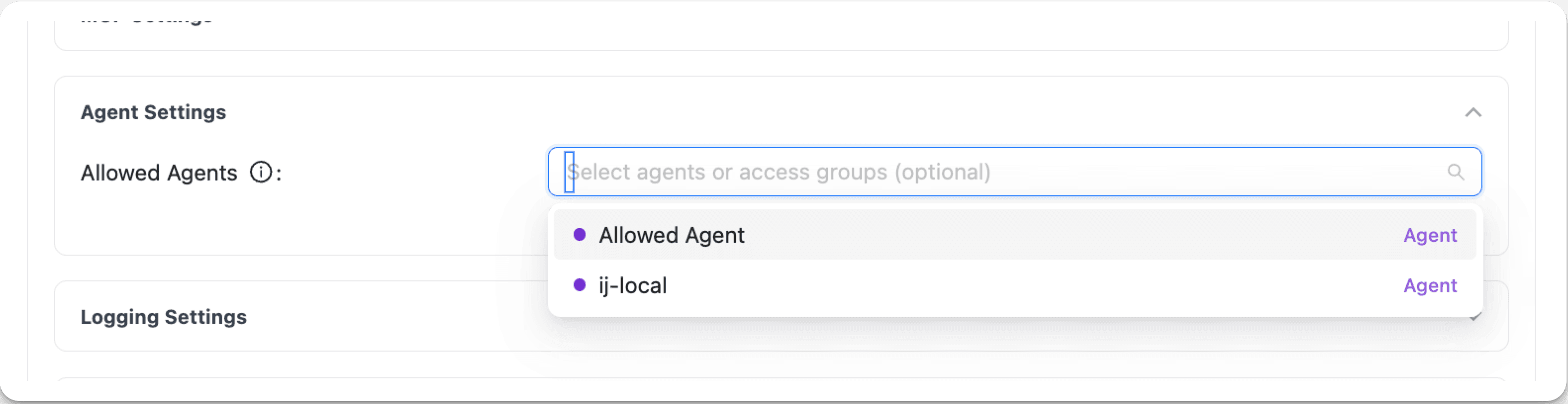
A key with no agent selection inherits its team's access. When both have restrictions, the agent must be allowed by both, including any access group grants.
To require explicit agent permissions for non-admin keys, set general_settings.agent_access_default_deny: true in the proxy configuration. Since v1.108.0
Let an agent act for the caller
Permission to invoke an agent is separate from permission for that agent to call models, MCP servers, or other agents. Give the agent its own Virtual Key, then forward the caller's context on its downstream requests.
Create the key with the registered agent's agent_id. Replace the example IDs with your agent and its team; choose a model that team permits:
curl "$LITELLM_BASE_URL/key/generate" \
  -H "Authorization: Bearer $LITELLM_ADMIN_KEY" \
  -H "Content-Type: application/json" \
  -d '{
    "key_alias": "support-agent",
    "agent_id": "registered-agent-id",
    "team_id": "agent-team-id",
    "models": ["gpt-4o"]
  }'
Store the returned key as AGENT_API_KEY. Configure its MCP and downstream agent grants as needed. A key without agent_id does not apply the caller restrictions described here.
The caller invokes POST /a2a/{agent_id} with their own credential. LiteLLM forwards the resolved identity to the agent backend as X-LiteLLM-User-Id and X-LiteLLM-Team-Id, when present. Accept this context only from authenticated gateway requests.
In your agent's request handler, forward those headers with the agent's own key. For example, using FastAPI and the OpenAI Python SDK:
import os

from fastapi import Request
from openai import AsyncOpenAI

client = AsyncOpenAI(
    api_key=os.environ["AGENT_API_KEY"],
    base_url=f"{os.environ['LITELLM_BASE_URL'].rstrip('/')}/v1",
)

async def call_model(request: Request):
    caller_headers = {
        name: request.headers[name]
        for name in ("X-LiteLLM-User-Id", "X-LiteLLM-Team-Id")
        if request.headers.get(name)
    }
    return await client.chat.completions.create(
        model="gpt-4o",
        messages=[{"role": "user", "content": "Summarize this support request."}],
        extra_headers=caller_headers,
    )
Forward the same headers on MCP and agent-to-agent requests. LiteLLM further restricts the agent's own permissions:
- Models: the caller team's model access and per-member restrictions apply; without a caller team, the caller user's model list applies.
- MCP: caller team and user permissions can narrow servers and tools.
- Other agents: the caller team's agent grants apply.
These headers cannot expand the agent's grants. They do not carry the caller's Virtual Key restrictions or select the caller's upstream OAuth credentials. Missing headers leave the agent's own permissions in effect. The model request's user field is separate attribution and customer-budget context.
Test with a resource the agent can access but the caller cannot; the downstream request should be denied. See access inheritance and the shared-agent walkthrough for the broader setup.
Manage access through your IdP
Sync users and teams, then assign agent permissions to those teams. Applications can authenticate with IdP tokens through JWT key mapping.
Test access
Call GET /v1/agents with the application's static API credential or mapped JWT to list its allowed agents. Call an allowed agent, then a registered agent outside its permissions. A blocked call to POST /a2a/{agent_id} returns 403 Forbidden.
Agent permissions API examples
Change or remove access
Open the key or team, select Settings → Edit Settings, update Agents / Access Groups, then click Save Changes. Remove any access group grants that also allow the agent.
Clearing the selection can restore inherited access. To stop all requests from an application, open the key's actions menu and choose Block Key or Delete Key.