Service Accounts
Use this if you want to create Virtual Keys that are not owned by a specific user but instead created for production projects
Why use a service account key?
- Prevent key from being deleted when user is deleted.
- Apply team limits, not team member limits to key.
Service Account vs Regular Keys
| Feature | Regular Key | Service Account Key |
|---|---|---|
user_id | Optional | Always null |
team_id | Optional | Required |
| Applied limits | User + Team limits | Team limits only |
| Key deleted when user is deleted? | Yes | No — persists |
service_account_id in metadata | Not set | Immutable once set |
team_member_key_duration | Inherits | Does not inherit |
Budgets & Limits
Service account keys apply budgets and rate limits at the team level, not per user or per key member.
- Set
max_budget,tpm_limit,rpm_limiton the key itself, or inherit them from the team. team_member_key_duration(an enterprise feature that controls how long team-member keys last) does not apply to service account keys.
Usage
Use the /key/service-account/generate endpoint to generate a service account key.
curl -L -X POST 'http://localhost:4000/key/service-account/generate' \
-H "Authorization: Bearer $LITELLM_API_KEY" \
-H 'Content-Type: application/json' \
-d '{
    "team_id": "my-unique-team"
}'
service_account_id field
You can optionally provide a service_account_id inside metadata to give the key a stable, human-readable identifier:
curl -L -X POST 'http://localhost:4000/key/service-account/generate' \
-H "Authorization: Bearer $LITELLM_API_KEY" \
-H 'Content-Type: application/json' \
-d '{
    "team_id": "my-unique-team",
    "metadata": {
        "service_account_id": "my-ci-pipeline"
    }
}'
Immutability rules. Once service_account_id is set, it cannot be changed:
| Operation | Result |
|---|---|
| Overwrite with a different value | 400 error |
Set to null explicitly | 400 error |
Send metadata: null (would clear it) | 400 error |
Omit metadata entirely on update | Safe — existing value is preserved |
| Resend the same value | Allowed (no-op) |
Example - require user param for all service account requests
1. Set settings for Service Accounts
Set service_account_settings if you want to create settings that only apply to service account keys
general_settings:
    service_account_settings:
        enforced_params: ["user"] # this means the "user" param is enforced for all requests made through any service account keys
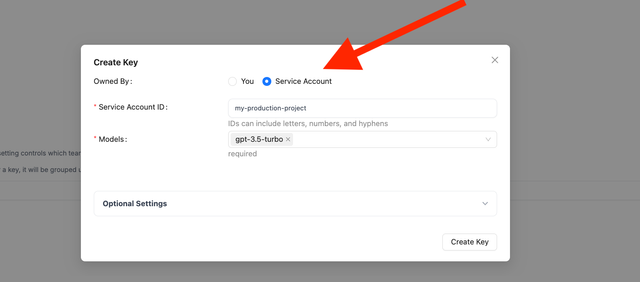
2. Create Service Account Key on LiteLLM Proxy Admin UI
3. Test Service Account Key
- Unsuccessful call
- Successful call
curl --location 'http://localhost:4000/chat/completions' \
    --header 'Authorization: Bearer <sk-your-service-account>' \
    --header 'Content-Type: application/json' \
    --data '{
    "model": "gpt-5.6-luna",
    "messages": [
        {
        "role": "user",
        "content": "hello"
        }
    ]
}'
Expected Response
{
  "error": {
    "message": "BadRequest please pass param=user in request body. This is a required param for service account",
    "type": "bad_request_error",
    "param": "user",
    "code": "400"
  }
}
curl --location 'http://localhost:4000/chat/completions' \
    --header 'Authorization: Bearer <sk-your-service-account>' \
    --header 'Content-Type: application/json' \
    --data '{
    "model": "gpt-5.6-luna",
    "messages": [
        {
        "role": "user",
        "content": "hello"
        }
    ],
    "user": "test-user"
}'
Expected Response
{
  "id": "chatcmpl-ad9595c7e3784a6783b469218d92d95c",
  "choices": [
    {
      "finish_reason": "stop",
      "index": 0,
      "message": {
        "content": "\n\nHello there, how may I assist you today?",
        "role": "assistant",
        "tool_calls": null,
        "function_call": null
      }
    }
  ],
  "created": 1677652288,
  "model": "gpt-5.6-luna",
  "object": "chat.completion",
  "system_fingerprint": "fp_44709d6fcb",
  "usage": {
    "completion_tokens": 12,
    "prompt_tokens": 9,
    "total_tokens": 21,
    "completion_tokens_details": null
  },
  "service_tier": null
}

