SAML 2.0 SSO
SSO requires a LiteLLM Enterprise license. Start a free 30-day trial or book a demo. See what Enterprise includes.
SSO is free for up to 5 users. Beyond that, an enterprise license is required.
LiteLLM supports SAML 2.0 single sign-on for the admin UI alongside its existing OIDC providers (Google, Microsoft, Generic OAuth). SAML can be configured from the admin UI (Admin Settings -> SSO Settings) or through environment variables; no changes to config.yaml are needed. When SAML is configured and no OIDC provider is set, the existing SSO login button on the admin UI automatically redirects to the SAML Identity Provider.
How it works
The proxy acts as a SAML Service Provider (SP). A user clicking the login button is redirected to the Identity Provider (IdP) with a signed AuthnRequest. After the user authenticates at the IdP, the browser POSTs the signed SAML assertion back to the proxy's Assertion Consumer Service (ACS) endpoint. The proxy validates the assertion's signature, audience, and timestamps, provisions the user in the database if needed, and issues a session JWT that logs them into the admin UI.
Both SP-initiated and IdP-initiated flows are supported over the HTTP-POST binding. SP-initiated logins are bound to the browser that started them via an HttpOnly state cookie, so a captured assertion cannot be replayed into another browser. IdP-initiated (unsolicited) responses are rejected by default and only accepted when SAML_ALLOW_UNSOLICITED=true is set explicitly.
Configure from the admin UI
The quickest way to set up SAML is from the dashboard. Go to Admin Settings -> SSO Settings, click Configure SSO, and pick SAML SSO from the provider dropdown. Paste your IdP's metadata (a URL or the inline XML), set the SP Entity ID and Proxy Base URL, and optionally enable IdP-initiated responses, then save.
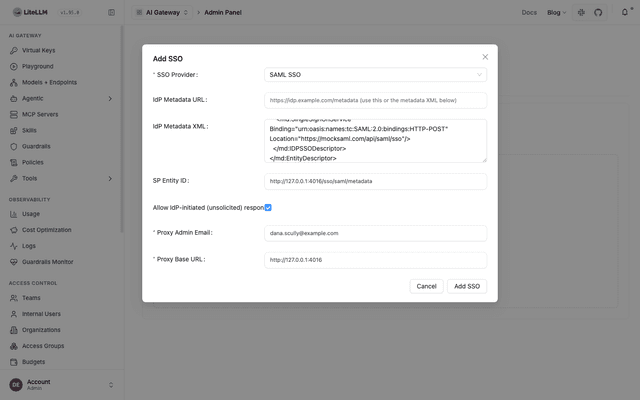
The settings are stored (encrypted) in the SSO config table and applied as the SAML_* variables the handler reads, so they survive restarts without env vars. Prefer environment variables for headless or GitOps deployments; the Quick start below covers that path.
Quick start
1. Install the SAML extra
The SAML integration depends on the python3-saml library, which bundles the native xmlsec/libxml2 libraries. Install it with the saml extra:
pip install 'litellm[saml]'
The official Docker images already include this extra. If you are building your own image, add litellm[saml] to your install step.
2. Set environment variables
At minimum, you need your IdP's metadata (as a URL or inline XML) and optionally an SP entity ID:
# Point to your IdP's metadata (pick one)
SAML_IDP_METADATA_URL="https://your-idp.example.com/app/abc123/sso/saml/metadata"
# or
SAML_IDP_METADATA_XML="<EntityDescriptor ...>...</EntityDescriptor>"

# Optional: override the SP entity ID (defaults to the metadata endpoint URL)
SAML_SP_ENTITY_ID="https://litellm.yourcompany.com/sso/saml/metadata"

# Required for any SSO
PROXY_BASE_URL="https://litellm.yourcompany.com"
LITELLM_MASTER_KEY="sk-..."
DATABASE_URL="postgresql://..."
3. Register the proxy at your IdP
Your IdP needs two values from the proxy:
| Field | Value |
|---|---|
| ACS URL (Assertion Consumer Service) | https://<proxy_base_url>/sso/saml/callback |
| SP Entity ID / Audience | https://<proxy_base_url>/sso/saml/metadata (or whatever you set in SAML_SP_ENTITY_ID) |
You can download the SP metadata XML directly from GET /sso/saml/metadata and import it into your IdP if it supports metadata upload.
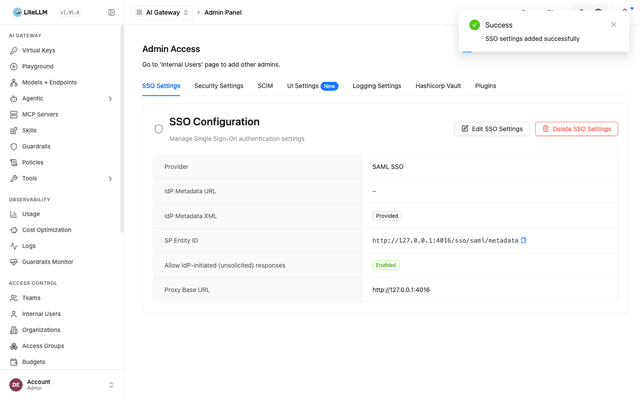
After saving, the SSO Settings page shows the configured provider, including the SP Entity ID you register at the IdP:
4. Start the proxy and test
Start (or restart) the proxy. Navigate to https://<proxy_base_url>/ui and click the SSO login button. You should be redirected to your IdP, and after authenticating, redirected back to the admin UI.
IdP setup guides
- Okta
- Microsoft Entra ID (Azure AD)
- Other SAML IdPs
Step 1: Create a SAML application in Okta
In your Okta Admin Console, go to Applications > Create App Integration and select SAML 2.0.
On the General Settings page, give the app a name (e.g. "LiteLLM Proxy").
On the Configure SAML page, fill in:
| Field | Value |
|---|---|
| Single sign-on URL | https://<proxy_base_url>/sso/saml/callback |
| Audience URI (SP Entity ID) | https://<proxy_base_url>/sso/saml/metadata |
| Name ID format | EmailAddress |
Under Attribute Statements, add the attributes your proxy will read. The defaults work out of the box with common claim names, but you can add explicit mappings:
| Name | Value |
|---|---|
email | user.email |
firstName | user.firstName |
lastName | user.lastName |
If you want to control user roles from Okta, add a Group Attribute Statement or a custom attribute named role with a value of proxy_admin, proxy_admin_viewer, internal_user, or internal_user_viewer.
Step 2: Copy the IdP metadata URL
After creating the app, go to the Sign On tab and copy the Metadata URL (it looks like https://your-org.okta.com/app/abc123/sso/saml/metadata).
Step 3: Set environment variables
SAML_IDP_METADATA_URL="https://your-org.okta.com/app/abc123/sso/saml/metadata"
PROXY_BASE_URL="https://litellm.yourcompany.com"
Step 4: Assign users
In the Assignments tab of the Okta app, assign the users or groups that should have access to the LiteLLM admin UI.
Step 1: Create an Enterprise Application
In the Azure portal, go to Microsoft Entra ID > Enterprise applications > New application > Create your own application. Name it (e.g. "LiteLLM Proxy") and select "Integrate any other application you don't find in the gallery (Non-gallery)".
Step 2: Set up SAML SSO
Go to Single sign-on > SAML and configure:
| Field | Value |
|---|---|
| Identifier (Entity ID) | https://<proxy_base_url>/sso/saml/metadata |
| Reply URL (ACS URL) | https://<proxy_base_url>/sso/saml/callback |
Under Attributes & Claims, verify that the default claims include the user's email. The default Entra ID claims (emailaddress, givenname, surname) are auto-detected by LiteLLM.
To map LiteLLM roles, add a custom claim named role with a value sourced from an App Role or directory attribute.
Step 3: Copy the metadata URL
Under SAML Certificates, copy the App Federation Metadata Url.
Step 4: Set environment variables
SAML_IDP_METADATA_URL="https://login.microsoftonline.com/<tenant-id>/federationmetadata/2007-06/federationmetadata.xml?appid=<app-id>"
PROXY_BASE_URL="https://litellm.yourcompany.com"
Step 5: Assign users
In Users and groups, assign the users or groups that should have access.
Any SAML 2.0 compliant IdP works. You need:
- The IdP's metadata XML (as a URL or pasted inline).
- To register the proxy's ACS URL (
/sso/saml/callback) and Entity ID (/sso/saml/metadata) at the IdP. - The IdP must send signed assertions containing at minimum the user's email (as the NameID or an attribute).
# URL-based metadata
SAML_IDP_METADATA_URL="https://idp.example.com/metadata"

# Or paste the full metadata XML inline
SAML_IDP_METADATA_XML='<EntityDescriptor xmlns="urn:oasis:names:tc:SAML:2.0:metadata" entityID="https://idp.example.com">...</EntityDescriptor>'

PROXY_BASE_URL="https://litellm.yourcompany.com"
Attribute mapping
LiteLLM auto-detects common SAML attribute names (URN/OID and friendly names) for email, first name, last name, role, and teams. If your IdP uses non-standard attribute names, override them with environment variables:
| Environment Variable | Default candidates | Description |
|---|---|---|
SAML_ATTRIBUTE_EMAIL | urn:oid:0.9.2342.19200300.100.1.3, emailaddress claim URI, email, mail | Attribute containing the user's email |
SAML_ATTRIBUTE_USER_ID | NameID | Attribute for the stable user identifier |
SAML_ATTRIBUTE_FIRST_NAME | urn:oid:2.5.4.42, givenname claim URI, givenName | First name attribute |
SAML_ATTRIBUTE_LAST_NAME | urn:oid:2.5.4.4, surname claim URI, sn | Last name attribute |
SAML_ATTRIBUTE_ROLE | role, roles, litellm_role | Attribute mapped to the LiteLLM user role |
SAML_ATTRIBUTE_TEAM_IDS | teams, team_ids, groups | Attribute mapped to LiteLLM team IDs |
The role attribute value must be one of: proxy_admin, proxy_admin_viewer, internal_user, or internal_user_viewer.
Configuration reference
All configuration is done through environment variables. SAML is activated when either SAML_IDP_METADATA_URL or SAML_IDP_METADATA_XML is set.
| Variable | Default | Purpose |
|---|---|---|
SAML_IDP_METADATA_URL | unset | URL of the IdP metadata to fetch and parse |
SAML_IDP_METADATA_XML | unset | Inline IdP metadata XML (alternative to the URL) |
SAML_IDP_METADATA_VALIDATE_CERT | true | Verify the TLS certificate when fetching metadata over HTTPS |
SAML_SP_ENTITY_ID | <proxy_base_url>/sso/saml/metadata | Service Provider entity ID |
SAML_SP_NAME_ID_FORMAT | emailAddress | Requested NameID format |
SAML_STRICT | true | Enforce strict SAML validation (audience, timestamps, destination) |
SAML_WANT_ASSERTIONS_SIGNED | true | Reject unsigned assertions |
SAML_WANT_MESSAGES_SIGNED | false | Require the SAML response message itself to be signed |
SAML_AUTHN_REQUESTS_SIGNED | false | Sign outgoing AuthnRequests |
SAML_ALLOW_UNSOLICITED | false | Accept IdP-initiated (unsolicited) responses |
SAML_ATTRIBUTE_EMAIL | auto-detected | Override the assertion attribute name for email |
SAML_ATTRIBUTE_USER_ID | NameID | Override the assertion attribute for user ID |
SAML_ATTRIBUTE_FIRST_NAME | auto-detected | Override the assertion attribute for first name |
SAML_ATTRIBUTE_LAST_NAME | auto-detected | Override the assertion attribute for last name |
SAML_ATTRIBUTE_ROLE | role | Override the assertion attribute for the LiteLLM role |
SAML_ATTRIBUTE_TEAM_IDS | teams/groups | Override the assertion attribute for team IDs |
SP endpoints
The proxy exposes three SAML endpoints:
| Method | Path | Purpose |
|---|---|---|
GET | /sso/saml/login | SP-initiated login; redirects the browser to the IdP |
GET | /sso/saml/metadata | SP metadata XML for registering the proxy at the IdP |
POST | /sso/saml/callback | Assertion Consumer Service; validates the IdP's signed response |
The existing GET /sso/key/generate endpoint (the login button on the admin UI) automatically redirects to the SAML IdP when SAML is the only configured SSO provider.
Security
SP-initiated logins use an HttpOnly state cookie (litellm_saml_authn) to bind the SAML response to the browser that started the login. This prevents login CSRF attacks where a signed response is captured and replayed into a different browser session. The cookie is Secure; SameSite=None over HTTPS (so it survives the IdP's cross-site POST) and SameSite=Lax over plain HTTP for local development.
Assertions are checked for replay via a consumed-assertion guard keyed on the assertion ID. Each assertion can only be used once within its validity window.
IdP-initiated (unsolicited) responses cannot be browser-bound, which is why they are rejected by default. Set SAML_ALLOW_UNSOLICITED=true only if your deployment requires IdP-initiated login and you understand the trade-off.
Troubleshooting
"SAML SSO requires the optional 'python3-saml' dependency" (501 error). Install the SAML extra: pip install 'litellm[saml]'. The official Docker images include it.
"Could not parse an IdP entityID/SSO URL/certificate from the SAML metadata" (502 error). The metadata URL returned something the parser could not extract an IdP descriptor from. Verify the URL is correct and accessible from the proxy. If using SAML_IDP_METADATA_XML, make sure the full XML is set (not truncated by shell quoting).
"SAML response references an unknown or already-used login request" (401 error). The InResponseTo in the assertion does not match any pending login. This can happen if the login state expired (10 minute window), the user bookmarked the IdP redirect, or the assertion was replayed. Have the user start a fresh login from /sso/saml/login.
"Unsolicited (IdP-initiated) SAML responses are disabled" (401 error). The proxy received a SAML response without an InResponseTo attribute, meaning it was an IdP-initiated login. Set SAML_ALLOW_UNSOLICITED=true if you want to allow this flow.
Assertion validation fails after the IdP's cross-site POST. Make sure PROXY_BASE_URL is set to the public URL of the proxy (including https://). The ACS URL and audience in the SP metadata are derived from it, and a mismatch causes validation to fail.

