Connect Claude Code to LiteLLM
Claude Code talks to the Anthropic Messages API. LiteLLM serves that format at /v1/messages, so two environment variables point Claude Code at the gateway and it works against any model in your config, not just Anthropic's.
Quick reference
| Setting | Value |
|---|---|
ANTHROPIC_BASE_URL | <LITELLM_PROXY_BASE_URL> (e.g. http://localhost:4000) |
ANTHROPIC_AUTH_TOKEN | Your LiteLLM virtual key |
ANTHROPIC_MODEL | A model_name from your config |
| MCP endpoint | <LITELLM_PROXY_BASE_URL>/<server_name>/mcp |
| MCP auth header | x-litellm-api-key: Bearer <virtual key> |
LLM setup
1. Point Claude Code at the gateway
Export the base URL, your virtual key, and the model, then launch Claude Code:
export LITELLM_API_KEY="sk-<your-virtual-key>"
export ANTHROPIC_BASE_URL="http://localhost:4000"
export ANTHROPIC_AUTH_TOKEN="$LITELLM_API_KEY"
export ANTHROPIC_MODEL="claude-sonnet-5"

claude
Claude Code sends every request to LiteLLM's /v1/messages endpoint with your virtual key as the bearer token. To make this permanent, add the exports to your shell profile (~/.zshrc, ~/.bashrc) or to the env block of Claude Code's settings.json. If ANTHROPIC_API_KEY is also set in your shell, unset it for this session so Claude Code does not send it instead of the virtual key.
2. Pick a model
Claude Code sends whatever model id is selected, so that id has to exist as a model_name on your gateway. ANTHROPIC_MODEL pins the default to one of your names. The /model picker inside a session still lists Anthropic's own ids (for example claude-haiku-4-5-20251001), so choosing one there fails with Invalid model name passed in unless your config also defines that exact name; either add those names to model_list or keep switching models through ANTHROPIC_MODEL. Route Claude Code to non-Anthropic models covers mapping the Sonnet, Opus, and Haiku tiers to any provider.
Your team or key must allow the selected model. If access is restricted, set ANTHROPIC_MODEL to an allowed alias.
3. Verify
Send a prompt. Here Claude Code 2.1 is answering through a local gateway with ANTHROPIC_MODEL set to a model from model_list:
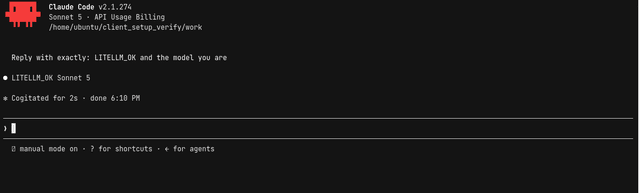
Then confirm the traffic in the Admin UI under Logs or Usage, attributed to your virtual key and the model you chose.
Sign in without a static key
See Claude Code SSO for Claude apps gateway setup, Lite CLI SSO, and using a Claude subscription through LiteLLM.
MCP setup
Expose your LiteLLM MCP gateway tools inside Claude Code with claude mcp add. The URL is <LITELLM_PROXY_BASE_URL>/<server_name>/mcp, where <server_name> matches a key under mcp_servers: in your gateway config, and the virtual key goes in the x-litellm-api-key header:
claude mcp add --transport http litellm-tools \
  http://localhost:4000/my_mcp_server/mcp \
  --header "x-litellm-api-key: Bearer $LITELLM_API_KEY"
| Part | Meaning |
|---|---|
litellm-tools | The name for this server inside Claude Code; choose anything |
http://localhost:4000/my_mcp_server/mcp | <PROXY_URL>/<server_name>/mcp; my_mcp_server must match the key under mcp_servers: on the gateway |
--header "x-litellm-api-key: Bearer $LITELLM_API_KEY" | Your virtual key, authenticating you to the gateway |
The key needs access to my_mcp_server (see the overview); otherwise the gateway rejects the connection with The key is not allowed to access the requested MCP servers. Start Claude Code and run /mcp: the server shows as connected with its tools listed, prefixed with the server name (my_mcp_server-read_wiki_structure).
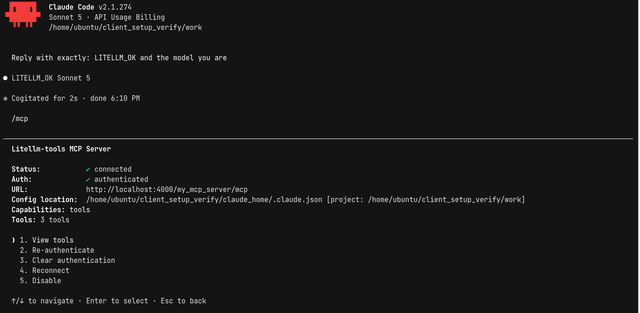
For servers behind upstream OAuth (for example a hosted GitHub or Atlassian MCP), keep the LiteLLM key in x-litellm-api-key and let LiteLLM run the OAuth flow; see MCP OAuth.
Next steps
Cut Claude Code costs with budgets, prompt caching, and fallbacks, bring your own Anthropic key, route Claude Code to non-Anthropic models, or check the Claude Code compatibility matrix.

