Setting Tag Budgets
Track spend and set budgets for your API requests using tags. Tags allow you to categorize and monitor costs across different cost centers, projects, and departments.
Pre-Requisites
- You must set up a Postgres database (e.g. Supabase, Neon, etc.)
What are Tags?
Tags are labels you can attach to your LLM requests to track and limit spending by category.
Common Use Cases:
- Cost Center Tracking: Allocate LLM costs to specific departments or business units (e.g., "engineering", "marketing", "customer-support")
- Project-based Budgeting: Set budgets for different projects or initiatives (e.g., "project-alpha", "chatbot-v2")
- Customer Attribution: Track spend per customer or client (e.g., "customer-acme", "customer-techcorp")
- Feature Monitoring: Monitor costs for specific features (e.g., "feature-chat", "feature-summarization")
Tags can be set on each request (in metadata or via x-litellm-tags), attached to a virtual key so every request using that key inherits the tag and its budget limits automatically, or mapped from the request's baggage header.
Setting Tag Budgets
1. Create a tag with budget
Create a tag to represent a cost center, project, or any budget category. Set max_budget ($ value allowed) and budget_duration (how frequently the budget resets).
Example: Create a tag for your Engineering department with a monthly $500 budget
API
Create a new tag and set max_budget and budget_duration
curl -X POST 'http://0.0.0.0:4000/tag/new' \
     -H "Authorization: Bearer $LITELLM_API_KEY" \
     -H 'Content-Type: application/json' \
     -d '{
            "name": "engineering",
            "description": "Engineering department cost center",
            "max_budget": 500.0,
            "budget_duration": "30d",
            "rpm_limit": 100,
            "tpm_limit": 100000
        }'
Request Body Parameters:
| Parameter | Type | Required | Description |
|---|---|---|---|
name | string | Yes | Unique name for the tag (e.g., cost center name) |
description | string | No | Description of what this tag tracks |
models | list[string] | No | Restrict tag to specific models |
max_budget | float | No | Maximum budget in USD |
budget_duration | string | No | How often budget resets (e.g., "30d", "1d") |
soft_budget | float | No | Soft budget limit for warnings |
rpm_limit | int | No | Max requests per minute allowed for the tag across all keys and teams |
tpm_limit | int | No | Max tokens per minute allowed for the tag across all keys and teams |
Response:
{
  "name": "engineering",
  "description": "Engineering department cost center",
  "max_budget": 500.0,
  "budget_duration": "30d",
  "budget_reset_at": "2025-11-10T00:00:00Z",
  "created_at": "2025-10-11T00:00:00Z"
}
LiteLLM Admin UI
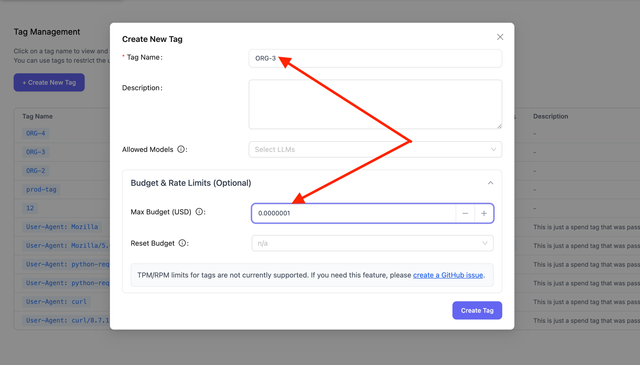
Navigate to the Tag Management page and click Create New Tag. Fill in the tag details and set your budget:
Possible values for budget_duration:
budget_duration | When Budget will reset |
|---|---|
budget_duration="1s" | every 1 second |
budget_duration="1m" | every 1 minute |
budget_duration="1h" | every 1 hour |
budget_duration="1d" | every 1 day |
budget_duration="7d" | every 1 week |
budget_duration="30d" | every 1 month |
2. Attach the tag to an API key (recommended)
Attach the tag when creating or updating a virtual key. Every request made with that key automatically inherits the tag, and the proxy enforces the tag's budget without requiring clients to pass metadata.tags on each request.
API
Use the top-level tags field on /key/generate or /key/update:
curl -X POST 'http://0.0.0.0:4000/key/generate' \
     -H "Authorization: Bearer $LITELLM_API_KEY" \
     -H 'Content-Type: application/json' \
     -d '{
            "tags": ["engineering"]
        }'
You can also set tags under key metadata:
curl -X POST 'http://0.0.0.0:4000/key/generate' \
     -H "Authorization: Bearer $LITELLM_API_KEY" \
     -H 'Content-Type: application/json' \
     -d '{
            "metadata": {
              "tags": ["engineering"]
            }
        }'
LiteLLM Admin UI
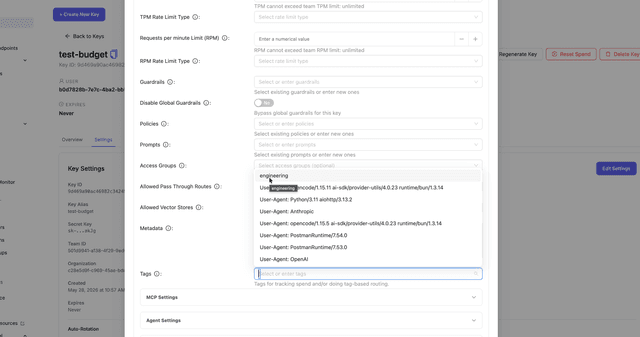
Navigate to Virtual Keys → Create Key (or edit an existing key) and select the tag(s) in the Tags field.
3. Use the tag in your requests (optional)
If you did not attach tags to the API key, add tags to each request in the metadata field (or via the x-litellm-tags header, see Request Tags):
- OpenAI SDK
- cURL
import openai

client = openai.OpenAI(
    api_key="sk-<your-litellm-api-key>",  # Your LiteLLM proxy key
    base_url="http://0.0.0.0:4000"
)

response = client.chat.completions.create(
    model="gpt-6.1-sol",
    messages=[{"role": "user", "content": "Hello"}],
    extra_body={
        "metadata": {
            "tags": ["engineering"]
        }
    }
)
curl -X POST 'http://0.0.0.0:4000/chat/completions' \
     -H "Authorization: Bearer $LITELLM_API_KEY" \
     -H 'Content-Type: application/json' \
     -d '{
           "model": "gpt-6.1-sol",
           "messages": [{"role": "user", "content": "Hello"}],
           "metadata": {
               "tags": ["engineering"]
           }
         }'
4. Test It
Make requests with the virtual key from step 2 until the tag budget is exceeded. You do not need to pass metadata.tags if the tag is already on the key:
curl -X POST 'http://0.0.0.0:4000/chat/completions' \
     -H 'Authorization: Bearer sk-your-key-with-engineering-tag' \
     -H 'Content-Type: application/json' \
     -d '{
           "model": "gpt-6.1-sol",
           "messages": [{"role": "user", "content": "Hello"}]
         }'
If you skipped step 2, include the tag in the request body instead:
curl -X POST 'http://0.0.0.0:4000/chat/completions' \
     -H "Authorization: Bearer $LITELLM_API_KEY" \
     -H 'Content-Type: application/json' \
     -d '{
           "model": "gpt-6.1-sol",
           "messages": [{"role": "user", "content": "Hello"}],
           "metadata": {
               "tags": ["engineering"]
           }
         }'
When budget is exceeded, the request is rejected with HTTP 422:
{
  "error": {
    "message": "Budget has been exceeded! Tag=engineering Current cost: 505.50, Max budget: 500.0",
    "type": "budget_exceeded",
    "param": null,
    "code": "422"
  }
}
Map Baggage Values to Tags
Since v1.109.0A request can get its tag from the W3C baggage header, which OpenTelemetry uses to pass context between services. Each rule in general_settings.request_tag_mappings reads one baggage key and adds a tag to the request, so a service that already sends a value like baggage: entrypoint=<value> gets its own tag without setting metadata.tags on every call. Spend is tracked against the mapped tag whether or not the tag has a budget, and a spent tag budget rejects the request with HTTP 422 before the provider call, the same as any other tag.
general_settings:
  request_tag_mappings:
    - key: entrypoint
      value: support_bot
      tag: support
    - key: entrypoint
      tag_prefix: "usecase:"
      required: true
      require_budgeted_tag: true
With this config, entrypoint=support_bot adds the tag support, and any other value such as entrypoint=checkout adds usecase:checkout. An exact value rule always wins over the tag_prefix rule for the same key. The second rule sets require_budgeted_tag, so create usecase:checkout with a max_budget first, as in step 1. Then send the baggage header with the request:
curl -X POST 'http://0.0.0.0:4000/chat/completions' \
     -H "Authorization: Bearer $LITELLM_API_KEY" \
     -H 'Content-Type: application/json' \
     -H 'baggage: entrypoint=checkout' \
     -d '{
           "model": "gpt-6.1-sol",
           "messages": [{"role": "user", "content": "Hello"}]
         }'
The request is charged to usecase:checkout, and the spend log lists the mapped tag in request_tags after the key, team, deployment and client tags.
Rule fields:
| Field | Required | Description |
|---|---|---|
key | Yes | Baggage key to read, e.g. entrypoint |
value | With tag | Exact baggage value to match |
tag | With value | Tag added when value matches |
tag_prefix | Without value | Matches any value and adds <tag_prefix><value> |
required | No | Rejects requests without a mapped value. Default false |
require_budgeted_tag | No | Rejects mapped tags without a max_budget. Default false |
A rule sets either value and tag, or tag_prefix alone. Each key can have one rule per exact value plus one tag_prefix rule, and the proxy refuses a config that repeats one. header defaults to baggage, which is its only allowed value. Without required, a request whose baggage maps nothing gets no mapped tag and goes through as before.
Required mappings
When any rule for a key sets required: true, a request gets HTTP 400 before the provider call if its baggage does not carry that key, carries it more than once, or carries a value that no rule for the key maps:
{
  "error": {
    "message": "Missing, invalid or unmapped baggage value for entrypoint",
    "type": "bad_request_error",
    "param": null,
    "code": "400"
  }
}
This applies to every mapped request, including file uploads and the Admin UI playground, so those callers need the baggage value too. A required rule also turns off WebSocket inference. Realtime, Responses WebSocket, Live and pass-through WebSocket connections get HTTP 403 for every key, because those connections cannot carry the tag to their spend logs. Serve WebSocket traffic from a proxy without a required rule if you need both.
Require a budget on the mapped tag
With require_budgeted_tag: true, the mapped tag must already exist with a max_budget. Otherwise the request gets HTTP 400 with the message Mapped tag usecase:checkout requires an existing tag budget, and nothing is sent to the provider. When the proxy cannot read tag budgets from the database, the request gets HTTP 503 instead. With allow_requests_on_db_unavailable turned on, it goes through with the mapped tag unchecked, the same as other tag budget checks during a database outage.
Budgets created after traffic starts
The proxy counts spend for a mapped tag from the first request that carries it, even before the tag exists. Creating the tag with /tag/new resets its spend counter, so a budget you add later counts only the spend written after the budget exists, not the spend from before. Spend still waiting in the proxy's database write batch when you create the tag can reach the new budget, and without Redis only the worker that handled /tag/new resets its counter.
What mappings apply to
Mappings apply to POST requests on LLM API routes such as /chat/completions, /v1/responses and /v1/messages, A2A agent routes, and registered pass-through endpoints. That includes follow-up calls such as POST /v1/batches/{batch_id}/cancel and POST /v1/responses/{response_id}/cancel, so under a required rule they need baggage too, while GET reads never do. Token counting, model listing, request previews, MCP routes, /v1/indexes and /v1/memory are skipped, so a required rule does not reject them and their spend carries no mapped tag.
A few more routes skip mappings in the same way because of known gaps. These are the experimental /queue/chat/completions route, the /v1/evals routes, and batch and file requests sent with a provider prefix that does not start with the name of a pass-through route, such as /litellm_proxy/v1/batches, /hosted_vllm/v1/files or /xai/v1/batches. A prefix that does, such as /openai/, /azure/, /vertex_ai/, /bedrock/ or /openai_like/, is mapped. /v1/batches and /v1/files are mapped too. They pick the provider from the request, for example target_model_names on the upload, the custom-llm-provider header or a custom_llm_provider field, and send it to OpenAI when the request names none.
A background /v1/responses call keeps the mapped tag from the request that created it, so the spend billed when it finishes goes to that tag even though the later read sends no baggage. A batch whose input file was uploaded with target_model_names keeps the tag of the batch create request in the same way. When the provider runs that batch, its spend is written by the batch cost poller, which runs every proxy_batch_polling_interval seconds (an hour by default) and handles up to MAX_OBJECTS_PER_POLL_CYCLE batches per run, so a tag budget sees that spend some time after the batch completes. An OpenAI batch whose input file was uploaded without target_model_names is billed on the GET /v1/batches/{batch_id} call that retrieves it, and that spend carries no mapped tag.
Mapped tags only drive spend tracking and budgets. They never select a deployment under enable_tag_filtering, attach a tag-scoped policy, or pick a tag-mode guardrail, unless the caller, key, team or project already carries the same tag. reject_clientside_metadata_tags does not block mapped tags, since an admin configured them. The client still chooses the baggage value, though, so any key can send another service's value and spend that tag's budget, and a tag_prefix rule lets the caller pick any tag under the prefix. Use exact value rules or require_budgeted_tag to limit callers to tags you created.
Baggage is decoded the way OpenTelemetry decodes it. Percent-encoded values are decoded and a bare + reads as a space, so send a literal plus as %2B. Properties after ; and spaces around = are ignored, and a value with a control character such as %00 maps no tag.
You can also edit the rules in the Admin UI. Open Router Settings in the Settings section, then the General tab, and use the request_tag_mappings row. Rules from config.yaml show there read-only.
This setting needs the opentelemetry-api package. The Docker image includes it, and a pip install of litellm[proxy] needs pip install opentelemetry-api as well.
Setting Tag Rate Limits
Set rpm_limit and tpm_limit on a tag to cap requests and tokens per minute for that tag. The limit applies to the tag itself, so usage is shared across every key and team that sends the tag, whether the tag arrives in request metadata.tags, the x-litellm-tags header, or a key's attached tags. This is separate from the per key tag_rpm_limit map in key metadata, which meters each key's requests under a tag independently.
Rate limits on tags are enforced by the v3 parallel request limiter. Once a tag crosses its limit, any request carrying it is rejected with HTTP 429 and a message like Rate limit exceeded for tag: engineering. Limit type: requests. Current limit: 100. rpm_limit counts each request at admission, and tpm_limit is charged with the request's actual token usage after the call completes, so a request can be admitted and the next one rejected once usage lands.
Create a tag with rate limits:
curl -X POST 'http://0.0.0.0:4000/tag/new' \
     -H "Authorization: Bearer $LITELLM_API_KEY" \
     -H 'Content-Type: application/json' \
     -d '{
            "name": "engineering",
            "rpm_limit": 100,
            "tpm_limit": 100000
        }'
Update rate limits on an existing tag:
curl -X POST 'http://0.0.0.0:4000/tag/update' \
     -H "Authorization: Bearer $LITELLM_API_KEY" \
     -H 'Content-Type: application/json' \
     -d '{
            "name": "engineering",
            "rpm_limit": 200,
            "tpm_limit": 200000
        }'
Managing Tags
View Tag Information
Get information about specific tags:
curl -X POST 'http://0.0.0.0:4000/tag/info' \
     -H "Authorization: Bearer $LITELLM_API_KEY" \
     -H 'Content-Type: application/json' \
     -d '{
           "names": ["engineering", "marketing"]
         }'
Response:
{
  "engineering": {
    "name": "engineering",
    "description": "Engineering department cost center",
    "spend": 245.50,
    "max_budget": 500.0,
    "budget_duration": "30d",
    "budget_reset_at": "2025-11-10T00:00:00Z",
    "created_at": "2025-10-11T00:00:00Z",
    "updated_at": "2025-10-11T12:30:00Z"
  },
  "marketing": {
    "name": "marketing",
    "description": "Marketing department cost center",
    "spend": 89.20,
    "max_budget": 300.0,
    "budget_duration": "30d",
    "budget_reset_at": "2025-11-10T00:00:00Z",
    "created_at": "2025-10-11T00:00:00Z",
    "updated_at": "2025-10-11T12:30:00Z"
  }
}
Update Tag Budget
Update an existing tag's budget:
curl -X POST 'http://0.0.0.0:4000/tag/update' \
     -H "Authorization: Bearer $LITELLM_API_KEY" \
     -H 'Content-Type: application/json' \
     -d '{
           "name": "engineering",
           "max_budget": 750.0,
           "budget_duration": "30d"
         }'
Delete Tag
curl -X POST 'http://0.0.0.0:4000/tag/delete' \
     -H "Authorization: Bearer $LITELLM_API_KEY" \
     -H 'Content-Type: application/json' \
     -d '{
           "name": "engineering"
         }'
Multiple Tags per Request
You can apply multiple tags to a single request to track costs across different dimensions simultaneously. For example, track both the cost center and the specific project:
response = client.chat.completions.create(
    model="gpt-6.1-sol",
    messages=[{"role": "user", "content": "Hello"}],
    extra_body={
        "metadata": {
            "tags": ["engineering", "project-alpha", "customer-acme"]
        }
    }
)
curl -X POST 'http://0.0.0.0:4000/chat/completions' \
     -H "Authorization: Bearer $LITELLM_API_KEY" \
     -H 'Content-Type: application/json' \
     -d '{
           "model": "gpt-6.1-sol",
           "messages": [{"role": "user", "content": "Hello"}],
           "metadata": {
               "tags": ["engineering", "project-alpha", "customer-acme"]
           }
         }'
Budget Enforcement: If any tag exceeds its budget, the request will be rejected.

