[Beta] Project Management
This feature requires a LiteLLM Enterprise license. Start a free 30-day trial or book a demo. See what Enterprise includes.
Projects in LiteLLM sit between teams and keys in the organizational hierarchy, enabling fine-grained access control and budget management for specific use cases or applications.
Hierarchy: Organizations > Teams > Projects > Keys
Quick Start
This walkthrough shows how to create a project, generate an API key, make requests, and view project-level spend tracking in the UI.
Step 1: Create a Project
curl --location 'http://0.0.0.0:4000/project/new' \
--header "Authorization: Bearer $LITELLM_API_KEY" \
--header 'Content-Type: application/json' \
--data '{
    "project_alias": "flight-search-assistant",
    "team_id": "ad898803-c8a3-4f4a-976a-a3c372cffa45",
    "models": ["gpt-6.1-sol", "gpt-6-luna"],
    "max_budget": 100,
    "metadata": {
        "use_case_id": "SNOW-12345",
        "responsible_ai_id": "RAI-67890"
    }
}' | jq
Response:
{
  "project_id": "e402a141-725a-4437-bff5-d47459189716",
  "project_alias": "flight-search-assistant",
  "team_id": "ad898803-c8a3-4f4a-976a-a3c372cffa45",
  "models": ["gpt-6.1-sol", "gpt-6-luna"],
  "max_budget": 100,
  ...
}
Step 2: Generate API Key for Project
curl 'http://0.0.0.0:4000/key/generate' \
--header "Authorization: Bearer $LITELLM_API_KEY" \
--header 'Content-Type: application/json' \
--data-raw '{
    "models": ["gpt-6-luna", "gpt-6.1-sol"],
    "metadata": {"user": "ishaan@berri.ai"},
    "project_id": "e402a141-725a-4437-bff5-d47459189716"
}' | jq
Response:
{
  "key": "sk-W8VbscpfuyvHm5TkxRYiXA",
  "key_name": "sk-...YiXA",
  "project_id": "e402a141-725a-4437-bff5-d47459189716",
  ...
}
Step 3: Use API Key in Chat Completions
curl http://localhost:4000/v1/chat/completions \
--header 'Content-Type: application/json' \
--header 'Authorization: Bearer sk-W8VbscpfuyvHm5TkxRYiXA' \
--data '{
    "model": "gpt-6.1-sol",
    "messages": [{"role": "user", "content": "What is litellm?"}]
}' | jq
Step 4: View Project Spend in UI
Navigate to the Logs page in the LiteLLM Admin UI. You'll see the user_api_key_project_id tracked in the request metadata:
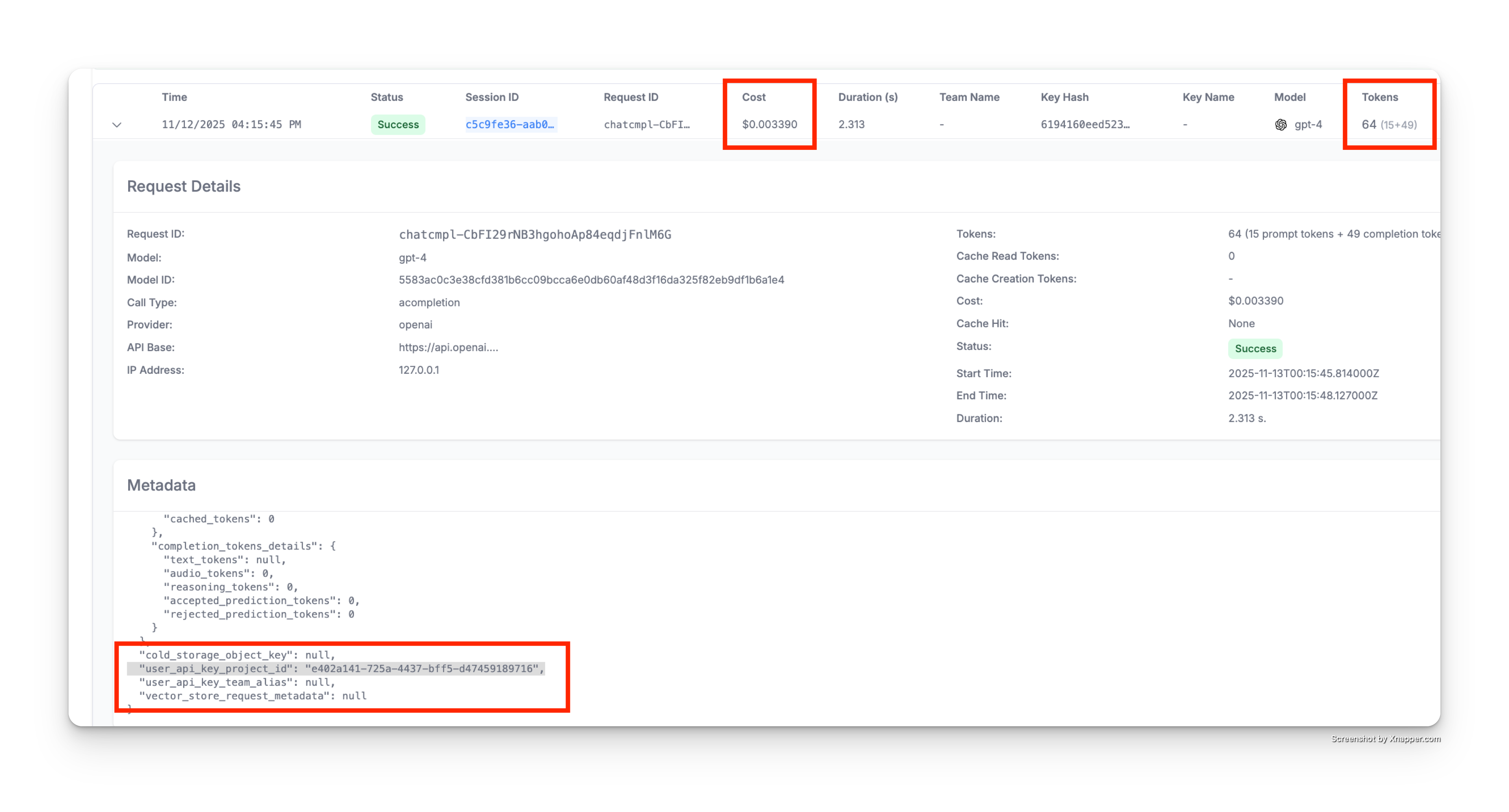
As shown above, the spend logs metadata includes:
"user_api_key_project_id": "e402a141-725a-4437-bff5-d47459189716"- Links the request to your project- All costs and token usage are automatically attributed to the project
- You can query and filter logs by project ID for detailed reporting
API Endpoints
POST /project/new
Create a new project.
Who can call: Admins or Team Admins
Parameters:
project_alias(string, optional): Human-readable name for the projectteam_id(string, required): The team this project belongs tomodels(array, optional): List of models the project can accessmax_budget(float, optional): Maximum spend budget for the projecttpm_limit(int, optional): Tokens per minute limitrpm_limit(int, optional): Requests per minute limitbudget_duration(string, optional): Budget reset period (e.g., "30d", "1mo")metadata(object, optional): Custom metadata for the projectblocked(boolean, optional): Block all API calls for this project
Example:
curl --location 'http://0.0.0.0:4000/project/new' \
--header "Authorization: Bearer $LITELLM_API_KEY" \
--header 'Content-Type: application/json' \
--data '{
    "project_alias": "hotel-recommendations",
    "team_id": "team-123",
    "models": ["claude-sonnet-5"],
    "max_budget": 200,
    "tpm_limit": 100000,
    "metadata": {
        "use_case_id": "SNOW-12346",
        "cost_center": "travel-products"
    }
}'
Response:
{
    "project_id": "project-def",
    "project_alias": "hotel-recommendations",
    "team_id": "team-123",
    "models": ["claude-sonnet-5"],
    "spend": 0.0,
    "budget_id": "budget-xyz",
    "metadata": {
        "use_case_id": "SNOW-12346",
        "cost_center": "travel-products"
    },
    "created_at": "2025-01-15T10:00:00Z",
    "updated_at": "2025-01-15T10:00:00Z"
}
POST /project/update
Update an existing project.
Who can call: Admins or Team Admins
Parameters:
project_id(string, required): The project to updateproject_alias(string, optional): Updated project nameteam_id(string, optional): Move project to different teammodels(array, optional): Updated list of allowed modelsmax_budget(float, optional): Updated budgettpm_limit(int, optional): Updated TPM limitrpm_limit(int, optional): Updated RPM limitmetadata(object, optional): Updated metadatablocked(boolean, optional): Updated blocked status
Example:
curl --location 'http://0.0.0.0:4000/project/update' \
--header "Authorization: Bearer $LITELLM_API_KEY" \
--header 'Content-Type: application/json' \
--data '{
    "project_id": "project-abc",
    "max_budget": 200,
    "tpm_limit": 200000,
    "metadata": {
        "status": "production"
    }
}'
GET /project/info
Get information about a specific project.
Parameters:
project_id(string, required): Query parameter
Example:
curl --location 'http://0.0.0.0:4000/project/info?project_id=project-abc' \
--header "Authorization: Bearer $LITELLM_API_KEY"
Response:
{
    "project_id": "project-abc",
    "project_alias": "flight-search-assistant",
    "team_id": "team-123",
    "models": ["gpt-6.1-sol", "gpt-6-luna"],
    "spend": 45.67,
    "model_spend": {
        "gpt-6.1-sol": 42.30,
        "gpt-6-luna": 3.37
    },
    "litellm_budget_table": {
        "budget_id": "budget-xyz",
        "max_budget": 100.0,
        "tpm_limit": 100000,
        "rpm_limit": 100
    },
    "metadata": {
        "use_case_id": "SNOW-12345"
    }
}
GET /project/list
List all projects the user has access to.
Example:
curl --location 'http://0.0.0.0:4000/project/list' \
--header "Authorization: Bearer $LITELLM_API_KEY"
Response:
[
    {
        "project_id": "project-abc",
        "project_alias": "flight-search-assistant",
        "team_id": "team-123",
        "spend": 45.67
    },
    {
        "project_id": "project-def",
        "project_alias": "hotel-recommendations",
        "team_id": "team-123",
        "spend": 23.45
    }
]
DELETE /project/delete
Delete one or more projects.
Who can call: Admins only
Parameters:
project_ids(array, required): List of project IDs to delete
Example:
curl --location --request DELETE 'http://0.0.0.0:4000/project/delete' \
--header "Authorization: Bearer $LITELLM_API_KEY" \
--header 'Content-Type: application/json' \
--data '{
    "project_ids": ["project-abc", "project-def"]
}'
Note: Projects with associated API keys cannot be deleted. Delete or reassign the keys first.
Model-Specific Quotas
You can set different quotas for different models within a project:
curl --location 'http://0.0.0.0:4000/project/new' \
--header "Authorization: Bearer $LITELLM_API_KEY" \
--header 'Content-Type: application/json' \
--data '{
    "project_alias": "multi-model-project",
    "team_id": "team-123",
    "models": ["gpt-6.1-sol", "gpt-6-luna", "claude-sonnet-5"],
    "max_budget": 500,
    "metadata": {
        "model_tpm_limit": {
            "gpt-6.1-sol": 50000,
            "gpt-6-luna": 200000,
            "claude-sonnet-5": 100000
        },
        "model_rpm_limit": {
            "gpt-6.1-sol": 50,
            "gpt-6-luna": 500,
            "claude-sonnet-5": 100
        }
    }
}'

