Health Checks
Two things consume the proxy's health state. Your orchestrator (Kubernetes, a load balancer, an uptime monitor) polls lightweight probe endpoints to decide whether the process is up and ready for traffic. You, the operator, check whether each configured LLM can actually serve requests. This page covers both.
Probe endpoints
These endpoints answer "is the gateway process up and able to serve traffic?" without making any LLM calls. They are the canonical liveness and readiness contract for the proxy.
| Endpoint | Auth | Returns | Meaning |
|---|---|---|---|
GET /health/liveliness | none | "I'm alive!" (200), or {"status": "shutting_down"} (503) during graceful shutdown | The process is up. No dependencies are checked. GET /health/liveness is an alias with the Kubernetes spelling; both are real routes |
GET /health/readiness | none | {"status": "healthy", "db": ...} (200) when ready; 503 when a configured database is unreachable | The worker is ready to accept traffic. The db field is "connected", "disconnected", or "Not connected" when no database is configured |
The db value lets an orchestrator distinguish a healthy worker from one that booted but cannot reach its database. When the database is configured and unreachable, readiness returns 503 so the pod is pulled from rotation.
The default readiness payload is deliberately low-detail so it is safe to expose to unauthenticated probes. For full diagnostics (callbacks, cache, version), either set general_settings.allow_public_health_readiness_details: true to expand /health/readiness itself, or call the authenticated GET /health/readiness/details endpoint.
A minimal Kubernetes probe pair on the proxy's port 4000:
livenessProbe:
  httpGet:
    path: /health/liveliness
    port: 4000
readinessProbe:
  httpGet:
    path: /health/readiness
    port: 4000
For full deployment manifests, see the Production Deployment guide and the production checklist.
Model health in the Admin UI
The primary way to check whether your models are serving is the Admin UI. Go to Models + Endpoints, open the Health Status tab, and click Run All Checks. Each model shows a status, error details when it fails, and the last check and last success times.
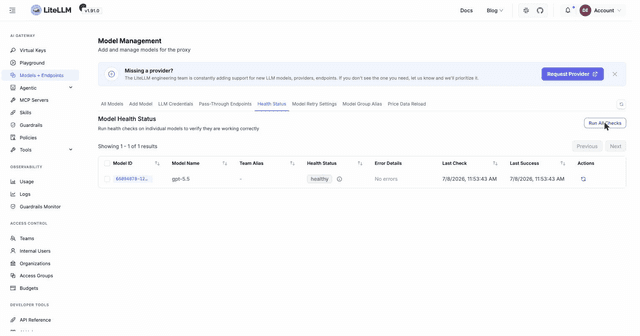
The API equivalent is GET /health.
Model health from the API
GET /health reports each deployment the calling key may see as healthy or unhealthy. Unless background health checks are on, every call sends a real test request to each of those deployments, so it costs a few tokens per deployment. A targeted check of an auto router deployment also sends a test request to each model it routes to.
curl 'http://0.0.0.0:4000/health' -H "Authorization: Bearer $LITELLM_API_KEY"
{
    "healthy_endpoints": [
        {"model": "openai/gpt-6-luna", "model_id": "openai-small-1", "x-ratelimit-remaining-requests": "29999"}
    ],
    "unhealthy_endpoints": [
        {"model": "anthropic/claude-sonnet-5", "model_id": "anthropic-1", "error": "litellm.AuthenticationError: ...", "exception_status": 401}
    ],
    "healthy_count": 1,
    "unhealthy_count": 1
}
The endpoint scopes its result to the calling key, answers a targeted check with a status code a monitor can act on, and returns only a fixed set of diagnostic fields. The sections below describe that contract as of v1.102.0.
Releases from v1.84.0 up to v1.102.0 already scope the result to the key's models list and answer 503 for a targeted call with no healthy deployment, but they differ in a few ways. Access groups in the key's list are not expanded, so a key that lists only a group gets empty lists, and a non-admin key also sees other teams' deployments. A ?model_id= outside the key's scope is ignored, and the call answers with the key's own deployments instead of 403. Entries also carry other litellm_params values, such as max_tokens and cache, instead of only the fields listed below. Only api_base and api_version are removed for a non-admin key, so aws_bedrock_runtime_endpoint still shows, and the header reads api_base and api_version are admin-only on this endpoint. On v1.84.0 a ?model= the key cannot call answers 401 instead of 403.
Which deployments a key sees
A proxy admin, meaning the master key or a key whose user has the proxy_admin or proxy_admin_viewer role, sees every deployment, unless the admin's key has its own models list, which then decides what it sees. Every other key sees only deployments that no other team owns. Within those, a key whose own models list is empty or contains all-proxy-models sees all of them, and any other key sees only the deployments whose model_name is in its models list, with access group names and all-team-models in that list expanded.
Only the key's own models list narrows the result. A models limit on the key's team, user, organization, or project does not narrow the untargeted result or a model_id check yet, though a ?model= that the limit forbids is refused the same way as a chat request. Without background health checks, such a key's untargeted call therefore sends a test request to deployments it cannot call. To scope what such a key sees, give it its own models list, or all-team-models for a team key. A wildcard entry such as openai/* matches only a deployment whose model_name is literally openai/*, so a key whose list holds only wildcards gets an empty result even for models it can call.
Check one model
Pass ?model=<model_name> to check every deployment behind that public model name. When no deployment carries that name, the proxy matches it against each deployment's litellm_params.model instead, so an admin can pass ?model=openai/gpt-6-luna. Pass ?model_id=<id> to check the single deployment with that model_info.id, which GET /v1/model/info lists. When a request has both, model_id picks the deployment, though model must still pass the key's model access check. A model_group_alias name in model checks the deployments the alias routes to when the key has no models list or its list holds the alias name. A key whose list holds only the target name gets 403 for the alias, even though a chat request through the alias succeeds, so check the target name instead. A name that only a wildcard route serves, such as anthropic/claude-sonnet-5 behind an anthropic/* deployment, matches no deployment, so it answers 503 with empty lists to an admin and 403 to any other key even though a chat request for it succeeds. Check such a route with ?model_id= or with the wildcard name itself, ?model=anthropic/*.
Status codes
| Status | When |
|---|---|
| 200 | Any untargeted call, even with every deployment unhealthy |
| 200 | A targeted call with at least one healthy deployment |
| 503 | A targeted call with no healthy deployment |
| 403 | The target is outside the key's scope |
| 404 | No deployment has the model_id |
| 401 | The key is not valid |
A 503 carries the normal response body, so a monitor can alert on the status code and still read each unhealthy entry.
The 403 and 404 bodies come in two shapes. A model the key cannot call is refused by the same model access check as a chat request, so the body is the standard error object, {"error": {"type": "key_model_access_denied", ...}}, or the matching type for the limit that refused it, such as team_model_access_denied, user_model_access_denied, org_model_access_denied, or project_model_access_denied. A model_id outside the key's scope answers {"detail": {"error": "key not allowed to health-check model_id <id>"}}, and a model that passes the access check but matches no deployment in scope answers {"detail": {"error": "key not allowed to health-check model <name>"}}. An unknown model_id answers 404 with {"detail": {"error": "Model with ID <id> not found"}} before any scope check. An admin key with no models list that passes a model no deployment serves gets 503 with empty lists.
Response fields
Every entry carries model_id, the deployment's model_info.id, and model, the model the probe called. model is usually the deployment's litellm_params.model, but a health_check_model or a provider route, such as a Bedrock region in the model string, can change it, so match entries to deployments on model_id. Any other field in an entry comes from this list, and only when the deployment or its probe sets it: custom_llm_provider, mode, base_model, aws_region_name, region_name, watsonx_region_name, vertex_project, vertex_location, tpm, rpm, error, raw_request_typed_dict, x-ratelimit-remaining-requests, x-ratelimit-remaining-tokens, and x-ms-region. An unhealthy entry usually also carries exception_status, the HTTP status of the failed probe, which is 500 when the error has none. An entry never has an api_key field or any other credential field from litellm_params, and the only other litellm_params values it can carry are the admin-only fields below. Later releases can add fields to this list, so a client should ignore fields it does not know.
api_base, api_version, and aws_bedrock_runtime_endpoint are removed from each entry for a non-admin key. Later releases add server-side auth settings to that list, such as anthropic_identity_source from v1.106.0 and token_exchange_endpoint and github_copilot_host from v1.107.0. Every 200 or 503 response to a non-admin key has a Litellm-Health-Field-Notice header that lists every admin-only field, whether or not an entry in that response had one:
Litellm-Health-Field-Notice: api_base, api_version, aws_bedrock_runtime_endpoint, ... are admin-only on this endpoint
Read that header instead of a hardcoded list, because the set of admin-only fields can grow.
On an unhealthy entry, error holds the failed probe's full error text and raw_request_typed_dict describes the request the probe sent, including the URL it called, which starts with the deployment's api_base or Bedrock runtime endpoint. Both go to every key that can see the deployment, so removing the admin-only fields does not hide a deployment's address from a non-admin key. Set health_check_details: false when non-admin keys should see only each deployment's status.
With general_settings.health_check_details: false, each entry carries only model, model_id, and exception_status on an unhealthy entry, with no error. The one exception is an auto router deployment that cannot reach one of the models it routes to, which keeps an error that names that model. The admin-only fields are left out for proxy admins too.
Background health checks
By default /health probes every model on each call. To avoid querying models too frequently, run the checks in the background and have /health serve the last cached result. Configure this in general_settings:
general_settings:
  background_health_checks: true      # run checks in the background
  health_check_interval: 300          # seconds between runs (default 300)
  health_check_details: true          # false trims each entry to model, model_id, and status fields (default true)
Set health_check_details: false to return only the minimal entry when the proxy is exposed to a broad audience.
The cached result follows the same rules as a live check. Each key sees only its own deployments, a targeted call answers 503 when no targeted deployment is healthy in the cache, and non-admin keys get the admin-only fields removed. Until the first background run finishes the cache is empty, so an untargeted call answers 200 with empty lists, or {} for an admin key with no models list, and every targeted call answers 503 with empty lists. Each proxy worker, and each pod, runs its own background loop and keeps its own cache. Right after the proxy starts, or after a worker restarts, a worker whose first run has not finished answers from an empty cache while another worker already has results, so the same call can answer 503 and then 200 a moment later. A deployment the background loop skips, through disable_background_health_check or background_health_check_model_groups below, is never in the cache, so it never shows up and a targeted check of it always answers 503 with empty lists.
To exclude a model from the background loop, set disable_background_health_check: true in its model_info. While background checks are on, /health only reads the cache, so that deployment drops out of its result as described above. Set general_settings.health_check_skip_disabled_background_models: true to also leave those deployments out of on-demand checks, which run when background checks are off, and out of shared health checks.
model_list:
  - model_name: openai/gpt-6.1-sol
    litellm_params:
      model: openai/gpt-6.1-sol
      api_key: os.environ/OPENAI_API_KEY
    model_info:
      disable_background_health_check: true
To scope the background loop to specific model groups instead of excluding models one by one, set general_settings.background_health_check_model_groups to the list of model group names to probe. Only deployments in the listed groups are checked, so /health reports only those groups, and health check routing applies only to them; unlisted groups keep their configured routing behavior. Model groups added later are not probed until you add them to the list, and a value that is not a list of strings fails at startup
general_settings:
  background_health_checks: true
  background_health_check_model_groups: ["prod-openai"]
For coordinating checks across multiple pods so expensive models are not probed once per pod, see Shared Health Check State.
Model modes
The health check picks the operation to test from the model's model_info.mode. Set it so the probe uses the right API surface; if you leave it unset, LiteLLM auto-detects from the model's capabilities and falls back to a chat completion.
mode | Health check calls |
|---|---|
chat (default) | /chat/completions |
completion | /completions |
embedding | /embeddings |
image_generation | image generation |
audio_transcription | audio transcription |
audio_speech | text to speech (requires health_check_voice) |
rerank | rerank |
batch | batch (Azure only) |
realtime | realtime session |
ocr | OCR |
video_generation | video generation |
image_edit | image edit |
anthropic_messages | /v1/messages |
Bedrock Mantle serves Claude models only on the Anthropic Messages API, so a bedrock_mantle/anthropic.claude-* deployment with mode unset is probed with anthropic_messages instead of a chat completion. An explicit mode still wins
For a wildcard route (* in litellm_params.model), set health_check_model to the concrete model the probe should call. With mode unset on a wildcard route, max_tokens is left unset on the probe request.
model_list:
  - model_name: azure-embedding-model
    litellm_params:
      model: azure/azure-embedding-model
      api_base: os.environ/AZURE_API_BASE
      api_key: os.environ/AZURE_API_KEY
      api_version: "2023-07-01-preview"
    model_info:
      mode: embedding
Audio output chat models
Since v1.109.0OpenAI and Azure chat models that output audio, such as gpt-audio-1.5 and gpt-audio-mini, reject a request with no audio in its input or output. The chat probe asks these models for text plus audio output, a wav clip in the health_check_voice voice, so they pass the default probe with no model_info.health_check_params override. Values you set in health_check_params still win, and a modalities list there without "audio" keeps the probe text only.
LiteLLM picks these models by base_model, read from model_info and then litellm_params, or else by the deployment's model name. So a custom-named Azure deployment gets the audio probe only when base_model names its model, as for cost tracking.
model_list:
  - model_name: gpt-audio
    litellm_params:
      model: azure/my-gpt-audio-deployment
      api_base: os.environ/AZURE_API_BASE
      api_key: os.environ/AZURE_API_KEY
    model_info:
      base_model: azure/gpt-audio-1.5
Health check tuning reference
Set these under a model's model_info unless noted otherwise. They control how the probe request is shaped.
| Key | Default | Purpose |
|---|---|---|
health_check_timeout | 60s | Per-model timeout for the probe |
health_check_max_tokens | 16 (unset for wildcard routes) | max_tokens on the probe request |
health_check_max_tokens_reasoning | unset | max_tokens for reasoning models when health_check_max_tokens is not set |
health_check_max_tokens_non_reasoning | unset | max_tokens for non-reasoning models when health_check_max_tokens is not set |
health_check_reasoning_effort | unset | reasoning_effort on the probe (chat, completion, batch, responses modes only) |
health_check_voice | alloy | Voice for audio_speech probes, and for chat probes of OpenAI and Azure models that output audio Since v1.109.0. Gemini TTS deployments map alloy and the other OpenAI voice names to a Gemini prebuilt voice (alloy becomes Kore, see the mapping) from v1.107.0, so the default passes. Set a Gemini name like Kore to pick one directly, which earlier releases need |
health_check_model | unset | Concrete model a wildcard route probes |
disable_background_health_check | false | Skip this model in the background loop |
Reasoning models often need a higher probe max_tokens because providers count reasoning tokens toward the completion budget; the separate reasoning and non-reasoning keys let you raise it without listing every model. Three environment variables set global defaults: DEFAULT_HEALTH_CHECK_PROMPT overrides the default probe prompt ("test from litellm"), BACKGROUND_HEALTH_CHECK_MAX_TOKENS is the global max_tokens fallback, and BACKGROUND_HEALTH_CHECK_MAX_TOKENS_REASONING takes precedence for non-wildcard reasoning models.
To route traffic away from deployments that fail health checks, see Health Check Driven Routing.
Other health endpoints
All of these require a valid key unless noted.
GET /health/services?service=<name>tests a configured alerting or logging service (datadog, slack, langfuse, and so on); accepts any valid keyGET /health/readiness/detailsreturns the authenticated readiness diagnostics (db, cache, callbacks, version)GET /health/historyreturns past health check resultsGET /health/latestreturns the most recent health check resultGET /health/backlogreturns the number of in-flight requests on the workerGET /health/drainstarts a graceful drain for KubernetespreStophooks; disabled by default (404) unlessgeneral_settings.enable_drain_endpoint: true, and gated by theX-Drain-Tokenheader whenDRAIN_ENDPOINT_TOKENis set

