Endpoint Activity
Track and visualize API endpoint usage directly in the dashboard. Monitor endpoint-level activity analytics, spend breakdowns, and performance metrics to understand which endpoints are receiving the most traffic and how they're performing.
Overview
Endpoint Activity enables you to track spend and usage for individual API endpoints automatically. Every time you call an endpoint through the LiteLLM proxy, activity is automatically tracked and aggregated. This allows you to:
- Track spend per endpoint automatically
- View endpoint-level usage analytics in the Admin UI
- Monitor token consumption by endpoint
- Analyze success and failure rates per endpoint
- Identify which endpoints are getting the most activity
- View trend data showing endpoint usage over time
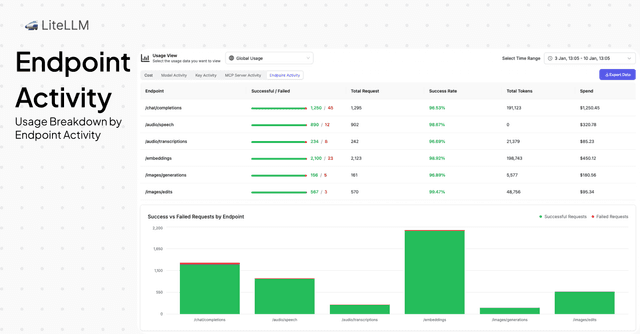
How Endpoint Activity Works
Endpoint activity is automatically tracked whenever you make API calls through the LiteLLM proxy. No additional configuration is required - simply call your endpoints as usual and activity will be tracked.
Example API Call
When you make a request to any endpoint, activity is automatically recorded:
# /chat/completions: 👈 ENDPOINT AUTOMATICALLY TRACKED
# Authorization: 👈 YOUR PROXY KEY
curl -X POST 'http://0.0.0.0:4000/chat/completions' \
  --header 'Content-Type: application/json' \
  --header "Authorization: Bearer $LITELLM_API_KEY" \
  --data '{
    "model": "gpt-5.6-luna",
    "messages": [
      {
        "role": "user",
        "content": "What is the capital of France?"
      }
    ]
  }'
The endpoint (/chat/completions) will be automatically tracked with:
- Token counts (prompt tokens, completion tokens, total tokens)
- Spend for the request
- Request status (success or failure)
- Timestamp and other metadata
How to View Endpoint Activity
View Activity in Admin UI
Navigate to the Endpoint Activity tab in the Admin UI to view endpoint-level analytics:
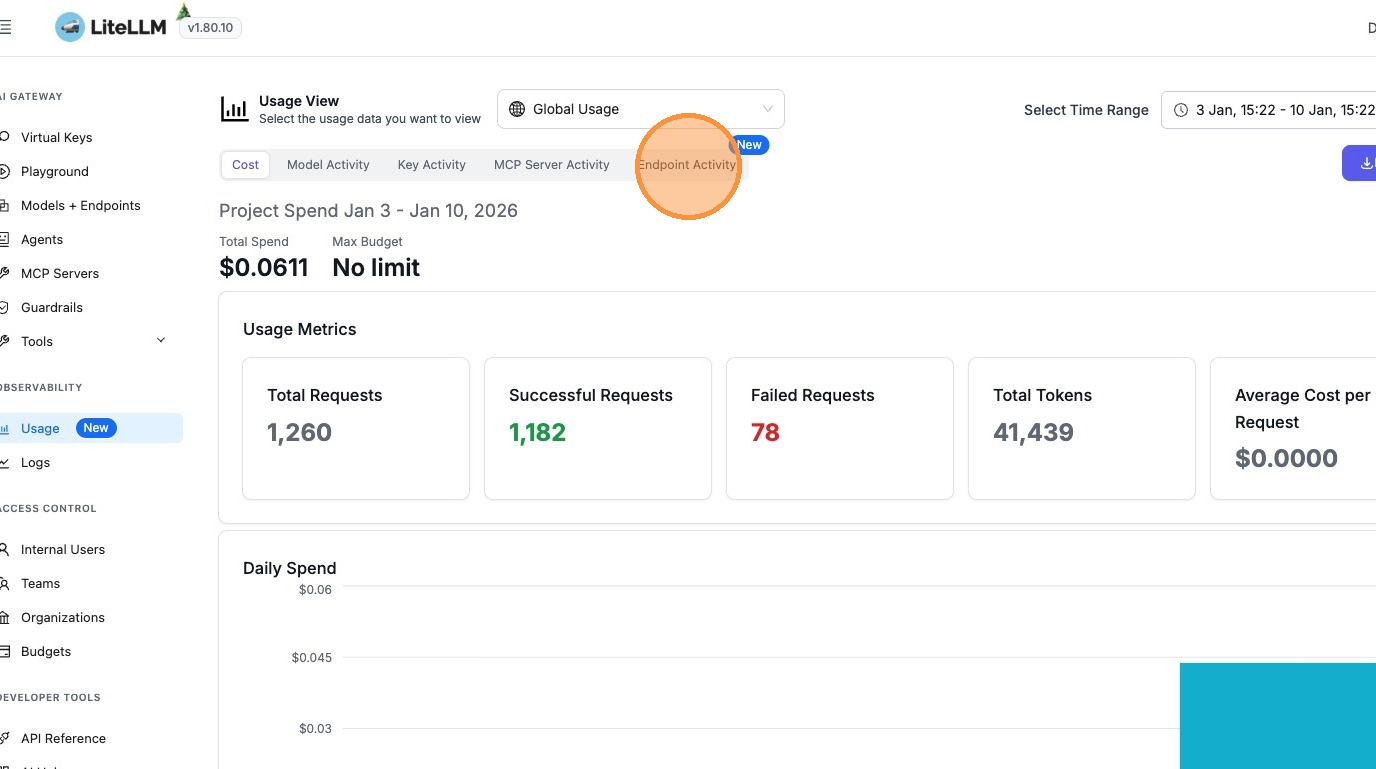
1. Access Endpoint Activity
Go to the Usage page in the Admin UI (PROXY_BASE_URL/ui/?login=success&page=new_usage) and click on the Endpoint Activity tab.
2. View Endpoint Analytics
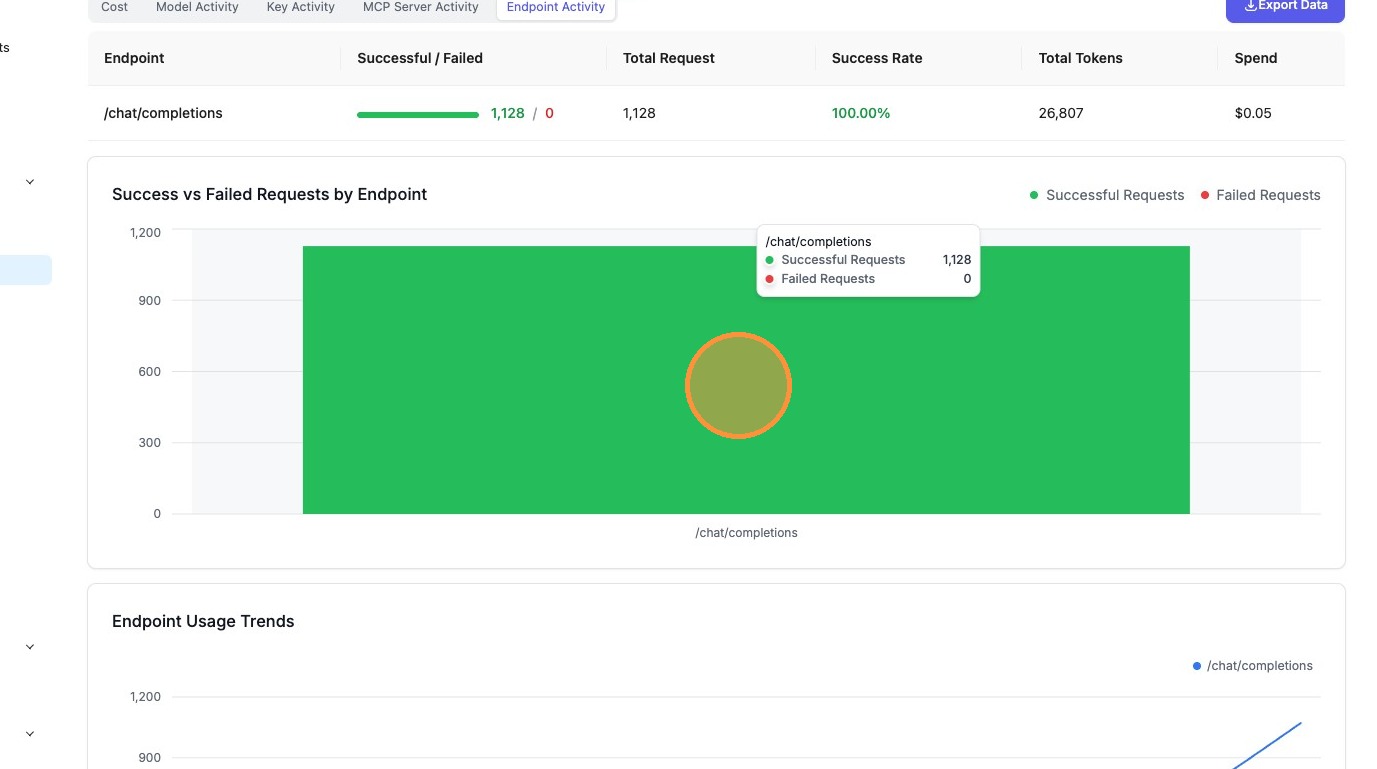
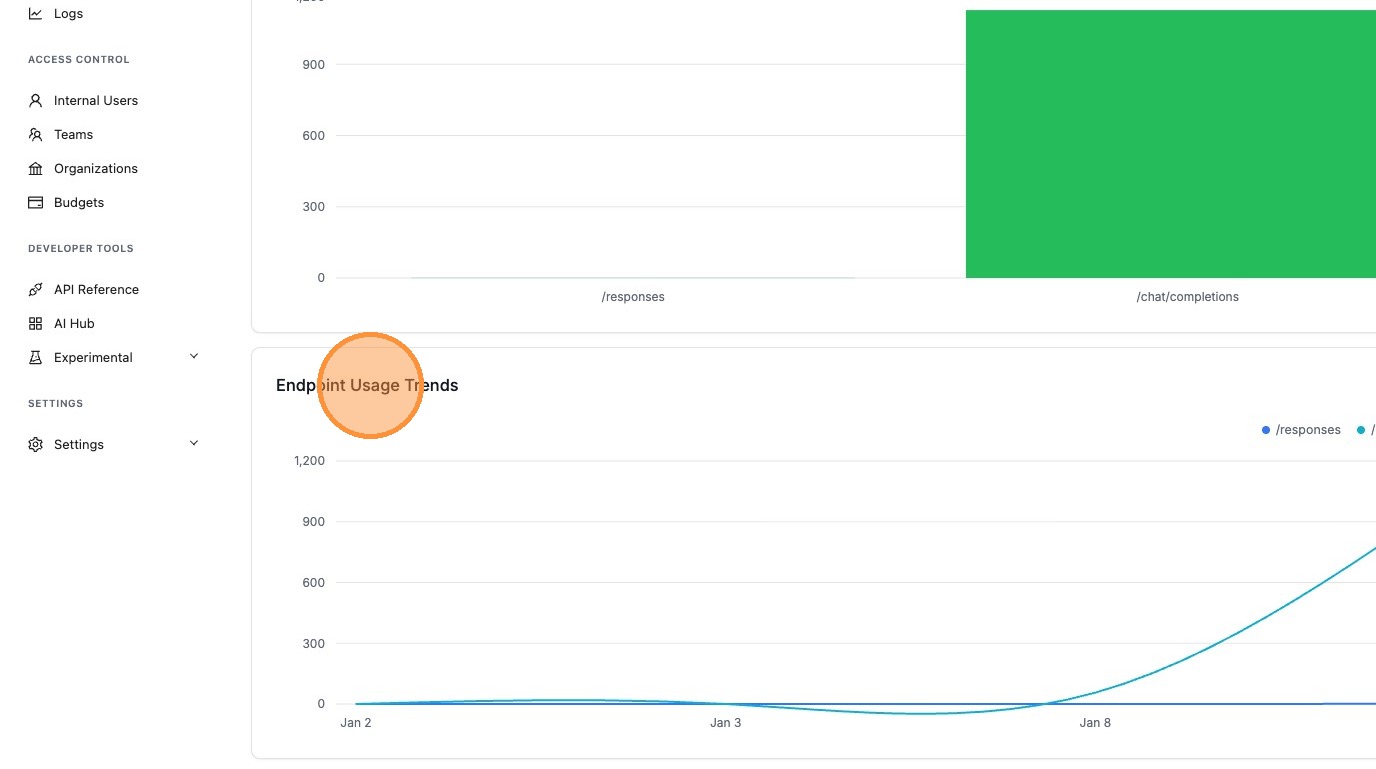
The Endpoint Activity dashboard provides:
- Endpoint usage table: View all endpoints with aggregated metrics including:
- Total requests (successful and failed)
- Success rate percentage
- Total tokens consumed
- Total spend per endpoint
- Success vs Failed requests chart: Visualize request success and failure rates by endpoint
- Usage trends: See how endpoint activity changes over time with daily trend data
3. Understand Endpoint Metrics
Each endpoint displays the following metrics:
- Successful Requests: Number of requests that completed successfully
- Failed Requests: Number of requests that encountered errors
- Total Requests: Sum of successful and failed requests
- Success Rate: Percentage of successful requests
- Total Tokens: Sum of prompt and completion tokens
- Spend: Total cost for all requests to that endpoint
Gateway Request Counts
The Successful Requests and Failed Requests tiles on the Usage page, along with the Gateway Requests by Endpoint chart below them, are counted by the proxy itself rather than derived from spend logs. LiteLLM's request-metrics middleware sits at the ASGI edge, classifies each inbound LLM, MCP and A2A call, and records the status the gateway returned. Those counts are folded into the LiteLLM_DailyGatewayRequests table, keyed by date, category and route. The key holds nothing a caller supplies and no per-key, per-user or per-deployment dimension, so the table grows with how many route classes your deployment serves and how long it has been running, never with traffic
Counting at the edge changes what the number means. A request is recorded whether or not it ever reached LiteLLM's logging callbacks, so authentication rejections, rate limit responses and provider errors land in the failed column instead of going missing; every status is counted, not just 2xx. One inbound request also counts exactly once however many upstream calls LiteLLM made to serve it, so router retries, fallbacks and internal fan-out do not inflate the total
Counts accumulate in memory and are committed on the same interval as the spend batch writer, proxy_batch_write_at, which defaults to 10 seconds, so a request can take a few seconds to appear. A commit that fails is merged back and retried on the next flush rather than dropped, and the accumulator is drained once more during shutdown. None of this is gated behind an enterprise license; any deployment with a database configured records these counts
Why gateway counts do not match the per-key and per-model breakdowns
The per-key, per-model, per-provider and per-tag panels on the Usage page still read the daily spend rollups, which are written from spend logs after a request completes. The two sources answer different questions and are not expected to tie out
A spend log row exists only for a request that got far enough to be logged, and it carries the key, team and model that served it. A gateway count exists for anything the proxy answered, including requests rejected before a key was resolved or a model was chosen, which is why the gateway table carries no key or user dimension at all. Drift runs in both directions: the gateway counts only classified inference, MCP and A2A traffic and collapses internal fan-out into one row, while the spend rollups also cover logged management and passthrough calls and record each upstream attempt separately. Use the tile for traffic volume and the breakdowns for attributing spend
/gateway/daily/activity
Gateway counts are served by their own endpoint. Because the underlying table is deployment-wide with no per-key or per-user dimension, it is restricted to the proxy_admin and proxy_admin_viewer roles; any other caller gets a 403. In the Admin UI a non-admin simply sees the spend-derived counts in the tiles and no gateway chart. The same fallback applies to an admin whose deployment has not recorded any gateway counts yet
start_date and end_date are both optional and take YYYY-MM-DD; omitting them returns the last 30 days
curl -L -X GET 'http://localhost:4000/gateway/daily/activity?start_date=2026-07-28&end_date=2026-08-04' \
  -H "Authorization: Bearer $LITELLM_API_KEY"
{
  "total_successful_requests": 1284,
  "total_failed_requests": 37,
  "by_date": [
    { "date": "2026-08-03", "successful_requests": 612, "failed_requests": 11 },
    { "date": "2026-08-04", "successful_requests": 672, "failed_requests": 26 }
  ],
  "by_route": [
    { "category": "llm", "route": "/chat/completions", "successful_requests": 1103, "failed_requests": 31 },
    { "category": "llm", "route": "/embeddings", "successful_requests": 141, "failed_requests": 4 },
    { "category": "mcp", "route": "/mcp", "successful_requests": 40, "failed_requests": 2 }
  ]
}
by_date is ordered oldest first and by_route is ordered by successful requests, highest first. category is one of llm, mcp or a2a, and route is the normalized route the classifier assigned rather than the raw request path, so /v1/chat/completions and /chat/completions fold into the same row. The chart in the Admin UI renders the top 15 routes
Use Cases
Performance Monitoring
Monitor endpoint health and performance:
- Identify endpoints with high failure rates
- Track which endpoints are receiving the most traffic
- Monitor token consumption patterns by endpoint
- Detect anomalies in endpoint usage
Cost Optimization
Understand spend distribution across endpoints:
- Identify high-cost endpoints
- Optimize expensive endpoints
- Allocate budget based on endpoint usage
- Track cost trends over time
Related Features
- Customer Usage - Track spend and usage for individual customers
- Cost Tracking - Cost tracking and analytics
- Spend Logs - Detailed request-level spend logs

