Team Bring-Your-Own Guardrails
Team-based guardrails let developers register a guardrail for their team via the API; an admin then reviews and approves or rejects it in the LiteLLM UI. Only Generic Guardrail API guardrails can be registered this way.
Overview
- Developer flow: Use a team-scoped API key to
POST /guardrails/registerwith your guardrail config. The submission is stored with statuspending_review. - Admin flow: In the proxy UI, open Guardrails → Team Guardrails, review pending submissions, and Approve or Reject. Approved guardrails become active and are initialized in memory.
Developer flow: Register a guardrail
Prerequisites
- A team-scoped API key (the key must be associated with a team). Keys without a team cannot register guardrails.
- Your guardrail must follow the Generic Guardrail API contract and config.
Request
Endpoint: POST /guardrails/register
Headers: Authorization: Bearer <team_scoped_api_key>
Body: JSON matching the Generic Guardrail API config.
| Field | Type | Required | Description |
|---|---|---|---|
guardrail_name | string | Yes | Unique name for the guardrail. |
litellm_params | object | Yes | Must include guardrail: "generic_guardrail_api", mode (e.g. pre_call, post_call), and api_base. See Generic Guardrail API. |
guardrail_info | object | No | Optional metadata (e.g. description). |
Requirements for litellm_params
guardrailmust be exactly"generic_guardrail_api".api_baseis required (your guardrail API base URL).modeis required (e.g.pre_call,post_call,during_call).
Example
curl -X POST "http://localhost:4000/guardrails/register" \
  -H "Authorization: Bearer <your_team_scoped_api_key>" \
  -H "Content-Type: application/json" \
  -d '{
    "guardrail_name": "my-team-guard",
    "litellm_params": {
      "guardrail": "generic_guardrail_api",
      "mode": "pre_call",
      "api_base": "https://your-guardrail-api.com",
      "api_key": "optional-api-key",
      "unreachable_fallback": "fail_closed",
      "forward_api_key": true
    },
    "guardrail_info": {
      "description": "Team content moderation guardrail"
    }
  }'
Example response
{
  "guardrail_id": "123e4567-e89b-12d3-a456-426614174000",
  "guardrail_name": "my-team-guard",
  "status": "pending_review",
  "submitted_at": "2025-02-28T12:00:00.000Z"
}
Errors
- 400 – Missing or invalid body (e.g.
guardrailnotgeneric_guardrail_api, missingapi_baseormode), or a guardrail with the sameguardrail_namealready exists. - 400 – "Registration requires an API key associated with a team. Use a team-scoped key." → Use an API key that has a team.
- 500 – Server/database error.
After a successful register, the guardrail stays in pending_review until an admin approves or rejects it.
Admin flow: Approve or reject in the UI
Admins review and approve or reject team guardrail submissions in the LiteLLM proxy UI.
1. Open the Guardrails page
In the proxy dashboard, go to Guardrails (sidebar or navigation).
2. Open the Team Guardrails tab
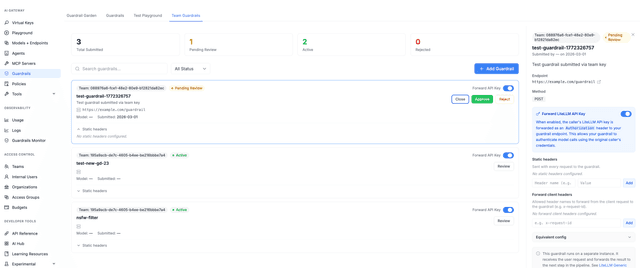
Switch to the Team Guardrails tab. This tab lists all team-submitted guardrails and their status.
3. Review submissions
The table shows:
- Name, Team, Endpoint (api_base), Status (Pending Review / Active / Rejected), Submitted date, Submitted by (user/email), and other config details.
Summary cards show counts for Total, Pending Review, Active, and Rejected.
4. Approve or reject
- Pending Review: Use Approve to activate the guardrail. The proxy sets its status to
activeand initializes it in memory so it can be used on requests. - Use Reject to decline the submission (status becomes
rejected).
Approval triggers the same initialization as adding a guardrail via config or the admin guardrail API; rejection only updates the status and does not load the guardrail.
API equivalent (admin only)
Admins can also use the REST API:
- List submissions:
GET /guardrails/submissions(optional query:status,team_id,search) - Get one:
GET /guardrails/submissions/{guardrail_id} - Approve:
POST /guardrails/submissions/{guardrail_id}/approve - Reject:
POST /guardrails/submissions/{guardrail_id}/reject
These endpoints require admin (e.g. PROXY_ADMIN) authentication.
Summary
| Role | Action |
|---|---|
| Developer | Call POST /guardrails/register with a team-scoped key and a generic_guardrail_api config. Submission enters pending_review. |
| Admin | Open Guardrails → Team Guardrails in the UI (or use the submissions API), then Approve or Reject each submission. Approved guardrails become active. |
Only guardrails with litellm_params.guardrail: "generic_guardrail_api" are accepted for registration. For the full contract and config options, see Generic Guardrail API.

