LiteLLM Content Filter (Built-in Guardrails)
Built-in guardrail for detecting and filtering sensitive information using regex patterns and keyword matching. No external dependencies required.
When to use? Good for cases which do not require an ML model to detect sensitive information.
Overview
| Property | Details |
|---|---|
| Description | On-device guardrail for detecting and filtering sensitive information using regex patterns and keyword matching. Built into LiteLLM with no external dependencies. |
| Guardrail Name | litellm_content_filter |
| Detection Methods | Prebuilt regex patterns, custom regex, keyword matching |
| Actions | BLOCK (reject request), MASK (redact content) |
| Supported Modes | pre_call, post_call, during_call (streaming), logging_only |
| Performance | Fast - runs locally, no external API calls |
Quick Start
LiteLLM UI
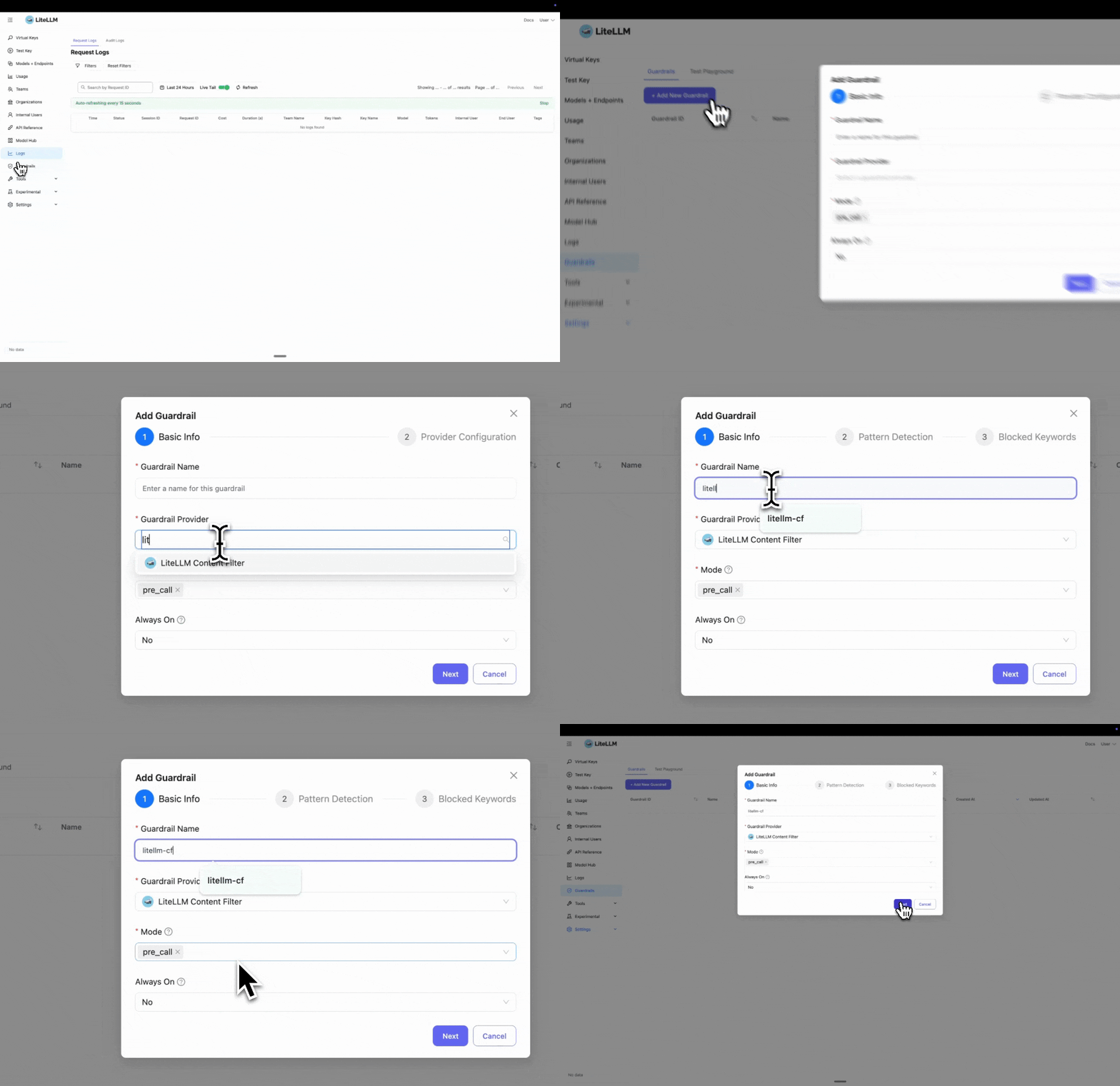
Step 1: Select LiteLLM Content Filter
Click "Add New Guardrail" and select "LiteLLM Content Filter" as your guardrail provider.
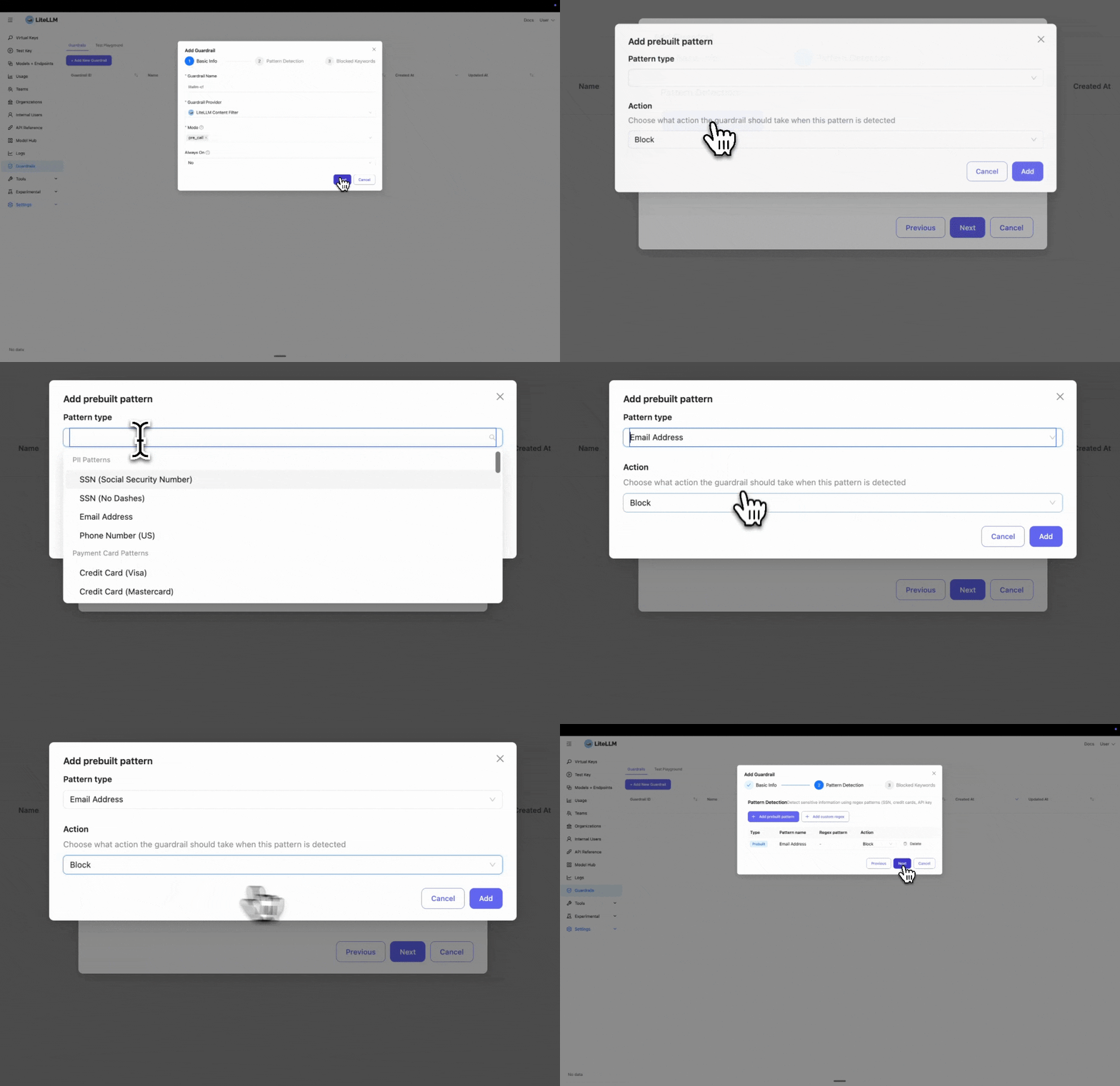
Step 2: Configure Pattern Detection
Select the prebuilt entities you want to block or mask. In this example, we select "Email" to detect and block email addresses.
If you need to block a custom entity, you can add a custom regex pattern by clicking "Add custom regex".
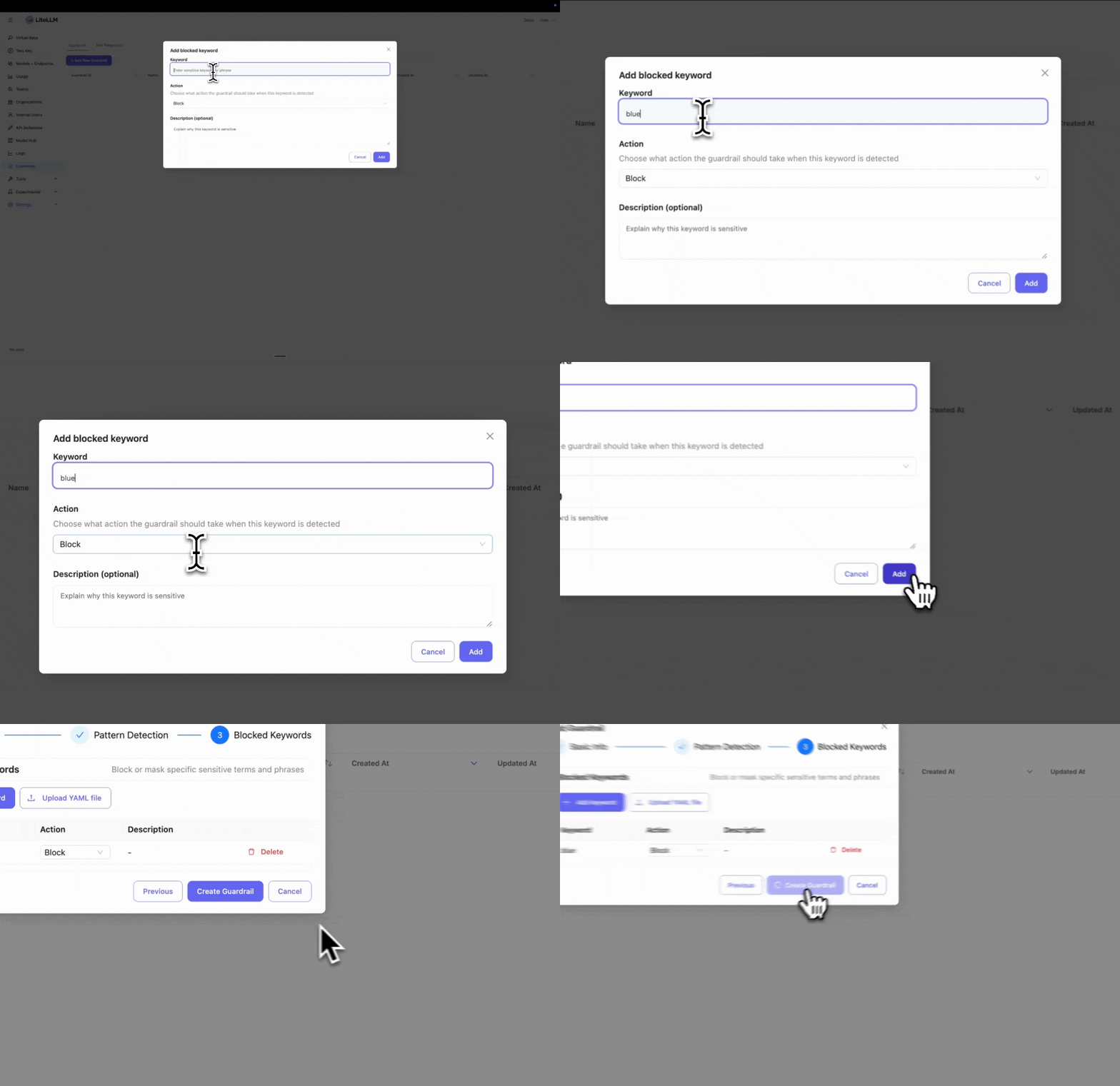
Step 3: Add Blocked Keywords
Enter specific keywords you want to block. This is useful if you have policies to block certain words or phrases.
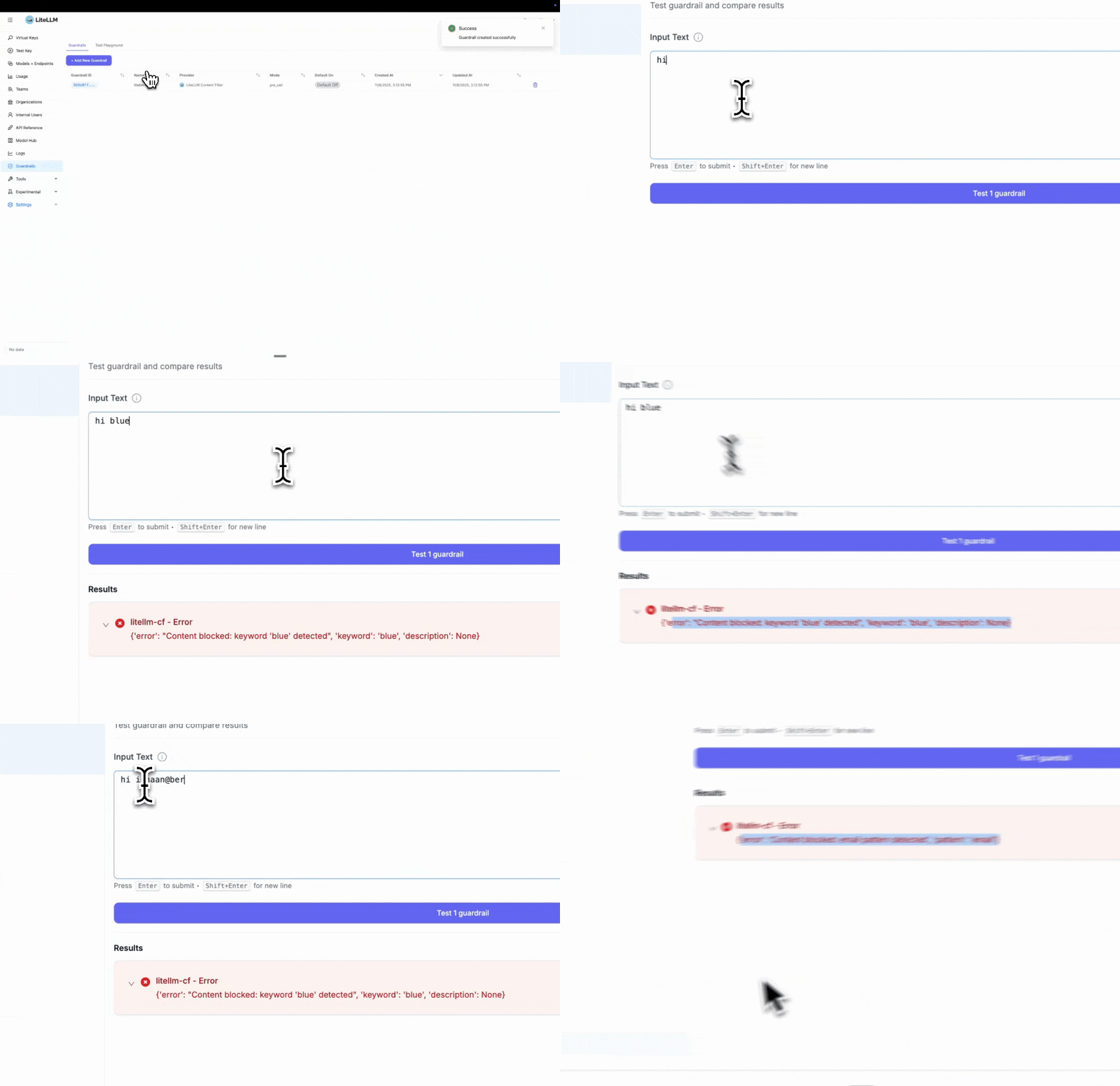
Step 4: Test Your Guardrail
After creating the guardrail, navigate to "Test Playground" to test it. Select the guardrail you just created.
Test examples:
- Blocked keyword test: Entering "hi blue" will trigger the block since we set "blue" as a blocked keyword
- Pattern detection test: Entering "Hi ishaan@berri.ai" will trigger the email pattern detector
LiteLLM Config.yaml Setup
Step 1: Define Guardrails in config.yaml
- Harmful Content Detection
- PII Protection
- Combined
model_list:
  - model_name: gpt-6-luna
    litellm_params:
      model: openai/gpt-6-luna
      api_key: os.environ/OPENAI_API_KEY

guardrails:
  - guardrail_name: "harmful-content-filter"
    litellm_params:
      guardrail: litellm_content_filter
      mode: "pre_call"

      # Enable harmful content categories
      categories:
        - category: "harmful_self_harm"
          enabled: true
          action: "BLOCK"
          severity_threshold: "medium"

        - category: "harmful_violence"
          enabled: true
          action: "BLOCK"
          severity_threshold: "medium"

        - category: "harmful_illegal_weapons"
          enabled: true
          action: "BLOCK"
          severity_threshold: "medium"
model_list:
  - model_name: gpt-6-luna
    litellm_params:
      model: openai/gpt-6-luna
      api_key: os.environ/OPENAI_API_KEY

guardrails:
  - guardrail_name: "content-filter-pre"
    litellm_params:
      guardrail: litellm_content_filter
      mode: "pre_call"

      # Prebuilt patterns for common PII
      patterns:
        - pattern_type: "prebuilt"
          pattern_name: "us_ssn"
          action: "BLOCK"

        - pattern_type: "prebuilt"
          pattern_name: "email"
          action: "MASK"

      # Custom blocked keywords
      blocked_words:
        - keyword: "confidential"
          action: "BLOCK"
          description: "Sensitive internal information"
model_list:
  - model_name: gpt-6-luna
    litellm_params:
      model: openai/gpt-6-luna
      api_key: os.environ/OPENAI_API_KEY

guardrails:
  - guardrail_name: "comprehensive-filter"
    litellm_params:
      guardrail: litellm_content_filter
      mode: "pre_call"

      # Harmful content categories
      categories:
        - category: "harmful_violence"
          enabled: true
          action: "BLOCK"
          severity_threshold: "high"

      # PII patterns
      patterns:
        - pattern_type: "prebuilt"
          pattern_name: "us_ssn"
          action: "BLOCK"
        - pattern_type: "prebuilt"
          pattern_name: "email"
          action: "MASK"

      # Custom keywords
      blocked_words:
        - keyword: "confidential"
          action: "BLOCK"
Step 2: Start LiteLLM Gateway
litellm --config config.yaml
Step 3: Test Request
- SSN Blocked
- Email Masked
curl -i http://localhost:4000/v1/chat/completions \
  -H "Content-Type: application/json" \
  -H "Authorization: Bearer $LITELLM_API_KEY" \
  -d '{
    "model": "gpt-6-luna",
    "messages": [
      {"role": "user", "content": "My SSN is 123-45-6789"}
    ],
    "guardrails": ["content-filter-pre"]
  }'
Response: HTTP 400 Error
{
  "error": {
    "message": {
      "error": "Content blocked: us_ssn pattern detected",
      "pattern": "us_ssn"
    },
    "code": "400"
  }
}
curl -i http://localhost:4000/v1/chat/completions \
  -H "Content-Type: application/json" \
  -H "Authorization: Bearer $LITELLM_API_KEY" \
  -d '{
    "model": "gpt-6-luna",
    "messages": [
      {"role": "user", "content": "Contact me at john@example.com"}
    ],
    "guardrails": ["content-filter-pre"]
  }'
The request is sent to the LLM with the email masked:
Contact me at [EMAIL_REDACTED]
Configuration
Supported Modes
pre_call- Run before LLM call, filters input messagespost_call- Run after LLM call, filters output responsesduring_call- Run during streaming, filters each chunk in real-timelogging_only- Scan the logged request and response after the call without changing what the client receives
In logging_only mode the filter only observes. Every match is recorded in the request's guardrail information on the Logs page, whatever its action. A BLOCK match is recorded with status guardrail_flagged instead of rejecting the call, and the response is still scanned after a request match. A MASK match is recorded with its masked entity counts and the logged text is left as it was. Anything an enforcing mode would reject, such as a MASK match on a tool argument name that cannot be rewritten, is also recorded as guardrail_flagged.
guardrails:
  - guardrail_name: "secrets-audit"
    litellm_params:
      guardrail: litellm_content_filter
      mode: logging_only
      default_on: true
      patterns:
        - pattern_type: regex
          pattern: "AKIA[0-9A-Z]{16}"
          name: aws_access_key
          action: BLOCK
        - pattern_type: regex
          pattern: "ghp_[A-Za-z0-9]{36}"
          name: github_pat
          action: BLOCK
In the Admin UI, pick Logging Only as the mode when you add the guardrail.
Actions
BLOCK- Reject the request with HTTP 400 errorMASK- Replace sensitive content with redaction tags (e.g.,[EMAIL_REDACTED])
Prebuilt Patterns
Available Patterns
| Pattern Name | Description | Example |
|---|---|---|
us_ssn | US Social Security Numbers | 123-45-6789 |
email | Email addresses | user@example.com |
us_phone | US phone numbers | +1-555-123-4567 |
visa | Visa credit cards | 4532-1234-5678-9010 |
mastercard | Mastercard credit cards | 5425-2334-3010-9903 |
amex | American Express cards | 3782-822463-10005 |
aws_access_key | AWS access keys | AKIAIOSFODNN7EXAMPLE |
aws_secret_key | AWS secret keys | wJalrXUtnFEMI/K7MDENG/bPxRfi... |
github_token | GitHub tokens | example-github-token-123 |
Using Prebuilt Patterns
guardrails:
  - guardrail_name: "pii-filter"
    litellm_params:
      guardrail: litellm_content_filter
      mode: "pre_call"
      patterns:
        - pattern_type: "prebuilt"
          pattern_name: "us_ssn"
          action: "BLOCK"

        - pattern_type: "prebuilt"
          pattern_name: "email"
          action: "MASK"

        - pattern_type: "prebuilt"
          pattern_name: "aws_access_key"
          action: "BLOCK"
Custom Regex Patterns
Define your own regex patterns for domain-specific sensitive data:
guardrails:
  - guardrail_name: "custom-patterns"
    litellm_params:
      guardrail: litellm_content_filter
      mode: "pre_call"
      patterns:
        # Custom employee ID format
        - pattern_type: "regex"
          pattern: '\b[A-Z]{3}-\d{4}\b'
          name: "employee_id"
          action: "MASK"

        # Custom project code format
        - pattern_type: "regex"
          pattern: 'PROJECT-\d{6}'
          name: "project_code"
          action: "BLOCK"
Keyword Filtering
Block or mask specific keywords:
guardrails:
  - guardrail_name: "keyword-filter"
    litellm_params:
      guardrail: litellm_content_filter
      mode: "pre_call"
      blocked_words:
        - keyword: "confidential"
          action: "BLOCK"
          description: "Internal confidential information"

        - keyword: "proprietary"
          action: "MASK"
          description: "Proprietary company data"

        - keyword: "secret_project"
          action: "BLOCK"
Loading Keywords from File
For large keyword lists, use a YAML file:
guardrails:
  - guardrail_name: "keyword-file-filter"
    litellm_params:
      guardrail: litellm_content_filter
      mode: "pre_call"
      blocked_words_file: "/path/to/sensitive_keywords.yaml"
blocked_words:
  - keyword: "project_apollo"
    action: "BLOCK"
    description: "Confidential project codename"

  - keyword: "internal_api"
    action: "MASK"
    description: "Internal API references"

  - keyword: "customer_database"
    action: "BLOCK"
    description: "Protected database name"
Streaming Support
Content filter works with streaming responses by checking each chunk:
guardrails:
  - guardrail_name: "streaming-filter"
    litellm_params:
      guardrail: litellm_content_filter
      mode: "during_call"  # Check each streaming chunk
      patterns:
        - pattern_type: "prebuilt"
          pattern_name: "email"
          action: "MASK"
import openai

client = openai.OpenAI(
    api_key="sk-<your-litellm-api-key>",
    base_url="http://localhost:4000"
)

response = client.chat.completions.create(
    model="gpt-6-luna",
    messages=[{"role": "user", "content": "Tell me about yourself"}],
    stream=True,
    extra_body={"guardrails": ["streaming-filter"]}
)

for chunk in response:
    print(chunk.choices[0].delta.content)
    # Emails automatically masked in real-time
Image Content Filtering
Content filter can analyze images by generating descriptions and applying filters to the text descriptions.
This can introduce significant latency to the request - depending on the speed of the vision-capable model.
This is because, each request containing images will be sent to the vision-capable model to generate a description.
Configuration
model_list:
  - model_name: gpt-4-vision
    litellm_params:
      model: openai/gpt-6.1-sol
      api_key: os.environ/OPENAI_API_KEY

guardrails:
  - guardrail_name: "image-filter"
    litellm_params:
      guardrail: litellm_content_filter
      mode: "pre_call"
      image_model: "gpt-4-vision"  # value is `model_name` of the vision-capable model

      # Apply same filters to image descriptions
      categories:
        - category: "harmful_violence"
          enabled: true
          action: "BLOCK"
          severity_threshold: "medium"

      patterns:
        - pattern_type: "prebuilt"
          pattern_name: "email"
          action: "MASK"
How It Works
- Image is sent to the vision model to generate a text description
- Content filters are applied to the description
- If harmful content is detected, request is blocked with context about the image
Example:
import openai

client = openai.OpenAI(
    api_key="sk-<your-litellm-api-key>",
    base_url="http://localhost:4000"
)

response = client.chat.completions.create(
    model="gpt-4-vision",
    messages=[{
        "role": "user",
        "content": [
            {"type": "text", "text": "What's in this image?"},
            {"type": "image_url", "image_url": {"url": "https://example.com/image.jpg"}}
        ]
    }],
    extra_body={"guardrails": ["image-filter"]}
)
If the image description contains filtered content, you'll get:
{
  "error": "Content blocked: harmful_violence category keyword 'weapon' detected (severity: high) (Image description): The image shows..."
}
Customizing Redaction Tags
When using the MASK action, sensitive content is replaced with redaction tags. You can customize how these tags appear.
Default Behavior
Patterns: Each pattern type gets its own tag based on the pattern name
Input:  "My email is john@example.com and SSN is 123-45-6789"
Output: "My email is [EMAIL_REDACTED] and SSN is [US_SSN_REDACTED]"
Keywords: All keywords use the same generic tag
Input:  "This is confidential and proprietary information"
Output: "This is [KEYWORD_REDACTED] and [KEYWORD_REDACTED] information"
Customizing Tags
Use pattern_redaction_format and keyword_redaction_tag to change the redaction format:
guardrails:
  - guardrail_name: "custom-redaction"
    litellm_params:
      guardrail: litellm_content_filter
      mode: "pre_call"
      pattern_redaction_format: "***{pattern_name}***"  # Use {pattern_name} placeholder
      keyword_redaction_tag: "***REDACTED***"
      patterns:
        - pattern_type: "prebuilt"
          pattern_name: "email"
          action: "MASK"
        - pattern_type: "prebuilt"
          pattern_name: "us_ssn"
          action: "MASK"
      blocked_words:
        - keyword: "confidential"
          action: "MASK"
Output:
Input:  "Email john@example.com, SSN 123-45-6789, confidential data"
Output: "Email ***EMAIL***, SSN ***US_SSN***, ***REDACTED*** data"
Key Points:
pattern_redaction_formatmust include{pattern_name}placeholder- Pattern names are automatically uppercased (e.g.,
email→EMAIL) keyword_redaction_tagis a fixed string (no placeholders)
Content Categories
Prebuilt categories use keyword matching to detect harmful content, bias, and inappropriate advice. Keywords are matched with word boundaries (single words) or as substrings (multi-word phrases), case-insensitive.
Available Categories
Reference any category below by name; no category_file: is required
| Category | Description |
|---|---|
| Harmful Content | |
harmful_self_harm | Self-harm, suicide, eating disorders |
harmful_violence | Violence, criminal planning, attacks |
harmful_illegal_weapons | Illegal weapons, explosives, dangerous materials |
harmful_child_safety | Inappropriate content involving minors |
| Bias / Employment Discrimination | |
bias_gender | Gender-based discrimination, stereotypes |
bias_sexual_orientation | LGBTQ+ discrimination, homophobia, transphobia |
bias_racial | Racial/ethnic discrimination, hate speech |
bias_religious | Religious discrimination, stereotypes |
age_discrimination | Age-based employment discrimination |
disability | Employment discrimination against people with disabilities |
gender_sexual_orientation | Employment discrimination on gender, sex, or sexual orientation |
military_status | Employment discrimination against veterans / military personnel |
religion | Employment discrimination based on religion or religious beliefs |
| Denied Advice | |
denied_financial_advice | Personalized financial advice, investment recommendations |
denied_medical_advice | Medical advice, diagnosis, treatment recommendations |
denied_legal_advice | Legal advice, representation, legal strategy |
denied_insults | Insults, name-calling, personal attacks |
| Prompt Injection | |
prompt_injection_jailbreak | Jailbreak attempts (DAN, roleplay attacks, safety bypass) |
prompt_injection_system_prompt | Attempts to extract, reveal, or override system prompts |
prompt_injection_sql | SQL injection embedded in prompts |
prompt_injection_malicious_code | Malicious code injection via prompts |
prompt_injection_data_exfiltration | Attempts to extract training data or internal information |
| Claims Abuse | |
claims_fraud_coaching | Coaching on fraudulent insurance claims |
claims_medical_advice | Medical advice in claims context |
claims_phi_disclosure | Unauthorized PHI disclosure / HIPAA violations |
claims_prior_auth_gaming | Prior authorization gaming attempts |
claims_system_override | Claims system override / role impersonation attempts |
Bias detection is complex and context-dependent. Rule-based systems catch explicit discriminatory language but may generate false positives on legitimate discussions. Start with high severity thresholds and test thoroughly. For mission-critical bias detection, consider combining with AI-based guardrails (e.g., HiddenLayer, Lakera).
Configuration
guardrails:
  - guardrail_name: "content-filter"
    litellm_params:
      guardrail: litellm_content_filter
      mode: "pre_call"

      categories:
        - category: "harmful_self_harm"
          enabled: true
          action: "BLOCK"
          severity_threshold: "medium"  # Blocks medium+ severity

        - category: "bias_gender"
          enabled: true
          action: "BLOCK"
          severity_threshold: "high"  # Only explicit discrimination

        - category: "denied_financial_advice"
          enabled: true
          action: "BLOCK"
          severity_threshold: "medium"
Severity Thresholds:
"high"- Only blocks high severity items"medium"- Blocks medium and high severity (default)"low"- Blocks all severity levels
Custom Category Files
Override a built-in category, or add a brand-new category, with your own keyword list
categories:
  - category: "<your-category-name>"
    enabled: true
    action: "BLOCK"
    severity_threshold: "medium"
    category_file: "<your-category-name>.yaml"
category_name: "<your-category-name>"
description: "Short description of what this category detects"
default_action: "BLOCK"

keywords:
  - keyword: "example keyword"
    severity: "high"

exceptions:
  - "example exception phrase"
Where to put the file
Put your YAML in one of these two locations:
Option A: inside the built-in categories/ directory (recommended)
Mount the file at <site-packages>/litellm/proxy/guardrails/guardrail_hooks/litellm_content_filter/categories/<your-category-name>.yaml and drop the category_file: field. The loader picks it up by category name
extraVolumeMounts:
  - name: content-filter-categories
    mountPath: /usr/local/lib/python3.13/site-packages/litellm/proxy/guardrails/guardrail_hooks/litellm_content_filter/categories/<your-category-name>.yaml
    subPath: <your-category-name>.yaml
    readOnly: true

extraVolumes:
  - name: content-filter-categories
    configMap:
      name: <your-configmap-name>
guardrails:
  - guardrail_name: "<your-guardrail-name>"
    litellm_params:
      guardrail: litellm_content_filter
      mode: pre_call
      default_on: true
      categories:
        - category: "<your-category-name>"
          enabled: true
          action: "BLOCK"
          severity_threshold: "high"
Update mountPath if you upgrade to a litellm image built on a different Python minor version
Option B: any other path, with the env var opt-in
Set
LITELLM_CONTENT_FILTER_ALLOW_EXTERNAL_PATHS=true
on the proxy pod, then reference the file by absolute path
categories:
  - category: "<your-category-name>"
    enabled: true
    action: "BLOCK"
    severity_threshold: "high"
    category_file: "/absolute/path/to/<your-category-name>.yaml"
Only use this when everyone who can write category_file (proxy config, DB, Admin UI, team-scoped configs) is trusted; with the flag on, category_file can point at any YAML-parseable file on the pod
Verifying it loaded
Check the proxy startup log for either
content_filter.py: Loaded category <name>: N keywords, M always-block keywords ...
or
content_filter.py: Category <name>: invalid category_file path, skipping. ...
The second line means the file was rejected and the category is running with zero rules; use one of the two options above to fix it
Use Cases
1. Harmful Content Detection
Block or detect requests containing harmful, illegal, or dangerous content:
categories:
  - category: "harmful_self_harm"
    enabled: true
    action: "BLOCK"
    severity_threshold: "medium"
  - category: "harmful_violence"
    enabled: true
    action: "BLOCK"
    severity_threshold: "high"
  - category: "harmful_illegal_weapons"
    enabled: true
    action: "BLOCK"
    severity_threshold: "medium"
2. Bias and Discrimination Detection
Detect and block biased, discriminatory, or hateful content across multiple dimensions:
categories:
  # Gender-based discrimination
  - category: "bias_gender"
    enabled: true
    action: "BLOCK"
    severity_threshold: "medium"

  # LGBTQ+ discrimination
  - category: "bias_sexual_orientation"
    enabled: true
    action: "BLOCK"
    severity_threshold: "medium"

  # Racial/ethnic discrimination
  - category: "bias_racial"
    enabled: true
    action: "BLOCK"
    severity_threshold: "high"  # Only explicit to reduce false positives

  # Religious discrimination
  - category: "bias_religious"
    enabled: true
    action: "BLOCK"
    severity_threshold: "medium"
Sensitivity Tuning:
For bias detection, severity thresholds are critical to balance safety and legitimate discourse:
# Conservative (low false positives, may miss subtle bias)
categories:
  - category: "bias_racial"
    severity_threshold: "high"  # Only blocks explicit discriminatory language

# Balanced (recommended)
categories:
  - category: "bias_gender"
    severity_threshold: "medium"  # Blocks stereotypes and explicit discrimination

# Strict (high safety, may have more false positives)
categories:
  - category: "bias_sexual_orientation"
    severity_threshold: "low"  # Blocks all potentially problematic content
3. PII Protection
Block or mask personally identifiable information before sending to LLMs:
patterns:
  - pattern_type: "prebuilt"
    pattern_name: "us_ssn"
    action: "BLOCK"
  - pattern_type: "prebuilt"
    pattern_name: "email"
    action: "MASK"
2. Credential Detection
Prevent API keys and secrets from being exposed:
patterns:
  - pattern_type: "prebuilt"
    pattern_name: "aws_access_key"
    action: "BLOCK"
  - pattern_type: "prebuilt"
    pattern_name: "github_token"
    action: "BLOCK"
3. Sensitive Internal Data Protection
Block or mask references to confidential internal projects, codenames, or proprietary information:
blocked_words:
  - keyword: "project_titan"
    action: "BLOCK"
    description: "Confidential project codename"
  - keyword: "internal_api"
    action: "MASK"
    description: "Internal system references"
For large lists of sensitive terms, use a file:
blocked_words_file: "/path/to/sensitive_terms.yaml"
4. Safe AI for Consumer Applications
Combining harmful content and bias detection for consumer-facing AI:
guardrails:
  - guardrail_name: "safe-consumer-ai"
    litellm_params:
      guardrail: litellm_content_filter
      mode: "pre_call"

      categories:
        # Harmful content - strict
        - category: "harmful_self_harm"
          enabled: true
          action: "BLOCK"
          severity_threshold: "medium"

        - category: "harmful_violence"
          enabled: true
          action: "BLOCK"
          severity_threshold: "medium"

        # Bias detection - balanced
        - category: "bias_gender"
          enabled: true
          action: "BLOCK"
          severity_threshold: "high"  # Avoid blocking legitimate gender discussions

        - category: "bias_sexual_orientation"
          enabled: true
          action: "BLOCK"
          severity_threshold: "medium"

        - category: "bias_racial"
          enabled: true
          action: "BLOCK"
          severity_threshold: "high"  # Education and news may discuss race
Perfect for:
- Chatbots and virtual assistants
- Educational AI tools
- Customer service AI
- Content generation platforms
- Public-facing AI applications
5. Compliance
Ensure regulatory compliance by filtering sensitive data types:
# Categories checked first (high priority)
# Category keywords are matched first
categories:
  - category: "harmful_self_harm"
    severity_threshold: "high"

# Then regex patterns
patterns:
  - pattern_type: "prebuilt"
    pattern_name: "visa"
    action: "BLOCK"
  - pattern_type: "prebuilt"
    pattern_name: "us_ssn"
    action: "BLOCK"

