Admin Setup
Create an Auto Router for your team using one of the methods below. To connect your coding agent to an existing router, follow User Setup.
After setup, Customize your classifier explains every classification setting, with dashboard screenshots and matching YAML for heuristic/LLM chains, prompts, context, and self-hosted classifiers.
Five ways in. All of them create the same auto_router/complexity_router deployment.
Add an Auto Router (Models + Endpoints → Auto Router)
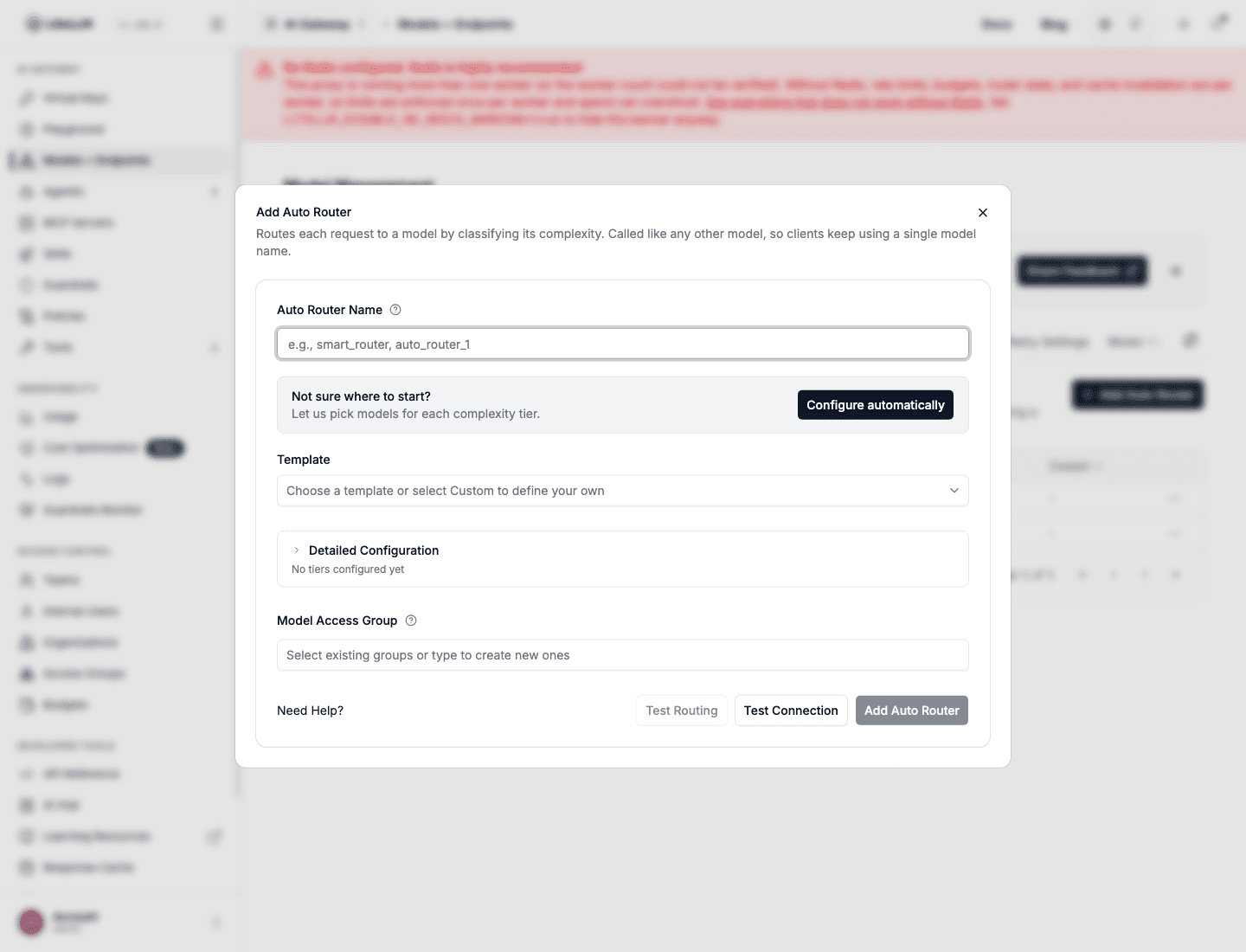
- In the LiteLLM Dashboard, go to Models + Endpoints and open the Auto Router tab. Add a new Auto Router model, or enable and configure an existing one.
- Enter an Auto Router name, then select Configure automatically or choose a template. Review the generated tiers, test routing, and save.
- Configure automatically checks the models your proxy already serves, selects the best available models for all four complexity tiers, and fills in the form for you.
- Templates: 1M Context, Anthropic Family, OpenAI Family, Gemini Family, Lite. Each fills all four tiers from models your proxy already serves.
- A template whose models are not deployed is greyed out with the missing names listed.
- Test Routing sends one prompt through the classifier and shows the model it would pick. Nothing is created and the picked model is not called.
- Test Connection runs a minimal request per tier model group. Green means reachable with your credentials.
- Detailed Configuration holds the rest: keyword rules, LLM classifier and prompt, escalation keywords, adaptive pools.
The templates as config.yaml: Recommended Configurations. Release post: AutoRouter: 1 Click Deploy.
Agent skill
run curl -fsSL https://docs.litellm.ai/skills/auto-router and follow the instructions
- Reads the models your proxy already serves.
- Asks for the router name and a model per tier.
- States the defaults it is assuming before it writes anything.
config.yaml
model_list:
  - model_name: gpt-6-luna
    litellm_params: {model: openai/gpt-6-luna, api_key: os.environ/OPENAI_API_KEY}
  - model_name: gpt-6.1-sol
    litellm_params: {model: openai/gpt-6.1-sol, api_key: os.environ/OPENAI_API_KEY}
  - model_name: claude-sonnet-5
    litellm_params: {model: anthropic/claude-sonnet-5, api_key: os.environ/ANTHROPIC_API_KEY}
  - model_name: claude-opus-5
    litellm_params: {model: anthropic/claude-opus-5, api_key: os.environ/ANTHROPIC_API_KEY}

  - model_name: smart-router
    litellm_params:
      model: auto_router/complexity_router
      complexity_router_config:
        tiers:
          SIMPLE:    gpt-6-luna
          MEDIUM:    gpt-6.1-sol
          COMPLEX:   claude-sonnet-5
          REASONING: claude-opus-5
      complexity_router_default_model: gpt-6.1-sol
- Tiers name other
model_nameentries in the same file, so every tier is a deployment the proxy already knows. complexity_router_default_modelserves whenever the router cannot decide.- No
classifier_typemeans the heuristic scorer: free, no added latency. classifier_type: llmwith a small model raises accuracy on agent traffic for a fraction of a cent per request. See benchmarks.- Everything else (keyword rules, tier pools, session affinity, scorer tuning): configuration reference.
JEV classifier (TypeSafe AI)
This section uses the Jev configuration and dashboard labels supported by released builds. The new OSS Classifier configuration requires backend #43626, and its dashboard requires UI #43768. See OSS classifiers for hosted Jev, self-hosted Nimble and Laya, the Databricks ai_decide AI Function, and the migration from the existing names. The new backend continues to accept the configuration below.
classifier_type: jev uses TypeSafe System One Choice evaluation to select a tier inside the existing Auto Router. LiteLLM sends the classifier input to POST /v1/systemone as state, with one questions.tier question whose criteria describe the configured tiers. The chosen tier's model serves the completion
Set the server key
Provision TYPESAFE_API_KEY in the proxy process through your deployment's secret manager. The dashboard does not need the provider key. Clients keep using a LiteLLM virtual key
export TYPESAFE_API_BASE="https://api.typesafe.ai"
litellm --config config.yaml
TYPESAFE_API_BASE is optional and defaults to https://api.typesafe.ai. Omitting jev_classifier_config.api_key and api_base uses these server settings. A missing TypeSafe key prevents JEV initialization. An explicit api_base requires an explicit api_key, so a configuration override cannot redirect the server's environment key to a different host. Team members using the management API cannot set either field
Create or edit in the dashboard
In Models + Endpoints, open Auto Router and add a router, or edit an existing router. Configure its tier models, then choose JEV Classifier under Classification Method in Detailed Configuration
Set JEV Model (jev-latest by default) and JEV Timeout (ms) (3000 by default). Review the circuit breaker, classifier fallback, Context Window Size, Context Character Budget, and assistant-turn setting. Enterprise users can replace the built-in rubric with JEV Instructions, or restore the built-in instructions
JEV uses the same history defaults as the LLM classifier: up to three prior user turns within an 8,000-character prior-turn budget, with assistant turns excluded. This history is sent to the configured TypeSafe endpoint, which can differ from your completion provider. Set Context Window Size to 0 to omit history; the current ask and selected system text are still sent
When upgrading an existing JEV router to the dashboard and context integration, omitting these settings enables those defaults. Set classifier_context_window_size: 0 before upgrading if the router should continue sending no prior conversation
Test Routing classifies your input without creating a router or calling the selected completion model. It can make a paid JEV request, and semantic keyword matching can also make a paid embedding request. Test Connection checks the configured model dependencies and makes a separate JEV classification probe. Its JEV result reports an error when routing used a fallback, even if the selected completion model is reachable. These probes can incur provider charges
Save the router and call its model name through the normal completion API. Reopen the edit form to change the classifier settings. To investigate a decision, inspect its cause and classifier metadata in the routing-decision card rather than assuming that a successful completion proves JEV answered
Configure in YAML
Add this router entry alongside the tier deployments in your model_list. The tier values and default model must name deployments already configured on the proxy
- model_name: jev-router
  litellm_params:
    model: auto_router/complexity_router
    complexity_router_default_model: gpt-6.1-sol
    complexity_router_config:
      tiers:
        SIMPLE: gpt-6-luna
        MEDIUM: gpt-6.1-sol
        COMPLEX: claude-sonnet-5
        REASONING: claude-opus-5
      classifier_type: jev
      jev_classifier_config:
        model: jev-latest
        timeout_ms: 3000
        circuit_breaker_enabled: true
        circuit_breaker_cooldown_seconds: 30
      classifier_fallback: default_model
      classifier_context_window_size: 3
      classifier_context_budget_chars: 8000
      classifier_context_include_assistant_turns: false
This example explicitly chooses default_model fallback. The shipped classifier_fallback default is heuristic. The prior-turn character budget does not bound the current ask or system text, so review classifier input separately from the completion model's context window
Built-in JEV classification uses the same licensing policy as the built-in LLM classifier. Custom instructions and tier_definitions use the existing Enterprise custom-classifier capability. JEV also supports enable_non_reasoning_tier
See the JEV reference for defaults, context, recovery, authorization and accounting, the measured comparison for quality and cost scope, and TypeSafe pass-through for calling System One directly
Model-management API
For CI/CD or scripts, create the same deployment with POST /model/new. Enable store_model_in_db first; Auto Routers are model deployments, so there is no separate /auto_router/new endpoint. This example uses the Anthropic Family preset; create the referenced model deployments first.
curl -X POST "http://localhost:4000/model/new" \
  -H "Authorization: Bearer $LITELLM_MASTER_KEY" \
  -H "Content-Type: application/json" \
  -d '{
    "model_name": "claude-auto",
    "litellm_params": {
      "model": "auto_router/complexity_router",
      "complexity_router_config": {
        "tiers": {
          "SIMPLE": "claude-haiku-4-5",
          "MEDIUM": "claude-sonnet-5",
          "COMPLEX": "claude-opus-5",
          "REASONING": "claude-opus-5-high"
        },
        "classifier_type": "heuristic",
        "escalation_keywords": ["LITELLM ESCALATE"],
        "session_affinity": false
      },
      "complexity_router_default_model": "claude-sonnet-5"
    }
  }'
The response includes model_id. Use it with PATCH /model/{model_id}/update for partial changes, and call the router by its model_name. Validate a complexity configuration before saving with POST /auto_router/validate_complexity_router_config. See Model Management for deployment CRUD and Configuration Reference for the full router payload.
lite autoroute
- Stands up a throwaway local proxy that forwards every request to your real proxy.
- Routes Claude Code traffic through it for the session. Nothing bypasses the real proxy and its config is untouched.
- Guide: lite autoroute.
Claude Code and Claude Desktop
- Claude Code populates its model picker from
/v1/modelsand keeps only names containingclaudeoranthropic. Name the router accordingly, or setANTHROPIC_MODELdirectly. - On Claude for Teams or Enterprise, the exact router name must be on the organization allowlist. The check runs client-side, so a rejected router leaves nothing in gateway logs.
- A router advertises no context window until you declare one in
model_info, and Claude Code applies its own default regardless. Both sides: context window. - Tutorial: Auto Router with Claude Code and Claude Desktop.

