TypeSafe AI (Jev)
Pass-through endpoint for the TypeSafe AI System One API. Jev returns typed decisions (a choice, a score, or a yes/no probability) instead of text, so it is called through its own evaluate endpoint rather than /chat/completions.
| Feature | Supported | Notes |
|---|---|---|
| Cost Tracking | ✅ | Priced from the response usage and the model registry |
| Logging | ✅ | works across all integrations |
| End-user Tracking | ❌ | Tell us if you need this |
| Streaming | ❌ | Not offered by the TypeSafe API |
Just replace https://api.typesafe.ai with LITELLM_PROXY_BASE_URL/typesafe
LiteLLM adds the TypeSafe API key from the proxy environment, so clients only need a LiteLLM virtual key.
Client headers that start with TypeSafe-Danger-Zone-, such as TypeSafe-Danger-Zone-Images: true for images and box questions on Jev 1.14, are forwarded to TypeSafe. Other client headers are not.
To call Jev through your model_list with load balancing, fallbacks and per-deployment keys, or to send the same request to OpenAI, Perplexity, Cloudflare or Strands Decider, use the unified /v1/systemone endpoint instead. It takes the same System One body, and /v1/decisions takes the OpenAI Decisions format
To let JEV pick the model for a completion, configure the JEV Auto Router with classifier_type: jev and jev_classifier_config. It uses one System One Choice question for the configured tiers, then dispatches to the selected completion model. See routing context, fallback and accounting and the measured classifier comparison
The OSS classifier guide documents the canonical classifier_type: oss_classifier and opensource_classifier_config.provider: jev names, which require a gateway build containing backend #43626. Both configurations use the TypeSafe transport; the new backend continues to accept the existing Jev names.
Quick Start
- Set the TypeSafe API key in the proxy environment
export TYPESAFE_API_KEY=""
# optional, defaults to https://api.typesafe.ai
export TYPESAFE_API_BASE="https://api.typesafe.ai"
- Start the proxy
litellm

# RUNNING on http://0.0.0.0:4000
- Ask Jev a question through the proxy
curl -X POST 'http://0.0.0.0:4000/typesafe/v1/systemone' \
-H "Authorization: Bearer $LITELLM_API_KEY" \
-H 'Content-Type: application/json' \
-d '{
  "state": "Help! My payouts have been failing for 3 days.",
  "model": "jev-latest",
  "questions": {
    "department": {
      "type": "choice",
      "instructions": "Which team should handle this?",
      "criteria": {
        "billing": "Payments, invoicing, refunds",
        "technical": "Bugs, outages, integrations",
        "sales": "Pricing, upgrades, new accounts"
      }
    }
  }
}'
The response is TypeSafe's own, unchanged:
{
  "model": "jev-1.13.0",
  "answers": {
    "department": {
      "type": "choice",
      "choice": "technical",
      "probabilities": {"billing": 0.08, "technical": 0.85, "sales": 0.07},
      "confidence": 0.82
    }
  },
  "usage": {"input_tokens": 312, "output_tokens": 48}
}
Any path under /typesafe/ is forwarded, so GET /typesafe/v1/models lists the available models. See the TypeSafe API reference
Try it in the Admin UI
The Playground Decisions tab (Beta) sends Jev requests without curl. It calls the proxy's /v1/systemone route rather than this pass-through, so add a typesafe/ model to your model_list first, for example jev from the proxy setup on the Decisions page, and set TYPESAFE_API_KEY. Open LITELLM_PROXY_BASE_URL/ui/?page=llm-playground&tab=system-one, or go to Playground and pick Decisions.
Pick /v1/systemone under Endpoint and your Jev model under Model. Load example fills in a request, such as Triage a bug report, which asks one question of each type: area (choice), has_repro_steps (yes / no) and severity (score). The eraser button clears the form.
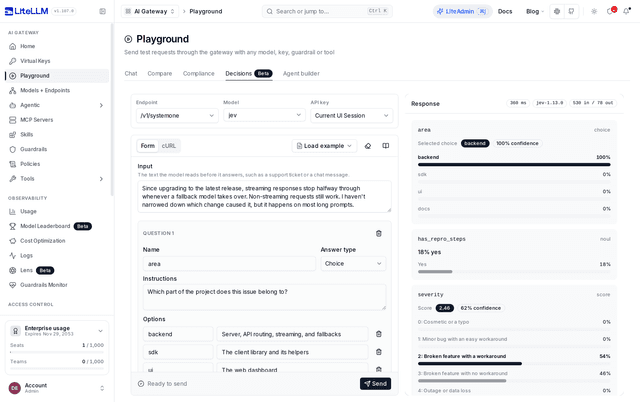
The editor opens on the Form tab, so you can build a request without writing JSON. Type the text the model should read into Input, then fill in each question card: its Name, its Answer type (Choice, Yes / no or Score), its Instructions and its criteria. A choice takes Options with descriptions, a yes / no question takes Yes means and No means, and a score takes Levels, lowest first, numbered from 0. Add question, Add option and Add level add rows, and the trash buttons remove them.
The cURL tab shows the request as a read-only curl command for the proxy's /v1/systemone, and it follows your edits. Once the form has no issues, Copy cURL copies it, and you replace $LITELLM_API_KEY with a virtual key. To tag the call in LiteLLM's spend logs, which the form has no input for, copy the curl and add "metadata": {"tags": ["triage"]} to its -d body.
The form checks the request as you type. Problems are listed above Send, such as Add the text the model should decide about. for an empty Input and Give every question a name. for an unnamed question, and Send stays disabled until they are fixed. TypeSafe checks the rest when you send, so a yes / no question with no instructions and no Yes means or No means comes back as a 400.
API key picks the key. Current UI Session uses your dashboard login, and Virtual Key lets you paste one so the call is attributed and budgeted against that key. Send posts to /v1/systemone through your model_list, so spend and logs land under the proxy model name like any other request. The /typesafe/v1/systemone pass-through from the curl above is not selectable in the Playground.
Once the call returns, the Response card shows one card per question: the picked choice with its confidence and a bar per option, the yes / no probability, and the score with its confidence and a bar per level. Its header shows the latency, the model name from the response and the input and output tokens, and Raw response opens the JSON body. Auth and upstream errors, such as a 401 for an unknown key, replace the answers with Decisions request failed and the error.
Cost Tracking
Spend uses usage.input_tokens and usage.output_tokens from the response and the typesafe/<model> entry in LiteLLM's model registry (jev-1.13.0, jev-1.14.0, jev-latest, jev-preview). The request is logged under the versioned model TypeSafe reports, for example typesafe/jev-1.13.0, even when the request used an alias.

