Customize your classifier
An Auto Router's classifier decides which tier should handle a request.
Choose a classifier
Heuristic v2, custom scoring, custom tiers/instructions, and forecast modes follow the gateway's displayed allowances. Check View limits rather than assuming a disabled option is a missing feature. Built-in v1 and built-in OSS classification do not require a license. A v2 chain consumes the same v2 allowance as a standalone v2 router.
Find the controls
Start with the classifier that fits your traffic, measure its decisions, then tune its thresholds, context, or instructions. The model assigned to the selected tier generates the answer; the judge model only makes the routing decision.
This guide pairs the dashboard controls with their config.yaml equivalents. It covers classification first, then the routing rules that can override or reuse a decision. For initial deployment, see Admin Setup; for measuring quality and savings, see Evaluate.
The screenshots show the updated editor in LiteLLM #44928, using a local demonstration router. The separate tuning sections and selectable v1/v2 local heuristic require a gateway and dashboard build containing that change. Do not assume an older release exposes these controls or accepts local_heuristic.
The examples describe that implementation. Defaults can change between releases; leaving an optional setting unset follows the defaults in your installed build. Screenshot model names are demonstration deployment aliases, not provider model IDs.
Open Models + Endpoints > Auto-Routers > Add Auto Router. For a saved router, open its row and select Edit Auto Router. Choose What classifies your requests?, assign the tier models, then expand Advanced settings.
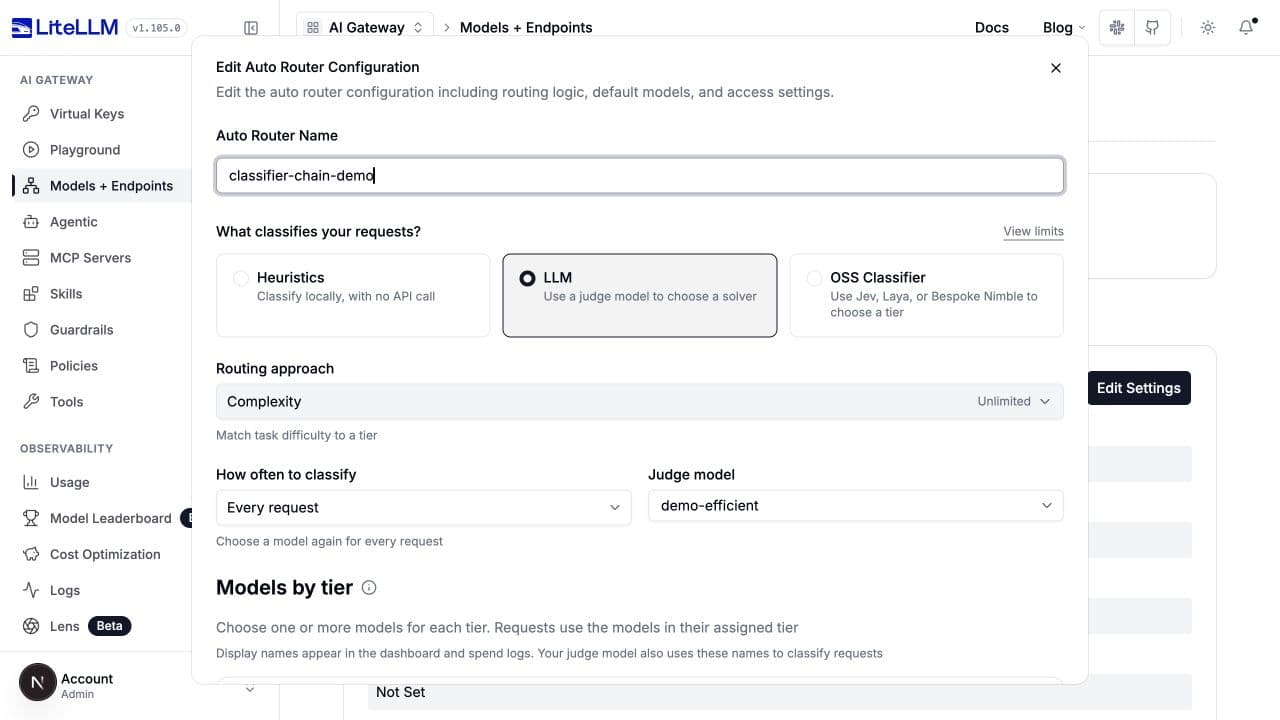
For an LLM complexity router, Local checks before the judge selects the chain. Heuristic tuning contains the selected local scorer's settings, and LLM tuning contains the judge settings. Always use the judge hides heuristic tuning. OSS providers use a separate Classifier tuning section.
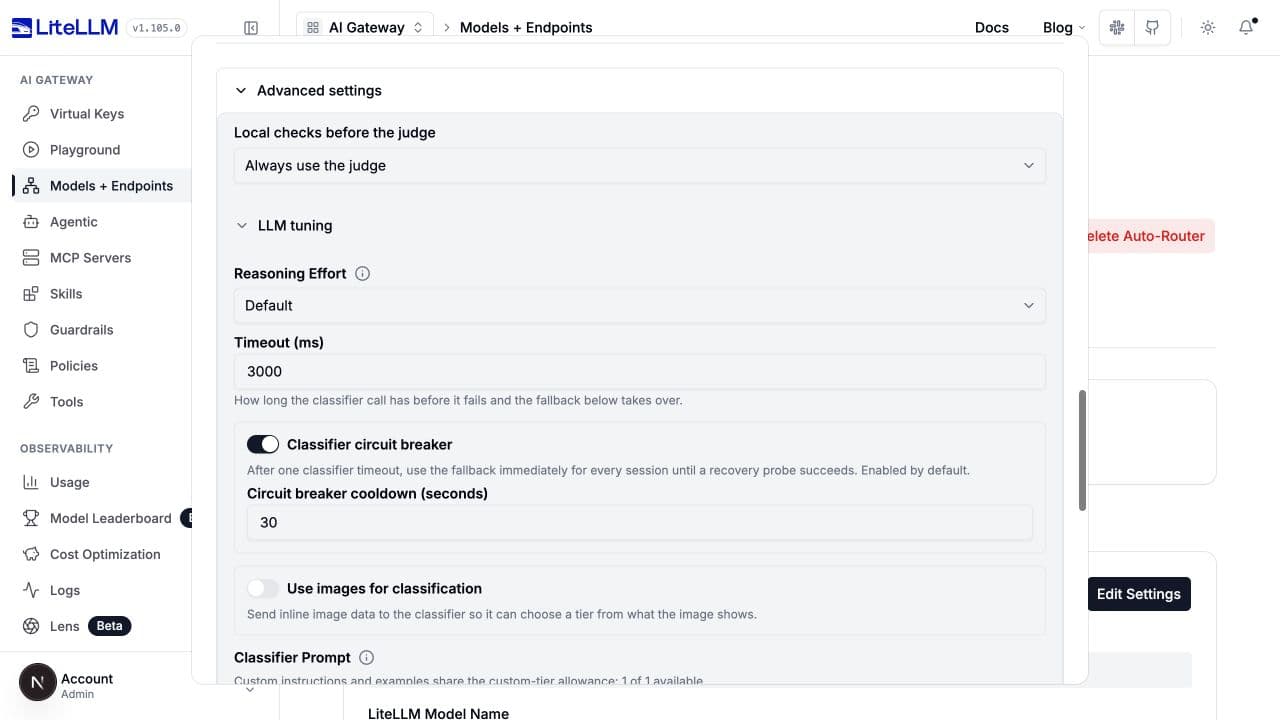
Always use the judge disables the local-first stage. It does not disable keyword overrides, session reuse, or heuristic recovery after a judge failure. Switching modes can preserve inactive tuning values; it does not reset every setting.
Start with a complete configuration
All settings below belong inside model_list[].litellm_params.complexity_router_config, unless explicitly labeled otherwise. complexity_router_default_model is a sibling under litellm_params.
This example mirrors the heuristic-first v2 screenshot: a 0.6 success threshold and a MEDIUM local ceiling. Those values illustrate the controls; evaluate them on your own traffic before adopting them.
model_list:
  - model_name: demo-efficient
    litellm_params:
      model: openai/gpt-6-luna
      api_key: os.environ/OPENAI_API_KEY
  - model_name: demo-capable
    litellm_params:
      model: openai/gpt-6.1-sol
      api_key: os.environ/OPENAI_API_KEY
  - model_name: classifier-chain-demo
    litellm_params:
      model: auto_router/complexity_router
      complexity_router_default_model: demo-efficient
      complexity_router_config:
        tiers:
          SIMPLE: demo-efficient
          MEDIUM: demo-efficient
          COMPLEX: demo-capable
          REASONING: demo-capable
        classifier_type: heuristic_first
        local_heuristic: heuristic_v2
        heuristic_first_max_tier: MEDIUM
        heuristic_v2_success_threshold: 0.6
        classifier_llm_config:
          model: demo-efficient
          timeout_ms: 3000
          classification_rubric: agentic
        classifier_fallback: heuristic
        classifier_context_window_size: 3
        classifier_context_budget_chars: 8000
Set OPENAI_API_KEY on the gateway, start litellm --config config.yaml, and send client requests to model: classifier-chain-demo. Tier values and the judge's model must name deployed model groups. The judge may share a deployment with a solver, as above, or use a separate alias.
The following examples are configuration fragments: replace the corresponding fields inside complexity_router_config, keeping your deployed tier models. Remove mode-specific fields when changing modes instead of accumulating settings from every example.
Chain a heuristic with an LLM
Select LLM > Routing approach > Complexity. Expand Advanced settings, choose Heuristic first or Hybrid, then choose Heuristic before the judge. Both modes support Heuristic v1 (rule-based) and Heuristic v2.
Heuristic first
Decide locally up to sets the most expensive tier the heuristic can choose without a judge call. V1 also needs at least one scoring signal. V2 needs a tier that meets its success threshold. Higher-tier results, absent v1 signals, or a v2 prediction where no tier qualifies go to the judge.
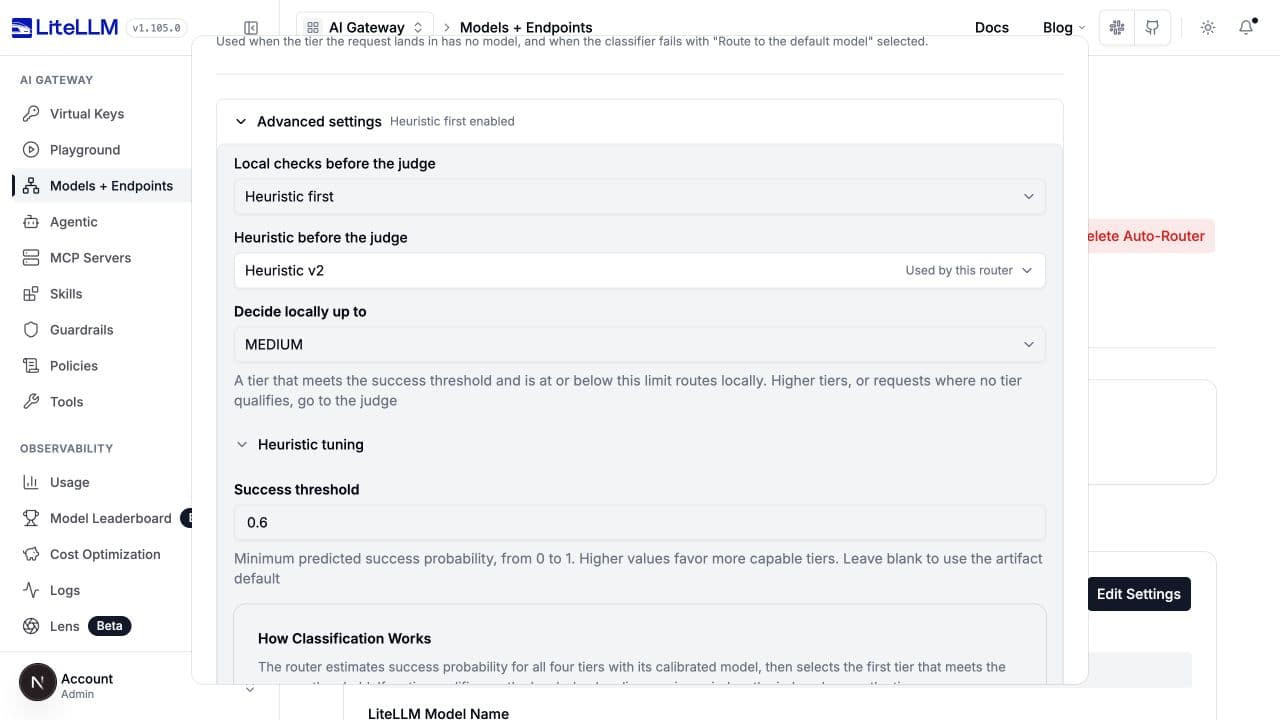
classifier_type: heuristic_first
local_heuristic: heuristic_v2
heuristic_first_max_tier: MEDIUM
heuristic_v2_success_threshold: 0.6
classifier_llm_config:
  model: demo-efficient
  classification_rubric: agentic
Set local_heuristic: heuristic to use v1 and tune its weights below. Omitted or null local_heuristic preserves v1 behavior. heuristic_first_max_tier is required in YAML and must be a configured built-in tier below the highest tier; the UI initially selects SIMPLE.
Hybrid
Hybrid can accept any local tier. With v1, Boundary margin measures distance from the weighted-score tier boundaries. A score within the margin of any active boundary, including equality, goes to the judge. A request with no scoring signal also goes to the judge.
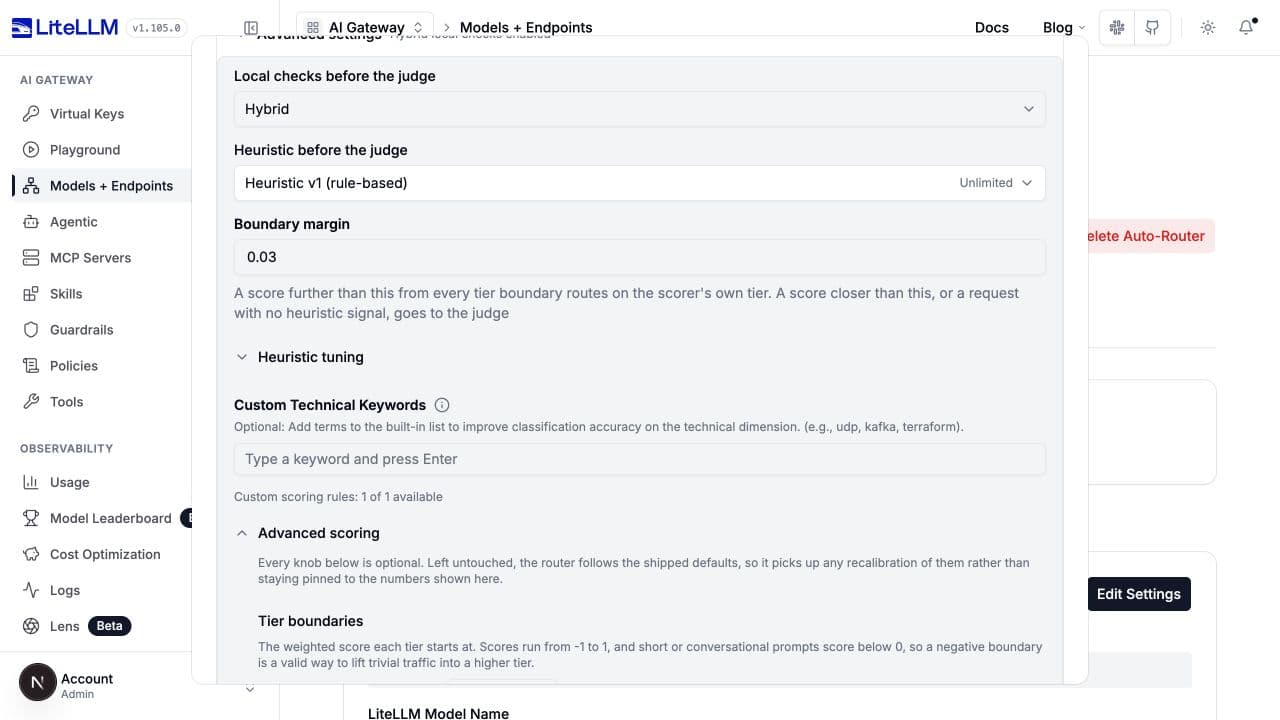
classifier_type: hybrid
local_heuristic: heuristic
hybrid_boundary_margin: 0.03
classifier_llm_config:
  model: demo-efficient
  classification_rubric: agentic
With v2, the label becomes Success threshold margin. The lowest qualifying tier is accepted only when its probability and every lower tier's probability are farther than the margin from the success threshold. If no tier qualifies, ask the judge. Higher-tier probabilities do not affect this boundary check.
classifier_type: hybrid
local_heuristic: heuristic_v2
hybrid_boundary_margin: 0.03
heuristic_v2_success_threshold: 0.75
classifier_llm_config:
  model: demo-efficient
  classification_rubric: agentic
hybrid_boundary_margin is required in YAML, accepts 0 through 1, and starts at 0.03 in the UI. A larger margin delegates more boundary cases; 0 still delegates exact-boundary results. Do not set both the hybrid margin and the heuristic-first ceiling. local_heuristic is accepted only for these two chain types.
Judge-visible images and encrypted tasks bypass the local shortcut. On a judge error, classifier_fallback: heuristic uses the selected local version. A v2 chain recovers with v2, not v1.
Tune heuristic v1
Select Heuristics > Rule-based (classifier_type: heuristic), the default when YAML omits the type. Open Advanced settings > Heuristic tuning > Advanced scoring. V1 scores the current ask using seven built-in dimensions, plus optional custom dimensions. It estimates tokens as text length divided by four; it does not call a tokenizer or LLM for classification.
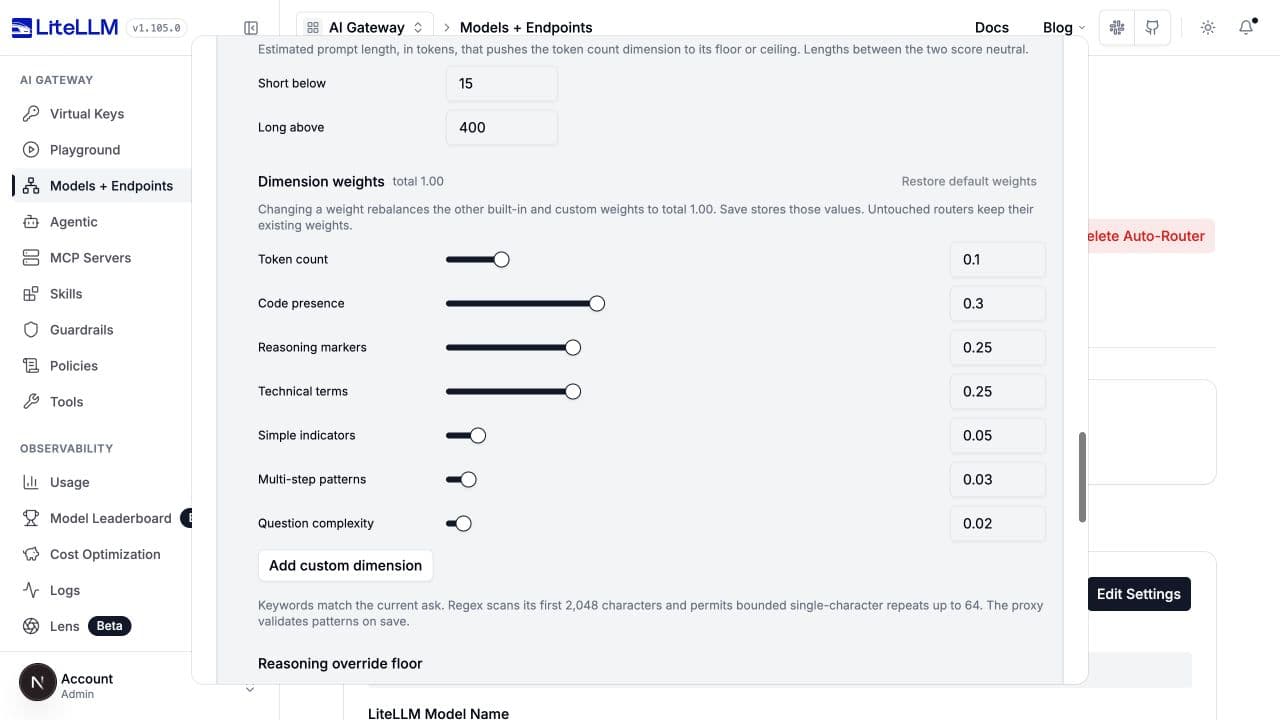
Weights, thresholds, and boundaries
| UI label / key | Shipped default | What changing it does |
|---|---|---|
Token count / dimension_weights.tokenCount | 0.10 | Changes the contribution from short or long requests. |
Code presence / dimension_weights.codePresence | 0.30 | Changes the contribution from code-related terms. |
Reasoning markers / dimension_weights.reasoningMarkers | 0.25 | Changes the contribution from reasoning phrases. |
Technical terms / dimension_weights.technicalTerms | 0.25 | Changes the contribution from technical vocabulary. |
Simple indicators / dimension_weights.simpleIndicators | 0.05 | Changes the contribution from greetings, definitions, and other simple-request indicators. |
Multi-step patterns / dimension_weights.multiStepPatterns | 0.03 | Changes the contribution from step sequences and numbered tasks. |
Question complexity / dimension_weights.questionComplexity | 0.02 | Changes the contribution from multiple questions. |
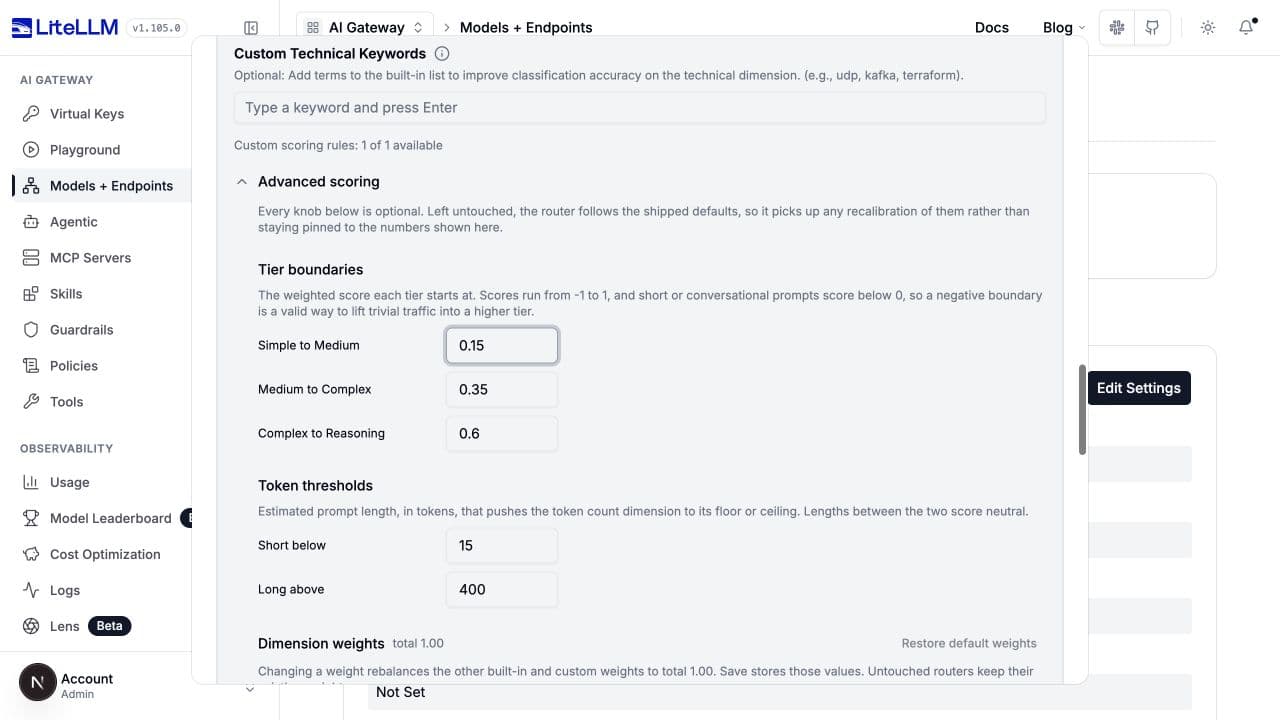
Simple to Medium / tier_boundaries.simple_medium | 0.15 | Scores below this remain SIMPLE. Lowering it promotes more requests. |
Medium to Complex / tier_boundaries.medium_complex | 0.35 | Scores at or above this reach at least COMPLEX. |
Complex to Reasoning / tier_boundaries.complex_reasoning | 0.60 | Scores at or above this reach REASONING. |
Short below / token_thresholds.simple | 15 | Below this estimated token count, the token dimension scores -1. |
Long above / token_thresholds.complex | 400 | Above this estimated token count, the token dimension scores 1; between thresholds it scores 0. |
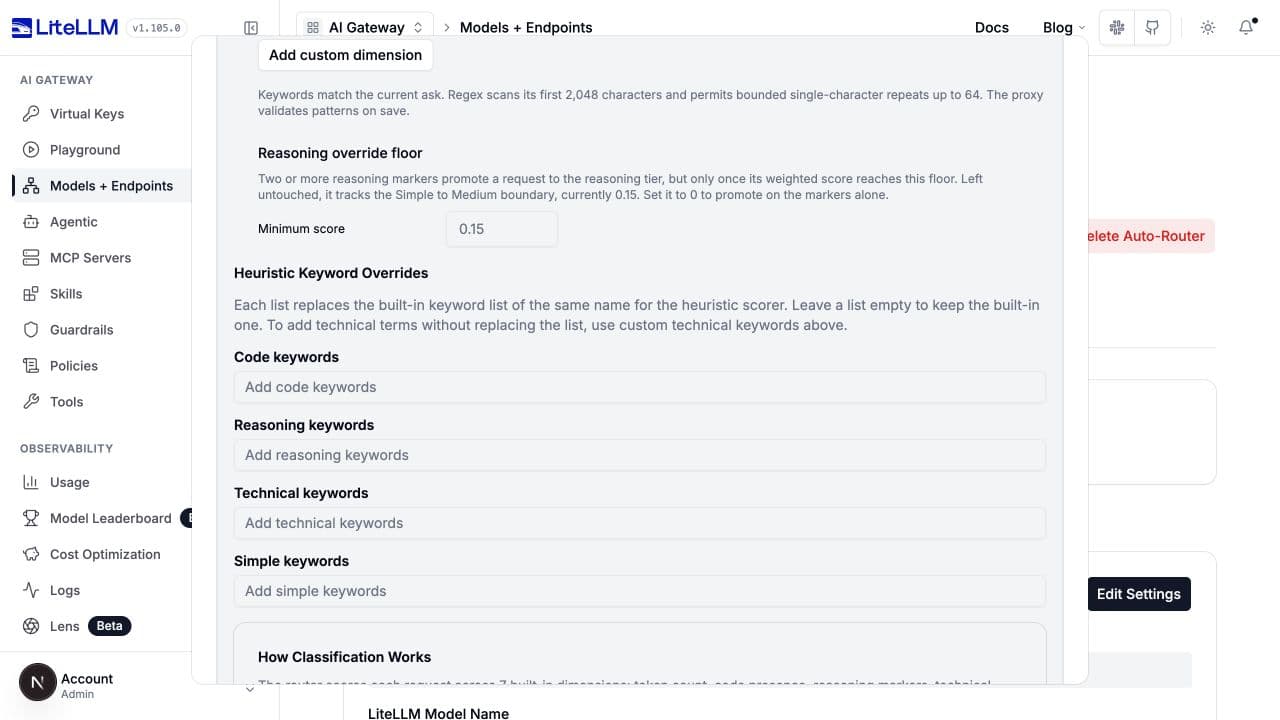
Minimum score / reasoning_override_min_score | Follows simple_medium | Two or more reasoning markers can promote to REASONING once this floor is reached. 0 restores marker-only promotion. |
The UI accepts boundaries and the reasoning floor from -1 to 1, and nonnegative whole-number token thresholds. Keep boundaries increasing and the short threshold below the long threshold. Equality with a tier boundary selects the higher tier.
Changing a weight in the UI rebalances the other built-in and custom weights to total 1.00. Restore default weights removes the override and custom dimensions. Untouched controls follow shipped defaults.
In YAML, a supplied dimension_weights map replaces the map: omitted dimensions get weight zero. Supply all seven keys when retaining them. Partial boundary and token-threshold maps, in contrast, merge with their defaults. The backend does not automatically normalize a YAML weight map.
Tier-boundary and token-threshold controls
tier_boundaries:
  simple_medium: 0.15
  medium_complex: 0.35
  complex_reasoning: 0.60
token_thresholds:
  simple: 15
  complex: 400
dimension_weights:
  tokenCount: 0.10
  codePresence: 0.30
  reasoningMarkers: 0.25
  technicalTerms: 0.25
  simpleIndicators: 0.05
  multiStepPatterns: 0.03
  questionComplexity: 0.02
Keyword lists
Custom Technical Keywords appends to the effective technical list. Heuristic Keyword Overrides replaces the corresponding built-in list. Matching is case-insensitive; individual words normally use word boundaries, while phrases and CJK terms use substring matching. Empty override lists keep the built-ins rather than disabling a dimension.
| UI label | Key | Default / effect |
|---|---|---|
| Custom Technical Keywords | custom_technical_keywords | None. Append terms, deduplicated case-insensitively. |
| Code keywords | code_keywords | Shipped code-related list; replace it with your list. |
| Reasoning keywords | reasoning_keywords | Shipped reasoning list; also supplies the reasoning-override markers. |
| Technical keywords | technical_keywords | Shipped technical list; custom technical keywords append to this replacement. |
| Simple keywords | simple_keywords | Shipped simple-request list; replace it with your list. |
custom_technical_keywords: [kafka, terraform, postgresql]
Keyword override controls
Custom dimensions
Under Advanced scoring > Dimension weights, select Add custom dimension. Each row has its own inline weight and keyword or restricted-regex matchers.
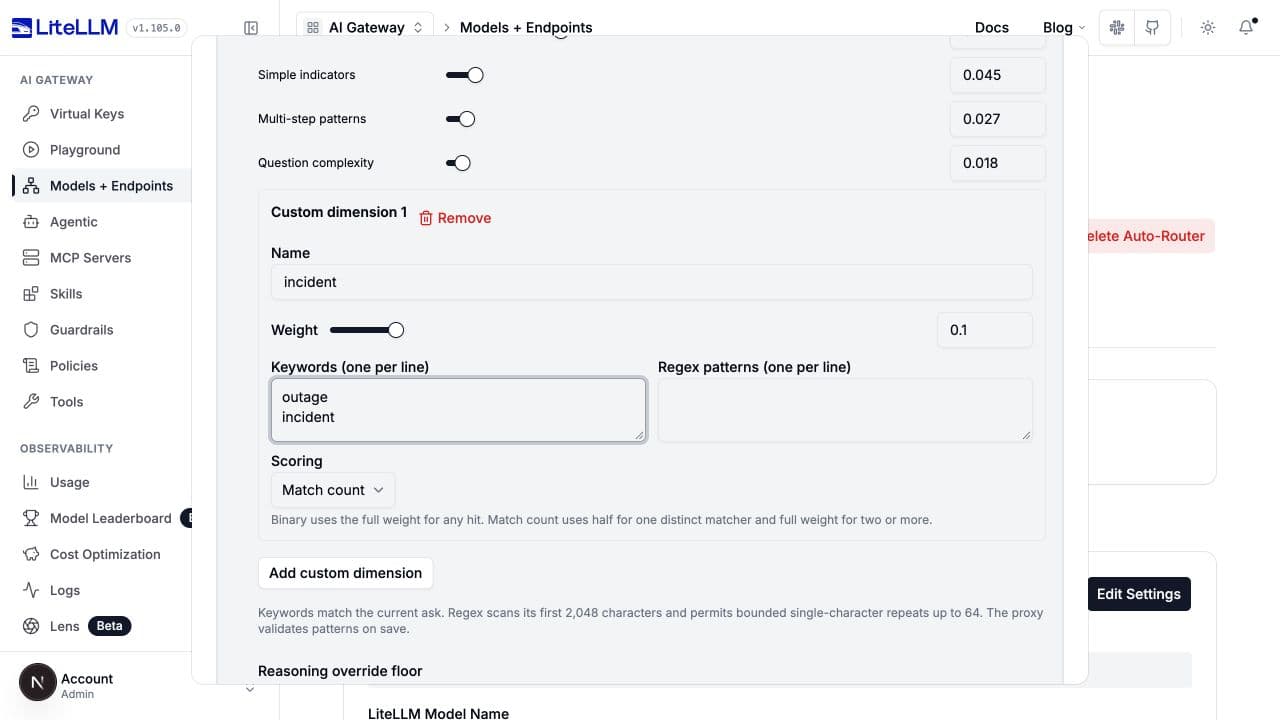
This is the configuration shown above, including the UI's rebalanced built-in weights:
dimension_weights:
  tokenCount: 0.09
  codePresence: 0.27
  reasoningMarkers: 0.225
  technicalTerms: 0.225
  simpleIndicators: 0.045
  multiStepPatterns: 0.027
  questionComplexity: 0.018
custom_dimensions:
  - name: incident
    weight: 0.1
    keywords: [outage, incident]
    scoring_mode: match_count
| Row field | Key under custom_dimensions[] | Constraints and behavior |
|---|---|---|
| Name | name | Unique case-insensitive ASCII identifier, starting with a letter, then letters, digits, or underscores; at most 64 characters. Cannot reuse a built-in dimension name. |
| Weight | weight | Finite number greater than 0, at most 1. Do not also put this dimension in dimension_weights. |
| Keywords | keywords | Nonblank keyword strings. At least one keyword or pattern is required. |
| Regex patterns | patterns | Case-insensitive patterns over the first 2,048 characters of the ask. |
| Scoring | scoring_mode | binary: any match contributes full weight. match_count: one distinct matching matcher contributes half, two or more contribute full weight. Repeated occurrences of one matcher do not increase the count. |
YAML defaults to binary; a newly added UI row starts with match_count. There can be at most 16 dimensions, 32 combined matchers per dimension, 256 characters per matcher, and 4,096 matcher characters per dimension. Regex permits bounded single-character or character-class repeats up to 64; unbounded quantifiers, repeated groups, backreferences, and lookarounds are rejected. Additional pattern-work limits protect the routing path.
Custom dimensions require standalone or chained v1. They are not accepted for v2, or just to tune an LLM/OSS/custom classifier's failure fallback.
Tune heuristic v2
Select Heuristics > Heuristic v2. Heuristic tuning > Success threshold maps to heuristic_v2_success_threshold, a number from 0 through 1. Blank uses the selected artifact's routing_threshold, currently 0.75 for the bundled ultrafeedback artifact.
V2 predicts success for each built-in tier and chooses the first that reaches the threshold. Raising it generally favors stronger tiers, or more judge calls in a chain. These are task-success estimates, not v1 scores or confidence in a class label. V1 weights, keywords, token thresholds, and custom dimensions do not tune v2.
classifier_type: heuristic_v2
heuristic_v2_success_threshold: 0.75
If no tier qualifies, standalone v2 chooses REASONING; a v2 chain asks the judge. The v2 chain screenshot shows the threshold control alongside its local ceiling.
Custom trained artifact (YAML only)
heuristic_v2_artifact defaults to ultrafeedback. It also accepts an inline trained artifact object, not a filename or URL. Use measured task outcomes to construct one; editing its statistics is not equivalent to adjusting a UI weight.
| Artifact field | Default / contract |
|---|---|
schema_version | 1 |
global_statistics | Exactly one entry for each tier 1 through 4, with positive observations and successes between zero and observations. |
domain_statistics, cohort_statistics | Optional domain and similarity-cohort statistics with unique keys. |
domain_prior_mass, cohort_prior_mass | 200, 20; strictly positive smoothing strengths. Higher values favor broader prior statistics over sparse observations. |
routing_threshold | 0.75; overridden by heuristic_v2_success_threshold when set. |
datasets, success_definition, split_method | Training provenance describing the evidence and evaluation split. |
Global entries contain tier, successes, and observations. Domain entries add a request_type; cohort entries add a nonempty cohort identifier generated by the predictor's feature grouping. Each domain/tier or cohort/tier pair must be unique. Dataset entries contain nonempty name, url, license, optional success_definition, and a positive rows count. These fields record evidence; they do not download or train on a dataset. The default split description is sha256(prompt): 70% train, 15% validation, 15% test.
See the artifact schema for the nested statistics contract. Feature extraction is built in, and the predictor makes per-tier success probabilities monotonic.
Tune the LLM judge
For judge-only routing, select LLM > Routing approach > Complexity, then Advanced settings > Local checks before the judge > Always use the judge. Choose the Judge model in the main form, then open LLM tuning. These settings also apply to heuristic-first and hybrid chains; they are separate from each tier model's reasoning effort and generation settings.
| UI label | Key under classifier_llm_config | Default / effect |
|---|---|---|
| Judge model | model | Required deployed model-group alias. Choose a model that supports the classifier's structured response. |
| Reasoning Effort | reasoning_effort | Unset uses the deployment/provider default. Available choices depend on the selected model. More reasoning can increase judge latency and cost. |
| Timeout (ms) | timeout_ms | 3000; use a positive integer. Too short increases fallback frequency; too long delays requests on a slow judge. |
| Classifier circuit breaker | circuit_breaker_enabled | true. A timeout opens this router instance's classifier circuit and immediately uses fallback on later requests. |
| Circuit breaker cooldown (seconds) | circuit_breaker_cooldown_seconds | 30, strictly positive. After cooldown, one request probes while concurrent requests keep using fallback. Success closes the circuit; a failed probe restarts cooldown. |
| Use images for classification | vision.enabled | false. Forward inline image data from the newest user turn when the judge declares vision support. |
| Maximum images per request | vision.max_images | 1, positive integer; shown when image classification is enabled. Limits added judge cost. |
classifier_type: llm
classifier_llm_config:
  model: demo-efficient
  timeout_ms: 3000
  circuit_breaker_enabled: true
  circuit_breaker_cooldown_seconds: 30
  classification_rubric: agentic
  vision:
    enabled: false
    max_images: 1
Image classification forwards only inline data: URIs, not remote HTTP(S) image URLs or images from prior turns. Unsupported judges still receive text only. Use images for classification changes what the judge sees; Modality Routing separately ensures the answering model can accept images.
Prompt and rubric
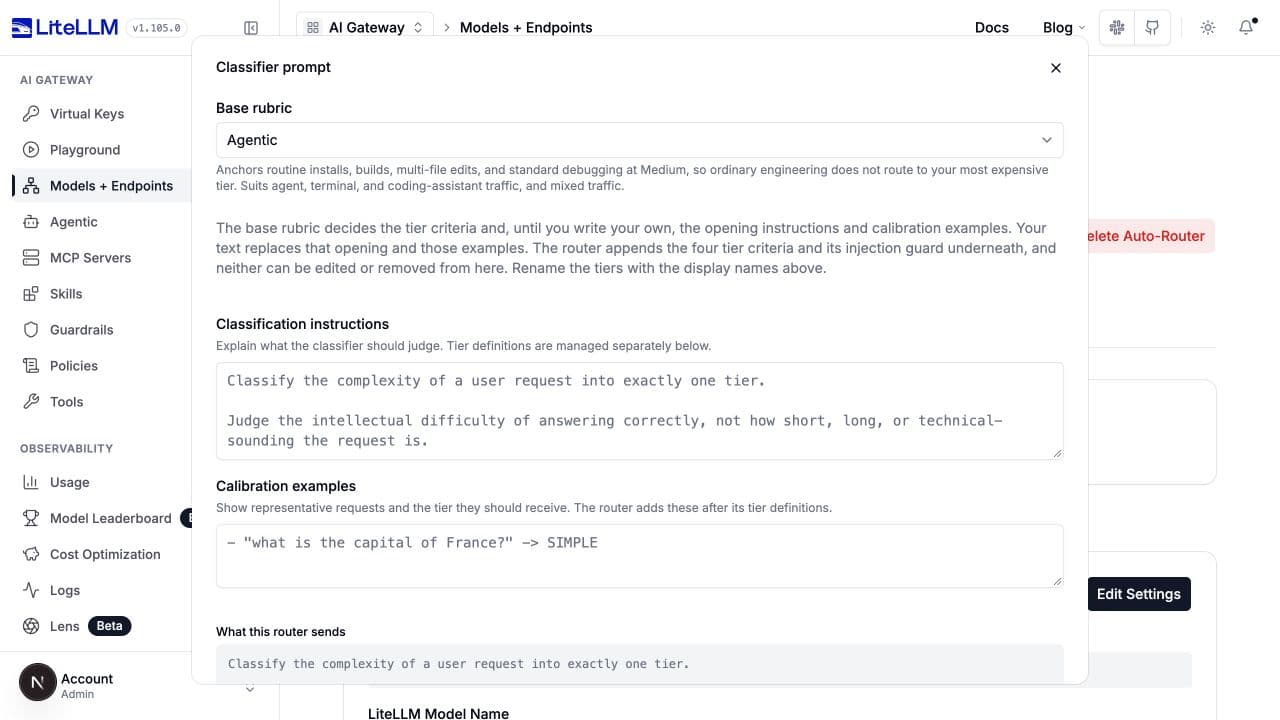
Open Classifier Prompt > Customize prompt. Choose a Base rubric, optionally replace Classification instructions or Calibration examples, and inspect What this router sends before saving.
| Control / key | Options or limit | Use |
|---|---|---|
Base rubric / classifier_llm_config.classification_rubric | legacy, agentic, chat, business | agentic anchors routine engineering at Medium; chat omits engineering anchors; business uses business criteria and examples; legacy preserves the original uncalibrated rubric. |
Classification instructions / classification_prompt | Optional nonblank text, at most 2,000 characters | Replace the opening instructions, retaining tier criteria and the appended prompt-injection defense. |
Calibration examples / classification_examples | Optional nonblank text, at most 4,000 characters | Replace only the example lines. The router supplies the section heading. |
New LLM configurations in the UI start with agentic. Omitted YAML uses legacy, so explicitly set a rubric when you want UI-equivalent behavior. Rubrics and these section overrides also apply to complexity chains. Capability and Fuse v2 use their own packaged prompts instead.
classifier_llm_config:
  model: demo-efficient
  classification_rubric: business
classification_prompt: >-
  Classify the work needed to answer this support request correctly.
  Prefer the cheapest tier that can complete it.
classification_examples: |-
  "Summarize this support conversation" -> MEDIUM
  "Diagnose why retries caused duplicate charges across services" -> COMPLEX
Reset to default removes custom opening/examples while retaining the selected rubric. Custom tier criteria are edited through Edit tiers, not by rewriting them in the opening prompt.
Legacy full system-prompt replacement
classifier_llm_config.system_prompt replaces the entire system role, including tier criteria and the built-in injection defense. It is mutually exclusive with classification_rubric, classification_prompt, and classification_examples. An existing full-prompt configuration uses the legacy UI editor; new configurations should normally use the section editor above.
If you use full replacement, supply your own instruction to treat quoted caller text as data, never routing instructions. Use classifier_fallback: default_model when your taxonomy is no longer complexity. Tier renames do not rewrite text frozen into a full system-prompt string.
Failure policy and conversation context
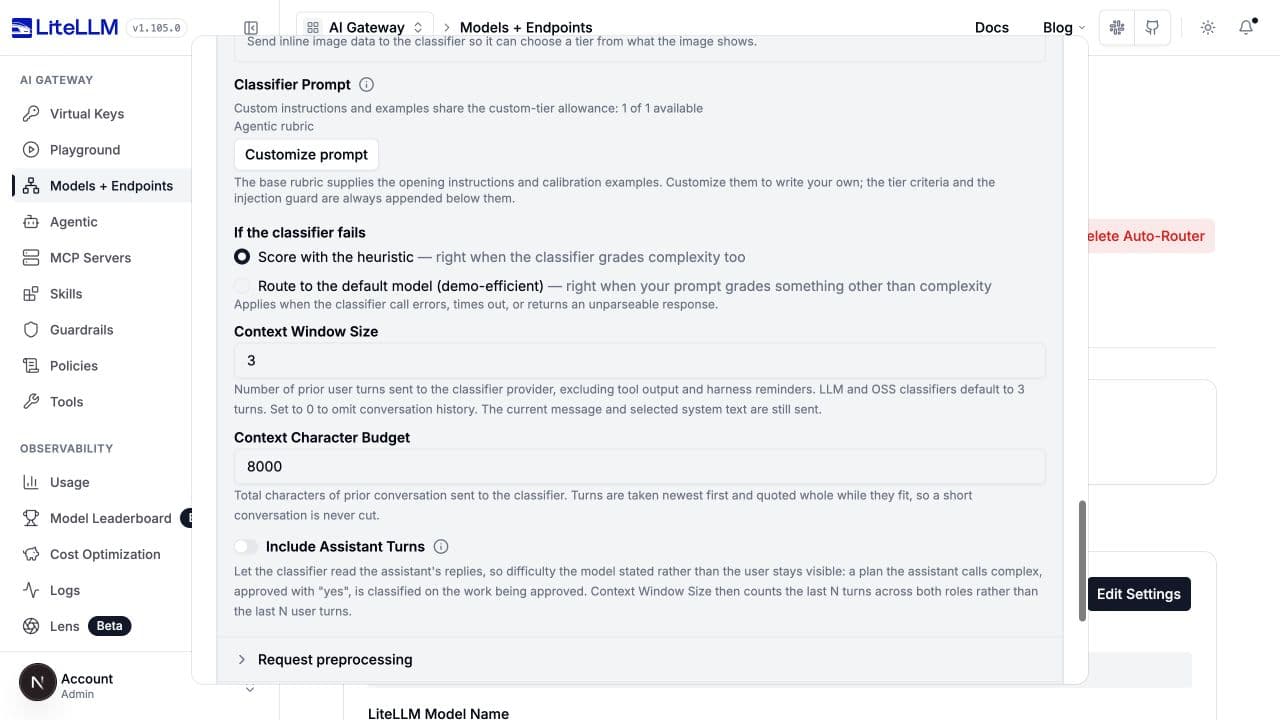
These controls are in LLM tuning for complexity LLM/chains and Classifier tuning for OSS. They are not the forecast modes' fallback-policy editors.
| UI label | Key | Default / behavior |
|---|---|---|
| If the classifier fails | classifier_fallback | heuristic scores locally after an error, timeout, invalid response, or plugin decline. default_model routes directly to the configured default model. |
| Context Window Size | classifier_context_window_size | 3; nonnegative count of prior user turns. 0 omits history and its depth summary, not the current ask or selected system text. |
| Context Character Budget | classifier_context_budget_chars | 8000; nonnegative budget for prior-turn text. Whole fitting turns can survive a small budget; an oversized boundary turn is omitted when too little room remains for truncation. |
| Include Assistant Turns | classifier_context_include_assistant_turns | false. When enabled, the window counts prior turns across both roles. Useful when a user's "yes" approves work described by the assistant. |
| Per-turn cap (YAML only) | classifier_context_per_turn_chars | Unset; optional positive cap on each prior turn, applied before the total budget. Keeps the opening and ending of a capped turn. |
classifier_fallback: heuristic
classifier_context_window_size: 3
classifier_context_budget_chars: 8000
classifier_context_include_assistant_turns: false
History excludes tool output and harness reminders. The router takes recent turns first, retains whole turns where possible, and truncates the oldest retained turn if necessary. The current ask and selected system text sit outside the prior-turn budget. Claude Code system text is excluded from classification; the answering model still receives it.
Increasing history sends more data to the judge's provider, which may differ from the answering provider. Use window size 0 when you do not want prior turns sent. It does not make classification data-free.
For classifier_fallback: default_model, configure Default Model, preferably through the sibling litellm_params.complexity_router_default_model shown in the complete example. In the normalized router configuration, this is default_model. A plain LLM/OSS/custom heuristic fallback uses v1; a chain uses its selected local version. Custom taxonomies use fallback_tier. Capability and Fuse v2 always recover to their capable solver.
Connect a self-hosted classifier
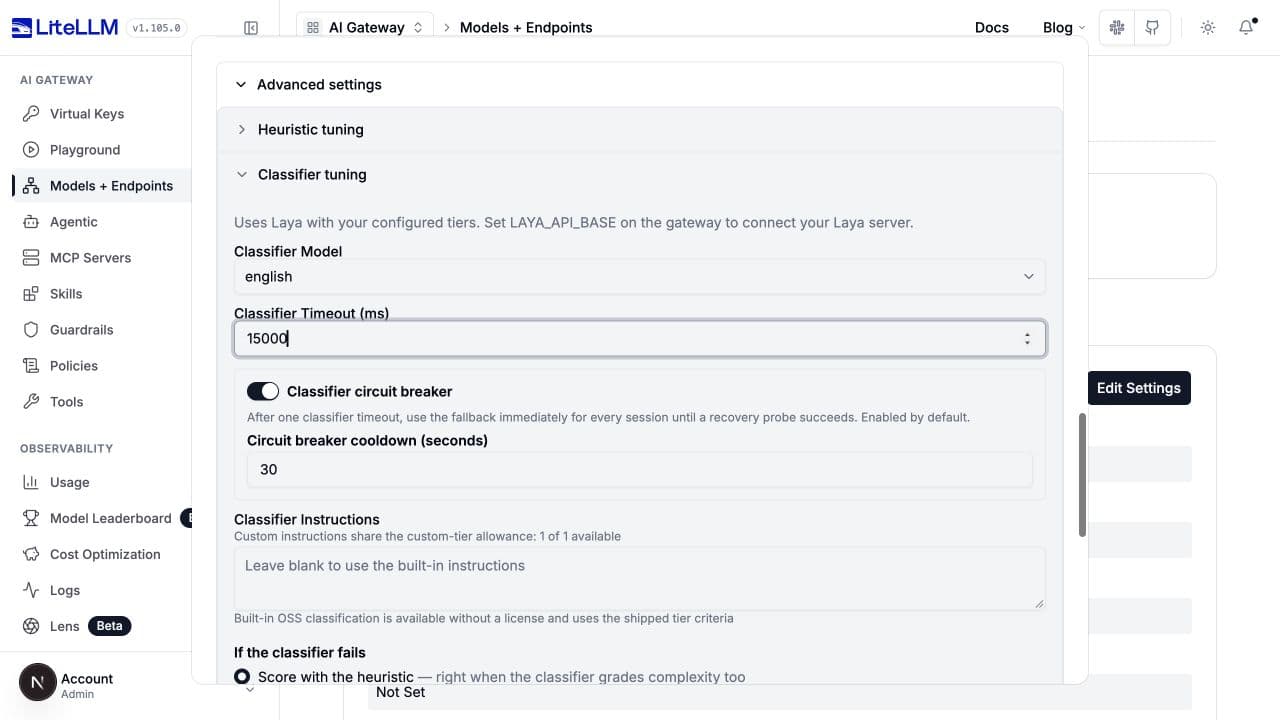
Select OSS Classifier, choose OSS provider, then expand Advanced settings > Classifier tuning. This connects to an existing server; it does not deploy or start one. See Self-hosted classifiers for installation and connectivity details.
| Provider | provider | Classifier model | Gateway environment |
|---|---|---|---|
| Laya, self-hosted | laya | english, multilingual, typed-decisions | LAYA_API_BASE, optional LAYA_API_KEY |
| Bespoke Nimble, self-hosted | bespoke | nimble-latest, nimble, bespokelabs/Bespoke-Nimble-9B | BESPOKE_API_BASE, optional BESPOKE_API_KEY |
| Jev, hosted TypeSafe API | jev | jev-latest by default | TYPESAFE_API_KEY; optional TYPESAFE_API_BASE, default https://api.typesafe.ai |
Set the environment on the gateway. An internal hostname is resolved from the gateway's host/container, not your browser. All three use POST /v1/systemone; set the base URL without that suffix.
export LAYA_API_BASE="http://laya-server:8000"
# Supply LAYA_API_KEY through your secret manager if the server requires it.
classifier_type: oss_classifier
opensource_classifier_config:
  provider: laya
  model: english
  timeout_ms: 15000
  circuit_breaker_enabled: true
  circuit_breaker_cooldown_seconds: 30
classifier_context_window_size: 3
classifier_context_budget_chars: 8000
For Nimble, change the provider to bespoke and model to a supported name your server serves. A 30000 ms timeout is a reasonable initial test value for that server, not the backend default. For Jev, select jev with jev-latest and configure the TypeSafe key.
| UI label | Key under opensource_classifier_config | Default / behavior |
|---|---|---|
| OSS provider | provider | jev; accepted values are jev, laya, bespoke. |
| Classifier Model | model | Backend default jev-latest; explicitly select the appropriate model for Laya/Nimble. UI provider changes choose that provider's preset default. |
| Classifier Timeout (ms) | timeout_ms | 3000, positive integer. Raise it for cold or slower self-hosted inference, then measure. |
| Classifier Instructions | instructions | Omit for built-ins; nonblank text replaces the opening instructions. Custom instructions follow the custom-tier allowance. |
| Classifier circuit breaker | circuit_breaker_enabled | true; timeout protection as described for the LLM judge. |
| Circuit breaker cooldown (seconds) | circuit_breaker_cooldown_seconds | 30, strictly positive. |
| Endpoint (YAML/admin API only) | api_base | Provider environment/default. Laya/Nimble require a reachable HTTP(S) base with no embedded credentials, query, or fragment. |
| Credential (YAML/admin API only) | api_key | Provider environment when using its environment base. Optional for unauthenticated self-hosted servers; required for Jev. |
An explicit api_base does not inherit the environment API key. Supply a matching explicit key when that endpoint requires authentication; Jev rejects an explicit base without an explicit key. The dashboard intentionally has no endpoint/key fields. Team members cannot set these overrides through management APIs.
The canonical keys are oss_classifier and opensource_classifier_config. Existing jev, jev_classifier_config, and provider typesafe aliases remain accepted; do not supply both classifier blocks.
A self-hosted OpenAI-compatible judge
A generic OpenAI-compatible chat endpoint, such as an Ollama model, is a different integration: register it as a regular model and select LLM, not an OSS System One provider. vLLM v0.32.0 and later can also serve Qwen models as a System One classifier; see vLLM. Add this deployment alongside your existing solvers, then use its alias in classifier_llm_config.model:
- model_name: local-routing-judge
  litellm_params:
    model: openai/your-served-model-name
    api_base: http://judge-server:8000/v1
    api_key: os.environ/LOCAL_JUDGE_API_KEY
classifier_type: llm
classifier_llm_config:
  model: local-routing-judge
  timeout_ms: 5000
  classification_rubric: agentic
Use an authentication value your server accepts, and verify its structured-output support. The same alias can be used in a heuristic-first/hybrid chain. Self-hosting the judge does not change where the selected completion models run.
Forecast solver success
Under LLM > Routing approach, Capability and Fuse v2 forecast task success instead of selecting a complexity label directly. Both have Efficient solver, Capable solver, and Judge model controls. Both use packaged prompts and choose the capable solver on an invalid forecast or classifier failure. Do not add generic prompt/rubric overrides, a local heuristic chain, or classifier_fallback: default_model to these modes.
Capability
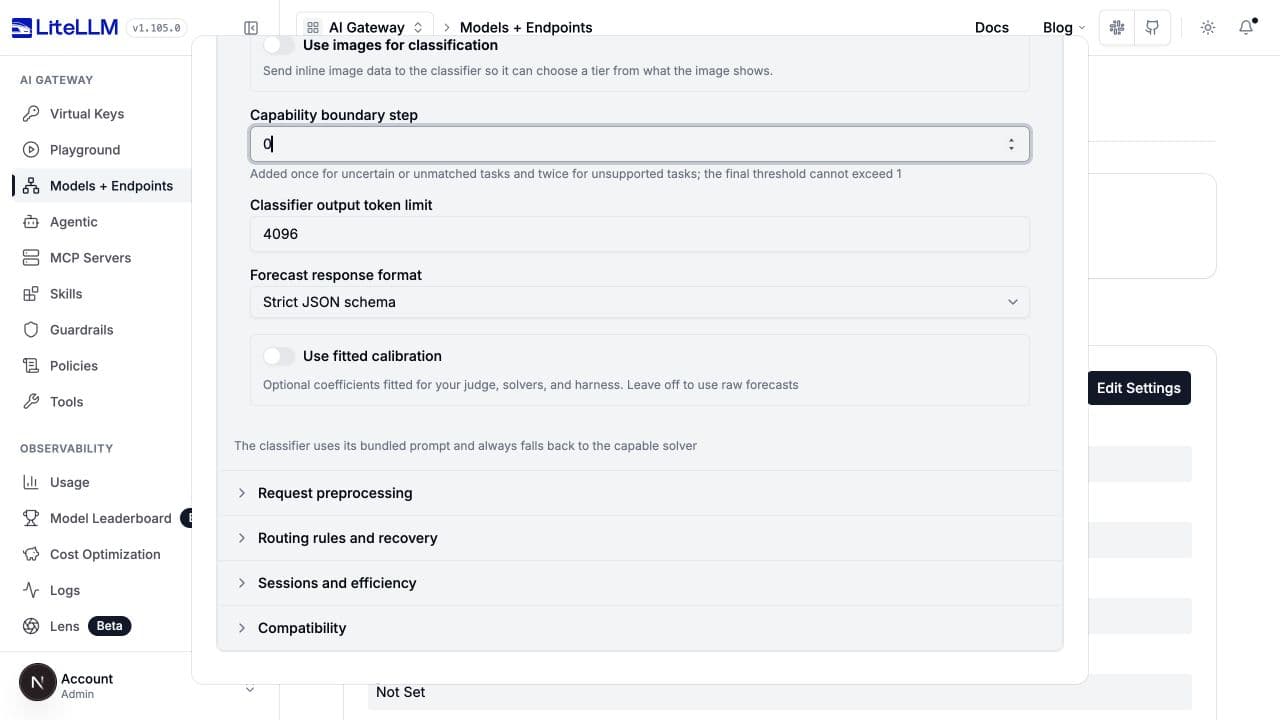
Set Solve probability threshold in the main form. In LLM tuning, Capability boundary step raises the required probability once for uncertain/unmatched tasks and twice for unsupported tasks.
tiers:
  SIMPLE: demo-efficient
  REASONING: demo-capable
classifier_type: capability
classifier_llm_config:
  model: demo-efficient
  timeout_ms: 3000
capability_classifier_config:
  efficient_tier: SIMPLE
  capable_tier: REASONING
  base_threshold: 0.5
  threshold_step: 0.0
  max_output_tokens: 4096
  response_format: json_schema
Key under capability_classifier_config | Default / limits | Effect |
|---|---|---|
efficient_tier, capable_tier | Required configured built-in tiers; capable must be higher | Choose solver pools and the failure destination. The UI chooses models while preserving these names. |
base_threshold | Required number in [0, 1] | Efficient is selected when its predicted success meets the adjusted threshold. |
threshold_step | 0.0, nonnegative | Supported: base. Uncertain/unmatched: base + step. Unsupported: base + 2 x step. Base + 2 x step must be at most 1. |
max_output_tokens | 4096, positive integer | Limits the judge's forecast response, not the solver's answer. |
response_format | json_schema; or json_object | JSON-object mode accommodates judges without strict schema support; returned forecasts are still validated. |
calibration | Unset | Optional fitted probability transformation before threshold comparison. |
Capability uses a bundled capability card, not a dashboard-editable solver profile. Tune the probability threshold against observed whole-task success rather than interpreting it as classification confidence.
Fuse v2
Supply Efficient solver profile, Capable solver profile, and Harness and budget, either using the preset selectors or custom text. Set Maximum quality gap to the allowed difference between predicted capable and efficient success probabilities.
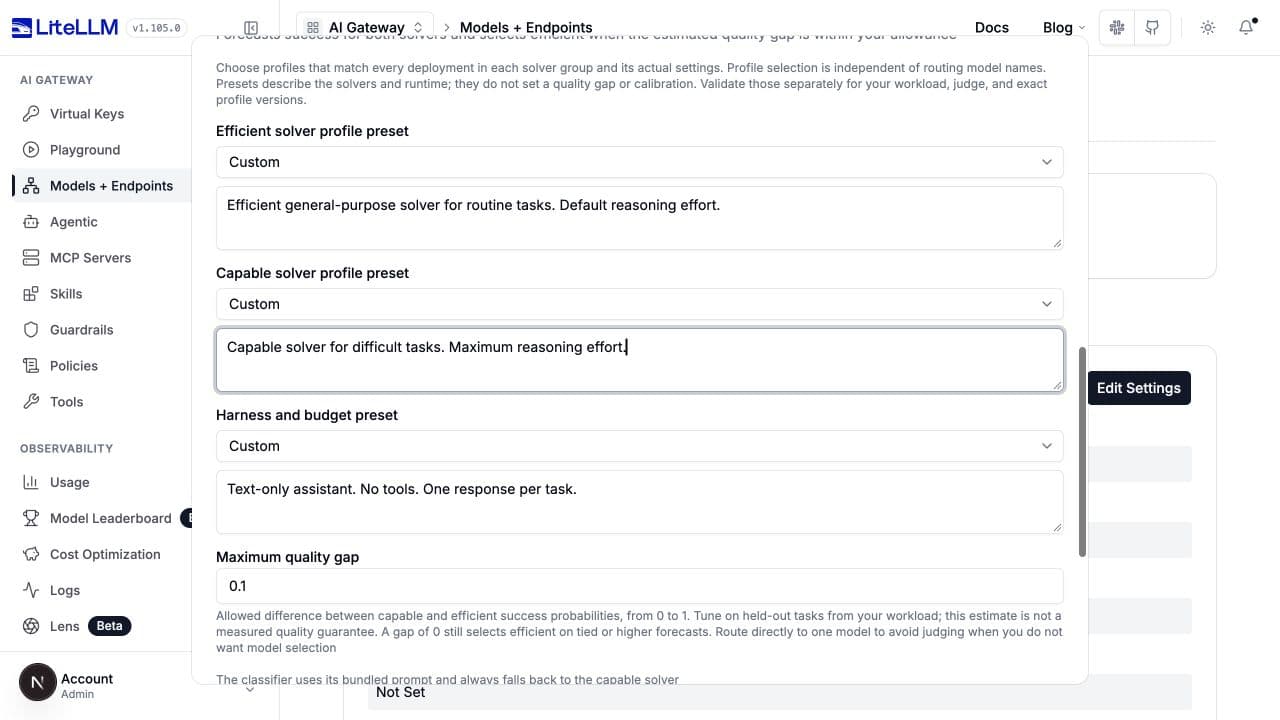
tiers:
  SIMPLE: demo-efficient
  REASONING: demo-capable
classifier_type: llm_v2
adaptive: false
classifier_llm_config:
  model: demo-efficient
llm_v2_config:
  efficient_tier: SIMPLE
  capable_tier: REASONING
  efficient_profile: Efficient general-purpose solver for routine tasks. Default reasoning effort.
  capable_profile: Capable solver for difficult tasks. Maximum reasoning effort.
  harness: Text-only assistant. No tools. One response per task.
  max_quality_gap: 0.1
  max_output_tokens: 1024
  response_format: json_schema
The profile text above demonstrates the fields. Replace it with evidence about your actual models, reasoning settings, tools, verification, and budget. Profile descriptions do not configure solver parameters; separately set those parameters on the solver deployments or tier model entries.
Key under llm_v2_config | Default / limits | Effect |
|---|---|---|
efficient_tier, capable_tier | SIMPLE, REASONING | Exactly two populated built-in tiers, capable above efficient, with one distinct model-group alias in each. |
efficient_profile, capable_profile, harness | Nonblank text, at most 4,000 characters each, or a corresponding preset | Describe what is being forecast. |
efficient_profile_preset, capable_profile_preset, harness_preset | Unset; known IDs from the gateway's preset catalog | Supply versioned descriptions. Explicit text overrides preset text; an unknown preset is still invalid. |
max_quality_gap | Required number in [0, 1] | Efficient wins when capable probability minus efficient probability is at most this gap. A larger gap tolerates more estimated quality loss. Zero still permits tied or higher efficient forecasts. |
max_output_tokens | 1024, positive integer | Judge response budget. |
response_format | json_schema; or json_object | Structured response mode; both validate the verdict. |
calibration | Unset | Optional separate fitted transformations for efficient and capable probabilities. |
The UI loads presets from /public/complexity_router/fuse_presets and displays their model, version, and sources. Presets do not supply a measured quality guarantee, quality-gap setting, or fitted calibration. Fuse requires adaptive: false and does not support custom or Non-Reasoning tiers.
Fitted forecast calibration
Use fitted calibration enables already-fitted coefficients; it does not run a training job. Both modes apply sigmoid(slope * logit(clipped_probability) + intercept) before choosing a solver. Fit and validate coefficients for your judge, solvers, prompt version, and execution setup.
| Mode | Calibration fields | Constraints |
|---|---|---|
| Capability | calibration.version, .slope, .intercept | Version 1-128 characters without surrounding whitespace; finite slope 0 through 20; finite intercept -20 through 20. |
| Fuse v2 | calibration.version, .prompt_version, .efficient.slope, .efficient.intercept, .capable.slope, .capable.intercept | Nonblank version up to 512 characters; prompt version llm-v2-1; finite slopes strictly greater than zero; finite intercepts. The UI supplies the prompt version. |
Without this block, routing uses raw forecasts. Calibration examples in the complexity prompt are unrelated to these numerical coefficients.
Customize tiers or use a plugin
Models by tier maps tiers to deployed model aliases or pools. Display name writes tier_labels; configuration keys remain canonical, while the LLM rubric also sees your labels. Per-model reasoning effort and fast mode configure the answering models, not the classifier.
| Control / key | Default / applicability |
|---|---|
tiers | Set explicitly to your deployed aliases. A single alias pins a model group; a list provides a pool. |
tier_model_configs | Empty; stores per-tier, per-model litellm_params. YAML can also use structured model entries in tiers. |
tier_labels | Empty partial map. Renames built-in tiers in UI/logs and the LLM rubric, without renaming YAML keys. |
Add a non-reasoning tier / enable_non_reasoning_tier | false. Adds NON_REASONING below SIMPLE; requires a mapped model and plain LLM, OSS, or custom classifier. Heuristics/chains/forecasts cannot produce it. |
Edit tiers / tier_definitions | Unset. Ordered custom taxonomy of 2-8 tiers; custom names need descriptions and must exactly match tiers. Requires LLM, OSS, or a custom classifier. |
Fallback Tier / fallback_tier | Required with a custom taxonomy; must name one of its tiers. Replaces heuristic/default-model classifier recovery. |
A custom taxonomy cannot combine with rubric presets, full system-prompt replacement, tier labels, adaptive routing, session affinity, nonempty escalation keywords, stalled-task escalation, or routing plugins. Use section-level instructions/examples and a fallback tier.
classifier_type: llm
classifier_llm_config:
  model: demo-efficient
tiers:
  routine: demo-efficient
  specialist: demo-capable
tier_definitions:
  - name: routine
    description: Routine support answers and summaries with established procedures.
  - name: specialist
    description: Diagnosis requiring specialist technical investigation.
fallback_tier: specialist
classification_prompt: Choose the support category needed to answer the request correctly.
escalation_keywords: []
Custom classifier (startup configuration only)
classifier_type: custom requires classifier_plugin, a dotted path to an installed Python instance in proxy YAML. It implements async classify(context), returning a tier name or None to use the fallback policy. Its RoutingContext contains raw and structured messages, metadata, and informational candidate models.
classifier_type: custom
classifier_plugin: classifiers.my_classifier
classifier_plugin_timeout_ms: 3000
classifier_fallback: heuristic
classifier_plugin_timeout_ms is a positive integer, default 3000, shown as Classifier plugin timeout (ms) for an existing custom router. Install and configure the plugin at proxy startup; the HTTP model-management and routing-test APIs do not import arbitrary plugin paths. The UI does not offer a plugin failure-policy picker; configure that in YAML.
classifier_plugin chooses the tier. The separate plugins list contains routing plugins whose run(context) narrows candidate models after classification. See the classification reference and routing plugin guide for the implementation contracts.
Control when classification runs
How often to classify is in the main form, above the model tiers.
| UI choice | Configuration | Behavior |
|---|---|---|
| Every request | classification_mode: every_request, session_affinity: false | Default. Includes tool-result continuation requests. |
| Every new user message | classification_mode: user_turn, session_affinity: false | Reclassifies new human asks; reuses the held decision on continuations. |
| Once per session | classification_mode: every_request, session_affinity: true | Pins the first model and skips later classification while the pin is valid. |
Reuse requires a resolvable client session ID and a valid held decision. Missing/expired state still classifies. Routing plugins suppress the ordinary replay paths, and custom taxonomies do not support once-per-session mode.
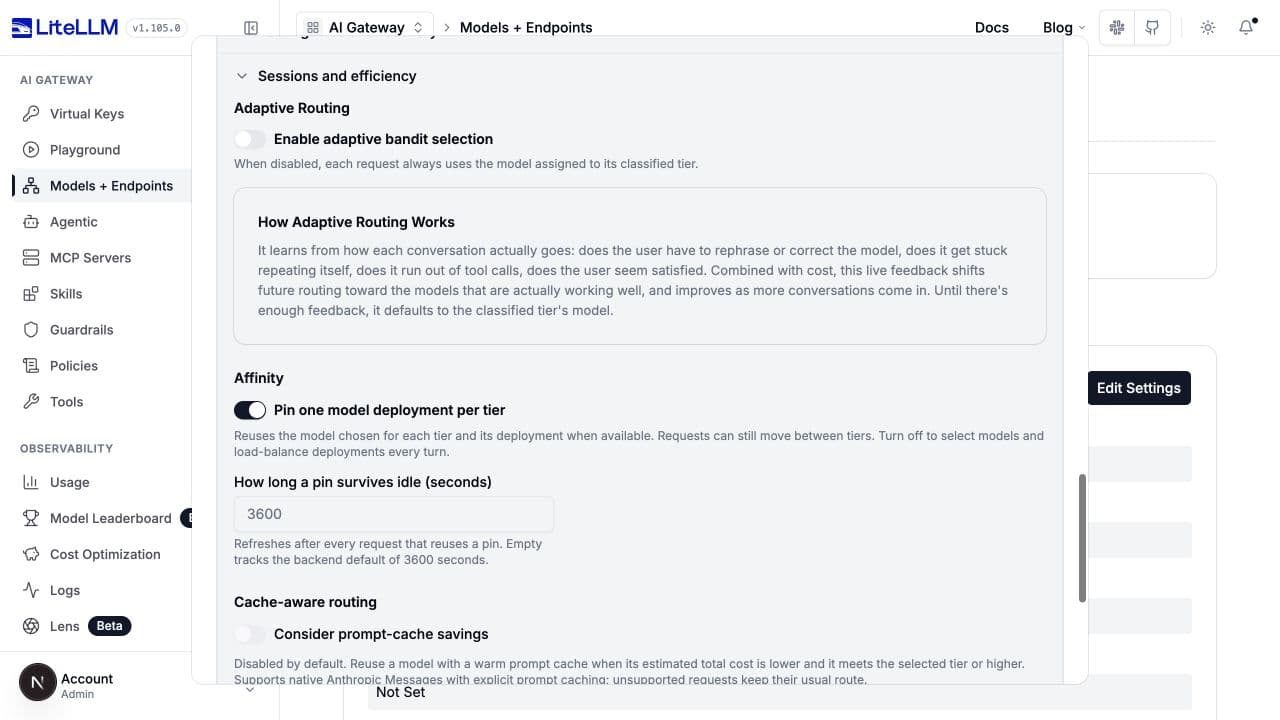
In Sessions and efficiency > Affinity, Pin one model deployment per tier maps to deployment_affinity (default true). It reuses a model/deployment within each classified tier while still permitting reclassification and tier changes. How long a pin survives idle maps to session_affinity_ttl_seconds (default 3600, positive integer), refreshed on reuse. Session affinity implies a deployment pin even when deployment_affinity is false.
classification_mode: user_turn
session_affinity: false
deployment_affinity: true
session_affinity_ttl_seconds: 3600
Session and efficiency controls
Preprocessing and routing overrides
These settings affect the input being classified or the final route. They are separate from the classifier's weights and prompt. An Always use the judge router can still skip a judge call because a keyword rule, housekeeping rule, or session decision already supplies the route.
Request preprocessing
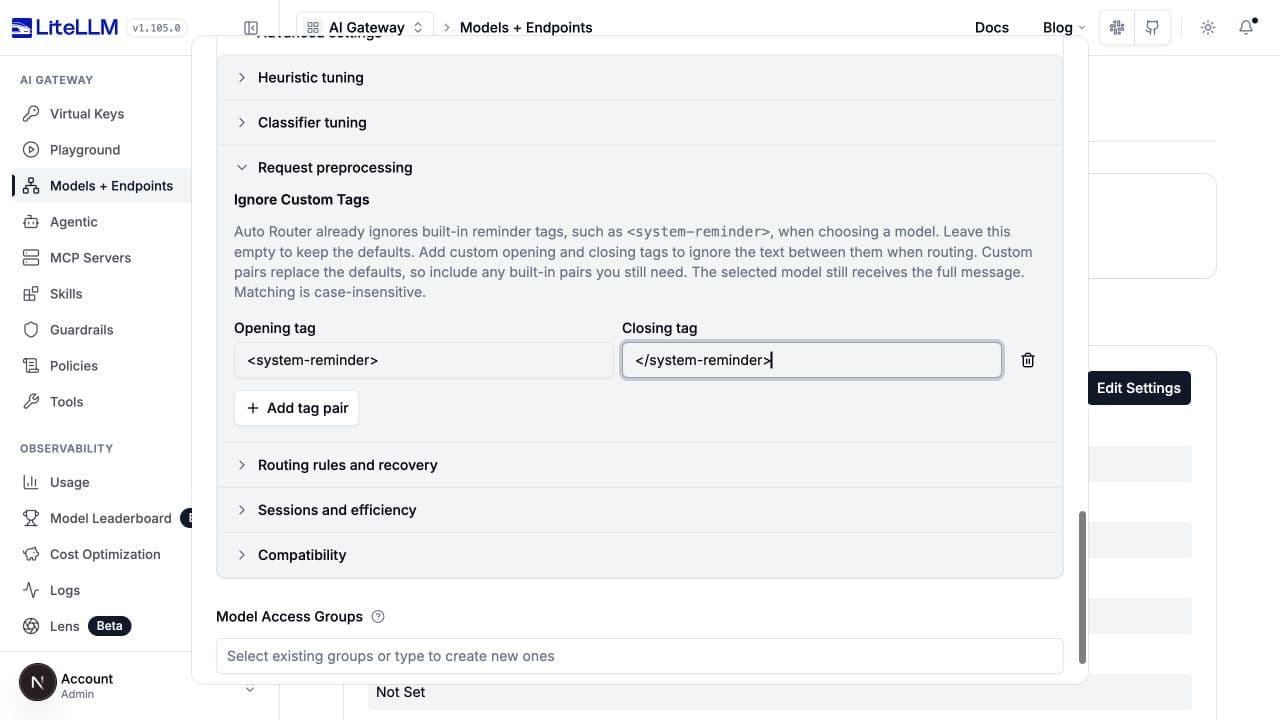
Request preprocessing > Ignore Custom Tags writes reminder_markers, a nonempty list of {open, close} pairs. Matching is case-insensitive. Custom pairs replace built-in pairs, including the Codex envelope pairs enabled for Codex user agents; include every built-in pair your harness still needs. Omit the setting to keep all applicable defaults.
reminder_markers:
  - open: <system-reminder>
    close: </system-reminder>
The selected answering model still receives the full message. This is classification cleanup, not redaction or an access-control boundary.
Tag-exclusion controls
Rules and recovery
Open Routing rules and recovery. Defaults and keys below apply to ordinary complexity routing; forecast/custom-tier modes hide or reject incompatible controls.
| UI section | Keys and defaults | Effect |
|---|---|---|
| Keyword Tier Overrides | keyword_tier_rules: null; rows contain keywords and tier | Match before classification. If several rules match, the highest matching tier wins. |
| Semantic keyword matching | semantic_keyword_matching: false, embedding_model: null, match_threshold: 0.5 | Uses embedding similarity instead of literal matching for the same rules. Requires an embedding model; threshold is 0 through 1. Adds an embedding call. |
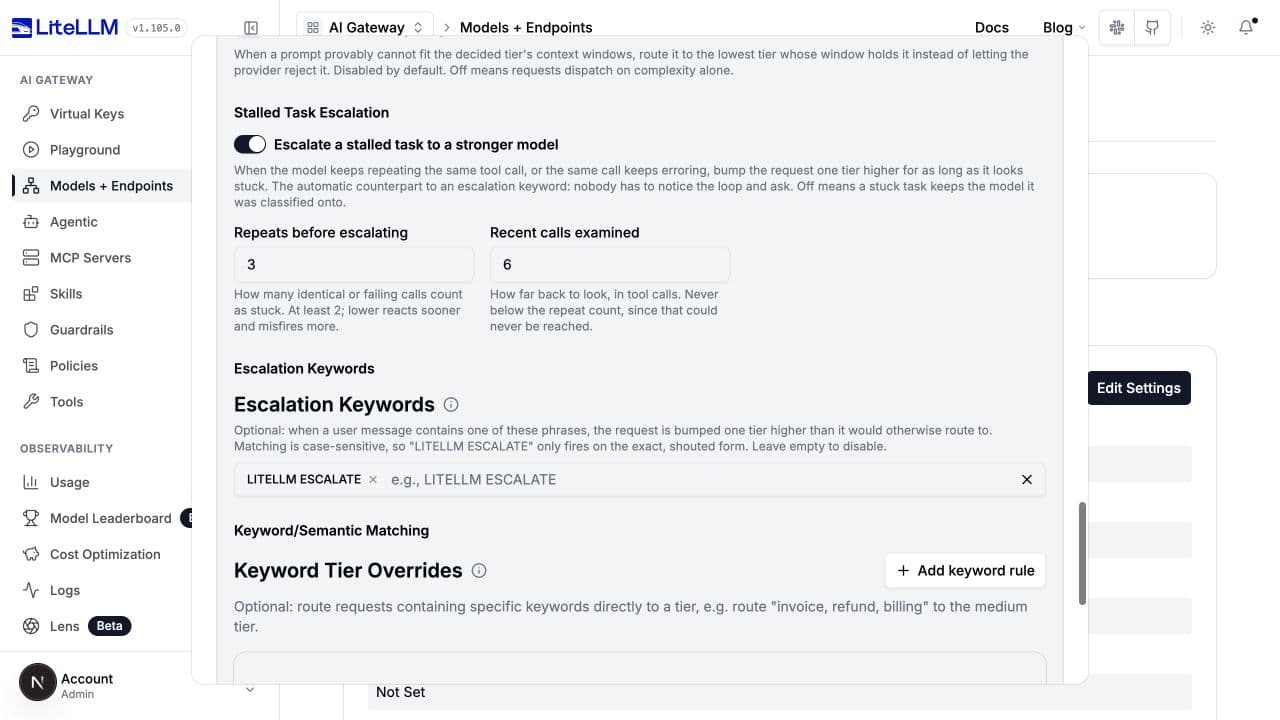
| Escalation Keywords | escalation_keywords defaults to ["LITELLM ESCALATE"] | Exact case-sensitive phrase bumps one tier. [] disables it. |
| Plan-Mode Override | plan_mode_min_tier: null, plan_mode_patterns: null | Optional minimum tier while agent plan-mode markers are present. Additional patterns are case-sensitive literal sentinels. Does not rewrite the session pin. |
| Housekeeping Routing | route_housekeeping_to_cheapest_tier: true, housekeeping_patterns: null | Recognized conversation-title calls skip classification and use the cheapest tier; keyword rules/pins still take precedence, and escalation can raise the result. Extra sentinels are case-sensitive. |
| Modality Routing | modality_routing: false, modality_pin_override: false | Replaces an explicitly non-vision model on image turns with a capable higher-tier/default model. The override allows this on a pinned session for that turn only. Unknown vision support is not treated as explicitly unsupported. |
| Context Window Escalation | enable_context_window_escalation: false, context_window_escalation_buffer: 0.95 | Restricts selection to models that fit, or moves to the nearest higher tier proven to fit. Buffer is greater than 0, at most 1. Models with unknown windows are not proof of a fit or overflow. |
| Stalled Task Escalation | stall_escalation_enabled: false, stall_escalation_window: 6, stall_escalation_repeat_threshold: 3 | Escalates repeated/failing recent tool calls one tier. Repeat count must be at least 2 and no greater than the positive window. Incompatible with session affinity or classification_mode: user_turn. |
keyword_tier_rules:
  - keywords: [invoice, refund, billing]
    tier: MEDIUM
semantic_keyword_matching: false
escalation_keywords: [LITELLM ESCALATE]
classification_mode: every_request
session_affinity: false
stall_escalation_enabled: true
stall_escalation_window: 6
stall_escalation_repeat_threshold: 3
If semantic matching fails, the router continues normal classification without retrying literal matching. Custom classifier plugins do not use the housekeeping shortcut. An explicit escalation keyword and stalled-task detection can each raise the result one rung in the same request. Plan-mode sentinels are caller-visible strings, not authorization controls.
Recovery controls
Model selection, compression, and compatibility
These do not change the meaning of a v1 score, v2 threshold, or judge prompt. See the routing reference and prompt-caching guide for full workflows.
| Setting group | Keys and defaults | Purpose |
|---|---|---|
| Adaptive Routing | adaptive: false; adaptive_weights: {quality: 0.3, cost: 0.7}; tier_distance_penalty: 0.5; adaptive_eligible: all | Learn model selection from feedback. Weights are 0 through 1 and sum to 1; penalty is nonnegative. classified_tier restricts sampling to the selected pool; all uses a soft tier-distance penalty. |
| Cache-aware routing | cache_aware_routing: false; cache_aware_routing_output_tokens: 1024; cache_aware_routing_timeout_ms: 2000 | Compare warm-cache cost on supported native Anthropic requests. Output estimate is nonnegative; timeout is positive. Unsupported requests retain their normal route. |
| Compression | Sibling litellm_params.auto_router_routing_compression and auto_router_model_compression, both unset | Choose a configured guardrail per hop. Both unset preserve inherited behavior. Once either is set, an omitted hop means no compression; none explicitly disables a hop. |
| Context compaction (YAML only) | context_compaction, enabled by default | Compacts full conversation history near the selected deployment's input limit. Distinct from the classifier's prior-turn window and compression guardrails. false or null disables it. |
| Compatibility | return_raw_model_name: false; max_tokens_from_tier_model: true | Return the resolved model name instead of the router alias; or control whether the selected model's output ceiling replaces the caller's token limit. Tier-level token overrides still win. |
| Routing plugins (startup configuration) | plugins: null | Narrow candidate models after classification; distinct from a tier-selecting classifier_plugin. |
Cache-aware routing has additional eligibility requirements: built-in tiers, supported native Anthropic requests and classified causes, no routing plugins/adaptive/session affinity, classification_mode: every_request, one string model alias per tier, no per-tier parameter overrides, and one eligible supported deployment per candidate. An enabled switch alone does not make every request eligible. Adaptive all is a soft tier preference, not a hard minimum-tier guarantee.
For full-history compaction, context_compaction.model optionally chooses a compatible native-compaction model; unset lets the router select a capable configured model. trigger_ratio defaults to 0.9 and must be strictly between 0 and 1; max_tokens defaults to 4096 and must be at least 512; timeout_seconds defaults to 120 and must be positive. Provider/client-managed native histories retain their existing behavior. Context-window escalation is suppressed while compaction is pending.
Verify a change
Keep a held-out set of real request shapes: simple lookups, difficult short questions, long context with a simple ask, follow-ups such as "yes", image tasks, tool continuations, and domain-specific terms. Change one policy or group of related settings, then compare against the previous configuration.
Use Test Routing to inspect the chosen tier/model without generating the final answer. A judge, OSS classifier, or semantic embedding call can still incur cost. Test Connection can also call completion models. A successful fallback does not prove the intended classifier answered.
Inspect the decision cause, classifier model, fallback/error information, and probabilities where available. OSS decisions retain cause: jev_classifier even for Laya and Nimble. Measure downstream task quality, judge-call rate, fallback rate, classification latency, and total cost including classifier calls. Self-hosted classifiers still incur infrastructure cost.
Save, reopen the router, and confirm the chosen mode, heuristic version, thresholds, and prompt. Use Evaluate to assess production quality and savings rather than treating a lower judge-call count or a higher forecast as a quality result.

