Auto Router OTEL Telemetry
Auto Router adds litellm.routing.* attributes to OpenTelemetry (OTEL) traces so you can identify which configuration ran, why it selected a model, and whether a classifier failed before the request recovered.
If your gateway already exports OTEL traces, there is no per-router telemetry switch to enable. Upgrade to a build with the instrumentation below. Use OTEL v2 for routing-phase details and retry/fallback events. Applications calling the gateway do not need an additional SDK or a different inference endpoint.
These attributes require a gateway build containing LiteLLM #44926. Setting an OTEL environment variable on an older build does not add the instrumentation. This guide covers inference through the gateway's asynchronous Router path; the dashboard's unsaved Test Routing preview is not an equivalent trace test.
Do I need to set anything up?
| Your gateway today | What to do |
|---|---|
| OTEL v2 already exports traces | Upgrade to a build containing the instrumentation. Existing routers and new routers emit the available fields automatically. |
Generic OTEL v1 with the otel callback | The upgraded build adds routing attributes to model spans. Enable v2 and restart for route-phase attributes and retry/fallback events. See the migration guide. |
| No OTEL exporter | Configure tracing once on the gateway using the example below. |
| Lens runs on a different gateway | Configure the source gateway's exporter or its collector to forward traces to Lens. Opening Lens does not connect the two gateways. |
Your exporter, sampling rules and collector filters still decide which traces reach the backend. If a collector forwards only selected router names, update that filter when adding a router.
Enable tracing on the gateway
Start with an existing Auto Router configuration and an OTLP collector reachable from the gateway. The gateway runtime needs the OpenTelemetry SDK and HTTP exporter; gateway server spans also need opentelemetry-instrumentation-fastapi. The LiteLLM proxy-runtime extra includes these dependencies.
Set the following in the gateway process environment before startup, then restart the gateway:
export LITELLM_OTEL_V2=true
export OTEL_EXPORTER=otlp_http
export OTEL_ENDPOINT="http://otel-collector:4318"
export OTEL_SERVICE_NAME="litellm-gateway"
export OTEL_INSTRUMENTATION_GENAI_CAPTURE_MESSAGE_CONTENT=no_content
Replace the endpoint with your collector's address. For OTLP/HTTP, LiteLLM appends /v1/traces to this base URL. Set OTEL_HEADERS if your collector requires authentication, for example Authorization=Bearer <collector-token>. Avoid also setting the equivalent OTEL_EXPORTER_OTLP_* aliases to conflicting values.
The complete example below explicitly registers the generic otel callback. If it is already configured, keep that entry. OTEL v2 also initializes a generic exporter on the proxy from its environment settings; no new callback is required for each router.
model_list:
  - model_name: efficient
    litellm_params:
      model: openai/gpt-6-luna
      api_key: os.environ/OPENAI_API_KEY
  - model_name: capable
    litellm_params:
      model: openai/gpt-6.1-sol
      api_key: os.environ/OPENAI_API_KEY
  - model_name: smart-router
    model_info:
      id: smart-router-config
    litellm_params:
      model: auto_router/complexity_router
      complexity_router_default_model: capable
      complexity_router_config:
        classifier_type: heuristic
        tiers:
          SIMPLE: efficient
          MEDIUM: efficient
          COMPLEX: capable
          REASONING: capable

litellm_settings:
  callbacks: ["otel"]

general_settings:
  master_key: os.environ/LITELLM_MASTER_KEY
Supply OPENAI_API_KEY and LITELLM_MASTER_KEY through your deployment's secret configuration, then start the proxy:
litellm --config config.yaml --port 4000
No collector yet? Use console export to inspect spans in gateway output:
unset OTEL_ENDPOINT OTEL_TRACES_ENDPOINT
unset OTEL_EXPORTER_OTLP_ENDPOINT OTEL_EXPORTER_OTLP_TRACES_ENDPOINT
export OTEL_EXPORTER=console
Clear the endpoint variables because a configured endpoint selects network export even when OTEL_EXPORTER=console. If you configured explicit network exporters in callback_settings.otel, remove those for this console-only preview as well. Console export does not send traces to Lens or another backend.
These routing attributes and span events do not require LITELLM_OTEL_INTEGRATION_ENABLE_METRICS or LITELLM_OTEL_INTEGRATION_ENABLE_EVENTS.
Send traces to Lens
Enable trace ingestion on the Lens gateway and obtain a LiteLLM key allowed to ingest traces there. To export directly from the source gateway, use the Lens gateway's base URL and ingestion key:
export LENS_GATEWAY_URL="https://your-lens-gateway.example"
export LENS_INGEST_KEY="<lens-ingestion-key>"
export OTEL_EXPORTER=otlp_http
export OTEL_ENDPOINT="${LENS_GATEWAY_URL}/v1/traces"
export OTEL_HEADERS="Authorization=Bearer ${LENS_INGEST_KEY}"
Keep LITELLM_OTEL_V2=true and restart the source gateway after changing its exporter. If an existing collector already sends traces to another backend, add Lens as a collector destination to keep both copies. The application continues sending inference requests to the source gateway; only telemetry is forwarded to Lens. See the Lens OpenTelemetry integration for ingestion setup and examples.
Verify an Auto Router request
Use a LiteLLM virtual key with access to smart-router as LITELLM_API_KEY:
curl http://localhost:4000/v1/chat/completions \
  -H "Authorization: Bearer $LITELLM_API_KEY" \
  -H "Content-Type: application/json" \
  -d '{"model":"smart-router","messages":[{"role":"user","content":"What is 2+2?"}]}'
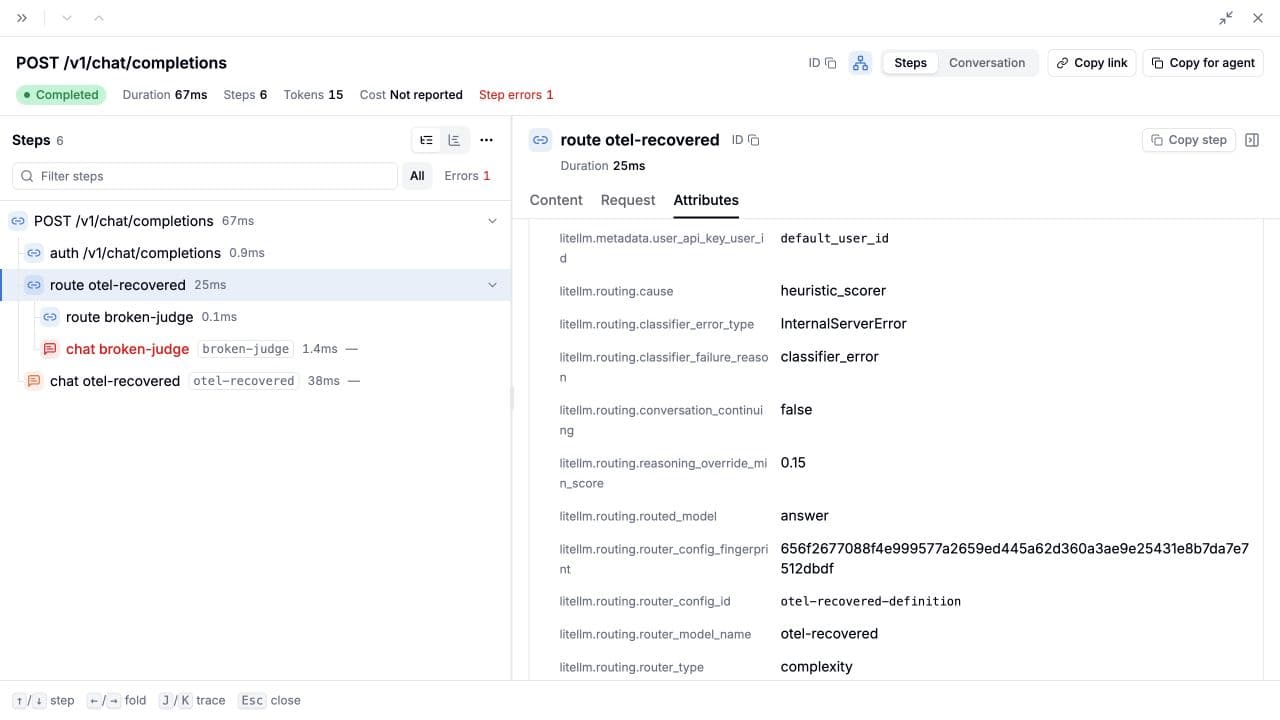
In your trace backend, find the request under service litellm-gateway. In Lens, open Lens > Traces, select the request, select route smart-router, then open Attributes. Look for litellm.routing.router_config_id=smart-router-config, litellm.routing.routed_model, and litellm.routing.cause.
| Trace location | Data you can inspect |
|---|---|
V2 route <requested-model> phase | Selected configuration before classification, then the completed decision when available. A failure before a decision can still retain the configuration. |
| Model-call span, v1 or v2 | The completed routing decision associated with that model call. The span name can retain the requested router alias; use routed_model for the selected model group. |
| V2 request root, or current span before a root exists | Routing retry/fallback events with the router name, error class and existing retry counter. |
Internal classifier and embedding calls do not inherit an unfinished outer routing decision. If a failed Auto Router attempt falls back to a plain model, that final model span clears the previous decision. Inspect the earlier route phase to diagnose the failed router.
Available telemetry
All attribute names in this table start with litellm.routing.. Fields are optional and appear only when the selected strategy produces a scalar value. An absent field does not mean zero, false or success.
| Attribute suffix | Meaning |
|---|---|
router_model_name, router_type | Registered router identity and executed strategy type: complexity, semantic, adaptive or quality. The registered name can differ from a team's public alias. |
router_config_id, router_config_updated_at | Selected definition's ID and update timestamp, when available. Static configurations may have no update timestamp. |
router_config_fingerprint | Fingerprint of configured routing fields, model and tags, calculated when the strategy is registered. |
routed_model, cause | Selected model group and why it was selected. |
tier, tier_label, request_type, score | Strategy-specific classification. Tiers can use custom names; a score is not necessarily a probability. |
classifier_model, classifier_cost, classifier_confidence | Classifier identity, recorded cost and confidence, when available. |
classifier_failure_reason, classifier_error_type | Bounded failure category and exception class name, when an exception exists. The exception message is not included in these fields. |
classifier_primary_rule, classifier_capability_boundary | Rule and capability boundary reported by a capability classifier. |
classifier_p_solve, classifier_calibrated_p_solve, classifier_calibration_version, classifier_threshold | Available capability estimates, calibration identity and threshold. |
classifier_efficient_p_solve, classifier_capable_p_solve, classifier_calibrated_efficient_p_solve, classifier_calibrated_capable_p_solve | Available solver forecasts for the efficient and capable models. |
classifier_max_quality_gap, classifier_prompt_version | Configured quality-gap constraint and classifier prompt version, when produced. |
escalated, context_escalated, context_escalation_original_tier, reasoning_override_min_score | Escalation and reasoning-override details. |
conversation_continuing | Whether the decision identifies a continuing conversation. |
savings_baseline_model, savings_baseline_deployment_id | Baseline identity used by the routing decision. These fields alone do not establish an amount saved. |
The fingerprint is not a complete snapshot of everything affecting routing. It excludes referenced file contents, live adaptive state and plugin implementation/state. Compare it alongside the configuration ID, timestamp and deployed gateway version.
Existing model-call telemetry supplies provider, token usage and cost attributes; span timing supplies duration. This feature does not create new routing metrics, dashboards or alerts. See the OTEL v2 reference for the surrounding trace data.
Classifier failures that recover
A successful HTTP response can contain a classifier failure. For example, an LLM classifier can fail and the configured heuristic fallback can still choose a model and complete the request. An illustrative decision is:
{
  "litellm.routing.router_model_name": "smart-router",
  "litellm.routing.router_config_id": "smart-router-config",
  "litellm.routing.routed_model": "efficient",
  "litellm.routing.cause": "heuristic_scorer",
  "litellm.routing.classifier_failure_reason": "classifier_error",
  "litellm.routing.classifier_error_type": "InternalServerError"
}
This recovery example requires an LLM classifier; the heuristic-only setup above makes no classifier model call. Search for the presence of classifier_failure_reason to find recovered failures. Filtering only for an error HTTP status or a cause containing fallback will miss some of them.
classifier_failure_reason | Meaning |
|---|---|
timeout | The classifier timed out. |
circuit_open | An open circuit prevented a classifier call. |
not_configured | A required classifier configuration was unavailable. |
unsupported_input | The classifier could not handle the input. |
invalid_response | The classifier result could not be used as a valid decision. |
declined | The classifier declined to choose a tier. |
classifier_error | Another classifier exception occurred. |
The routing cause keeps the actual decision reason, such as heuristic_scorer, heuristic_v2, llm_classifier, capability_classifier, jev_classifier, classifier_plugin or default_model_fallback. Semantic routers report semantic_match, semantic_no_match or semantic_error; a normal no-match is not a classifier failure. Other routing policies can report their own causes.
Retry and fallback events
OTEL v2 records litellm.routing.retry when the Router records retry/fallback bookkeeping for an auto-routed attempt. The event includes litellm.routing.router_model_name, litellm.retry.count and error.type, plus litellm.deployment.model_group and litellm.deployment.id when known.
The count follows the existing request retry counter. An event can describe an exhausted attempt or a fallback transition; it does not guarantee another outbound retry or equal the exact number of provider calls. Configuration identity remains on the route span.
Data capture and performance
The new scalar routing attributes exclude prompt-quoting fields such as signals, matched keywords and classifier_crux, along with raw configuration, exception messages and nested forecast maps. Other span attributes and logs still follow their own capture and redaction settings. In particular, v1 retains its existing metadata export; this allowlist does not make the entire trace prompt-free.
Telemetry adds attribute processing and larger trace payloads. It does not add classifier or completion calls, and the configuration fingerprint is reused between requests. Standard network exporters batch in the background; console and explicitly configured simple processors behave differently. Measure throughput and tail latency with your own exporter and traffic before setting a performance expectation.
Troubleshooting
| Symptom | Check |
|---|---|
| No trace arrives | Confirm OTEL is configured on the source gateway, the destination accepts the protocol and credentials, and sampling or collector filters retain the request. A successful completion does not prove export succeeded. |
Traces arrive without litellm.routing.* | Confirm the gateway includes the instrumentation, the request went through a saved router using the gateway inference API, and you are inspecting the route or model-call span. |
| Model attributes exist, but no routing-phase details | Enable v2 before startup and restart. Check that the backend or preset retains non-LLM spans and that gateway instrumentation dependencies are installed. |
| Configuration fields exist without a chosen model | The attempt may have failed before producing a routing decision. Inspect that phase and its error. |
| The final successful span has no routing fields | A plain-model fallback clears the earlier router decision. Inspect the previous route phase. |
| No fingerprint or timestamp | A definition may not have a timestamp, and a fingerprint can be absent when the configured definition cannot be serialized. Use the available identity fields. |
| A recovered failure has no exception class | Some failure categories are decisions rather than caught exceptions. Inspect classifier_failure_reason and cause together. |

