Create Pass Through Endpoints
Route requests from your LiteLLM proxy to any external API. Perfect for custom models, image generation APIs, or any service you want to proxy through LiteLLM.
Key Benefits:
- Onboard third-party endpoints like Bria API and Mistral OCR
- Set custom pricing per request, or let a target that fans out to several models report its own cost and usage
- Proxy Admins don't need to give developers api keys to upstream llm providers like Bria, Mistral OCR, etc.
- Maintain centralized authentication, spend tracking, budgeting
Quick Start with UI (Recommended)
The easiest way to create pass through endpoints is through the LiteLLM UI. In this example, we'll onboard the Bria API and set a cost per request.
Step 1: Create Route Mappings
To create a pass through endpoint:
- Navigate to the LiteLLM Proxy UI
- Go to the
Models + Endpointstab - Click on
Pass Through Endpoints - Click "Add Pass Through Endpoint"
- Enter the following details:
Required Fields:
Path Prefix: The route clients will use when calling LiteLLM Proxy (e.g.,/bria,/mistral-ocr)Target URL: The URL where requests will be forwarded
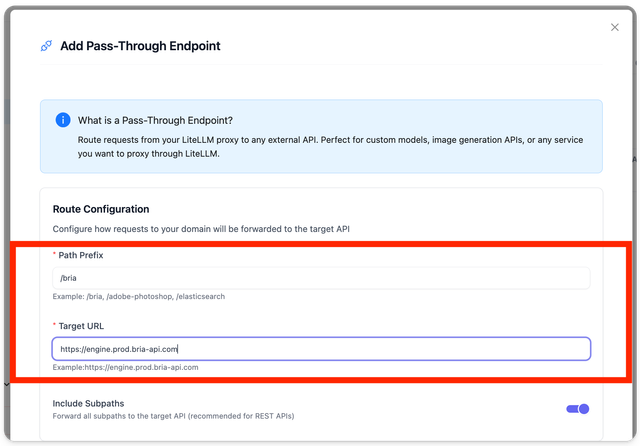
Route Mapping Example:
The above configuration creates these route mappings:
| LiteLLM Proxy Route | Target URL |
|---|---|
/bria | https://engine.prod.bria-api.com |
/bria/v1/text-to-image/base/model | https://engine.prod.bria-api.com/v1/text-to-image/base/model |
/bria/v1/enhance_image | https://engine.prod.bria-api.com/v1/enhance_image |
/bria/<any-sub-path> | https://engine.prod.bria-api.com/<any-sub-path> |
All routes are prefixed with your LiteLLM proxy base URL: https://<litellm-proxy-base-url>
Step 2: Configure Headers and Pricing
Configure the required authentication and pricing:
Authentication Setup:
- The Bria API requires an
api_tokenheader - Enter your Bria API key as the value for the
api_tokenheader
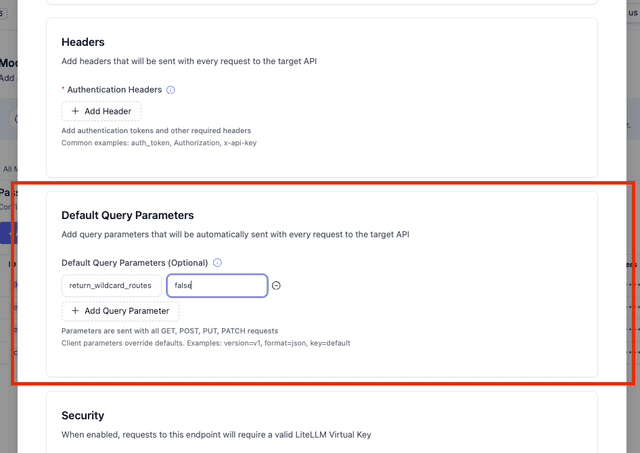
Default Query Parameters (Optional):
- Add query parameters that will be automatically sent with every request
- Perfect for API versioning, format specifications, or default configurations
- Clients can override these parameters by providing their own values
- Example:
version=v1,format=json,timeout=30
Pricing Configuration:
- Set a cost per request (e.g., $12.00 in this example)
- This enables cost tracking and billing for your users
- A flat cost per request suits a target whose price does not vary. If the target invokes several models internally and knows its own totals, have it report them instead, see Pass-Through Cost & Usage Tracking

Step 3: Save Your Endpoint
Once you've completed the configuration:
- Review your settings
- Click "Add Pass Through Endpoint"
- Your endpoint will be created and immediately available
Step 4: Test Your Endpoint
Verify your setup by making a test request to the Bria API through your LiteLLM Proxy:
curl -i -X POST \
  'http://localhost:4000/bria/v1/text-to-image/base/2.3' \
  -H 'Content-Type: application/json' \
  -H 'Authorization: Bearer <your-litellm-api-key>' \
  -d '{
    "prompt": "a book",
    "num_results": 2,
    "sync": true
  }'
Expected Response: If everything is configured correctly, you should receive a response from the Bria API containing the generated image data.
Config.yaml Setup
You can also create pass through endpoints using the config.yaml file. Here's how to add a /v1/rerank route that forwards to Cohere's API:
Example Configuration
general_settings:
  master_key: os.environ/LITELLM_MASTER_KEY
  pass_through_endpoints:
    - path: "/v1/rerank"                                  # Route on LiteLLM Proxy
      target: "https://api.cohere.com/v1/rerank"          # Target endpoint
      headers:                                            # Headers to forward
        Authorization: "bearer os.environ/COHERE_API_KEY"
        content-type: application/json
        accept: application/json
      forward_headers: true                               # Forward all incoming headers
      default_query_params:                               # Optional: Default query parameters
        version: "v1"                                     # Always send version=v1
        format: "json"                                    # Default format (can be overridden)
Start and Test
-
Start the proxy:
litellm --config config.yaml --detailed_debug -
Make a test request:
curl --request POST \
  --url http://localhost:4000/v1/rerank \
  --header 'accept: application/json' \
  --header 'content-type: application/json' \
  --data '{
    "model": "rerank-english-v3.0",
    "query": "What is the capital of the United States?",
    "top_n": 3,
    "documents": ["Carson City is the capital city of the American state of Nevada."]
  }'
Expected Response
{
  "id": "37103a5b-8cfb-48d3-87c7-da288bedd429",
  "results": [
    {
      "index": 2,
      "relevance_score": 0.999071
    }
  ],
  "meta": {
    "api_version": {"version": "1"},
    "billed_units": {"search_units": 1}
  }
}
Configuration Reference
Complete Specification
general_settings:
  pass_through_request_timeout: 600   # Optional: upstream timeout (seconds) for all pass-through routes. Default: 600
  pass_through_endpoints:
    - path: string                    # Route on LiteLLM Proxy Server
      target: string                  # Target URL for forwarding
      auth: boolean                   # Enable LiteLLM authentication (Enterprise)
      forward_headers: boolean        # Forward all incoming headers
      include_subpath: boolean        # If true, forwards requests to sub-paths (default: false)
      timeout: float                  # Optional: per-endpoint upstream timeout (seconds). Overrides pass_through_request_timeout
      methods: list[string]           # Optional: HTTP methods (e.g., ["GET", "POST"]). If not specified, all methods are supported.
      default_query_params:           # Optional: Default query parameters sent with every request
        <param-name>: string          # Key-value pairs (e.g., version: "v1", format: "json")
      headers:                        # Custom headers to add
        Authorization: string         # Auth header for target API
        content-type: string         # Request content type
        accept: string               # Expected response format
        LANGFUSE_PUBLIC_KEY: string  # For Langfuse endpoints
        LANGFUSE_SECRET_KEY: string  # For Langfuse endpoints
        <custom-header>: string      # Any custom header
Request timeouts
Pass-through routes default to a 600 second upstream timeout. Set general_settings.pass_through_request_timeout for a global override, or timeout on a custom endpoint (per-endpoint wins)
Native provider passthrough routes (Bedrock /converse, /v1/messages, and the native /v1/responses stream) resolve their timeout through the router, and the first value set wins: the request's timeout, the deployment's timeout under litellm_params, router_settings.timeout, litellm_settings.request_timeout when you set it (or the REQUEST_TIMEOUT env var), general_settings.pass_through_request_timeout, then 600 seconds. A streaming request checks stream_timeout at each of those levels before timeout. So a litellm_settings.request_timeout you set outranks pass_through_request_timeout on these routes, and on a stream it bounds each wait for the next chunk, so a stalled upstream ends the stream with an error instead of hanging
Header Options
- Authorization: Authentication for the target API
- content-type: Request body format specification
- accept: Expected response format
- LANGFUSE_PUBLIC_KEY/SECRET_KEY: For Langfuse integration
- Custom headers: Any additional key-value pairs
Default Query Parameters
- Parameter precedence: Client params > URL params > default params
- Use cases: API versioning, authentication tokens, format control, feature flags
- Override capability: Clients can override any default parameter
- Examples:
version: "v1",format: "json",timeout: "30"
Sub-path Routing
By default, pass-through endpoints only match the exact path specified. To forward requests to sub-paths, set include_subpath: true:
general_settings:
  pass_through_endpoints:
    - path: "/custom-api"                    # Any path prefix you choose
      target: "https://api.example.com"
      include_subpath: true  # Forward /custom-api/*, not just /custom-api
| Setting | Behavior |
|---|---|
include_subpath: false (default) | Only /custom-api is forwarded |
include_subpath: true | /custom-api, /custom-api/v1/chat, /custom-api/anything are all forwarded |
Restricting Keys and Teams to Routes
An endpoint with auth: true rejects non-admin keys with a 403 unless the key or its team lists the route in allowed_passthrough_routes. The key's list is used when it has one; otherwise the team's list applies. To carve a route back out of a broader grant, add it to denied_passthrough_routes. A deny on the key or on its team always wins over an allow, so a team can grant /custom-api while one key, or the whole team, is blocked from /custom-api/admin
curl -X POST http://localhost:4000/key/generate \
  -H "Authorization: Bearer $LITELLM_MASTER_KEY" \
  -H "Content-Type: application/json" \
  -d '{
    "allowed_passthrough_routes": ["/custom-api"],
    "denied_passthrough_routes": ["/custom-api/admin"]
  }'
/team/new, /team/update and /key/update take the same two fields, and both are stored in the key or team metadata. With the key above:
| Request | Result |
|---|---|
/custom-api/v1/chat | Forwarded |
/custom-api/admin, /custom-api/admin/users | 403 naming the matched denied_passthrough_routes entry |
/custom-api/administrator | Forwarded, since an entry only matches whole path segments |
/custom-api/public/../admin/users, /custom-api//admin/users | 403, the path is checked as it will be forwarded |
An entry matches its exact path and everything under it, a trailing / on an entry is ignored, and a trailing * matches any route that starts with the text before it (/custom-api/adm*). A more specific allow cannot re-open a route under a denied prefix. Team endpoint listings also hide the authenticated endpoints a team denies
The deny list is checked against the path LiteLLM forwards, after .., // and percent-encoding are resolved, and it matches that path exactly. Variants that LiteLLM forwards unchanged, such as /custom-api/ADMIN, /custom-api/admin;x=1, a trailing %20 or a backslash, are not denied. If your upstream treats those as the same path, grant only the routes a key needs with allowed_passthrough_routes instead of relying on a deny entry
Both fields are Enterprise features, and only proxy admins can set or change them. A non-admin update that would change, clear or drop an existing deny list, including by replacing metadata, gets a 403. Proxy admin keys are not restricted by either list. The deny list only applies to custom endpoints with auth: true; endpoints with auth: false and LiteLLM's built-in provider routes such as /anthropic/* ignore it
Default Query Parameters
Pass-through endpoints support default query parameters that are automatically added to every request. This is useful for API versioning, format specifications, authentication tokens, or any default configuration.
How It Works
Parameter Precedence (highest to lowest priority):
- Client-provided parameters (in the request URL)
- URL parameters (from the target URL)
- Default parameters (from configuration)
Example Configuration
general_settings:
  pass_through_endpoints:
    - path: "/api/v1"
      target: "https://external-api.com/service?timeout=60"  # URL has timeout=60
      default_query_params:
        version: "v1"          # Always add version=v1
        format: "json"         # Default format=json (can be overridden)
        auth_level: "basic"    # Always add auth_level=basic
Request Examples
Client Request: GET /api/v1/users
Actual Backend Call: https://external-api.com/service?version=v1&format=json&auth_level=basic&timeout=60
Client Request: GET /api/v1/users?format=xml&custom=value
Actual Backend Call: https://external-api.com/service?version=v1&auth_level=basic&timeout=60&format=xml&custom=value
- Client
format=xmloverrides defaultformat=json - Default
version=v1andauth_level=basicare preserved - URL
timeout=60is preserved - Client
custom=valueis added
Use Cases
- API Versioning: Always send
version=v2to maintain compatibility - Authentication: Add authentication tokens like
api_key=default_key - Format Control: Default to
format=jsonbut allow client override - Rate Limiting: Set
rate_limit=standardas default - Feature Flags: Enable
experimental=falseby default
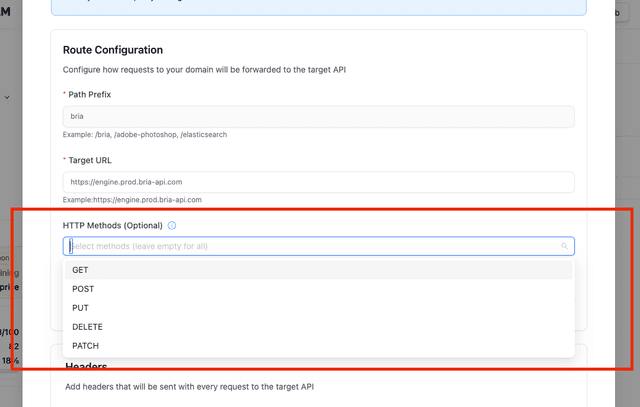
You can configure different target URLs for the same path using different HTTP methods. This is useful when different backends handle different operations:
general_settings:
  pass_through_endpoints:
    # GET requests to /azure/kb go to read API
    - path: "/azure/kb"
      target: "https://read-api.example.com/knowledge-base"
      methods: ["GET"]
      headers:
        Authorization: "bearer os.environ/READ_API_KEY"

    # POST requests to /azure/kb go to write API
    - path: "/azure/kb"
      target: "https://write-api.example.com/knowledge-base"
      methods: ["POST"]
      headers:
        Authorization: "bearer os.environ/WRITE_API_KEY"

    # PUT requests to /azure/kb go to update API
    - path: "/azure/kb"
      target: "https://update-api.example.com/knowledge-base"
      methods: ["PUT"]
      headers:
        Authorization: "bearer os.environ/UPDATE_API_KEY"
Key Points:
- If
methodsis not specified, the endpoint supports all HTTP methods (GET, POST, PUT, DELETE, PATCH) - Multiple endpoints can share the same path as long as they have different methods
- You can specify multiple methods for a single endpoint:
methods: ["GET", "POST"] - This allows you to route to different backends based on the operation type
Advanced: Custom Adapters
For complex integrations (like Anthropic/Bedrock clients), you can create custom adapters that translate between different API schemas.
1. Create an Adapter
from litellm import adapter_completion
from litellm.integrations.custom_logger import CustomLogger
from litellm.types.llms.anthropic import AnthropicMessagesRequest, AnthropicResponse

class AnthropicAdapter(CustomLogger):
    def translate_completion_input_params(self, kwargs):
        """Translate Anthropic format to OpenAI format"""
        request_body = AnthropicMessagesRequest(**kwargs)
        return litellm.AnthropicConfig().translate_anthropic_to_openai(
            anthropic_message_request=request_body
        )

    def translate_completion_output_params(self, response):
        """Translate OpenAI response back to Anthropic format"""
        return litellm.AnthropicConfig().translate_openai_response_to_anthropic(
            response=response
        )

anthropic_adapter = AnthropicAdapter()
2. Configure the Endpoint
model_list:
  - model_name: my-claude-endpoint
    litellm_params:
      model: gpt-6-luna
      api_key: os.environ/OPENAI_API_KEY

general_settings:
  master_key: os.environ/LITELLM_MASTER_KEY
  pass_through_endpoints:
    - path: "/v1/messages"
      target: custom_callbacks.anthropic_adapter
      headers:
        litellm_user_api_key: "x-api-key"
3. Test Custom Endpoint
curl --location 'http://0.0.0.0:4000/v1/messages' \
  -H "x-api-key: $LITELLM_API_KEY" \
  -H 'anthropic-version: 2023-06-01' \
  -H 'content-type: application/json' \
  -d '{
    "model": "my-claude-endpoint",
    "max_tokens": 1024,
    "messages": [{"role": "user", "content": "Hello, world"}]
  }'
Tutorial - Add Azure OpenAI Assistants API as a Pass Through Endpoint
In this video, we'll add the Azure OpenAI Assistants API as a pass through endpoint to LiteLLM Proxy.
Troubleshooting
Common Issues
Authentication Errors:
- Verify API keys are correctly set in headers
- Ensure the target API accepts the provided authentication method
Routing Issues:
- Confirm the path prefix matches your request URL
- Verify the target URL is accessible
- Check for trailing slashes in configuration
Response Errors:
- Enable detailed debugging with
--detailed_debug - Check LiteLLM proxy logs for error details
- Verify the target API's expected request format
Allowing Team JWTs to use pass-through routes
If you are using pass-through provider routes (e.g., /anthropic/*) and want your JWT team tokens to access these routes, add mapped_pass_through_routes to the team_allowed_routes in litellm_jwtauth or explicitly add the relevant route(s).
Example (proxy_server_config.yaml):
general_settings:
  enable_jwt_auth: True
  litellm_jwtauth:
    team_ids_jwt_field: "team_ids"
    team_allowed_routes: ["openai_routes","info_routes","mapped_pass_through_routes"]
For your own pass-through endpoints, mapped_pass_through_routes only covers the provider prefixes LiteLLM ships with. If your endpoints share a custom prefix, grant that prefix once with a trailing * and every endpoint you register under it later is allowed without another config change.
general_settings:
  enable_jwt_auth: True
  litellm_jwtauth:
    team_ids_jwt_field: "team_ids"
    team_allowed_routes: ["openai_routes","info_routes","/internal-models/*"]
Getting Help
Our emails ishaan@berri.ai / krrish@berri.ai

