Model optimizations
Compare models on your agent's work before changing its default model. In Lens > Model optimizations, you can compare answer quality, cost, and latency, then open individual answers and their source traces
Choose how to collect the comparison:
| Type | What runs | Use it to |
|---|---|---|
| Live | Your agent serves a share of live requests with candidate models | Measure quality and cost on real user traffic |
| Shadow | Lens replays the final model call from sampled traces | Compare answers while users keep receiving the original response |
| Offline | Lens tests a saved dataset with each model | Compare the same cases, using final-call replay or your full agent |
Your current model is the baseline. The other models you select are candidates. Each comparison has its own results, quality settings, and pause/resume controls
Before you start
Use a Lens deployment connected to your LiteLLM gateway, with agent traces reaching Lens and models available through that gateway. Open Lens with a proxy administrator account to create and control comparisons. Admin viewers can read results
Keep Demo data off when running your own comparisons. To explore the screens with sample traffic, use the demo walkthrough
For the runnable examples below, use Python 3.11 or newer. Clone Lens and install the SDK with the example dependencies:
git clone https://github.com/BerriAI/lens.git
cd lens
python -m pip install './src/sdk[examples]'
Load the following values into your shell through your environment or secret manager:
| Variable | Value |
|---|---|
LENS_BASE_URL | Gateway origin reachable from your agent, such as https://gateway.example.com |
LENS_API_KEY | Gateway key for the account running the comparison |
LITELLM_PROXY_API_BASE | Gateway model API base, such as https://gateway.example.com/v1 |
LITELLM_PROXY_API_KEY | Gateway key for model calls |
LENS_TRACE_ENDPOINT | Full OTLP HTTP trace endpoint from Lens tracing setup, ending in /v1/traces |
LENS_TRACE_API_KEY | Tracing key created in Lens |
LENS_OPTIMIZATION_AGENT | Agent name to record, such as model-comparison-example |
LENS_OPTIMIZATION_BASELINE | Current model's exact name in your gateway catalog |
Use inference and tracing credentials for the same team and user so Lens can join model spend to the trace. The example agent reads these values, calls the gateway, and exports the completed trace
Run it once to make the agent available in Lens:
python src/sdk/examples/optimizations.py shadow --question 'What is 3 times 6?'
The command prints the trace ID and model. Find that ID under Traces and open its answer before creating a comparison
Live
Test candidate models on a share of your agent's live runs. Users receive the answer from the assigned model, and you compare its cost and quality with the baseline
Set the share of traffic that candidates receive. For example, 10% traffic with two candidates gives each candidate about 5% of runs and leaves 90% on the baseline. Measure quality with existing 0–10 user feedback or an LLM judge
Live example
- Open Model optimizations > New optimization > Live
- Choose your agent and Current model. Set Traffic, then select candidate models under Models
- Under Quality, choose LLM judge and a Judge model. Open Advanced to set the Quality rubric and judge sampling percentages
- Choose Start live test, then run:
python src/sdk/examples/optimizations.py live --question 'What is 3 times 6?'
The runnable Live example selects a model, runs the agent, and prints the trace ID, model, and whether it used the baseline:
{"traceId": "11111111111111111111111111111111", "model": "candidate-model", "baseline": false}
Open the comparison to see the run, cost, latency, and judge score. Repeat with representative questions to collect results for both groups. For User feedback, scores come from feedback already attached to each trace
To connect your own agent, add this call before a run and use the returned model for that run's model calls:
assignment = await lens.optimizations.aassign(
    agent=agent_name,
    baseline=current_model,
    trace_id=trace_id,
)
result = await agent.run(input, model=assignment.model, trace_id=trace_id)
The comparison's Connect live routing panel provides the snippet with your agent and baseline filled in. Export spans with the same trace ID. The SDK keeps the supplied baseline if assignment fails; use fail_open=False to surface connection errors during setup
Shadow
Compare candidate answers alongside incoming traffic. After a sampled trace completes, Lens sends its final recorded model request to the candidates and scores their answers against the original. Your user keeps the original response
Shadow measures the final call's cost and quality. Use it to compare the answer step of an agent while keeping the recorded conversation and tool results
Shadow example
- Open Model optimizations > New optimization > Shadow
- Choose the agent, current model, candidates, and judge. Set Traffic to the share of completed traces to sample
- Choose Start shadow test, then send a traced baseline run:
python src/sdk/examples/optimizations.py shadow --question 'What is 3 times 6?'
The runnable Shadow example prints the original trace ID and model. Open the comparison to see the baseline and candidate answers, their judge scores, and cost per final call
For your own agent, record the complete Chat Completions request JSON on the final model span as lens.replay.request. Include messages, tool-call IDs, function definitions, and sampling or response-format settings. Keep credentials out of that attribute. The example exports this request with the model response ID, which Lens uses to find the call's cost
Offline
Compare models on a saved dataset revision. You choose the cases, baseline, candidates, and judge. Both the baseline and candidates make fresh model calls, and Lens scores them with the same rubric
Choose Final model call to reuse recorded conversation and tool results. Choose Full agent to execute your agent's tools and model calls for each case. Offline refers to the saved dataset; both paths make real model requests through your gateway
Offline example
- Open a trace and choose Add to dataset. Save its conversation as a case, then open the dataset
- Review the included cases and their Expected answers. Save your edits as a revision
- Choose Optimize models, keep Final model call, and select the current model, candidates, and judge
- Choose Run comparison
Lens runs the included cases with each model. The comparison reaches Completed when the batch finishes. Open a case to compare answers and follow Open source trace to inspect its recorded context
The comparison uses the selected dataset revision. Later edits belong to a new revision, so you can rerun a known set of cases
Full-agent example
Use this path to compare the whole task, including tool execution and multiple model calls. Your SDK runner executes the agent in your environment, where its dependencies and application access are available
- Open a dataset and choose Optimize models
- Select Full agent, the current model, candidates, and judge, then choose Run comparison
- Open Run your agent in the comparison. Copy its snippet to connect your agent, or use the runnable full-agent example
- For the example, set
LENS_OPTIMIZATION_AGENTto the dataset's agent name. Copy the comparison ID from thelens.optimizations.arun(...)call in that panel:
export LENS_OPTIMIZATION_ID='comparison-id-from-the-runner-snippet'
python src/sdk/examples/optimizations.py offline
For one case and two models, the example prints:
Submitted 2 full-agent trials
Each trial calls your task with a dataset case and the model to use. Your task returns a fresh completed trace. Lens then records the answer, total agent cost, duration, and judge score
To use your own agent, adapt its interface in the generated snippet:
import os
from lens import Lens, Run
from my_agent import agent

lens = Lens(os.environ["LENS_BASE_URL"], os.environ["LENS_API_KEY"])

async def task(case, model):
    result = await agent.run(
        case.input,
        model=model,
        trace_attributes={"lens.optimization.request_id": case.meta["request_id"]},
    )
    return Run(trace={"trace_id": result.trace_id})

completed = await lens.optimizations.arun(
    os.environ["LENS_OPTIMIZATION_ID"], task=task
)
print(f"Submitted {completed} full-agent trials")
Replace my_agent with your application's agent. Use the supplied model, export the trial ID on the root span, and return the completed trace ID. The SDK callback supports your multi-step agent; the runnable example provides a small one-call agent to demonstrate the connection
Read results
The model table shows run counts, scores, cost, latency, and savings. The cost/quality plot helps you compare the tradeoff. Open a case for side-by-side answers and its source trace, or choose Export to download the model table as CSV
This full-agent calculator example answered “What is 3 times 6?” with two model calls and a tool call per trial:
| Model | Answer | Judge / 10 | Total agent cost | Duration |
|---|---|---|---|---|
openai/gpt-6.1-sol | 18 | 10.00 | $0.000680 | 3.08s |
openai/gpt-6-luna | 18 | 10.00 | $0.000054 | 2.82s |
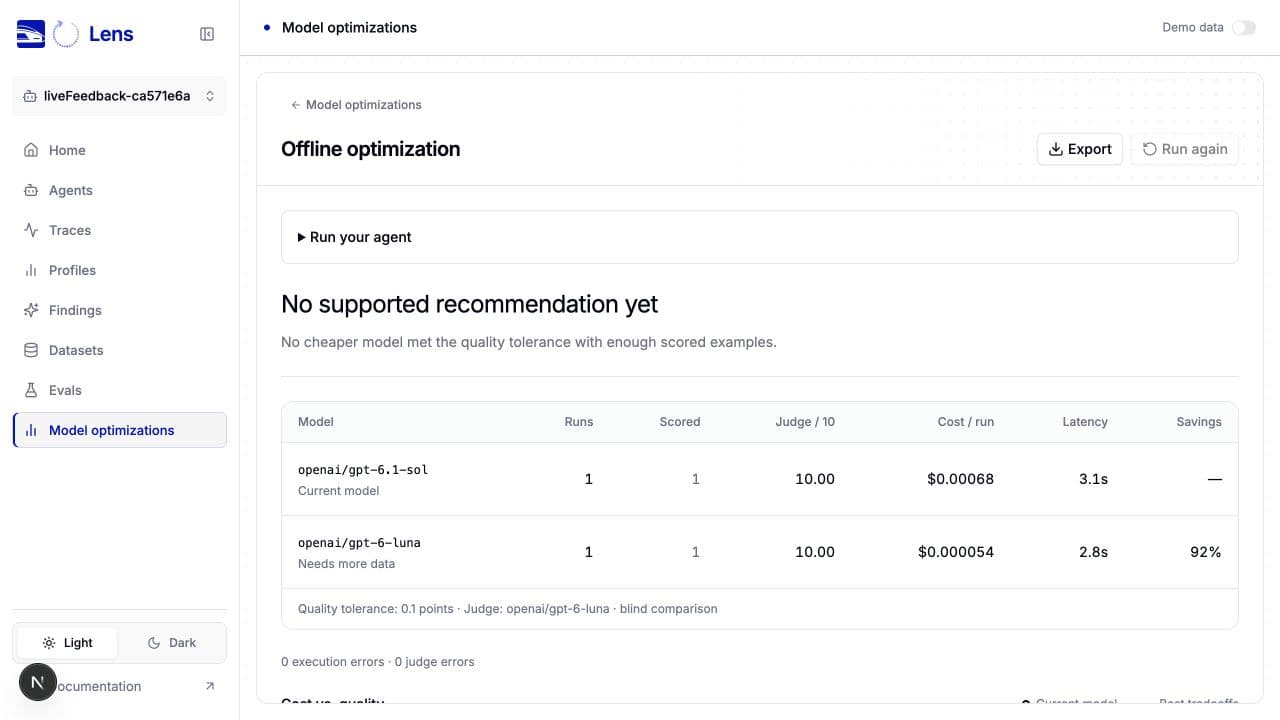
With one case per model, the example shows No supported recommendation yet. Collect representative cases before choosing a model. A recommendation requires at least 30 scored observations and a quality confidence bound within your selected tolerance. Feedback comparisons also need at least 50% coverage with similar coverage between groups
Missing cost or quality stays blank. Check the execution and judge error counts, then inspect the affected case and source trace for failed calls, incomplete answers, or model fallbacks. Costs in the table represent serving spend; replay and judging add gateway charges
Control a comparison
Pause stops new assignments and queued calls. Resume continues collection. Finish test freezes a Live or Shadow comparison's collected results, including feedback and spend received so far. A call already in flight can finish and incur charges
Use Run again to create another comparison with the same settings. From a Shadow or Offline recommendation, Start live test carries the recommended model into Live setup
Execution reference
Model discovery and replay use the Lens server's configured gateway key. Live assignment also checks the caller's permitted models. Live comparisons for the same agent, team, and baseline cannot overlap
Recommendations use a 95% normal-approximation lower bound: paired score differences for replay, independent groups for Live. Missing metrics and execution or judge errors prevent a recommendation
Final-call replay supports captured Chat Completions text and function-tool requests. Use full-agent execution for multimodal input, hosted tools, ambiguous parallel final calls, or provider-specific replay metadata. Capture requests up to 1 MB and traces up to 500 spans for final-call replay
Full-agent execution uses the SDK callback and its Case/Run contract. Lens matches each submitted trace to the trial, creation time, team, agent, and requested model. Each task has eight minutes to run, followed by up to 90 seconds for trace ingestion. After an interrupted process, the active lease can take up to ten minutes to expire. Uncertain paid calls remain visible for review instead of triggering another execution
Comparisons support eight candidates and 500 included dataset cases. Lens stores up to 100 comparisons, with 5,000 Live assignments per comparison and about 4,500 collected result rows for ongoing comparisons. Reaching the sample limit pauses collection