Framework examples through LiteLLM
Use these examples if your agents call models through a LiteLLM gateway. First create a tracing key and copy the full Lens trace endpoint. The gateway sends model requests; Lens receives traces.
For a standalone Lens installation with a direct provider, use the first-trace example or the direct-provider template in your framework's integration guide.
Configure the exporter
Run these exports in the terminal where you start your agent. Paste the endpoint and key from Lens tracing setup:
export LENS_TRACING_KEY="<paste your Lens tracing key>"
export OTEL_EXPORTER_OTLP_TRACES_ENDPOINT="<paste the full Traces endpoint>"
export OTEL_EXPORTER_OTLP_TRACES_HEADERS="Authorization=Bearer $LENS_TRACING_KEY"
export OTEL_EXPORTER_OTLP_PROTOCOL="http/protobuf"
export OTEL_METRICS_EXPORTER="none"
export OTEL_LOGS_EXPORTER="none"
export OTEL_SERVICE_NAME="research_agent"
Keep your existing model configuration if you are adding tracing to an application. Initialize instrumentation before creating the agent. If your app already has an OpenTelemetry tracer provider, keep it and update its exporter instead of creating a second one.
The framework examples below use LiteLLM for model calls. For a direct provider connection, use the OpenAI Agents SDK or OpenTelemetry direct-provider template. Both send telemetry directly to Lens.
For the gateway examples below, also set the model connection:
export LITELLM_GATEWAY_URL="<your gateway base URL without a trailing slash or /v1>"
export LITELLM_API_KEY="<your key with model access>"
export LITELLM_MODEL="<your configured model alias>"
Get a model key from your administrator or Virtual Keys in the dashboard, and copy the model alias from Models. The local Docker gateway uses http://localhost:4000. The model key and the tracing key serve different purposes.
Run your agent
Choose your framework. Each tab includes dependencies, a complete example, and the run command. The agent is named research_agent using the framework's name, role, or tracing setting. Change it to your own agent's name.
Use a model that supports tool calls for agent frameworks. For Python examples, use Python 3.13 and a separate virtual environment:
python3 -m venv .venv
source .venv/bin/activate
- DeepAgents
- LangGraph
- LangChain
- OpenAI Agents
- Claude Agent SDK
- CrewAI
- Pydantic AI
- LlamaIndex
- Google ADK
- Strands
- Vercel AI SDK
- OpenClaw
- Hermes
- OpenTelemetry
python -m pip install opentelemetry-distro \
  opentelemetry-exporter-otlp-proto-http \
  deepagents openinference-instrumentation-langchain langchain-openai
Save this as agent.py:
import os

AGENT_NAME = "research_agent"

from opentelemetry.instrumentation.auto_instrumentation import initialize

initialize()

from deepagents import create_deep_agent

from langchain_openai import ChatOpenAI

model = ChatOpenAI(
    model=os.environ["LITELLM_MODEL"],
    base_url=f"{os.environ['LITELLM_GATEWAY_URL']}/v1",
    api_key=os.environ["LITELLM_API_KEY"],
)

agent = create_deep_agent(name=AGENT_NAME, model=model, tools=[])
result = agent.invoke({"messages": [{"role": "user", "content": "What is an agent trace?"}]})
print(result["messages"][-1].content)
python agent.py
python -m pip install opentelemetry-distro \
  opentelemetry-exporter-otlp-proto-http \
  langgraph openinference-instrumentation-langchain langchain-openai
Save this as agent.py:
import os

AGENT_NAME = "research_agent"

from opentelemetry.instrumentation.auto_instrumentation import initialize

initialize()

from langgraph.graph import END, START, MessagesState, StateGraph
from langchain_openai import ChatOpenAI

model = ChatOpenAI(
    model=os.environ["LITELLM_MODEL"],
    base_url=f"{os.environ['LITELLM_GATEWAY_URL']}/v1",
    api_key=os.environ["LITELLM_API_KEY"],
)
graph = StateGraph(MessagesState)
graph.add_node("answer", lambda state: {"messages": [model.invoke(state["messages"])]})
graph.add_edge(START, "answer")
graph.add_edge("answer", END)
agent = graph.compile(name=AGENT_NAME)
result = agent.invoke({"messages": [{"role": "user", "content": "What is an agent trace?"}]})
print(result["messages"][-1].content)
python agent.py
python -m pip install opentelemetry-distro \
  opentelemetry-exporter-otlp-proto-http \
  langchain openinference-instrumentation-langchain langchain-openai
Save this as agent.py:
import os

AGENT_NAME = "research_agent"

from opentelemetry.instrumentation.auto_instrumentation import initialize

initialize()

from langchain.agents import create_agent

from langchain_openai import ChatOpenAI

model = ChatOpenAI(
    model=os.environ["LITELLM_MODEL"],
    base_url=f"{os.environ['LITELLM_GATEWAY_URL']}/v1",
    api_key=os.environ["LITELLM_API_KEY"],
)

agent = create_agent(name=AGENT_NAME, model=model, tools=[])
result = agent.invoke({"messages": [{"role": "user", "content": "What is an agent trace?"}]})
print(result["messages"][-1].content)
python agent.py
python -m pip install opentelemetry-distro \
  opentelemetry-exporter-otlp-proto-http \
  openai-agents openinference-instrumentation-openai-agents
Save this as agent.py:
import os

AGENT_NAME = "research_agent"

from opentelemetry.instrumentation.auto_instrumentation import initialize

initialize()

from agents import Agent, RunConfig, Runner

from agents import OpenAIChatCompletionsModel
from openai import AsyncOpenAI

client = AsyncOpenAI(base_url=f"{os.environ['LITELLM_GATEWAY_URL']}/v1", api_key=os.environ["LITELLM_API_KEY"])
model = OpenAIChatCompletionsModel(model=os.environ["LITELLM_MODEL"], openai_client=client)

agent = Agent(name=AGENT_NAME, model=model)
result = Runner.run_sync(
    agent, "What is an agent trace?",
    run_config=RunConfig(workflow_name=AGENT_NAME),
)
print(result.final_output)
python agent.py
python -m pip install opentelemetry-distro \
  opentelemetry-exporter-otlp-proto-http \
  claude-agent-sdk openinference-instrumentation-claude-agent-sdk
Save this as agent.py:
Use an Anthropic-compatible model alias for LITELLM_MODEL. The SDK must be able to reach the gateway through its Anthropic API.
import asyncio
import os

AGENT_NAME = "research_agent"

os.environ["OTEL_RESOURCE_ATTRIBUTES"] = f"gen_ai.agent.name={AGENT_NAME}"

from opentelemetry.instrumentation.auto_instrumentation import initialize

initialize()

from claude_agent_sdk import ClaudeAgentOptions, ResultMessage, query

options = ClaudeAgentOptions(
    model=os.environ["LITELLM_MODEL"],
    env={"ANTHROPIC_BASE_URL": os.environ["LITELLM_GATEWAY_URL"], "ANTHROPIC_AUTH_TOKEN": os.environ["LITELLM_API_KEY"]},
    tools=[],
    setting_sources=[],
    max_turns=1,
)

async def main():
    async for message in query(prompt="What is an agent trace?", options=options):
        if isinstance(message, ResultMessage):
            print(message.result)

asyncio.run(main())
python agent.py
This captures SDK input and output; internal model calls are not exposed by this instrumentor.
python -m pip install opentelemetry-distro \
  opentelemetry-exporter-otlp-proto-http \
  crewai openinference-instrumentation-crewai
Save this as agent.py:
import os

AGENT_NAME = "research_agent"

from opentelemetry.instrumentation.auto_instrumentation import initialize

initialize()

from crewai import Agent, Crew, Task

from crewai import LLM

model = LLM(
    model=f"openai/{os.environ['LITELLM_MODEL']}",
    base_url=f"{os.environ['LITELLM_GATEWAY_URL']}/v1",
    api_key=os.environ["LITELLM_API_KEY"],
)

agent = Agent(
    role=AGENT_NAME,
    goal="Answer questions clearly",
    backstory="You explain technical concepts.",
    llm=model,
)
task = Task(description="What is an agent trace?", expected_output="A short answer", agent=agent)
print(Crew(agents=[agent], tasks=[task]).kickoff())
python agent.py
python -m pip install opentelemetry-distro \
  opentelemetry-exporter-otlp-proto-http \
  "pydantic-ai-slim[openai]>=1"
Save this as agent.py:
import os

AGENT_NAME = "research_agent"

from opentelemetry.instrumentation.auto_instrumentation import initialize

initialize()

from pydantic_ai import Agent

from pydantic_ai.models.openai import OpenAIChatModel
from pydantic_ai.providers.openai import OpenAIProvider

model = OpenAIChatModel(
    os.environ["LITELLM_MODEL"],
    provider=OpenAIProvider(base_url=f"{os.environ['LITELLM_GATEWAY_URL']}/v1", api_key=os.environ["LITELLM_API_KEY"]),
)

Agent.instrument_all()
agent = Agent(model, name=AGENT_NAME)
print(agent.run_sync("What is an agent trace?").output)
python agent.py
python -m pip install opentelemetry-distro \
  opentelemetry-exporter-otlp-proto-http \
  "llama-index-core>=0.14.19" openinference-instrumentation-llama-index \
  llama-index-llms-openai-like
Save this as agent.py:
import asyncio
import os

AGENT_NAME = "research_agent"

os.environ["OTEL_RESOURCE_ATTRIBUTES"] = f"gen_ai.agent.name={AGENT_NAME}"

from opentelemetry.instrumentation.auto_instrumentation import initialize

initialize()

from openinference.instrumentation.llama_index import LlamaIndexInstrumentor

LlamaIndexInstrumentor().instrument()
from llama_index.core.agent.workflow import FunctionAgent

from llama_index.llms.openai_like import OpenAILike

model = OpenAILike(
    model=os.environ["LITELLM_MODEL"],
    api_base=f"{os.environ['LITELLM_GATEWAY_URL']}/v1",
    api_key=os.environ["LITELLM_API_KEY"],
    is_chat_model=True,
    is_function_calling_model=True,
    temperature=1,
)

agent = FunctionAgent(name=AGENT_NAME, llm=model, tools=[], streaming=False)
async def main():
    result = await agent.run(user_msg="What is an agent trace?")
    print(result)

asyncio.run(main())
python agent.py
The resource attribute supplies the agent name because this instrumentor does not export FunctionAgent.name.
python -m pip install opentelemetry-distro \
  opentelemetry-exporter-otlp-proto-http \
  "google-adk>=1.18" litellm openinference-instrumentation-google-adk
Save this as agent.py:
import asyncio
import os

AGENT_NAME = "research_agent"

os.environ["OTEL_INSTRUMENTATION_GENAI_CAPTURE_MESSAGE_CONTENT"] = "SPAN_ONLY"

from opentelemetry.instrumentation.auto_instrumentation import initialize

initialize()

from google.adk.agents import Agent
from google.adk.runners import InMemoryRunner

from google.adk.models.lite_llm import LiteLlm

model = LiteLlm(
    model=f"openai/{os.environ['LITELLM_MODEL']}",
    api_base=f"{os.environ['LITELLM_GATEWAY_URL']}/v1",
    api_key=os.environ["LITELLM_API_KEY"],
)

agent = Agent(name=AGENT_NAME, model=model)
asyncio.run(InMemoryRunner(agent=agent).run_debug("What is an agent trace?"))
python agent.py
SPAN_ONLY records the messages needed to inspect and investigate the run.
python -m pip install opentelemetry-distro \
  opentelemetry-exporter-otlp-proto-http \
  "strands-agents[otel]" openai
Save this as agent.py:
import os

AGENT_NAME = "research_agent"

os.environ["OTEL_SEMCONV_STABILITY_OPT_IN"] = "gen_ai_latest_experimental,gen_ai_span_attributes_only"

from opentelemetry.instrumentation.auto_instrumentation import initialize

initialize()

from strands import Agent

from strands.models.openai import OpenAIModel

model = OpenAIModel(
    client_args={"base_url": f"{os.environ['LITELLM_GATEWAY_URL']}/v1", "api_key": os.environ["LITELLM_API_KEY"]},
    model_id=os.environ["LITELLM_MODEL"],
)

agent = Agent(name=AGENT_NAME, model=model)
print(agent("What is an agent trace?"))
python agent.py
The semantic-convention setting enables message content in spans.
npm install ai @ai-sdk/otel @opentelemetry/sdk-node \
  @opentelemetry/exporter-trace-otlp-http @ai-sdk/openai-compatible
npm install --save-dev tsx
Save this as agent.mts:
import { createOpenAICompatible } from "@ai-sdk/openai-compatible";
import { NodeSDK } from "@opentelemetry/sdk-node";
import { OTLPTraceExporter } from "@opentelemetry/exporter-trace-otlp-http";
import { OpenTelemetry } from "@ai-sdk/otel";
import { generateText, registerTelemetry } from "ai";

const sdk = new NodeSDK({ traceExporter: new OTLPTraceExporter() });
sdk.start();
registerTelemetry(new OpenTelemetry());

const AGENT_NAME = "research_agent";
const litellm = createOpenAICompatible({
  name: "litellm",
  baseURL: `${process.env.LITELLM_GATEWAY_URL}/v1`,
  apiKey: process.env.LITELLM_API_KEY,
});
const model = litellm(process.env.LITELLM_MODEL!);

try {
  const { text } = await generateText({
    model,
    prompt: "What is an agent trace?",
    telemetry: { isEnabled: true, functionId: AGENT_NAME },
  });
  console.log(text);
} finally {
  await sdk.shutdown();
}
npx tsx agent.mts
Enable the diagnostics-otel plugin and keep your existing model settings. Add the tracing configuration below to ~/.openclaw/openclaw.json:
{
  "agents": {
    "list": [{ "id": "research_agent" }]
  },
  "plugins": {
    "entries": { "diagnostics-otel": { "enabled": true } }
  },
  "diagnostics": {
    "enabled": true,
    "otel": {
      "enabled": true,
      "tracesEndpoint": "${OTEL_EXPORTER_OTLP_TRACES_ENDPOINT}",
      "headers": { "Authorization": "Bearer ${LENS_TRACING_KEY}" },
      "captureContent": true,
      "traces": true,
      "metrics": false,
      "logs": false,
      "sampleRate": 1
    }
  }
}
Run the agent in the terminal where you set the connection details:
openclaw agent --local --agent research_agent --session-id first-trace --message "What is an agent trace?"
Select research_agent in Lens. Restart an existing OpenClaw gateway after changing the config. Preserve your existing agents when adding the configuration.
Enable the community hermes-otel plugin and keep your existing model settings. Add the tracing configuration below to ~/.hermes/hermes_otel.yaml:
resource_attributes:
  gen_ai.agent.name: research_agent
content_capture: full
backends:
  - type: otlp
    endpoint: ${OTEL_EXPORTER_OTLP_TRACES_ENDPOINT}
    headers:
      Authorization: "Bearer ${LENS_TRACING_KEY}"
    metrics: false
    logs: false
Start a new Hermes session and ask a question. The configured name research_agent appears in Lens. Hermes' built-in diagnostic telemetry alone does not include the conversation content needed for investigations.
python -m pip install opentelemetry-distro \
  opentelemetry-exporter-otlp-proto-http openai
Save this as agent.py:
import os

AGENT_NAME = "research_agent"

from opentelemetry.instrumentation.auto_instrumentation import initialize

initialize()

from opentelemetry import trace
from openai import OpenAI

client = OpenAI(base_url=f"{os.environ['LITELLM_GATEWAY_URL']}/v1", api_key=os.environ["LITELLM_API_KEY"])

with trace.get_tracer(__name__).start_as_current_span(AGENT_NAME) as span:
    span.set_attribute("gen_ai.agent.name", AGENT_NAME)
    span.set_attribute("openinference.span.kind", "AGENT")
    span.set_attribute("input.value", "What is an agent trace?")
    result = client.chat.completions.create(
        model=os.environ["LITELLM_MODEL"],
        messages=[{"role": "user", "content": "What is an agent trace?"}],
    )
    answer = result.choices[0].message.content
    span.set_attribute("output.value", str(answer))
    print(answer)
python agent.py
For complete projects and multi-agent examples, use the Integrations guides in the sidebar or the examples repository. Those projects use LENS_URL for the ingestion base URL, without /v1/traces; their exporters append that path. The dashboard shows framework snippets directly in the tracing setup section.
For a working example, use DeepLite. Set LITELLM_DEV_BASE=https://<your-lens-ingestion-host>/v1/traces and LITELLM_DEV_KEY=<your-lens-tracing-key> in its .env file, then run the agent.
To record personal coding sessions, follow the Claude Code and Codex setup.
4. View your first trace
Open Lens > Traces. Select a time range that includes your run, then open it. For the examples above, look for research_agent. The same name is available under Agent when creating an investigation. Select a step to read its input, output, and attributes.
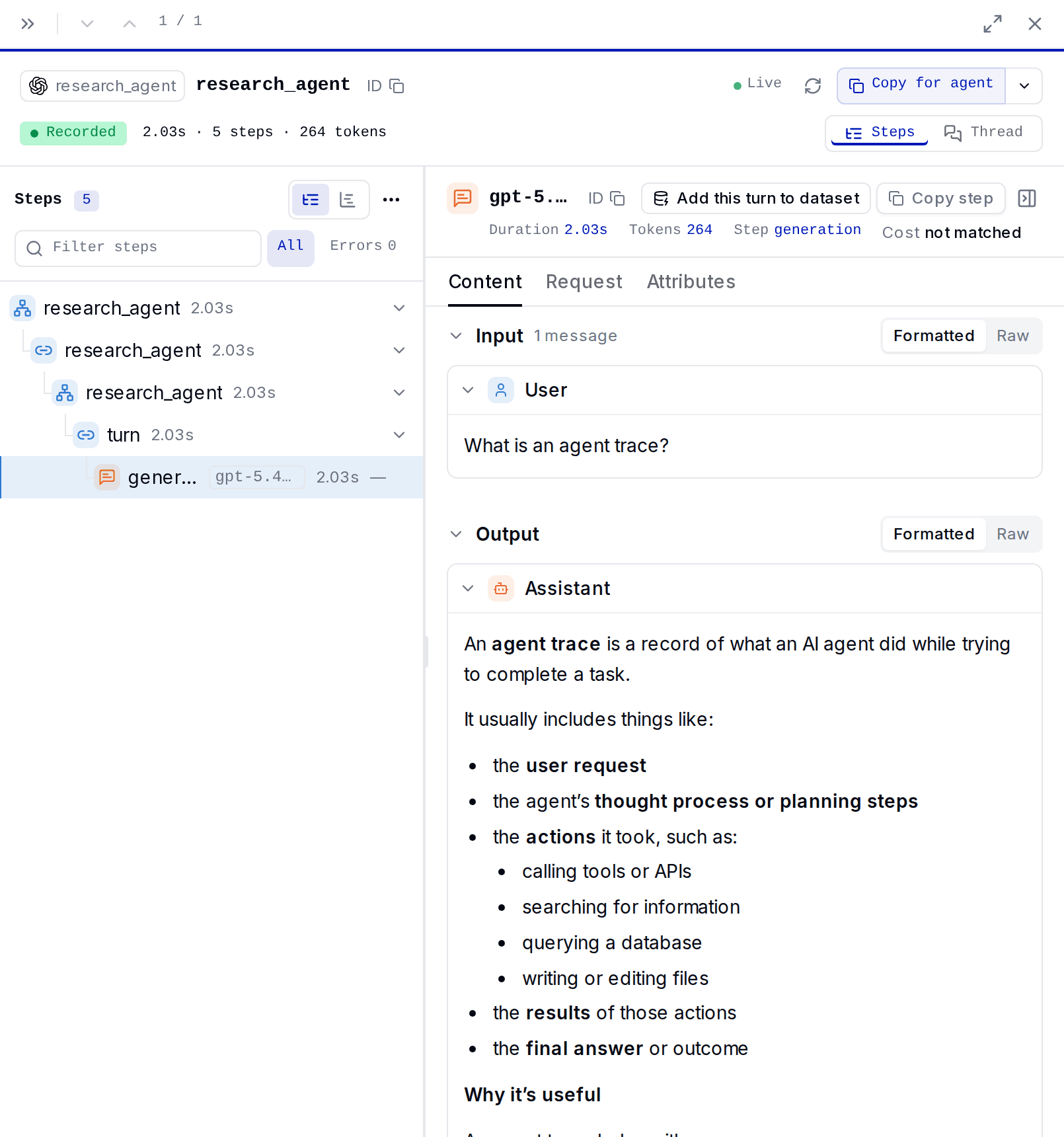
Check that you can see the task, tool results, and final answer. If these are missing, update your agent's instrumentation before running an investigation.
Troubleshooting
| What you see | What to check |
|---|---|
| A model answer appears, but no trace | Set the exporter variables in the same terminal as your agent. Initialize instrumentation before creating the agent. Check the terminal for exporter errors. |
401 from the trace endpoint | Use a dedicated Lens tracing key. Model keys cannot upload traces. |
404 or 410 from the trace endpoint | Copy the full endpoint from the dashboard. Keep /lens-ingest when present and include /v1/traces once. |
429 just after creating a key | Allow up to 30 seconds for credential sync and retry. |
Setup asks for LITELLM_LENS_PUBLIC_URL, or an upload returns 503 | Ask the administrator to check the service connection. |
| The model request fails | Check the gateway URL, model key, and model alias separately from the tracing settings. |
| Traces have no input or output | Check the framework's content-capture settings in its integration guide. |

