Arize AX
Use Arize AX when you want the full-featured Arize AI platform for production LLM observability and evaluation, available as managed cloud or enterprise self-hosted deployment.
Arize AX is separate from Arize Phoenix, the open-source tracing and evaluation project for local development, experimentation, and self-hosted workflows. LiteLLM supports both backends, but they use different callbacks, credentials, and endpoints. If you are sending traces to Phoenix, use the Arize Phoenix setup guide instead.
For production evaluation workflows, see Arize's agent evaluation guide and LLM evaluation guide for examples of using traces to debug failures, compare model behavior, and improve agent reliability.
Pre-Requisites
uv add litellm
Quick Start
- SDK
- LiteLLM Proxy
import litellm
import os

os.environ["LITELLM_OTEL_V2"] = "true"
os.environ["ARIZE_SPACE_ID"] = ""
os.environ["ARIZE_API_KEY"] = ""
os.environ["ARIZE_PROJECT_NAME"] = ""   # recommended: names the project traces land in
# LLM API Keys
os.environ["OPENAI_API_KEY"] = ""

# set arize as a callback, litellm will send the data to arize
litellm.callbacks = ["arize"]

# openai call
response = litellm.completion(
  model="gpt-6.1-sol",
  messages=[
    {"role": "user", "content": "Hi - i'm openai"}
  ]
)
- Setup config.yaml
model_list:
  - model_name: gpt-6.1-sol
    litellm_params:
      model: openai/gpt-6.1-sol
      api_key: os.environ/OPENAI_API_KEY

litellm_settings:
  callbacks: ["arize"]
- Set your credentials
LITELLM_OTEL_V2=true
ARIZE_SPACE_ID="your-space-id"
ARIZE_API_KEY="your-api-key"
ARIZE_PROJECT_NAME="your-project-name"   # recommended: names the project traces land in
- Start LiteLLM Proxy
litellm --config /path/to/config.yaml
- Test it!
curl -L -X POST 'http://0.0.0.0:4000/v1/chat/completions' \
-H 'Content-Type: application/json' \
-H "Authorization: Bearer $LITELLM_API_KEY" \
-d '{
  "model": "gpt-6.1-sol",
  "messages": [
    {
      "role": "user",
      "content": "Hey, how are you?"
    }
  ]
}'
What Arize renders
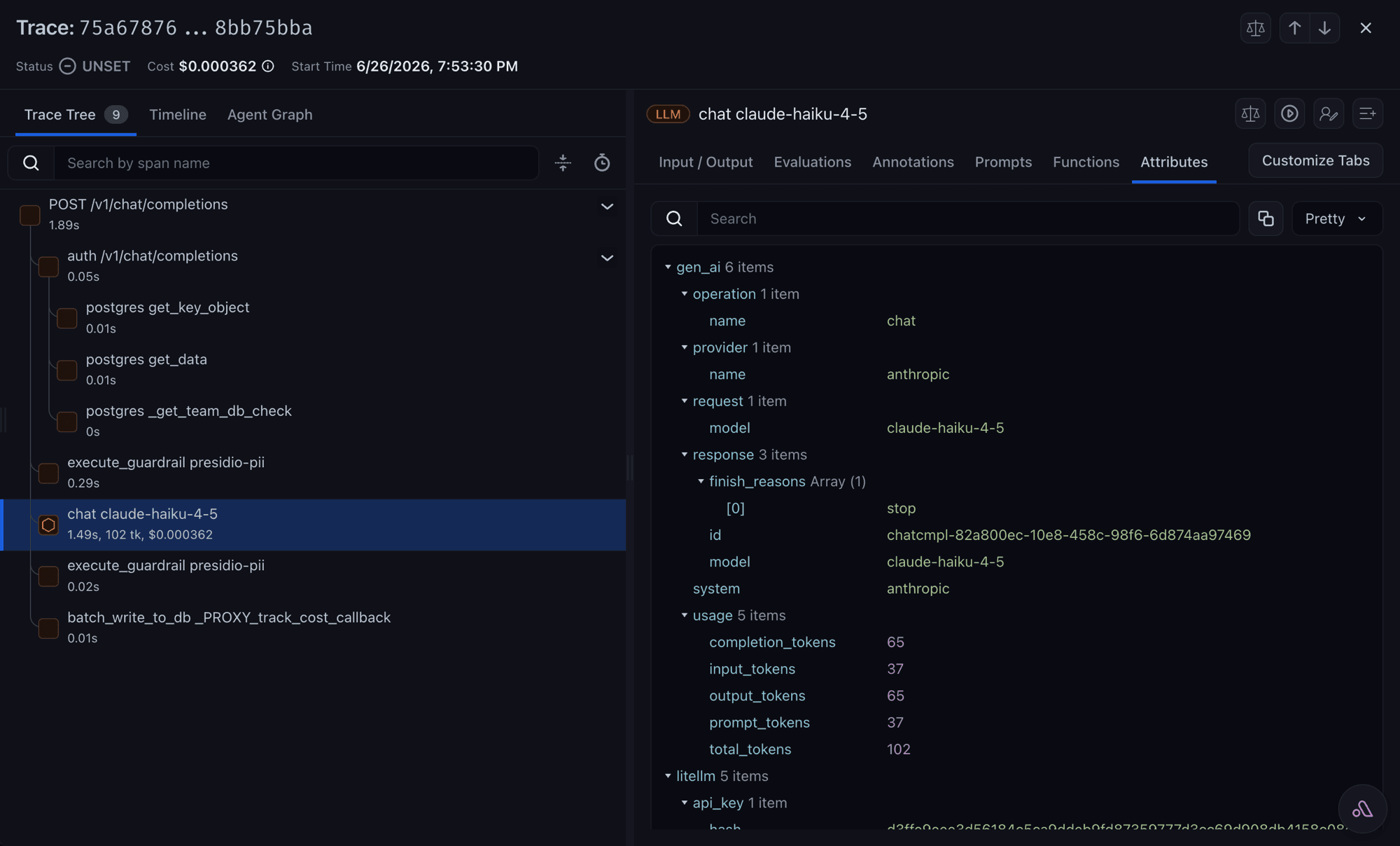
Open your Arize project; the trace appears under the project named by ARIZE_PROJECT_NAME. Each request shows up as a chat <model> span under the request root.
The openinference mapper stamps the OpenInference vocabulary onto the LLM-call span alongside the canonical gen_ai.* keys, so Arize reads its native schema without dropping the canonical ones. That covers llm.model_name and llm.provider, the llm.token_count.* usage split, llm.invocation_parameters, the llm.input_messages.* and llm.output_messages.* message arrays when content capture is on, and llm.tools.* for tool definitions. See the full attribute table or the OpenInference spec for the definitive vocabulary.
The mapper also writes each assistant tool call as structured llm.output_messages.{idx}.message.tool_calls.{idx}.tool_call.* attributes and the allowlisted request metadata as a metadata attribute, so Arize's LLM view shows the tool name and arguments and the metadata panel fills from the same allowlist as litellm.metadata.*. Before, a tool-calling reply showed up as {"role": "assistant", "content": null} with an empty metadata panel. See OpenInference tool calls and metadata for the attributes, the mapper_names setting, and the attribute budget.
The arize preset names the openinference mapper for you, so no extra setting is needed. MAPPER_NAMES (or callback_settings.otel.mapper_names) only comes into play when you ship Arize-bound spans through your own collector on the generic OTLP path.
Configuration
| Variable | Required | Notes |
|---|---|---|
ARIZE_SPACE_ID | Yes | ARIZE_SPACE_KEY is the deprecated name and is still read for backward compatibility; prefer ARIZE_SPACE_ID in new configs |
ARIZE_API_KEY | Yes | |
ARIZE_PROJECT_NAME | No | Names the project traces land in. Nothing enforces it and spans are not rejected without it, but set it so your traces are grouped where you expect |
ARIZE_ENDPOINT | No | gRPC endpoint, defaults to https://otlp.arize.com/v1 |
ARIZE_HTTP_ENDPOINT | No | Use instead of ARIZE_ENDPOINT to export over HTTP |
Setting ARIZE_ENDPOINT selects gRPC and ARIZE_HTTP_ENDPOINT selects HTTP; if neither is set, litellm uses the gRPC default.
Advanced
Send to Arize and another backend at once
Presets compose, so listing more than one sends the same traces to each destination in that tool's native format:
litellm_settings:
  callbacks: ["arize", "langfuse_otel"]
Per-team and per-key credentials
Arize supports per-request credentials, so different teams or keys can log to different Arize spaces without running separate proxies. Set arize_space_id and arize_api_key on the team or key as described in per-key / per-team credentials.
Sample a team's or key's traces
To send only a share of a tenant's requests to its Arize space, add arize_success_sampling_rate and arize_error_sampling_rate to the same callback_vars. Each takes a number from 0.0 to 1.0: 0.1 keeps about one request in ten, 0.0 keeps none, and a rate left unset keeps every request. A request with a failed span answers to the error rate and every other request to the success rate, so an error rate above the success rate keeps more of the failures. Saving a rate outside that range, or on a callback other than arize, returns an error.
curl -X POST 'http://localhost:4000/team/<team-id>/callback' \
  -H "Authorization: Bearer $LITELLM_API_KEY" -H 'Content-Type: application/json' \
  -d '{
    "callback_name": "arize",
    "callback_type": "success_and_failure",
    "callback_vars": {
      "arize_space_id": "...",
      "arize_api_key": "...",
      "arize_success_sampling_rate": "0.1",
      "arize_error_sampling_rate": "1.0"
    }
  }'
With LITELLM_OTEL_V2=true the proxy keeps or drops each request whole, from the HTTP request span down to the model call and the spend write, and the request's trace ID makes the decision. Every pod and worker reaches the same answer for the same trace ID and outcome, so when a caller sends several requests with one W3C traceparent, as an agent or an internal service usually does, the tenant sees all of them or none of them, however they are load balanced. A request without a traceparent starts a trace of its own and is sampled on its own.
Requests of one trace that end differently can still land apart when the two rates differ. At a success rate of 0.1 and an error rate of 1.0, a trace whose third request fails usually shows only that failed request. As long as the error rate is at least the success rate, a trace whose successful requests are kept always keeps its failed ones too.
Because the trace ID decides, a caller that reuses one trace ID gets the same answer every time, and a caller can pick a trace ID that is always kept or always dropped, as with OpenTelemetry's TraceIdRatioBased sampler. The rates thin only the tenant's own Arize space. Your proxy-wide exporters, and the copy that additive mode keeps, receive every request.
OpenTelemetry v1, without LITELLM_OTEL_V2, makes a random draw for each request instead, so requests that share a trace can be kept on one pod and dropped on another.
Full OpenTelemetry reference
This page covers the Arize-specific setup. For span attributes, prompt and response capture, metrics, distributed tracing, and which routes are traced, see the OpenTelemetry v2 guide.
Support & Talk to Founders
- Schedule Demo
- Community Discord
- Our emails ishaan@berri.ai / krrish@berri.ai

