Arize Phoenix
Arize Phoenix is the open-source LLM tracing and evaluation project from Arize AI. Use it for local development, experimentation, and self-hosted workflows.
Phoenix is separate from Arize AX, the full-featured platform for production teams, AI-native companies, and enterprises, available as managed cloud or enterprise self-hosted deployment. LiteLLM supports both backends, but they use different callbacks, credentials, and endpoints. Use arize_phoenix for Phoenix, use arize for AX, or enable both when you need to send the same traces to each.
For teams building evaluation loops around LiteLLM traces, Arize's agent evaluation guide and LLM evaluation guide cover production workflows for tracing failures, evaluating model behavior, and improving agent reliability.
Pre-Requisites
uv add litellm
Quick Start
- SDK
- LiteLLM Proxy
import litellm
import os

os.environ["LITELLM_OTEL_V2"] = "true"
os.environ["PHOENIX_API_KEY"] = ""
os.environ["PHOENIX_COLLECTOR_ENDPOINT"] = "https://app.phoenix.arize.com/v1/traces"
os.environ["PHOENIX_PROJECT_NAME"] = ""   # optional, defaults to "default"
# LLM API Keys
os.environ["OPENAI_API_KEY"] = ""

# set arize_phoenix as a callback, litellm will send the data to phoenix
litellm.callbacks = ["arize_phoenix"]

# openai call
response = litellm.completion(
  model="gpt-6.1-sol",
  messages=[
    {"role": "user", "content": "Hi - i'm openai"}
  ]
)
- Setup config.yaml
model_list:
  - model_name: gpt-6.1-sol
    litellm_params:
      model: openai/gpt-6.1-sol
      api_key: os.environ/OPENAI_API_KEY

litellm_settings:
  callbacks: ["arize_phoenix"]
- Set your credentials
LITELLM_OTEL_V2=true
PHOENIX_API_KEY="your-api-key"
PHOENIX_COLLECTOR_ENDPOINT="https://app.phoenix.arize.com/v1/traces"
PHOENIX_PROJECT_NAME="my-project"   # optional
- Start LiteLLM Proxy
litellm --config /path/to/config.yaml
- Test it!
curl -L -X POST 'http://0.0.0.0:4000/v1/chat/completions' \
-H 'Content-Type: application/json' \
-H "Authorization: Bearer $LITELLM_API_KEY" \
-d '{
  "model": "gpt-6.1-sol",
  "messages": [
    {
      "role": "user",
      "content": "Hey, how are you?"
    }
  ]
}'
What Phoenix renders
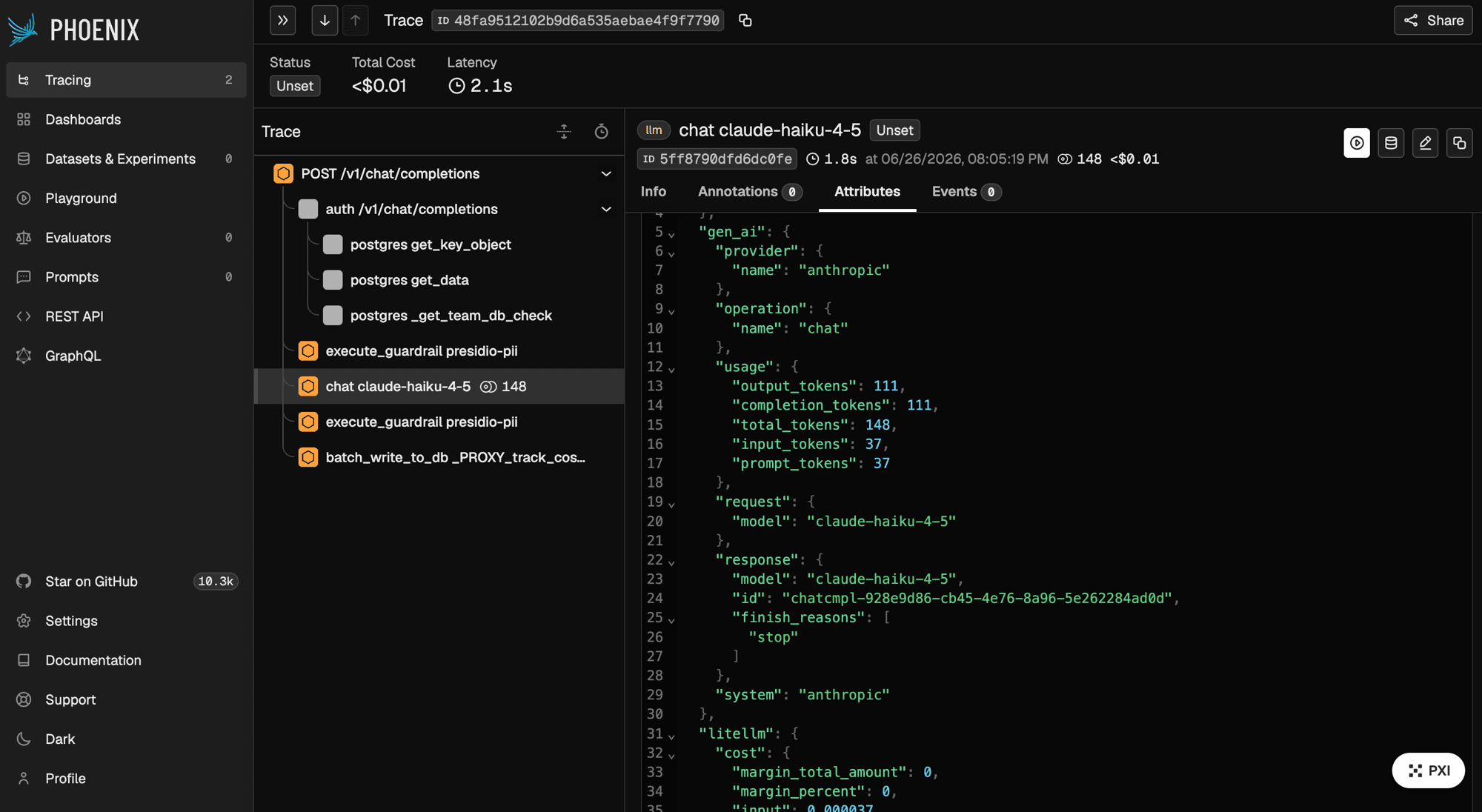
Open Phoenix; the project comes from PHOENIX_PROJECT_NAME (default default), stamped as the openinference.project.name resource attribute. Each request shows up as a chat <model> span under the request root. On the proxy you can send a team's or key's LLM spans to a different Phoenix project; see Route traces to a Phoenix project per team or key.
Phoenix uses the same OpenInference vocabulary as Arize AX, so the LLM-call span carries llm.model_name, llm.provider, the llm.token_count.* usage split, llm.invocation_parameters, the message arrays when content capture is on, and llm.tools.*, alongside the canonical gen_ai.* keys. The span also carries each assistant tool call as structured llm.output_messages.{idx}.message.tool_calls.{idx}.tool_call.* attributes and the allowlisted request metadata as a metadata attribute, which is what fills Phoenix's Output tool-call row and its Metadata section. See the full attribute table and OpenInference tool calls and metadata.
The arize_phoenix preset names the openinference mapper for you. If you point the generic OTLP path at Phoenix instead (your own collector, OTEL_ENDPOINT at the Phoenix /v1/traces URL), the spans arrive with only the canonical gen_ai.* names and render plainly until you name the mapper with MAPPER_NAMES=genai,openinference or callback_settings.otel.mapper_names.
Configuration
| Variable | Required | Notes |
|---|---|---|
PHOENIX_API_KEY | Phoenix Cloud only | Required when the endpoint is on app.phoenix.arize.com; litellm raises without it. Self-hosted Phoenix does not need one |
PHOENIX_COLLECTOR_HTTP_ENDPOINT | No | Collector endpoint; takes precedence over PHOENIX_COLLECTOR_ENDPOINT when both are set |
PHOENIX_COLLECTOR_ENDPOINT | No | Collector endpoint, used when the HTTP variable is unset |
PHOENIX_PROJECT_NAME | No | Defaults to default; also readable as PHOENIX_COLLECTOR_PROJECT_NAME. This is the fallback project when a key or team does not set phoenix_project_name |
If neither endpoint variable is set, litellm falls back to http://localhost:6006/v1/traces.
Protocol is inferred from the endpoint, not the variable name
Neither variable is tied to a protocol. litellm picks the protocol from the value you give it: an endpoint starting with grpc://, or containing :4317 without a /v1/traces path, exports over gRPC, and anything else exports over HTTP. So a Phoenix Cloud URL works in either variable, and pointing PHOENIX_COLLECTOR_ENDPOINT at https://app.phoenix.arize.com/v1/traces sends over HTTP as intended.
Picking the right collector endpoint
Phoenix has more than one collector endpoint shape, and picking the wrong one is the most common Phoenix setup mistake. Point the endpoint at the shape that matches your deployment:
| Deployment | Endpoint |
|---|---|
| Phoenix Cloud (Spaces) | https://app.phoenix.arize.com/s/<space-name>/v1/traces |
| Phoenix Cloud (legacy) | https://app.phoenix.arize.com/legacy/v1/traces |
| Phoenix Cloud (old) | https://app.phoenix.arize.com/v1/traces |
| Self-hosted | http://localhost:6006/v1/traces |
Route traces to a Phoenix project per team or key
One Phoenix collector can hold many projects. On the LiteLLM proxy, set phoenix_project_name on a team or a virtual key so that team's (or that key's) LLM spans land in their own Phoenix project. Keys with no project name keep using PHOENIX_PROJECT_NAME.
This is how you split traces by team without standing up a Phoenix instance per tenant. The project comes only from the team or key the proxy resolved at auth. A caller who puts phoenix_project_name in the request body is ignored; the call still returns 200 and no attacker-chosen project is created.
Requires OTel v2 (LITELLM_OTEL_V2=true) and callbacks: ["arize_phoenix"]. Phoenix 15.5.0+ honors the x-project-name header this uses; older collectors ignore it and stay on the env project.
- Per team
- Per key
Every key on the team sends its LLM spans to the named project.
curl -X POST 'http://localhost:4000/team/new' \
  -H "Authorization: Bearer $LITELLM_API_KEY" \
  -H 'Content-Type: application/json' \
  -d '{"team_alias": "payments", "metadata": {"phoenix_project_name": "payments-prod"}}'
Update an existing team the same way:
curl -X POST 'http://localhost:4000/team/update' \
  -H "Authorization: Bearer $LITELLM_API_KEY" \
  -H 'Content-Type: application/json' \
  -d '{"team_id": "<team-id>", "metadata": {"phoenix_project_name": "payments-prod"}}'
Then generate a key for that team and call the proxy as usual:
curl -X POST 'http://localhost:4000/key/generate' \
  -H "Authorization: Bearer $LITELLM_API_KEY" \
  -H 'Content-Type: application/json' \
  -d '{"team_id": "<team-id>"}'
curl -X POST 'http://localhost:4000/v1/chat/completions' \
  -H 'Authorization: Bearer $TEAM_KEY' \
  -H 'Content-Type: application/json' \
  -d '{"model": "gpt-6.1-sol", "messages": [{"role": "user", "content": "hello"}]}'
A single key can name its own project, including keys that do not belong to a team.
curl -X POST 'http://localhost:4000/key/generate' \
  -H "Authorization: Bearer $LITELLM_API_KEY" \
  -H 'Content-Type: application/json' \
  -d '{"metadata": {"phoenix_project_name": "payments-canary"}}'
Existing keys take the same field on /key/update.
You can set the same metadata.phoenix_project_name field on the team or key in the Admin UI.
After the chat (or /v1/messages, /v1/responses) call, Phoenix shows a project named payments-prod containing that request's chat <model> span. A second team with phoenix_project_name: "search-prod" lands in a different project on the same collector.
Which project wins
Highest priority first:
phoenix_project_name_overrideon the key or teamphoenix_project_nameon the key or teamPHOENIX_PROJECT_NAME(orPHOENIX_COLLECTOR_PROJECT_NAME), elsedefault
If the same field is set on both the key and the team, the team's value is used. phoenix_project_name_override is the escape hatch when a key should leave its team's project.
What is and is not routed
The LLM-call span (chat <model>) is the span Phoenix uses to create and fill the named project. The request's HTTP root, auth, and database spans stay in the env-configured default project.
Phoenix assigns a whole trace to one project by whichever of its spans arrives first. The routed LLM span therefore starts its own trace, with a link back to the request trace so you can still jump between them.
A gRPC-only Phoenix exporter cannot route: x-project-name is honored on OTLP/HTTP only. Point PHOENIX_COLLECTOR_HTTP_ENDPOINT at an HTTP /v1/traces URL (see Picking the right collector endpoint). Guardrail spans are not project-routed.
This is different from per-team credentials, which send a tenant's traces to its own backend account. Project routing stays on the one Phoenix collector and only changes the project name.
Advanced
Send to Phoenix and Arize AX at once
Presets compose, so you can run both backends from one proxy:
litellm_settings:
  callbacks: ["arize_phoenix", "arize"]
Full OpenTelemetry reference
This page covers the Phoenix-specific setup. For span attributes, prompt and response capture, metrics, distributed tracing, and which routes are traced, see the OpenTelemetry v2 guide.
Looking for prompt management rather than tracing? See Arize Phoenix Prompt Management.
Support & Talk to Founders
- Schedule Demo
- Community Discord
- Our emails ishaan@berri.ai / krrish@berri.ai

