Analyze LiteLLM costs with Hex
LiteLLM stores daily spend totals in Postgres. Hex reads those totals through a read-only connection. Review the three-step guide, or open the public Hex demo. The demo uses synthetic records and works without a login.
Connect Postgres
In Hex Settings → Data sources → + Connection → Postgres, add your LiteLLM Postgres database. Configure network access and TLS with your database administrator. You can use an existing reader; a replica is optional.
| Existing table | Reporting fields |
|---|---|
LiteLLM_DailyTeamSpend | date, team_id, model, model_group, spend, request/status counts, prompt and completion token counts. |
LiteLLM_TeamTable | team_id, team_alias. The join supplies a team display name. |
The query does not select api_key or read the credential table. Scope the Hex role to the columns above. It reads 60 complete UTC days and defaults the board to 30. Confirm that daily aggregation is populated and retained for your reporting period.
Example grants for a reader your administrator has created:
GRANT SELECT (date, team_id, model, model_group, spend, api_requests,
  successful_requests, failed_requests, prompt_tokens, completion_tokens)
ON public."LiteLLM_DailyTeamSpend" TO hex_reader;
GRANT SELECT (team_id, team_alias)
ON public."LiteLLM_TeamTable" TO hex_reader;
Import the team cost template
Download the Postgres template. In Hex Home, click the + next to Project and Thread, then Upload project. In the upload dialog, click Upload and select the file. You need a Hex role that can create projects.
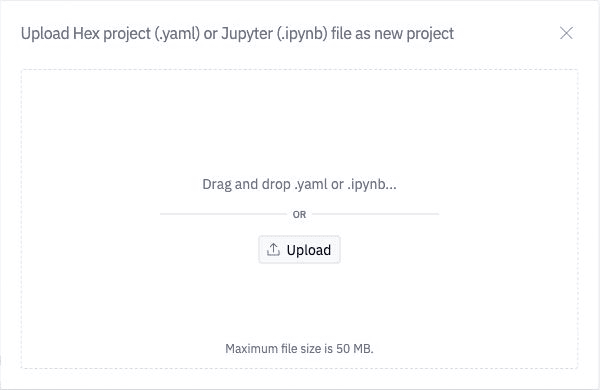
Open Source, select your Postgres connection, then Run all. Leave the two team filters blank for all permitted teams or enter one team ID. Publish the App to your chosen audience and add a scheduled run to refresh it.
Template version: 2.0.0. Imported copies do not update themselves. Review the source and changelog before replacing a board.
The daily source includes costs, requests, tokens and known success/failure counts. Latency, TTFT and response-cache hit rate stay unknown. The demo can show those metrics because it generates synthetic request-level measurements.
Complete the loop in LiteLLM
Use Teams → your team → Settings → Edit Settings to change a team model alias or set its budget. Use Models + Endpoints → Auto Router to configure tier-based routing. Confirm that applications call the configured alias or router, then compare the next complete reporting window in Hex.
See the UI walkthrough, Auto Router setup and team budget guide.
Other templates
The team demo YAML works without a database. The live public app remains the fastest way to inspect the dashboard.
The optional project ROI templates below use request-log metadata for project attribution. They need the aggregate view described below and keep business value separate from recorded LLM cost.
Restricted-view option
Use this optional request-log source for timing metrics and project attribution from request metadata. Its restricted reader must not read the raw spend-log table. The steps below install the aggregate view, then connect the restricted reader.
Prepare the spend view
Ask your database administrator to run setup-postgres.sql in the database that contains public."LiteLLM_SpendLogs". Have them provision a dedicated reader named hex_reader first, or change the two grants to match the reader they provide. Keep credentials in Hex's connection settings.
The SQL creates litellm_analytics.spend_daily_v1. Hex can read daily aggregates for the past 60 complete UTC days. The view exposes project and team identifiers, model names, spend, usage, timing and cache counts. It excludes request content, responses, IP addresses, key hashes and raw metadata. Give the Hex login access to this view; grant no access to the source table.
Consider a read replica if analytics queries add too much load. Confirm that your deployment logs requests to Postgres and retains enough history for the comparison you need. The view cannot recover expired or unlogged requests. Earlier LiteLLM schemas may lack a field; ask your administrator to map that metric to unknown rather than inventing a value.
The view reads metadata.user_api_key_project_id, then metadata.project_id, for project attribution. It preserves team ownership in a separate team_id column. Review your records and adapt this mapping to your deployment. Missing project attribution appears as (unassigned).
Add the connection in Hex
In Hex, open Settings → Data sources → + Connection → Postgres. Enter your reader's host, port, database and authentication details. Use the network and TLS settings your administrator requires. Follow Hex's Postgres guide for firewall or SSH setup.
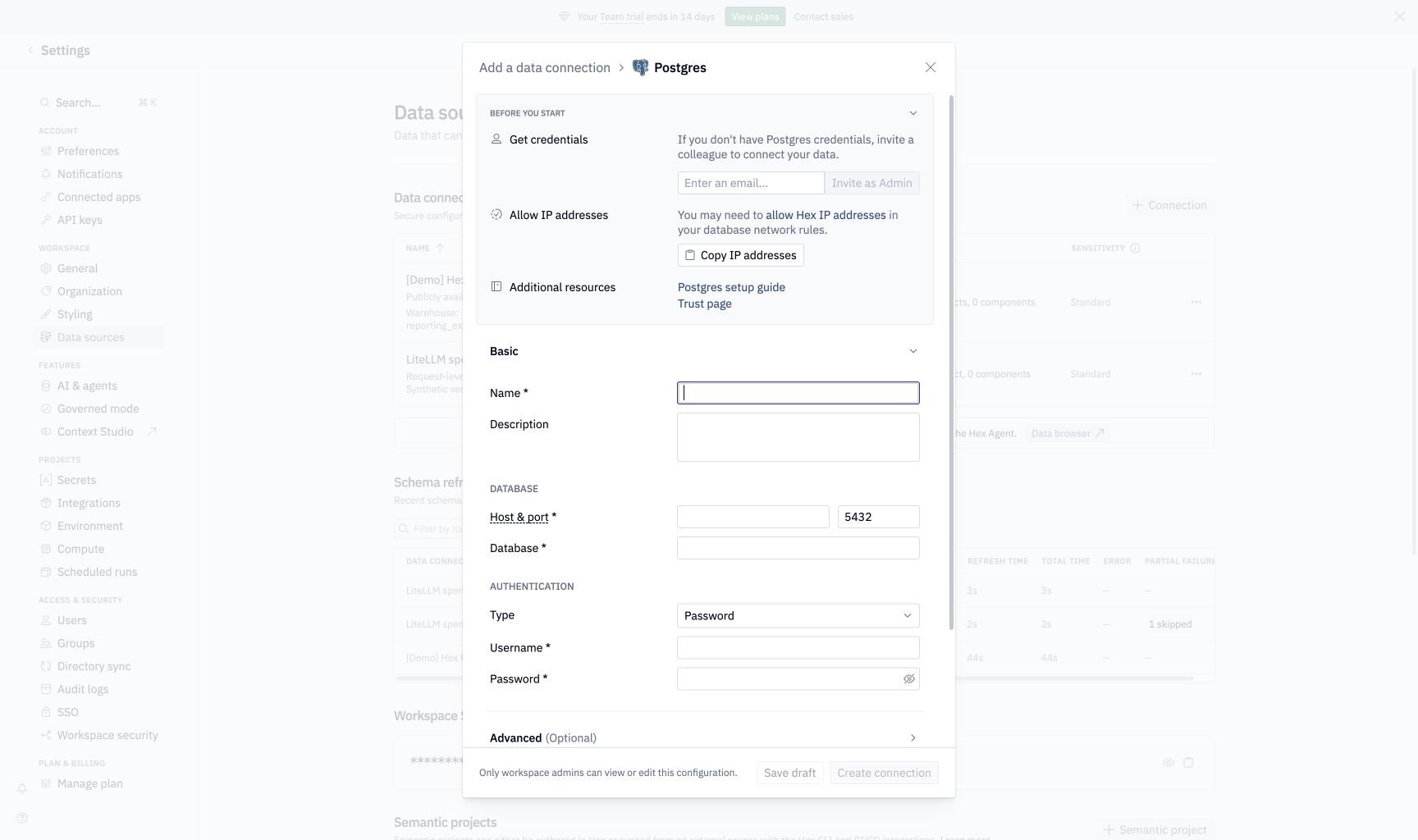
Refresh the connection schema. Include litellm_analytics in schema browsing and confirm that you can query spend_daily_v1.
SELECT *
FROM litellm_analytics.spend_daily_v1
ORDER BY day DESC
LIMIT 20;
Import and run the board
Download the restricted-view Postgres project. From Hex Home, use + → Upload project → Upload and select the .hex.yaml file. Open the Source SQL cell and select your Postgres connection. Run all cells.
In Settings, choose your report dates. The default covers the last 30 complete UTC days; the end date is exclusive. Use the Project and Entity inputs to inspect one scope. Leave the inputs blank to inspect all data your connection can read.
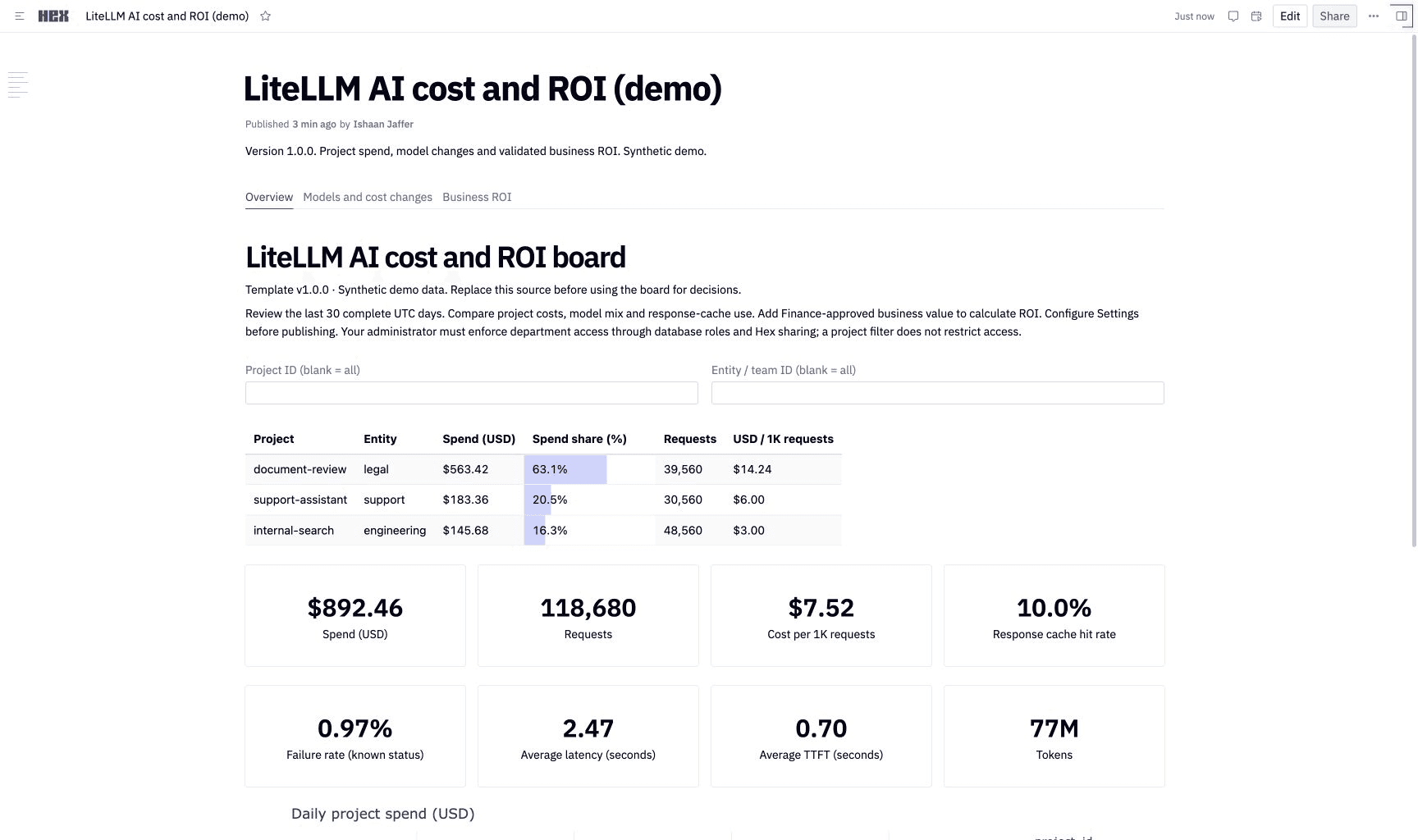
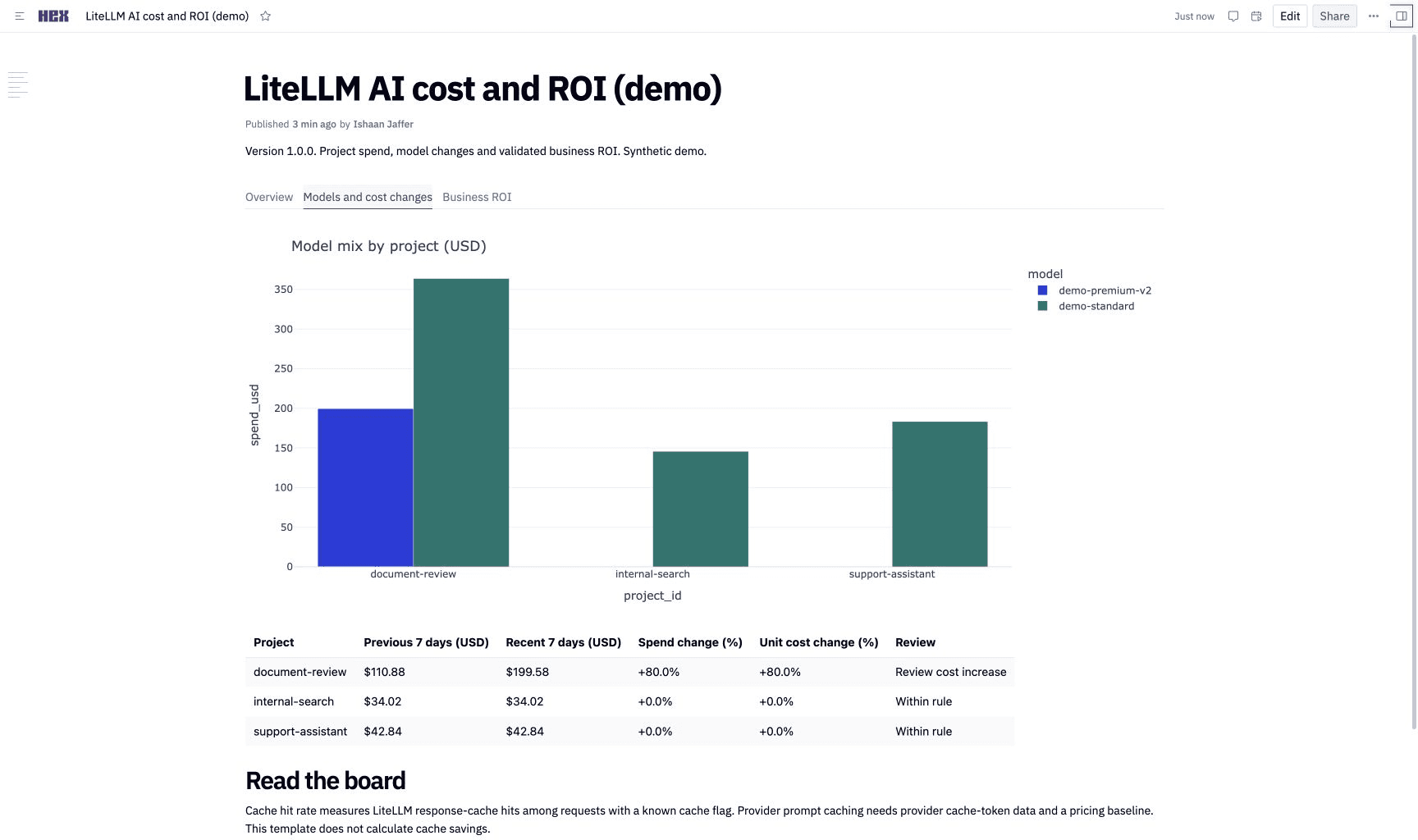
The board includes a ranked project and entity table, spend share, daily spend, model mix and a cost-change review queue. It compares the last seven complete days with the preceding seven and flags cost increases above 25% and $10 when both windows contain records on all seven days. Review cost per request alongside total spend to distinguish higher traffic from higher unit cost.
Add business value for ROI
Open Settings and fill value_data with Finance-approved values for the selected report window:
value_data = pd.DataFrame([{
    "project_id": "support-assistant",
    "value_usd": 5000,
    "other_cost_usd": 1000,
    "coverage_start": report_start,
    "coverage_end": report_end,
}])
These figures illustrate the input shape. Replace them with validated project data. Include infrastructure, automation, licensing and labor in other costs. Choose realized revenue or an approved avoided-cost estimate as business value, and avoid counting the same benefit twice.
The board computes (business value - LLM spend - other costs) / (LLM spend + other costs). It leaves ROI unknown until you supply a matching project and report window with recorded spend on each day and no flagged unknown costs. ROI requires the full project scope, so an Entity filter leaves it unknown. Verify log completeness and include costs outside LiteLLM before using the result for financial reporting.
Publish and keep it current
Publish the App to your intended audience. Configure a Hex scheduled run to update published results. Assign a board owner to check failed runs, source retention and attribution changes. Configure notifications in Hex if you need alerts; the template's review queue does not send messages.
Enforce department access through database permissions and Hex sharing. A viewer who can edit an input can change its scope; the Project and Entity filters do not provide access control. Create separate restricted connections and boards when departments must see different data.
Read the metrics
| Metric | Definition and limit |
|---|---|
| Spend | Sum of recorded LiteLLM spend. Confirm the currency; the template labels it USD. Some deployments record unavailable costs as zero, so reconcile with provider billing. |
| Failure rate | Failures divided by requests with a known success/failure status. The quality table counts requests with unknown status. |
| Cache hit rate | Unknown on the daily-aggregate source. On the request-log source, LiteLLM response-cache hits divided by requests with a known cache flag. Provider prompt caching uses different fields. |
| Latency and TTFT | Unknown on the daily-aggregate source. On the request-log source, weighted means over requests with valid timestamps. TTFT coverage depends on completion-start logging. |
| Missing days | Gaps in the daily chart. A missing row can mean no traffic or a logging gap. |
| Cache savings | Requires provider cache-token usage and a price baseline. This template does not estimate it. |
Template maintenance
We version the template files and SQL contract in the docs repository. The Hex templates check validates Hex's file schema, executes the demo, tests missing values and filters, and checks the SQL and reader grants against a disposable Postgres database. See the template README for checks and the changelog.
Optional S3 and Athena export
Since v1.110.0Use this separate route if you need an S3 spend export. It requires an AWS bucket, Athena and IAM configuration. The Postgres template above needs none of these resources.
Enable the callback
Add hex to your proxy configuration:
litellm_settings:
  callbacks: ["hex"]
Configure the destination before you start the proxy:
export HEX_S3_BUCKET_NAME="your-analytics-bucket"
export HEX_S3_REGION_NAME="us-east-1"
export HEX_S3_PATH="litellm-spend"
The bucket must already exist. Give the proxy's AWS IAM role s3:PutObject permission on the configured prefix. The callback uses the standard AWS credential chain, including workload credentials. Keep credentials outside the proxy configuration and source control.
| Variable | Required | Default | Purpose |
|---|---|---|---|
HEX_S3_BUCKET_NAME | Yes | None | Destination bucket. |
HEX_S3_PATH | No | litellm-spend | Object prefix. Use a dedicated prefix for this export. |
HEX_S3_REGION_NAME | No | AWS_REGION, then us-east-1 | Bucket region. |
HEX_S3_ENDPOINT_URL | No | AWS S3 endpoint | Custom endpoint for S3-compatible storage or local tests. Athena requires an AWS S3 data source. |
The destination is independent of an existing s3_v2 callback.
Connect Hex through Athena
Run the Athena table setup in your Athena database. Replace both occurrences of YOUR_BUCKET and the litellm-spend prefix with your configured values. The table uses date partition projection, so new daily folders become queryable without a crawler or MSCK REPAIR TABLE.
Create an Athena data connection in Hex. Prefer IAM role authentication with the trust policy and external ID that Hex provides. Grant the role read access to the spend prefix, the Athena and Glue permissions required by Hex, and write access to a separate Athena query-results prefix. Keep query results outside the spend prefix.
Schema discovery needs athena:ListDatabases, athena:ListTableMetadata, athena:GetDatabase, and athena:GetTableMetadata on your catalog, plus Glue read permissions on the catalog, database, and table. Query access alone does not make the table visible to Hex AI. Include the query and prepared-statement permissions in the Hex Athena setup guide, and athena:GetQueryResultsStream when your client uses streamed results.
After you create the table, refresh the connection schema and confirm that litellm_hex_spend appears in Hex's Data browser. Use the connection's schema filters to include only your spend database. You can then ask Hex AI to build a dashboard from that table or import the template below.
Import the Hex dashboard template as a project. Select your Athena connection for its four SQL cells and use the database that contains litellm_hex_spend. Run all cells and publish the App.
The template shows spend, requests, tokens, failures, unknown-cost requests, daily spend, model spend, and team spend for the last 30 UTC calendar days. Configure a Hex scheduled run for your desired refresh interval. Each query reads uploaded records; the dashboard refresh interval is separate from the callback's upload interval. Query-result caching is disabled in the template so a refresh queries S3 again.
Hex's S3 file picker imports selected files. It does not automatically discover each new log object for a historical dashboard. Use Athena for this workflow.
Exported records
Each request produces one row. Successful, failed, and completed streaming requests use the same schema. The callback batches rows into newline-delimited JSON objects under <prefix>/YYYY-MM-DD/. If s3_v2 is also configured as the proxy's cold-storage logger, the shared uploader uses individual JSON objects; the Athena table reads both formats.
| Fields | Meaning |
|---|---|
id, start_time, end_time | Request identifier and Unix timestamps in seconds. |
model, model_group, custom_llm_provider, call_type | Model, routing group, provider, and operation. |
status, spend, response_time, cache_hit | Outcome, USD cost, latency in seconds, and cache status. Cost can be null when unavailable. |
prompt_tokens, completion_tokens, total_tokens | Token usage. |
team_id, organization_id, user_id, key_alias | Ownership identifiers for attribution. |
Prompts, responses, raw error messages, arbitrary request metadata, and API keys are excluded. Team/user identifiers and key aliases are included; scope bucket and Hex access to the people who can view that attribution data. Avoid sensitive information in model names or aliases.
Delivery and scale
The callback uses LiteLLM's S3 upload queue and retry behavior. Records wait in memory until a flush; a process crash can lose records that have not reached S3. This is an asynchronous analytics export, with the same delivery limits as the S3 logger.
The shared defaults are 512 records per batch and a 10-second flush interval. DEFAULT_S3_BATCH_SIZE and DEFAULT_S3_FLUSH_INTERVAL_SECONDS change those defaults for S3 callbacks. Upload failures are retained for subsequent flushes subject to the S3 logger's queue and retry limits. Monitor callback failures and bucket delivery in your deployment.
At high volume, compact the JSON into partitioned Parquet or load it into your warehouse, then point Hex at that dataset. Set S3 lifecycle rules for your retention requirements. Athena queries incur AWS query costs.

