


Connect to the Realtime API via WebRTC from browser/mobile clients. LiteLLM handles auth and key management.
How it works
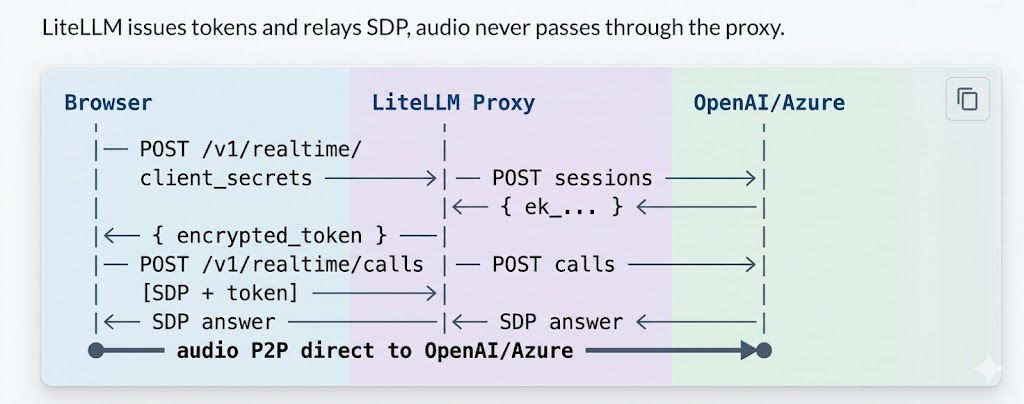
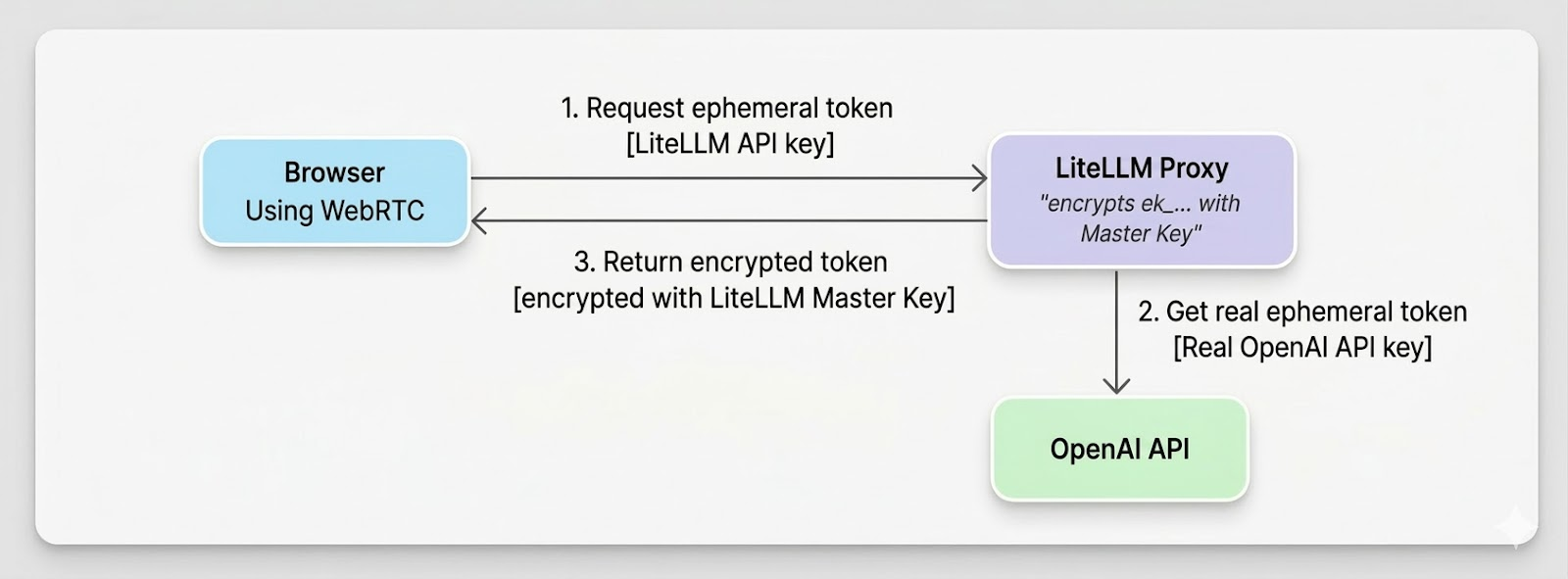
Flow of generating ephemeral token
Proxy Setup
model_list:
  - model_name: gpt-4o-realtime
    litellm_params:
      model: openai/gpt-4o-realtime-preview-2024-12-17
      api_key: os.environ/OPENAI_API_KEY
    model_info:
      mode: realtime
Azure: use model: azure/gpt-4o-realtime-preview, api_key, api_base.
litellm --config /path/to/config.yaml
Try it live
Client Usage
1. Get token - POST /v1/realtime/client_secrets with LiteLLM API key and { model }.
2. WebRTC handshake - Create RTCPeerConnection, add mic track, create data channel oai-events, send SDP offer to POST /v1/realtime/calls with Authorization: Bearer <encrypted_token> and Content-Type: application/sdp.
3. Events - Use the data channel for session.update and other events.
Full code example
// 1. Token
const r = await fetch("http://proxy:4000/v1/realtime/client_secrets", {
  method: "POST",
  headers: { "Authorization": "Bearer sk-litellm-key", "Content-Type": "application/json" },
  body: JSON.stringify({ model: "gpt-4o-realtime" }),
});
const { client_secret } = await r.json();
const token = client_secret.value;

// 2. WebRTC
const pc = new RTCPeerConnection();
const audio = document.createElement("audio");
audio.autoplay = true;
pc.ontrack = (e) => (audio.srcObject = e.streams[0]);
const ms = await navigator.mediaDevices.getUserMedia({ audio: true });
pc.addTrack(ms.getTracks()[0]);
const dc = pc.createDataChannel("oai-events");
const offer = await pc.createOffer();
await pc.setLocalDescription(offer);

const sdpRes = await fetch("http://proxy:4000/v1/realtime/calls", {
  method: "POST",
  headers: { "Authorization": `Bearer ${token}`, "Content-Type": "application/sdp" },
  body: offer.sdp,
});
await pc.setRemoteDescription({ type: "answer", sdp: await sdpRes.text() });

// 3. Events
dc.send(JSON.stringify({ type: "session.update", session: { instructions: "..." } }));
FAQ
Q: What do I do if I get a 401 Token expired error?
A: Tokens are short-lived. Get a fresh token right before creating the WebRTC offer.
Q: Which key should I use for /v1/realtime/calls?
A: Use the encrypted token from client_secrets, not your raw API key.
Q: Should I pass the model parameter when making the call?
A: No, the encrypted token already encodes all routing information including model.
Q: How do I resolve Azure api-version errors?
A: Set the correct api_version in litellm_params (or via the AZURE_API_VERSION environment variable), along with the right api_base and deployment values.
Q: What if I get no audio?
A: Make sure you grant microphone permission, ensure pc.ontrack assigns the audio element with autoplay enabled, check your network/firewall for WebRTC traffic, and inspect the browser console for ICE or SDP errors.