Security Update: Suspected Supply Chain Incident


Status: Active investigation Last updated: March 27, 2026
Update (March 30): A new clean version of LiteLLM is now available (v1.83.0). This was released by our new CI/CD v2 pipeline which added isolated environments, stronger security gates, and safer release separation for LiteLLM.
Update (March 27): Review Townhall updates, including explanation of the incident, what we've done, and what comes next. Learn more
Update (March 27): Added Verified safe versions section with SHA-256 checksums for all audited PyPI and Docker releases.
Update (March 26): Added
checkmarx[.]zoneto Indicators of compromise
Update (March 25): Added community-contributed scripts for scanning GitHub Actions and GitLab CI pipelines for the compromised versions. See How to check if you are affected. s/o @Zach Fury for these scripts.
TLDR;
- The compromised PyPI packages were litellm==1.82.7 and litellm==1.82.8. Those packages were live on March 24, 2026 from 10:39 UTC for about 40 minutes before being quarantined by PyPI.
- We believe that the compromise originated from the Trivy dependency used in our CI/CD security scanning workflow.
- Customers running the official LiteLLM Proxy Docker image were not impacted. That deployment path pins dependencies in requirements.txt and does not rely on the compromised PyPI packages.
We have paused all new LiteLLM releases until we complete a broader supply-chain review and confirm the release path is safe.Updated: We have now released a new safe version of LiteLLM (v1.83.0) by our new CI/CD v2 pipeline which added isolated environments, stronger security gates, and safer release separation for LiteLLM. We have also verified the codebase is safe and no malicious code was pushed tomain.
Overview
LiteLLM AI Gateway is investigating a suspected supply chain attack involving unauthorized PyPI package publishes. Current evidence suggests a maintainer's PyPI account may have been compromised and used to distribute malicious code.
At this time, we believe this incident may be linked to the broader Trivy security compromise, in which stolen credentials were reportedly used to gain unauthorized access to the LiteLLM publishing pipeline.
This investigation is ongoing. Details below may change as we confirm additional findings.
Confirmed affected versions
The following LiteLLM versions published to PyPI were impacted:
- v1.82.7: contained a malicious payload in the LiteLLM AI Gateway
proxy_server.py - v1.82.8: contained
litellm_init.pthand a malicious payload in the LiteLLM AI Gatewayproxy_server.py
If you installed or ran either of these versions, review the recommendations below immediately.
Note: These versions have already been removed from PyPI.
What happened
Initial evidence suggests the attacker bypassed official CI/CD workflows and uploaded malicious packages directly to PyPI.
These compromised versions appear to have included a credential stealer designed to:
- Harvest secrets by scanning for:
- environment variables
- SSH keys
- cloud provider credentials (AWS, GCP, Azure)
- Kubernetes tokens
- database passwords
- Encrypt and exfiltrate data via a
POSTrequest tomodels.litellm.cloud, which is not an official BerriAI / LiteLLM domain
Who is affected
You may be affected if any of the following are true:
- You installed or upgraded LiteLLM via
pipon March 24, 2026, between 10:39 UTC and 16:00 UTC - You ran
pip install litellmwithout pinning a version and received v1.82.7 or v1.82.8 - You built a Docker image during this window that included
pip install litellmwithout a pinned version - A dependency in your project pulled in LiteLLM as a transitive, unpinned dependency (for example through AI agent frameworks, MCP servers, or LLM orchestration tools)
You are not affected if any of the following are true:
LiteLLM AI Gateway/Proxy users: Customers running the official LiteLLM Proxy Docker image were not impacted. That deployment path pins dependencies in requirements.txt and does not rely on the compromised PyPI packages.
- You are using LiteLLM Cloud
- You are using the official LiteLLM AI Gateway Docker image:
ghcr.io/berriai/litellm - You are on v1.82.6 or earlier and did not upgrade during the affected window
- You installed LiteLLM from source via the GitHub repository, which was not compromised
How to check if you are affected
- SDK
- PROXY
- GitHub Actions
- GitLab CI
pip show litellm
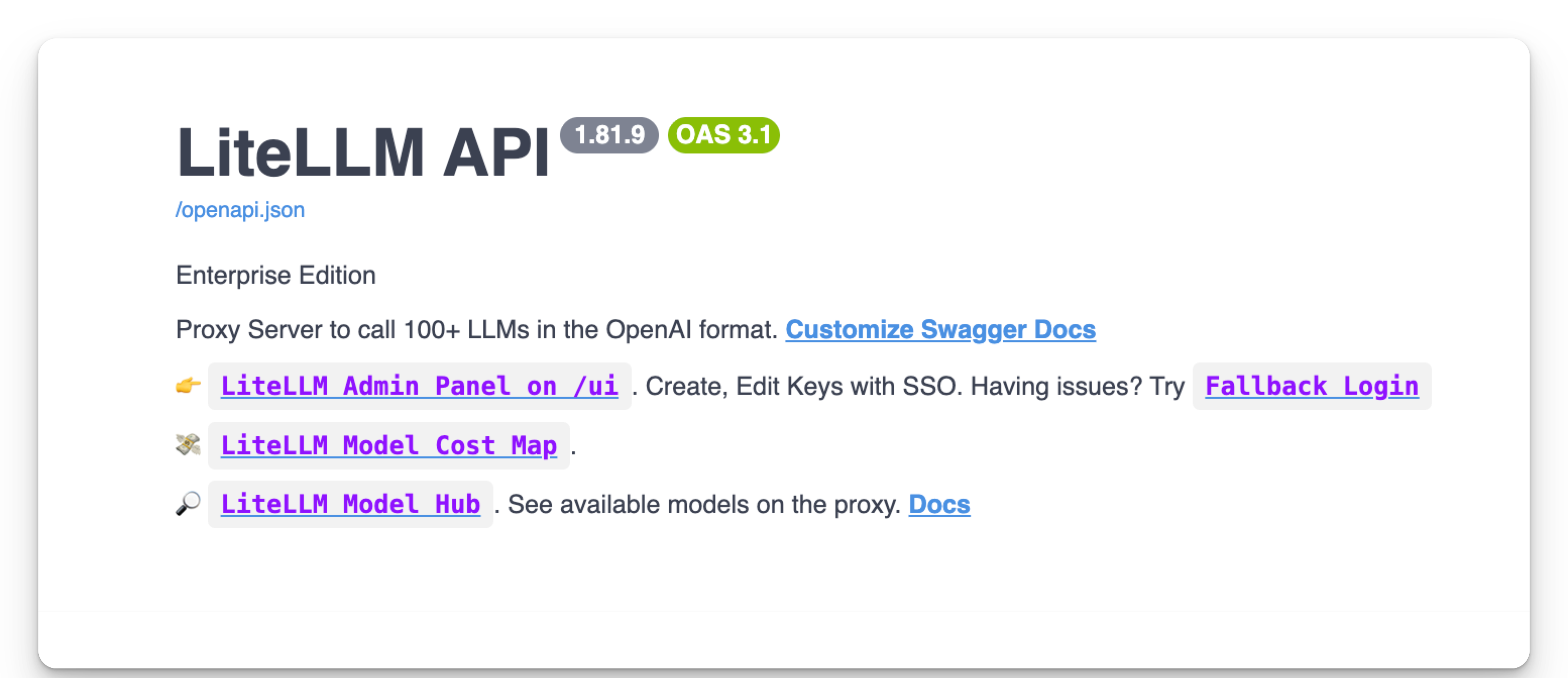
Go to the proxy base url, and check the version of the installed LiteLLM.
Scans all repositories in a GitHub organization for workflow jobs that installed the compromised versions.
Requirements: Python 3 and requests (pip install requests).
Setup:
export GITHUB_TOKEN="your-github-pat"
Run:
python find_litellm_github.py
Set the ORG variable in the script to your GitHub organization name.
Both scripts default to scanning jobs from today. Adjust the WINDOW_START and WINDOW_END constants to cover March 24, 2026 (the incident date) if running on a different day.View full script (find_litellm_github.py)
#!/usr/bin/env python3
"""
Scan all GitHub Actions jobs in a GitHub org that ran between
0800-1244 UTC today and identify any that installed litellm 1.82.7 or 1.82.8.

Adjust WINDOW_START / WINDOW_END to cover March 24, 2026 if running later.
"""

import io
import os
import re
import sys
import zipfile
from concurrent.futures import ThreadPoolExecutor, as_completed
from datetime import datetime, timezone

import requests

GITHUB_URL   = "https://api.github.com"
ORG          = "your-org"  # <-- set to your GitHub organization
TOKEN        = os.environ.get("GITHUB_TOKEN", "")

TODAY        = datetime.now(timezone.utc).date()
WINDOW_START = datetime(TODAY.year, TODAY.month, TODAY.day,  8,  0, 0, tzinfo=timezone.utc)
WINDOW_END   = datetime(TODAY.year, TODAY.month, TODAY.day, 12, 44, 0, tzinfo=timezone.utc)

TARGET_VERSIONS = {"1.82.7", "1.82.8"}
VERSION_PATTERN = re.compile(r"litellm[=\-](\d+\.\d+\.\d+)", re.IGNORECASE)

SESSION = requests.Session()
SESSION.headers.update({
    "Authorization": f"Bearer {TOKEN}",
    "Accept": "application/vnd.github+json",
    "X-GitHub-Api-Version": "2022-11-28",
})


def get_paginated(url, params=None):
    params = dict(params or {})
    params.setdefault("per_page", 100)
    page = 1
    while True:
        params["page"] = page
        resp = SESSION.get(url, params=params, timeout=30)
        if resp.status_code == 404:
            return
        resp.raise_for_status()
        data = resp.json()
        if isinstance(data, dict):
            items = next((v for v in data.values() if isinstance(v, list)), [])
        else:
            items = data
        if not items:
            break
        yield from items
        if len(items) < params["per_page"]:
            break
        page += 1


def parse_ts(ts_str):
    if not ts_str:
        return None
    return datetime.fromisoformat(ts_str.replace("Z", "+00:00"))


def get_repos():
    repos = []
    for r in get_paginated(f"{GITHUB_URL}/orgs/{ORG}/repos", {"type": "all"}):
        repos.append({"id": r["id"], "name": r["name"], "full_name": r["full_name"]})
    return repos


def get_runs_in_window(repo_full_name):
    created_filter = (
        f"{WINDOW_START.strftime('%Y-%m-%dT%H:%M:%SZ')}"
        f"..{WINDOW_END.strftime('%Y-%m-%dT%H:%M:%SZ')}"
    )
    url = f"{GITHUB_URL}/repos/{repo_full_name}/actions/runs"
    runs = []
    for run in get_paginated(url, {"created": created_filter, "per_page": 100}):
        ts = parse_ts(run.get("run_started_at") or run.get("created_at"))
        if ts and WINDOW_START <= ts <= WINDOW_END:
            runs.append(run)
    return runs


def get_jobs_for_run(repo_full_name, run_id):
    url = f"{GITHUB_URL}/repos/{repo_full_name}/actions/runs/{run_id}/jobs"
    jobs = []
    for job in get_paginated(url, {"filter": "all"}):
        ts = parse_ts(job.get("started_at"))
        if ts and WINDOW_START <= ts <= WINDOW_END:
            jobs.append(job)
    return jobs


def fetch_job_log(repo_full_name, job_id):
    url = f"{GITHUB_URL}/repos/{repo_full_name}/actions/jobs/{job_id}/logs"
    resp = SESSION.get(url, timeout=60, allow_redirects=True)
    if resp.status_code in (403, 404, 410):
        return ""
    resp.raise_for_status()

    content_type = resp.headers.get("Content-Type", "")
    if "zip" in content_type or resp.content[:2] == b"PK":
        try:
            with zipfile.ZipFile(io.BytesIO(resp.content)) as zf:
                parts = []
                for name in sorted(zf.namelist()):
                    with zf.open(name) as f:
                        parts.append(f.read().decode("utf-8", errors="replace"))
                return "\n".join(parts)
        except zipfile.BadZipFile:
            pass
    return resp.text


def check_job(repo_full_name, job):
    job_id   = job["id"]
    job_name = job["name"]
    run_id   = job["run_id"]
    started  = job.get("started_at", "")

    log_text = fetch_job_log(repo_full_name, job_id)
    if not log_text:
        return None

    found_versions = set()
    context_lines  = []
    for line in log_text.splitlines():
        m = VERSION_PATTERN.search(line)
        if m:
            ver = m.group(1)
            if ver in TARGET_VERSIONS:
                found_versions.add(ver)
                context_lines.append(line.strip())

    if not found_versions:
        return None

    return {
        "repo":       repo_full_name,
        "run_id":     run_id,
        "job_id":     job_id,
        "job_name":   job_name,
        "started_at": started,
        "versions":   sorted(found_versions),
        "context":    context_lines[:10],
        "job_url":    job.get("html_url", f"https://github.com/{repo_full_name}/actions/runs/{run_id}"),
    }


def main():
    if not TOKEN:
        print("ERROR: Set GITHUB_TOKEN environment variable.", file=sys.stderr)
        sys.exit(1)

    print(f"Time window : {WINDOW_START.isoformat()} -> {WINDOW_END.isoformat()}")
    print(f"Hunting for : litellm {', '.join(sorted(TARGET_VERSIONS))}")
    print()

    print(f"Fetching repositories for org '{ORG}'...")
    repos = get_repos()
    print(f"  Found {len(repos)} repositories")
    print()

    jobs_to_check = []

    print("Scanning workflow runs for time window...")
    for repo in repos:
        full_name = repo["full_name"]
        try:
            runs = get_runs_in_window(full_name)
        except requests.HTTPError as e:
            print(f"  WARN: {full_name} - {e}", file=sys.stderr)
            continue
        if not runs:
            continue
        print(f"  {full_name}: {len(runs)} run(s) in window")
        for run in runs:
            try:
                jobs = get_jobs_for_run(full_name, run["id"])
            except requests.HTTPError as e:
                print(f"    WARN: run {run['id']} - {e}", file=sys.stderr)
                continue
            for job in jobs:
                jobs_to_check.append((full_name, job))

    total = len(jobs_to_check)
    print(f"\nFetching logs for {total} job(s)...")
    print()

    hits = []
    with ThreadPoolExecutor(max_workers=8) as pool:
        futures = {
            pool.submit(check_job, full_name, job): (full_name, job["id"])
            for full_name, job in jobs_to_check
        }
        done = 0
        for future in as_completed(futures):
            done += 1
            full_name, jid = futures[future]
            try:
                result = future.result()
            except Exception as e:
                print(f"  ERROR {full_name} job {jid}: {e}", file=sys.stderr)
                continue
            if result:
                hits.append(result)
            print(
                f"  [{done}/{total}] {full_name} job {jid}" +
                (f"  *** HIT: litellm {result['versions']} ***" if result else ""),
                flush=True,
            )

    print()
    print("=" * 72)
    print(f"RESULTS: {len(hits)} job(s) installed litellm {' or '.join(sorted(TARGET_VERSIONS))}")
    print("=" * 72)

    if not hits:
        print("No matches found.")
        return

    for h in sorted(hits, key=lambda x: x["started_at"]):
        print()
        print(f"  Repo      : {h['repo']}")
        print(f"  Job       : {h['job_name']} (#{h['job_id']})")
        print(f"  Run ID    : {h['run_id']}")
        print(f"  Started   : {h['started_at']}")
        print(f"  Versions  : litellm {', '.join(h['versions'])}")
        print(f"  URL       : {h['job_url']}")
        print(f"  Log lines :")
        for line in h["context"]:
            print(f"    {line}")


if __name__ == "__main__":
    main()
Scans all projects in a GitLab group (including subgroups) for CI/CD jobs that installed the compromised versions.
Requirements: Python 3 and requests (pip install requests).
Setup:
export GITLAB_TOKEN="your-gitlab-pat"
Run:
python find_litellm_jobs.py
Set the GROUP_NAME variable in the script to your GitLab group name.
Both scripts default to scanning jobs from today. Adjust the WINDOW_START and WINDOW_END constants to cover March 24, 2026 (the incident date) if running on a different day.View full script (find_litellm_jobs.py)
#!/usr/bin/env python3
"""
Scan all GitLab CI/CD jobs in a GitLab group that ran between
0800-1244 UTC today and identify any that installed litellm 1.82.7 or 1.82.8.

Adjust WINDOW_START / WINDOW_END to cover March 24, 2026 if running later.
"""

import os
import re
import sys
from concurrent.futures import ThreadPoolExecutor, as_completed
from datetime import datetime, timezone

import requests

GITLAB_URL = "https://gitlab.com"
GROUP_NAME = "YourGroup"  # <-- set to your GitLab group name
TOKEN = os.environ.get("GITLAB_TOKEN", "")

TODAY = datetime.now(timezone.utc).date()
WINDOW_START = datetime(TODAY.year, TODAY.month, TODAY.day, 8, 0, 0, tzinfo=timezone.utc)
WINDOW_END   = datetime(TODAY.year, TODAY.month, TODAY.day, 12, 44, 0, tzinfo=timezone.utc)

TARGET_VERSIONS = {"1.82.7", "1.82.8"}
VERSION_PATTERN = re.compile(r"litellm[=\-](\d+\.\d+\.\d+)", re.IGNORECASE)

HEADERS = {"PRIVATE-TOKEN": TOKEN}
SESSION = requests.Session()
SESSION.headers.update(HEADERS)


def get_paginated(url, params=None):
    params = dict(params or {})
    params.setdefault("per_page", 100)
    page = 1
    while True:
        params["page"] = page
        resp = SESSION.get(url, params=params, timeout=30)
        resp.raise_for_status()
        data = resp.json()
        if not data:
            break
        yield from data
        if len(data) < params["per_page"]:
            break
        page += 1


def get_group_id(group_name):
    resp = SESSION.get(f"{GITLAB_URL}/api/v4/groups/{group_name}", timeout=30)
    resp.raise_for_status()
    return resp.json()["id"]


def get_all_projects(group_id):
    projects = []
    for p in get_paginated(
        f"{GITLAB_URL}/api/v4/groups/{group_id}/projects",
        {"include_subgroups": "true", "archived": "false"},
    ):
        projects.append({"id": p["id"], "name": p["path_with_namespace"]})
    return projects


def parse_ts(ts_str):
    if not ts_str:
        return None
    ts_str = ts_str.replace("Z", "+00:00")
    return datetime.fromisoformat(ts_str)


def jobs_in_window(project_id):
    matching = []
    url = f"{GITLAB_URL}/api/v4/projects/{project_id}/jobs"
    params = {"per_page": 100, "scope[]": ["success", "failed", "canceled", "running"]}

    page = 1
    while True:
        params["page"] = page
        resp = SESSION.get(url, params=params, timeout=30)
        if resp.status_code == 403:
            return matching
        resp.raise_for_status()
        jobs = resp.json()
        if not jobs:
            break

        stop_early = False
        for job in jobs:
            ts = parse_ts(job.get("started_at") or job.get("created_at"))
            if ts is None:
                continue
            if ts > WINDOW_END:
                continue
            if ts < WINDOW_START:
                stop_early = True
                continue
            matching.append(job)

        if stop_early or len(jobs) < 100:
            break
        page += 1

    return matching


def fetch_trace(project_id, job_id):
    url = f"{GITLAB_URL}/api/v4/projects/{project_id}/jobs/{job_id}/trace"
    resp = SESSION.get(url, timeout=60)
    if resp.status_code in (403, 404):
        return ""
    resp.raise_for_status()
    return resp.text


def check_job(project_name, project_id, job):
    job_id   = job["id"]
    job_name = job["name"]
    ref      = job.get("ref", "")
    started  = job.get("started_at", job.get("created_at", ""))

    trace = fetch_trace(project_id, job_id)
    if not trace:
        return None

    found_versions = set()
    for match in VERSION_PATTERN.finditer(trace):
        ver = match.group(1)
        if ver in TARGET_VERSIONS:
            found_versions.add(ver)

    if not found_versions:
        return None

    context_lines = []
    for line in trace.splitlines():
        if VERSION_PATTERN.search(line):
            ver_match = VERSION_PATTERN.search(line)
            if ver_match and ver_match.group(1) in TARGET_VERSIONS:
                context_lines.append(line.strip())

    return {
        "project":    project_name,
        "project_id": project_id,
        "job_id":     job_id,
        "job_name":   job_name,
        "ref":        ref,
        "started_at": started,
        "versions":   sorted(found_versions),
        "context":    context_lines[:10],
        "job_url":    f"{GITLAB_URL}/{project_name}/-/jobs/{job_id}",
    }


def main():
    if not TOKEN:
        print("ERROR: Set GITLAB_TOKEN environment variable.", file=sys.stderr)
        sys.exit(1)

    print(f"Time window : {WINDOW_START.isoformat()} -> {WINDOW_END.isoformat()}")
    print(f"Hunting for : litellm {', '.join(sorted(TARGET_VERSIONS))}")
    print()

    print(f"Resolving group '{GROUP_NAME}'...")
    group_id = get_group_id(GROUP_NAME)

    print("Fetching projects...")
    projects = get_all_projects(group_id)
    print(f"  Found {len(projects)} projects")
    print()

    all_jobs_to_check = []

    print("Scanning job listings for time window...")
    for proj in projects:
        try:
            jobs = jobs_in_window(proj["id"])
        except requests.HTTPError as e:
            print(f"  WARN: {proj['name']} - {e}", file=sys.stderr)
            continue
        if jobs:
            print(f"  {proj['name']}: {len(jobs)} job(s) in window")
        for j in jobs:
            all_jobs_to_check.append((proj["name"], proj["id"], j))

    total = len(all_jobs_to_check)
    print(f"\nFetching traces for {total} job(s)...")
    print()

    hits = []
    with ThreadPoolExecutor(max_workers=10) as pool:
        futures = {
            pool.submit(check_job, pname, pid, job): (pname, job["id"])
            for pname, pid, job in all_jobs_to_check
        }
        done = 0
        for future in as_completed(futures):
            done += 1
            pname, jid = futures[future]
            try:
                result = future.result()
            except Exception as e:
                print(f"  ERROR checking {pname} job {jid}: {e}", file=sys.stderr)
                continue
            if result:
                hits.append(result)
            print(f"  [{done}/{total}] checked {pname} job {jid}" +
                  (f"  *** HIT: litellm {result['versions']} ***" if result else ""),
                  flush=True)

    print()
    print("=" * 72)
    print(f"RESULTS: {len(hits)} job(s) installed litellm {' or '.join(sorted(TARGET_VERSIONS))}")
    print("=" * 72)

    if not hits:
        print("No matches found.")
        return

    for h in sorted(hits, key=lambda x: x["started_at"]):
        print()
        print(f"  Project   : {h['project']}")
        print(f"  Job       : {h['job_name']} (#{h['job_id']})")
        print(f"  Branch/tag: {h['ref']}")
        print(f"  Started   : {h['started_at']}")
        print(f"  Versions  : litellm {', '.join(h['versions'])}")
        print(f"  URL       : {h['job_url']}")
        print(f"  Log lines :")
        for line in h["context"]:
            print(f"    {line}")


if __name__ == "__main__":
    main()
CI/CD scripts contributed by the community (original gist). Review before running.
Indicators of compromise (IoCs)
Review affected systems for the following indicators:
litellm_init.pthpresent in yoursite-packages- Outbound traffic or requests to
models.litellm[.]cloudThis domain is not affiliated with LiteLLM - Outbound traffic or requests to
checkmarx[.]zoneThis domain is not affiliated with LiteLLM
Immediate actions for affected users
If you installed or ran v1.82.7 or v1.82.8, take the following actions immediately.
1. Rotate all secrets
Treat any credentials present on the affected systems as compromised, including:
- API keys
- Cloud access keys
- Database passwords
- SSH keys
- Kubernetes tokens
- Any secrets stored in environment variables or configuration files
2. Inspect your filesystem
Check your site-packages directory for a file named litellm_init.pth:
find /usr/lib/python3.13/site-packages/ -name "litellm_init.pth"
If present:
- remove it immediately
- investigate the host for further compromise
- preserve relevant artifacts if your security team is performing forensics
3. Audit version history
Review your:
- Local environments
- CI/CD pipelines
- Docker builds
- Deployment logs
Confirm whether v1.82.7 or v1.82.8 was installed anywhere.
Pin LiteLLM to a known safe version such as v1.82.6 or earlier, or to a later verified release once announced.
Response and remediation
The LiteLLM AI Gateway team has already taken the following steps:
- Removed compromised packages from PyPI
- Rotated maintainer credentials and established new authorized maintainers
- Engaged Google's Mandiant security team to assist with forensic analysis of the build and publishing chain
Verify Docker image signatures
Starting from v1.83.0-nightly, all LiteLLM Docker images published to GHCR are signed with cosign. Every release is signed with the same key introduced in commit 0112e53.
Verify using the pinned commit hash (recommended):
A commit hash is cryptographically immutable, so this is the strongest way to ensure you are using the original signing key:
cosign verify \
  --key https://raw.githubusercontent.com/BerriAI/litellm/0112e53046018d726492c814b3644b7d376029d0/cosign.pub \
  ghcr.io/berriai/litellm:<release-tag>
Verify using a release tag (convenience):
Tags are protected in this repository and resolve to the same key. This option is easier to read but relies on tag protection rules:
cosign verify \
  --key https://raw.githubusercontent.com/BerriAI/litellm/<release-tag>/cosign.pub \
  ghcr.io/berriai/litellm:<release-tag>
Replace <release-tag> with the version you are deploying (e.g. v1.83.0-stable).
Expected output:
The following checks were performed on each of these signatures:
  - The cosign claims were validated
  - The signatures were verified against the specified public key
Verified safe versions
We have audited every LiteLLM release published between v1.78.0 and v1.82.6 across both PyPI and Docker. Each artifact was verified by:
- Downloading the published artifact and computing its SHA-256 digest
- Scanning for the known indicators of compromise (IOCs)
- Comparing the artifact contents against the corresponding Git commit in the BerriAI/litellm repository
All versions listed below are confirmed clean.
- PyPI Releases
- Docker Images
| Version | SHA-256 | Clean of IOCs | Matches Git | Git Commit | Status |
|---|---|---|---|---|---|
| 1.82.6 | 164a3ef3e19f309e… | ✔ CLEAN | ✔ YES | 38d477507dad | ✔ CLEAN |
| 1.82.5 | e1012ab816352215… | ✔ CLEAN | ✔ YES | 1998c4f3703f | ✔ CLEAN |
| 1.82.4 | d37c34a847e7952a… | ✔ CLEAN | ✔ YES | cfeafbe38811 | ✔ CLEAN |
| 1.82.3 | 609901f6c5a5cf8c… | ✔ CLEAN | ✔ YES | 61409275c8d8 | ✔ CLEAN |
| 1.82.2 | 641ed024774fa3d5… | ✔ CLEAN | ✔ YES | f351bbdb3683 | ✔ CLEAN |
| 1.82.1 | a9ec3fe42eccb161… | ✔ CLEAN | ✔ YES | 94b002066e3a | ✔ CLEAN |
| 1.82.0 | 5496b5d4532cccdc… | ✔ CLEAN | ✔ YES | 6c6585af568e | ✔ CLEAN |
| 1.81.16 | d6bcc13acbd26719… | ✔ CLEAN | ✔ YES | 678200ee4887 | ✔ CLEAN |
| 1.81.15 | 2fa253658702509c… | ✔ CLEAN | ✔ YES | 2e819656cee9 | ✔ CLEAN |
| 1.81.14 | 6394e61bbdef7121… | ✔ CLEAN | ✔ YES | 96bcee0b0af7 | ✔ CLEAN |
| 1.81.13 | ae4aea2a55e85993… | ✔ CLEAN | ✔ YES | cc957a19a560 | ✔ CLEAN |
| 1.81.12 | 219cf9729e5ea30c… | ✔ CLEAN | ✔ YES | ba0d541b1982 | ✔ CLEAN |
| 1.81.11 | 06a66c24742e082d… | ✔ CLEAN | ✔ YES | 231aedeeff7e | ✔ CLEAN |
| 1.81.10 | 9efa1cbe61ac051f… | ✔ CLEAN | ✔ YES | 7488abece8e7 | ✔ CLEAN |
| 1.81.9 | 24ee273bc8a62299… | ✔ CLEAN | ✔ YES | a09d3e9162eb | ✔ CLEAN |
| 1.81.8 | 78cca92f36bc6c26… | ✔ CLEAN | ✔ YES | 4fea649f519b | ✔ CLEAN |
| 1.81.7 | 58466c88c3289c6a… | ✔ CLEAN | ✔ YES | 3f6a281d0f7a | ✔ CLEAN |
| 1.81.6 | 573206ba194d49a1… | ✔ CLEAN | ✔ YES | 8da3a93e6e63 | ✔ CLEAN |
| 1.81.5 | 206505c5a0c6503e… | ✔ CLEAN | ✔ YES | 2cc3778761d4 | ✔ CLEAN |
| 1.81.3 | 3f60fd8b72758795… | ✔ CLEAN | ✔ YES | f30742fe6e8e | ✔ CLEAN |
| Version | SHA-256 | Clean of IOCs | Matches Git | Git Commit | Status |
|---|---|---|---|---|---|
| 1.82.3 | 0a571da849db5f9c… | ✔ CLEAN | ✔ YES | 61409275c8d8 | ✔ CLEAN |
| 1.82.3-stable | 0c2b2a0ad3e50af1… | ✔ CLEAN | ✔ YES | 61409275c8d8 | ✔ CLEAN |
| 1.82.0-stable | 71bf7283767ca436… | ✔ CLEAN | ✔ YES | 97947c254252 | ✔ CLEAN |
| 1.81.15 | 303c31af87e7915e… | ✔ CLEAN | ✔ YES | 20bf3aa8070a | ✔ CLEAN |
| 1.81.14-stable | a34f975804823181… | ✔ CLEAN | ✔ YES | 0435375b1271 | ✔ CLEAN |
| 1.81.13 | a876f3f22f9b6fd4… | ✔ CLEAN | ✔ YES | cc957a19a560 | ✔ CLEAN |
| 1.81.12-stable | e24022878ccc87f5… | ✔ CLEAN | ✔ YES | ba0d541b1982 | ✔ CLEAN |
| 1.81.9-stable | 262e53d7702ed825… | ✔ CLEAN | ✔ YES | a09d3e9162eb | ✔ CLEAN |
| 1.81.3-stable | dff82ccc32fb6489… | ✔ CLEAN | ✔ YES | 61ed8f9e0355 | ✔ CLEAN |
| 1.81.0-stable | f4913297d1bb3dc3… | ✔ CLEAN | ✔ YES | 790a5ce0b323 | ✔ CLEAN |
| 1.80.15-stable | 0b4ec3861e978b4a… | ✔ CLEAN | ✔ YES | 17c8d8d109b5 | ✔ CLEAN |
| 1.80.11-stable | 4068108d9101cd2a… | ✔ CLEAN | ✔ YES | 57e07bddd341 | ✔ CLEAN |
| 1.80.8-stable | 0304c2eb1f3cf542… | ✔ CLEAN | ✔ YES | 3381d63152f8 | ✔ CLEAN |
| 1.80.5-stable | a89e173135fff96a… | ✔ CLEAN | ✔ YES | 6c49b95a4ab7 | ✔ CLEAN |
| 1.80.0-stable | a3416f4cd0c896c9… | ✔ CLEAN | ✔ YES | 98365205acd0 | ✔ CLEAN |
| 1.79.3-stable | 27aae83d6ab6cb0b… | ✔ CLEAN | ✔ YES | c0548542d4a9 | ✔ CLEAN |
| 1.79.1-stable | 7780d29a9543c4ce… | ✔ CLEAN | ✔ YES | c217bddb59ba | ✔ CLEAN |
| 1.79.0-stable | 32bf6ac059a56641… | ✔ CLEAN | ✔ YES | 8d495f56a9cc | ✔ CLEAN |
| 1.78.5-stable | d5e607648eafa15e… | ✔ CLEAN | ✔ YES | c471bf1f16c2 | ✔ CLEAN |
| 1.78.0-stable | 7a56b32dc7153763… | ✔ CLEAN | ✔ YES | 5fde83d9f154 | ✔ CLEAN |
Questions and support
If you believe your systems may be affected, contact us immediately:
- Security:
security@berri.ai - Support:
support@berri.ai - Slack: Reach out to the LiteLLM team directly
For real-time updates, follow LiteLLM (YC W23) on X.