 MoyaiOpen source cloud agent
 Hermes
 Claude Code
 Codex
Codex OpenCode
 Deep AgentsOpenAIAnthropic
 Fireworks
 Google
 xAI
xAI Mistral
 DeepSeek
 Bedrock
Works with Claude Code and CodexSelf-hosted · 100+ providers through LiteLLM
- [1]The problem
- [2]Our cost estimate
- [3]Why we're open sourcing it
- [4]A cloud agent that keeps working
- [5]Choose your agent
- [6]Choose your models
- [7]Know what you spend
- [8]Set up your first task



Today we're open sourcing Moyai, the cloud coding agent our team runs at LiteLLM. Give it a task in Slack or the browser, then come back to a pull request with code and test results to review. You choose the agent and compatible model, run it on your infrastructure, and track the cost through LiteLLM.
Set up your first cloud task, or see the cost comparison and a real bug fix below.
The problem
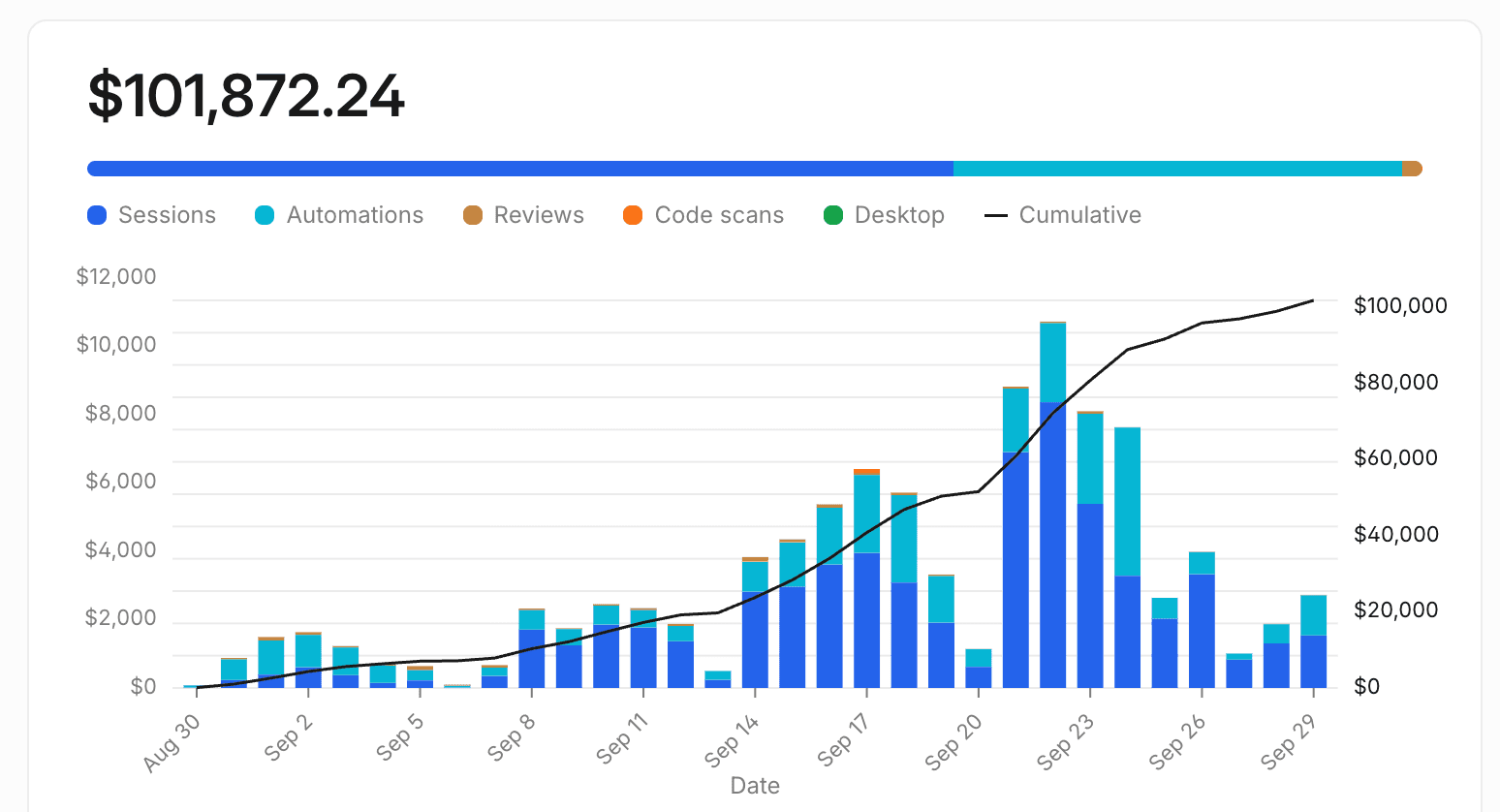
Our Devin bill hit $101,872 in a single month, and only our own team used it. Our engineers kicked off those sessions and automations on models and routing we couldn't control.
We already run a gateway that routes across 100+ providers. We wanted to choose the model and routing for each coding task, with the usage visible in our own gateway.
Our estimate: 79% lower costs
We estimate about $700 a day to run Moyai for our team. Over 31 days, that comes to about $21,700 against our $101,872 Devin bill: roughly $80,000 less, or 79% lower estimated cost. This is an internal comparison, not a matched-workload benchmark. Your model mix, workload, compute, and storage determine your costs.
Devin's daily curve is approximated from its billing dashboard and scaled to the invoice total. The Moyai line assumes $700/day for our team. Actual costs depend on your workload and infrastructure.
Why we're open sourcing it
Last week we wrote about how we built our own internal Devin in 2 days, and most replies asked to run it themselves. Moyai is the same code we run in production at LiteLLM. You deploy it on your infrastructure and point it at your LiteLLM gateway. You control the installation and provider access; model requests still go to the provider you select.
A cloud agent that keeps working
Each session gets its own cloud workspace with a terminal, a filesystem, and a browser. The agent edits code and runs your tests there, then opens a pull request for you to review. Closing your laptop leaves the cloud task running.
You can follow along in the web app and send a correction while it works, or pick the thread back up in Slack the next morning. For large tasks, the agent can split work across parallel workers and collect their results.
Watch a real bug fix move from a Slack request through investigation and regression tests to a pull request:
/personal:team bug fix across Slack and the web. Edited 18-second walkthrough of a completed session; tests used a mocked Slack transport.Choose the agent for the task
Pick a supported agent such as Codex, Claude Agent SDK, or Hermes when you start a session. Moyai runs it in a cloud workspace with the connections you enable.
HermesClaude CodeCodexOpenCodeDeep AgentsCheck the agent and model compatibility table when choosing a combination for your gateway.
Choose your models through LiteLLM
Moyai sends model requests through LiteLLM. Choose a compatible model for the task and your budget, with provider keys kept on the gateway. Moyai attributes each tracked request to the teammate who sent the message.
OpenAIAnthropicFireworksGooglexAIMistralDeepSeekBedrockLiteLLM supports 100+ providers. Your selected agent needs a model and gateway endpoint that support its protocol and tool calls.
One source of truth for model costs
Moyai uses LiteLLM's reported charges for its per-user, session, and model breakdowns. You can see which teammates and tasks account for spend, then check a tracked request against the same gateway cost. See the spend dashboard and cost accounting details.
Set up your first cloud task
Bring a Modal account, a reachable LiteLLM gateway, and a key for your chosen model. Follow the setup guide to deploy Moyai, verify a cloud task, and connect one repository. Give it a small bug your team already understands. Review the PR, test output, and model cost before expanding the rollout.
You own the installation, updates, credentials, and backups. You pay for model usage and cloud infrastructure. Read the architecture guide for the system design, checkpoints, and recovery behavior.
Preview the interface locally first
The local demo lets you explore the interface without model credentials. Demo tasks are simulated; they do not verify cloud execution.
git clone https://github.com/BerriAI/moyai.git
cd moyai
cp .env.example .env
uv sync --frozen
uv run uvicorn app.main:app --host 127.0.0.1 --port 8787 --workers 1
Issues and PRs are welcome on GitHub.