NEW PROVIDER / OCTOBER 2026
OpenCode Go.
Now in LiteLLM.

Your Go subscription, through one gateway. Choose a model, keep your client, and let LiteLLM handle the API format and session.
One connection to your Go models.
OpenCode Go is a hosted model service available through Go and Go Plus subscriptions. It gives you access to models from multiple providers. The OpenCode app is a coding agent that can use Go, or connect to other providers.
The new opencode_go/ provider brings Go into LiteLLM’s SDK and AI Gateway. Use your Console key and a Go model ID. LiteLLM selects the right upstream API, preserves the conversation’s session, and records estimated usage under OpenCode Go.
- Model routing
- Chat Completions, Responses, Messages, and Gemini formats, selected from model metadata.
- Model discovery
- Fetch available model IDs from Go, with support for a configured gateway endpoint.
- Usage visibility
- Published token and cache rates in LiteLLM’s catalog, including supported context tiers.
Choose the model. Keep your client.
ILLUSTRATED REQUEST FLOW/v1/chat/completionsglm-5.3-flash/chat/completionsThe selected model determines the upstream format. Your client can also send native Responses or Anthropic Messages requests. This illustration makes no API calls.
From a Go account to a first reply.
You need an active Go or Go Plus subscription and an API key from OpenCode Console. The Console key authenticates LiteLLM to Go; signing in to the OpenCode app alone does not authenticate your gateway.
Install and set your keys
Run these commands in the shell that will host LiteLLM. Replace the placeholders with your Console key and a long, random gateway key.
The OpenCode key stays on the gateway. Clients use the LiteLLM key.
pip install --upgrade 'litellm[proxy]'
export OPENCODE_API_KEY="your-opencode-api-key"
export LITELLM_MASTER_KEY="your-litellm-gateway-key"
Add a Go model
Save this as config.yaml. The client calls the alias go; LiteLLM calls the configured Go model. You do not need to set an upstream base URL.
For an existing gateway, add the model entry to your current configuration and keep your existing authentication settings.
model_list:
  - model_name: go
    litellm_params:
      model: opencode_go/glm-5.3-flash
      api_key: os.environ/OPENCODE_API_KEY

general_settings:
  master_key: os.environ/LITELLM_MASTER_KEY
litellm --config config.yaml --host 127.0.0.1 --port 4000
Send a request
In another terminal, set the same LITELLM_MASTER_KEY and run this request.
A successful response contains a greeting in choices[0].message.content and token counts in usage. Reuse the session ID for later turns in this conversation.
curl http://localhost:4000/v1/chat/completions \
  -H "Authorization: Bearer $LITELLM_MASTER_KEY" \
  -H 'Content-Type: application/json' \
  -H 'x-litellm-session-id: go-demo' \
  -d '{
    "model": "go",
    "messages": [{"role": "user", "content": "Say hello."}]
  }'
Connect the OpenCode app
With OpenCode installed, add this to your project’s opencode.json, or merge the entry into its existing provider object.
Start opencode from that project in a shell with your gateway key set. Run /models, choose Go · GLM-5.3-Flash under LiteLLM Go, and send a message.
OpenCode talks to your local LiteLLM gateway. LiteLLM sends the request to Go.
{
  "$schema": "https://opencode.ai/config.json",
  "provider": {
    "litellm-go": {
      "npm": "@ai-sdk/openai-compatible",
      "name": "LiteLLM Go",
      "options": {
        "baseURL": "http://localhost:4000/v1",
        "apiKey": "{env:LITELLM_MASTER_KEY}"
      },
      "models": {
        "go": {"name": "Go · GLM-5.3-Flash"}
      }
    }
  }
}
Keep the conversation together.
Go uses a stable session ID to route a conversation efficiently and support prompt caching. Losing that ID at the gateway can cause a missing-session error.
Alongside the provider, we added automatic forwarding of a supplied session ID as x-opencode-session. This also covers existing OpenAI and Anthropic configurations that point to supported OpenCode endpoints.
x-litellm-session-id: go-demoREQUEST TO OPENCODE GOx-opencode-session: go-demoAn explicit OpenCode session header takes precedence. LiteLLM does not invent a session ID when none is supplied.
Use litellm_session_id in the SDK or x-litellm-session-id at the gateway. Keep it stable within a conversation and use a different ID for a new conversation. Read the session fix ↗
Track usage.
Understand your allowance.
LiteLLM estimates request cost using Go’s published token rates. That gives you a consistent value for logs and gateway budgets.
Your Go subscription, remaining allowance, rolling limits, and resets stay with OpenCode. A LiteLLM cost estimate is not an extra invoice charge, and its budget counter does not mirror your plan’s remaining allowance.
Rates and model availability can change. DeepSeek estimates use the published peak rate, so off-peak requests can cost less in Console. Check the current Go rate card for plan details.
Real models.
Real tool calls.
We tested all three incoming APIs against four upstream formats, including Gemini: 12 combinations returning responses and token usage.
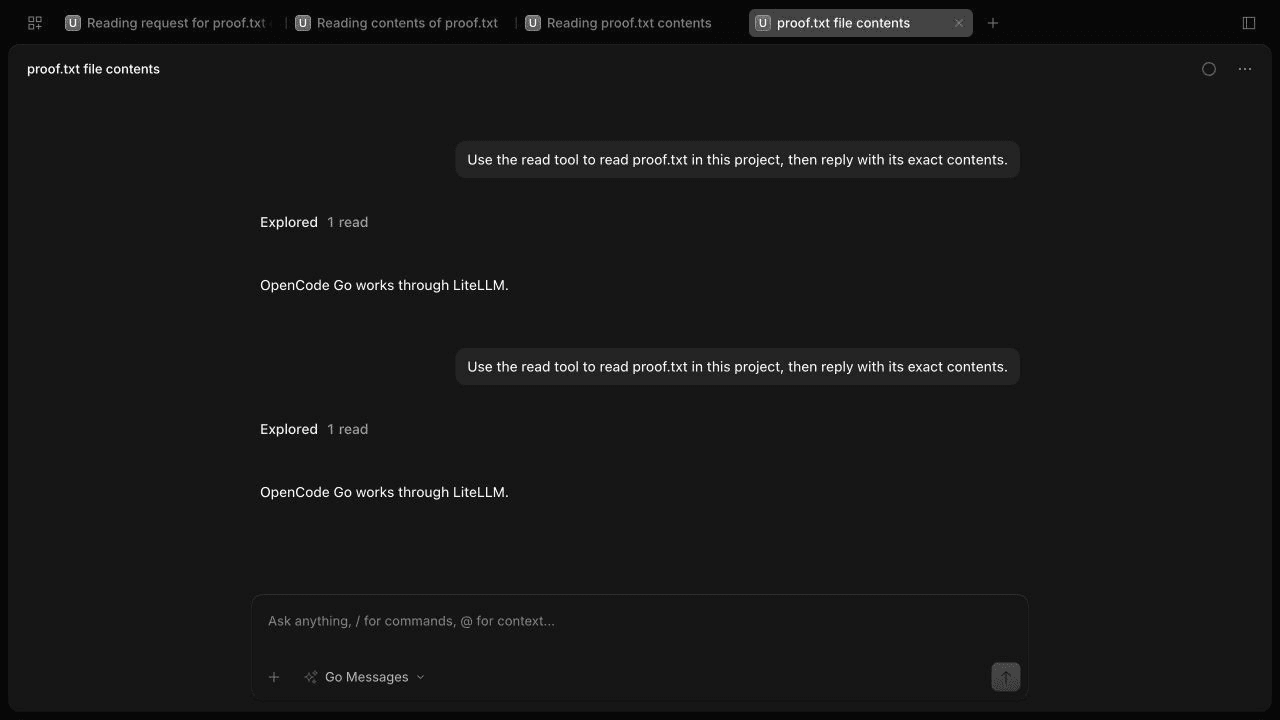
We also ran streamed tool calls, tool-result follow-ups, and file reads in OpenCode. The screenshot shows a recorded file-read test through the gateway.
See the implementation and test evidence ↗