LiteLLM AI Gateway
Customer Portal
Budget and charge your agent's customers.
Illustrative customer traffic flows through LiteLLM into your customer portal. Organization, team, and member budgets use three views of the same request cost.




Today we're launching LiteLLM Customer Portal for AI-native companies using the gateway. If you're building an agent on LiteLLM and need to track spend and set budget limits for your customers by their organizations, teams, and individual members, this is for you.
Who is this for?
For AI-native companies building production agents using LiteLLM AI Gateway who need to run their agents profitably, with positive ROI.
The problem
With B2B AI agents, cost tracking gets complicated across customer organizations, teams, and individual members. Your customer's AI spend can exceed what you charge them.
AI model cost rises above your price.
Different models, providers, and request parameters multiply that complexity.
Track that spend by customer organization, team, and member:
That's a bunch of glue code to build around your agent. Since LiteLLM is already your source of truth for model costs, we're exposing APIs to track customer spend, set budgets, and build these controls into your product.
How to use LiteLLM AI Gateway for this problem
Point your agent to LiteLLM AI Gateway and send your customer's organization alias and member ID:
- OpenAI Responses
- LangChain Deep Agents
import os

from openai import OpenAI

client = OpenAI(
    api_key=os.environ["LITELLM_API_KEY"],
    base_url=f"{os.environ['LITELLM_BASE_URL'].rstrip('/')}/v1",
)
raw_response = client.responses.with_raw_response.create(
    model=os.environ["LITELLM_MODEL"],
    input="Write a short welcome message.",
    max_output_tokens=128,
    extra_headers={
        "x-litellm-customer-org-alias": "Acme",
        "x-litellm-customer-member-id": "acme-alice",
    },
)
response = raw_response.parse()
print(response.output_text)
print("LiteLLM call ID:", raw_response.headers.get("x-litellm-call-id"))
Install with pip install openai.
import os

from deepagents import create_deep_agent
from langchain_openai import ChatOpenAI

model = ChatOpenAI(
    model=os.environ["LITELLM_MODEL"],
    base_url=f"{os.environ['LITELLM_BASE_URL'].rstrip('/')}/v1",
    api_key=os.environ["LITELLM_API_KEY"],
    use_responses_api=True,
    default_headers={
        "x-litellm-customer-org-alias": "Acme",
        "x-litellm-customer-member-id": "acme-alice",
    },
)
agent = create_deep_agent(model=model)
result = agent.invoke({"messages": [{"role": "user", "content": "Say hello to Alice."}]})
print(result["messages"][-1].text)
Install with pip install deepagents langchain-openai. Configure the model for the authenticated customer; pass the same identity to any other models the agent calls.
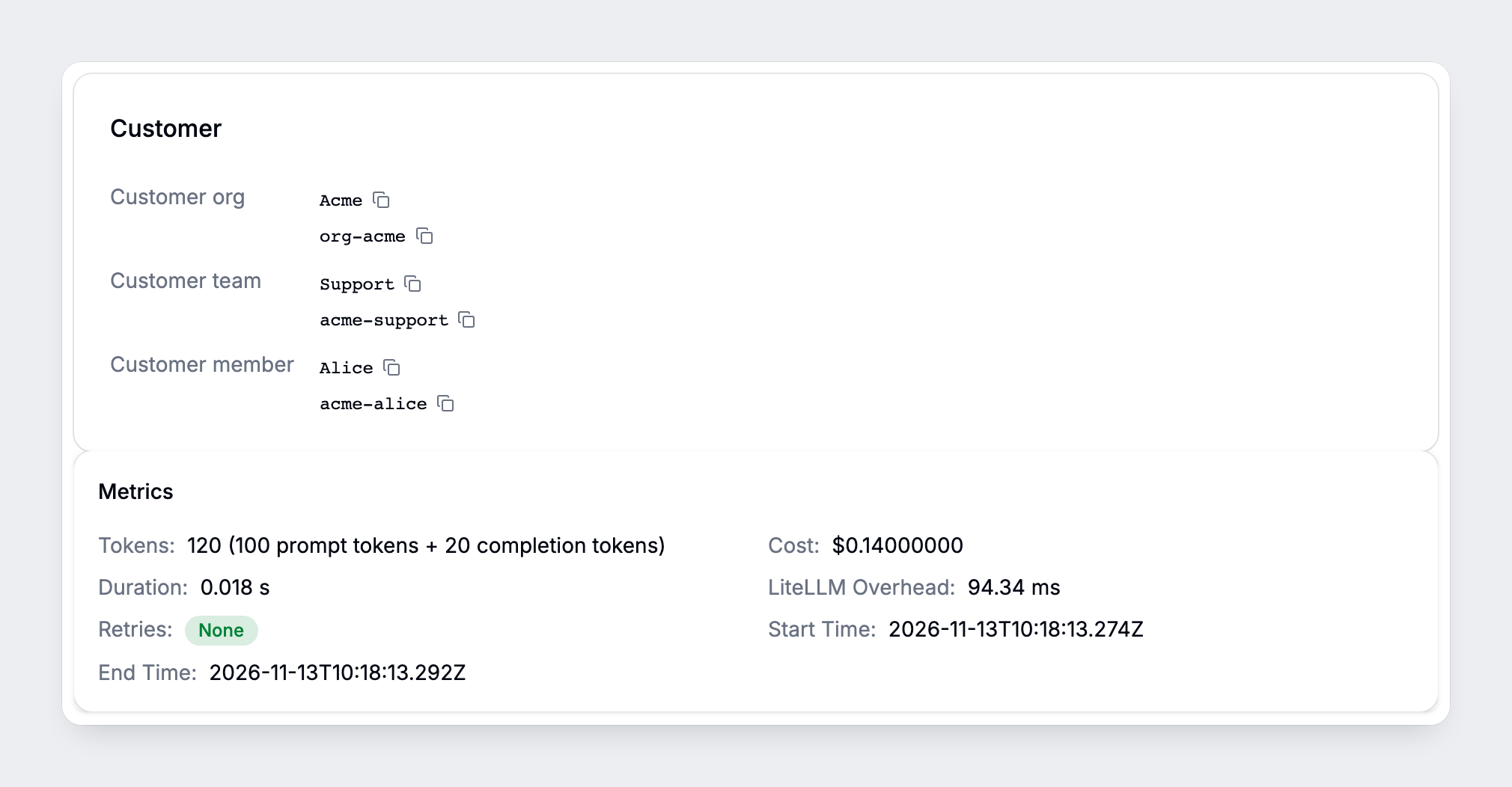
That's it for attributing the call. LiteLLM resolves the member's customer team and organization and records the spend. The same headers work with Responses, Chat Completions, and Anthropic Messages.
Use your application key and a gateway model alias. LITELLM_BASE_URL is the gateway root URL; register the customer first, and select their identity from your authenticated session.
Set customer budgets that protect your margin
If you charge $100 per member, you can give that member a $60 AI allowance. Set separate budgets for the customer organization, each team, and each member:

organization
team
member
The same request's cost rolls up from the member to their team and organization. Here, the member hits their $60 cap while both parents still have room, so further requests pause.
Choose the organization cap and default member profile when you onboard a customer. These examples use a 30-day budget period:
- API
- LiteLLM UI
curl --fail-with-body --request POST \
  "$LITELLM_BASE_URL/management/v1/customer_organizations" \
  --header "Authorization: Bearer $LITELLM_ADMIN_KEY" \
  --header "Content-Type: application/json" \
  --data '{
    "customer_org_id": "org-acme",
    "alias": "Acme",
    "budget": {
      "max_budget": 1000,
      "budget_duration": "30d"
    },
    "default_budgets": [{
      "name": "default-user",
      "max_budget": 60,
      "soft_budget": 48,
      "budget_duration": "30d"
    }],
    "default_budget_template": "default-user"
  }'
Use a server-side proxy admin credential as LITELLM_ADMIN_KEY. Add the customer's teams and members; new members inherit the default profile.
Open Customer Portal → Customers → your customer → Settings. Use Set budget or Edit budget to set Spend limit (USD) and Reset period. Select a member's Budget template for its default allowance.
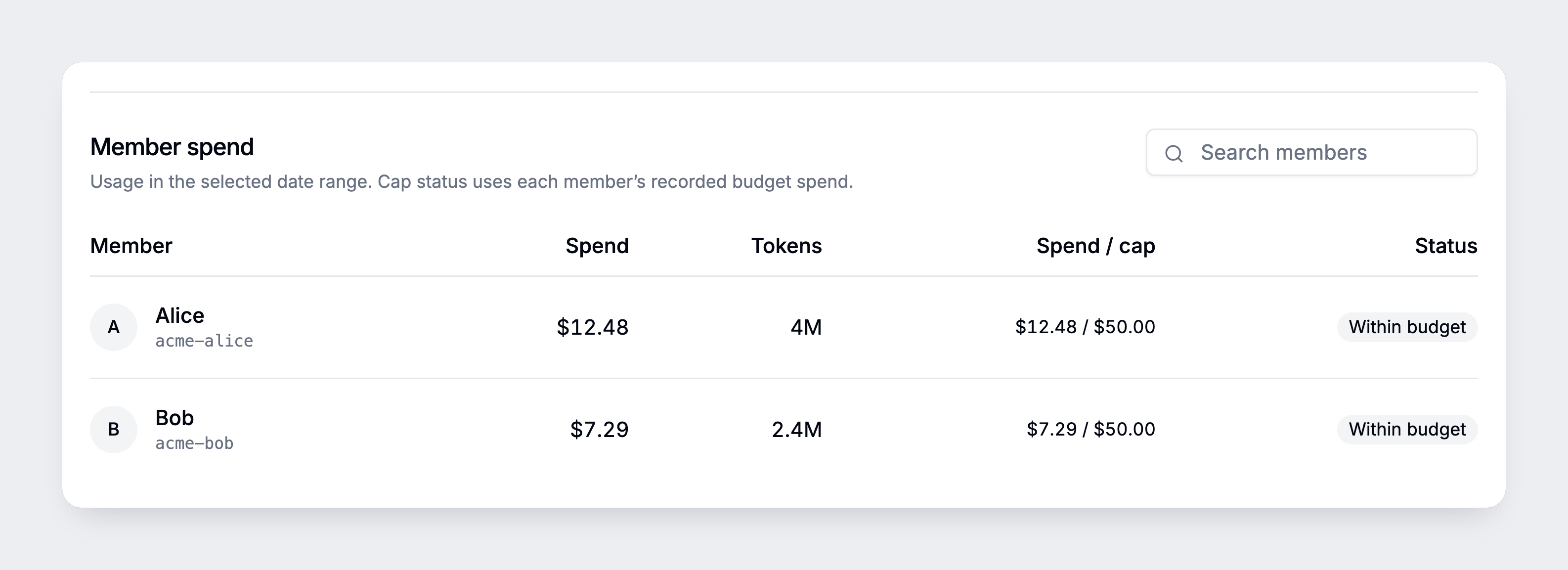
At the cap, LiteLLM rejects new requests based on recorded spend. Leave room for accounting delays and requests already in flight.
Give default users and power users different profiles
Some customers need more allowance. Create a power-user profile, then assign its returned budget_id when you create new members. Use the same APIs in your product so your customer's admins can manage these profiles.
curl --fail-with-body --request POST \
  "$LITELLM_BASE_URL/management/v1/customer_organizations/org-acme/default_budgets" \
  --header "Authorization: Bearer $LITELLM_ADMIN_KEY" \
  --header "Content-Type: application/json" \
  --data '{
    "name": "power-user",
    "max_budget": 90,
    "soft_budget": 72,
    "budget_duration": "30d"
  }'
Trigger a webhook when a customer hits their limit
When a member reaches their $60 cap, use the budget webhook to alert your team or open an approval request. Your receiver formats the notification from LiteLLM's JSON event. Configure and test delivery; reconcile missed alerts with usage reads because delivery is best effort.
Approve a temporary increase when your customer upgrades
If the customer needs more, tie the increase to a plan upgrade or extra charge in your product. The workflow above shows a $150 price and an approved temporary $90 AI allowance.
Set INCREASE_EXPIRES_AT to a future timestamp with a timezone, then apply the temporary member override:
curl --fail-with-body --request PATCH \
  "$LITELLM_BASE_URL/management/v1/customer_members/acme-alice" \
  --header "Authorization: Bearer $LITELLM_ADMIN_KEY" \
  --header "Content-Type: application/json" \
  --data "{
    \"budget_override\": {\"max_budget\": 90},
    \"budget_override_expires_at\": \"$INCREASE_EXPIRES_AT\"
  }"
Your billing system handles the price change. LiteLLM applies the allowance until it expires; the organization and team caps still apply. Use the approval APIs if your workflow needs a review queue.
Put the usage and budget controls in your own product
Now give the customer a usage page next to their plan, allowance, and upgrade options. Our APIs let your backend fetch their spend and budget settings, so the customer sees the same costs you use for chargebacks:
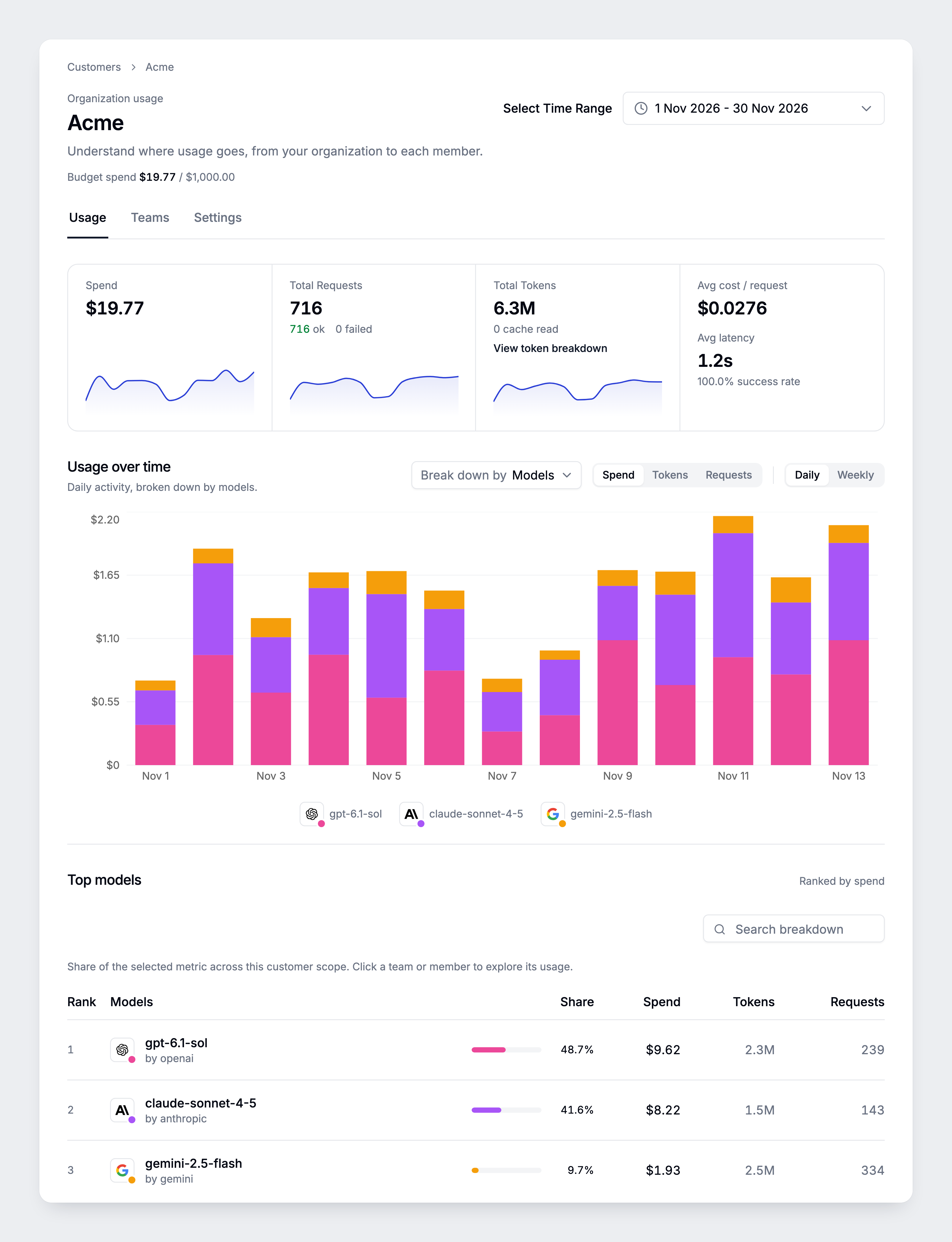
Fetch complete organization totals for a date range:
curl --fail-with-body --silent --show-error --get \
  "$LITELLM_BASE_URL/management/v1/customer_organizations/daily/activity/aggregated" \
  --header "Authorization: Bearer $LITELLM_ADMIN_KEY" \
  --data-urlencode "customer_org_ids=org-acme" \
  --data-urlencode "start_date=2026-11-01" \
  --data-urlencode "end_date=2026-11-30"
Read metadata.total_spend, total_tokens, and total_api_requests. Fetch caps from the organization, team, and member records; keep admin credentials on your backend and authorize each customer's access. Your billing system applies your prices and collects payment.
OSS and Enterprise
| Customer Portal | LiteLLM OSS | LiteLLM Enterprise |
|---|---|---|
| Customer organizations | Up to 5 | More than 5 |
| Customer teams per organization | Up to 5 | More than 5 |
| Customer members per team | Up to 5 | More than 5 |
Start with the walkthrough and API reference. For larger customer hierarchies, talk to us about Enterprise.
This draft targets main; a published release containing the complete flow has not been verified. Check availability before deploying.