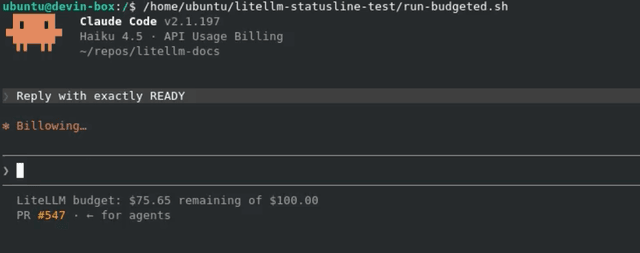
Claude Code - Budget Status Line
Show a user's remaining LiteLLM budget in the Claude Code status line. The status line calls /user/info with the user's virtual key and displays the difference between user_info.max_budget and user_info.spend.
If the user does not have a max_budget, the script prints nothing.
Prerequisites
- Claude Code is configured to use LiteLLM
- The Claude Code virtual key belongs to a user with a
max_budget curlandjqare installed
Use a user virtual key rather than the proxy master key. Calling /user/info without a user_id returns the user associated with the authenticated key.
1. Set LiteLLM environment variables
Set the proxy root URL and the same virtual key that Claude Code uses:
export LITELLM_BASE_URL="http://localhost:4000"
export LITELLM_API_KEY="$ANTHROPIC_AUTH_TOKEN"
LITELLM_BASE_URL must point to the proxy root, not the /anthropic pass-through endpoint.
2. Create the status line script
Save this script as ~/.claude/litellm-budget-statusline.sh:
#!/bin/bash

BASE_URL="${LITELLM_BASE_URL:-${ANTHROPIC_BASE_URL:-}}"
API_KEY="${LITELLM_API_KEY:-${ANTHROPIC_AUTH_TOKEN:-${ANTHROPIC_API_KEY:-}}}"

[ -n "$BASE_URL" ] && [ -n "$API_KEY" ] || exit 0

BASE_URL="${BASE_URL%/}"
BASE_URL="${BASE_URL%/anthropic}"

USER_INFO=$(curl --silent --fail --max-time 2 \
  "${BASE_URL}/user/info" \
  --header "Authorization: Bearer ${API_KEY}") || exit 0

BUDGET=$(printf '%s' "$USER_INFO" | jq -r '
  if .user_info.max_budget == null then
    empty
  else
    [.user_info.max_budget, (.user_info.spend // 0)] | @tsv
  end
')

[ -n "$BUDGET" ] || exit 0

MAX_BUDGET=$(printf '%s' "$BUDGET" | cut -f1)
SPEND=$(printf '%s' "$BUDGET" | cut -f2)

awk -v max="$MAX_BUDGET" -v spend="$SPEND" 'BEGIN {
  remaining = max - spend
  if (remaining < 0) remaining = 0
  printf "LiteLLM budget: $%.2f remaining of $%.2f\n", remaining, max
}'
Make the script executable:
chmod +x ~/.claude/litellm-budget-statusline.sh
The two-second timeout prevents a slow or unavailable proxy from delaying Claude Code. API errors and users without a configured budget leave the status line empty.
3. Configure Claude Code
Add the script to ~/.claude/settings.json:
{
  "statusLine": {
    "type": "command",
    "command": "~/.claude/litellm-budget-statusline.sh"
  }
}
Claude Code refreshes the status line after each assistant response. For more customization options, see the Claude Code status line documentation.
Example
For a user with a $100 maximum budget and $24.35 in tracked spend, the status line displays:
LiteLLM budget: $75.65 remaining of $100.00
The remaining budget appears beneath the Claude Code prompt: