Plugins
Plugins let external services appear as selectable modes in the LiteLLM UI sidebar alongside the AI Gateway. Each plugin runs as its own backend; LiteLLM proxies requests to it, injects a scoped credential, and hands the iframe a short-lived identity claim so the user never re-authenticates.
This is useful when you want to ship an internal tool (a reporting UI, an agent control plane, a data labelling app) under the LiteLLM dashboard without leaking the caller's master key to that tool.
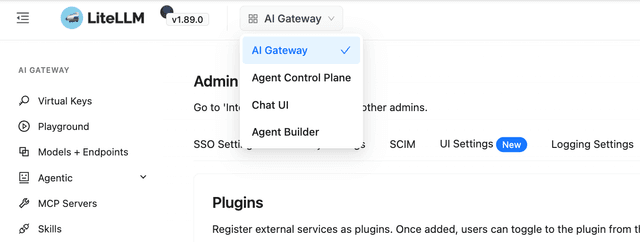
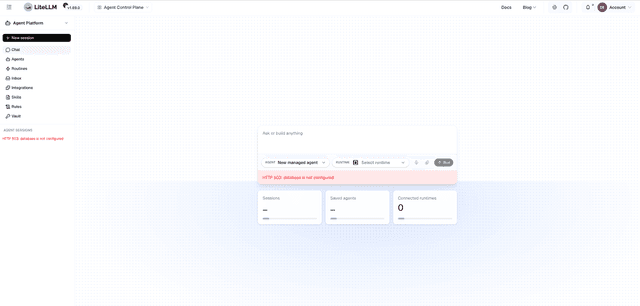
Selecting a plugin replaces the AI Gateway navigation with the plugin's own; the page below is an Agent Control Plane plugin loaded inside the LiteLLM dashboard frame.
Available in v1.89.3+.
Quick start
1. Register the plugin in config.yaml
general_settings:
  master_key: os.environ/LITELLM_MASTER_KEY
  plugins:
    - name: my-plugin              # unique identifier, no spaces
      display_name: My Plugin      # label shown in the UI dropdown
      url: "https://my-plugin.example.com"
      plugin_key: "sk-plugin-..."  # plugin's own auth credential
plugin_key is injected as Authorization: Bearer <plugin_key> on every request the proxy forwards to the plugin. The caller's LiteLLM credential is stripped first so the plugin never receives a live LiteLLM API key.
You can also add plugins through the dashboard at Admin Settings > Plugins. The same fields apply; plugin_key is write-only and never returned by the API once saved.
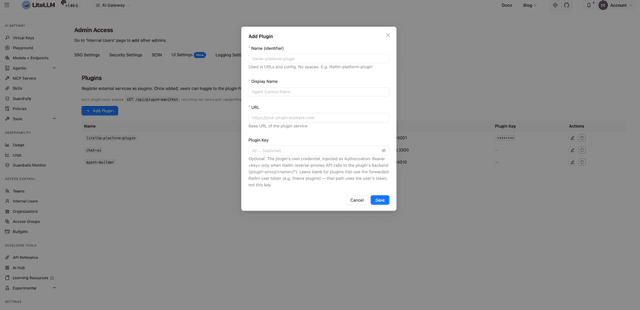
2. Implement the two plugin endpoints
The plugin service must expose two public endpoints. GET /api/plugin-manifest returns plugin metadata that the LiteLLM UI uses to render the sidebar, and POST /api/plugin-auth decrypts the identity claim that LiteLLM hands the iframe so the user does not sign in twice.
A minimal manifest:
{
  "name": "my-plugin",
  "display_name": "My Plugin",
  "version": "1.0.0",
  "nav_items": [
    { "key": "home",    "label": "Home",    "icon": "HomeOutlined",    "path": "/" },
    { "key": "reports", "label": "Reports", "icon": "BarChartOutlined", "path": "/reports" }
  ],
  "capabilities": ["reports", "data"]
}
For POST /api/plugin-auth, the iframe forwards a session_claim ciphertext. The proxy never shares LITELLM_SALT_KEY with the plugin; instead, each plugin is provisioned with its own dedicated key, derived as HMAC-SHA256(LITELLM_SALT_KEY, plugin_name). Compute it once on the proxy host and hand the result to your plugin as a secret (for example, as PLUGIN_AUTH_KEY):
python -c 'import base64,hmac,hashlib,os; \
print(base64.urlsafe_b64encode(hmac.new(os.environ["LITELLM_SALT_KEY"].encode(), b"my-plugin", hashlib.sha256).digest()).decode())'
A compromised plugin holding only this scoped key cannot recover LITELLM_SALT_KEY or decrypt any other LiteLLM secret.
Decrypt and validate the claim in the plugin:
import json, os, time
from cryptography.fernet import Fernet

_CLAIM_TTL_SECONDS = 30

def plugin_auth(session_claim: str) -> dict:
    cipher = Fernet(os.environ["PLUGIN_AUTH_KEY"].encode())
    claim = json.loads(cipher.decrypt(session_claim.encode(), ttl=_CLAIM_TTL_SECONDS))
    if claim.get("plugin") != "my-plugin":
        raise ValueError("claim audience mismatch")
    if int(claim.get("exp", 0)) < int(time.time()):
        raise ValueError("claim expired")
    return claim
The claim payload is { "plugin", "user_id", "user_role", "exp" }. It carries no LiteLLM bearer token. Establish the plugin's own session from user_id and user_role, and authenticate API calls back to LiteLLM through the /plugin-proxy/<name>/* reverse proxy, which injects plugin_key for you.
What the plugin receives about the user
LiteLLM forwards a deliberately minimal user context. The plugin never sees the caller's email, key alias, team, budget, or bearer token; only an identifier and a role.
The decrypted session_claim payload contains exactly four fields:
{
  "plugin": "my-plugin",
  "user_id": "user_abc123",
  "user_role": "proxy_admin",
  "exp": 1750460400
}
plugin is the plugin name the claim was issued for. Always check that it matches your own plugin before trusting the rest, so a claim for one plugin cannot be replayed against another. user_id is the LiteLLM internal user identifier of the caller; use it as the stable join key against LiteLLM's /user/info if you need to look up profile data. user_role is the caller's LiteLLM role string (for example proxy_admin, internal_user, or internal_user_viewer); use it as a coarse authorization hint, then enforce your own checks. exp is a Unix timestamp set 30 seconds in the future; the Fernet ttl argument already rejects expired ciphertexts, but verifying exp independently catches clock skew between the proxy and the plugin.
Both user_id and user_role default to "" when the proxy could not resolve them (for example, an unauthenticated caller). Treat empty strings as unauthenticated; do not grant elevated access on a missing role.
On every /plugin-proxy/<name>/<path> call the proxy makes to the plugin's backend, the same identity is forwarded as two headers:
x-litellm-user-id: user_abc123
x-litellm-user-role: proxy_admin
These headers are informational. The plugin should still authenticate the request against its own session (issued from a verified session_claim), not from headers it cannot independently verify.
How iframe auth works
LiteLLM UI
  GET /api/plugins/auth-token        -> { session_claim }
  postMessage({ type:"litellm-auth", session_claim }, pluginOrigin)
       |
       v
Plugin iframe (browser)
  POST /api/plugin-auth { session_claim }
       |
       v
Plugin server
  decrypt(session_claim, PLUGIN_AUTH_KEY) -> { user_id, user_role, exp }
  establish plugin session -> stored in sessionStorage
No LiteLLM bearer token ever leaves the proxy. The claim only conveys the caller's identity and expires after 30 seconds, so a postMessage intercept yields ciphertext that is useless without the plugin's scoped key.
Proxy routes
GET /api/plugins lists the registered plugins, returning name, display_name, and url for each. plugin_key is never returned; it stays server-side. The caller must be authenticated.
GET /api/plugins/auth-token?plugin_name=<name> returns a short-lived encrypted identity claim for the named plugin. It requires LITELLM_SALT_KEY to be set on the proxy (responds 503 otherwise) and the plugin to be registered (404 otherwise).
ANY /plugin-proxy/{name}/{path} is the authenticated reverse proxy to the plugin backend. Access is restricted to proxy_admin.
Reverse proxy behaviour
When an admin (or a server-to-server caller) hits /plugin-proxy/<name>/<path>, the proxy authenticates the caller locally and then rewrites the request before forwarding it to the plugin's url.
Every LiteLLM credential header is stripped before forwarding. That includes Authorization, x-api-key, API-Key, x-goog-api-key, Ocp-Apim-Subscription-Key, x-litellm-api-key, any configured litellm_key_header_name, and Cookie. The plugin can never be handed the caller's live LiteLLM key.
plugin_key is then injected as Authorization: Bearer <plugin_key>. That is the only credential the plugin receives.
Caller identity is forwarded as x-litellm-user-id and x-litellm-user-role so the plugin can run its own authorization. These are informational hints, not credentials.
Responses are sandboxed with Content-Security-Policy: sandbox and X-Content-Type-Options: nosniff so plugin-controlled bytes served from the LiteLLM origin cannot execute against the dashboard.
Security checklist
Before exposing a plugin to your users, confirm that LITELLM_SALT_KEY is set on the proxy and is never shared with the plugin, that the plugin holds only its derived HMAC(LITELLM_SALT_KEY, plugin_name) key (provisioned as a dedicated secret), and that plugin_key is a dedicated credential scoped to the plugin rather than your LiteLLM master key. The plugin's POST /api/plugin-auth must enforce both the claim's plugin audience and its exp (30 second TTL). The plugin should treat x-litellm-user-id and x-litellm-user-role as identity hints, not as proof of authentication, and the plugin service URL should use HTTPS in production.

