---
title: "Compare models, harnesses, and agents with the Lens CLI"
url: "/docs/proxy/lens/cli"
canonical_url: "https://docs.litellm.ai/docs/proxy/lens/cli"
type: "docs"
last_updated: "2026-11-21"
summary: "Evaluate models, harnesses, and custom agents on your own tasks."
related:
- "/docs/proxy/lens/first-trace"
- "/docs/proxy/lens/rbac"
---
# Compare models, harnesses, and agents with the Lens CLI
> Index of all LiteLLM docs: https://docs.litellm.ai/llms.txt
Evaluate models, harnesses, and custom agents on your own tasks.

A real run in progress. The walkthrough below uses its own task set and configurations
:::info Preview
This walkthrough requires the private CLI preview with LiteLLM agent-evaluation support; a public package release is not available yet
:::
## 1. Connect your models and agents
Use an existing preview environment and a [Lens-enabled LiteLLM gateway](./deployment/litellm.md). Check that `lens run --help` lists `--trials`. This example compares Tool Loop and Codex, so the `codex` executable must also be available on PATH
```bash
lens run --help
codex --version
```
Download evals.py and tasks.csv into one directory. The configuration includes real model calls, explicit pass checks, and a custom `EvalAgent`
Set your gateway root, without `/v1`, and replace `model-a` and `model-b` with exact **Model Name** values from your gateway's **Models** page. In Bash or Zsh, enter a virtual key allowed to call those models:
```bash
export LITELLM_PROXY_API_BASE="https://gateway.example.com"
read -rs LITELLM_PROXY_API_KEY
export LITELLM_PROXY_API_KEY
export LENS_MODEL_A="litellm_proxy/model-a"
export LENS_MODEL_B="litellm_proxy/model-b"
```
The configuration compares both models through Tool Loop and Codex, plus your custom agent:
```python
models = [os.environ["LENS_MODEL_A"], os.environ["LENS_MODEL_B"]]
targets = [EvalTarget(Harness.TOOL_LOOP, model) for model in models]
targets += [EvalTarget(Harness.CODEX, model) for model in models]
targets += [MyAgent("my-agent")]
```
Replace `MyAgent.run` in the download with your agent's execution code. Keep per-attempt state inside `run`, since attempts can run concurrently. The complete configuration records cost and usage; omitted custom metrics remain unknown. Other [supported harnesses](/docs/harness) include Claude Code, OpenCode, Pi, and Deep Agents, with their own runtime dependencies
## 2. Run the same tasks through each configuration
From the download directory, run:
```bash
lens run tasks.csv --config evals.py --trials 2
```
The three support tickets run twice through four model/harness combinations and your custom agent: 30 attempts with real API charges. Change the tasks and success checks to match your agent's work
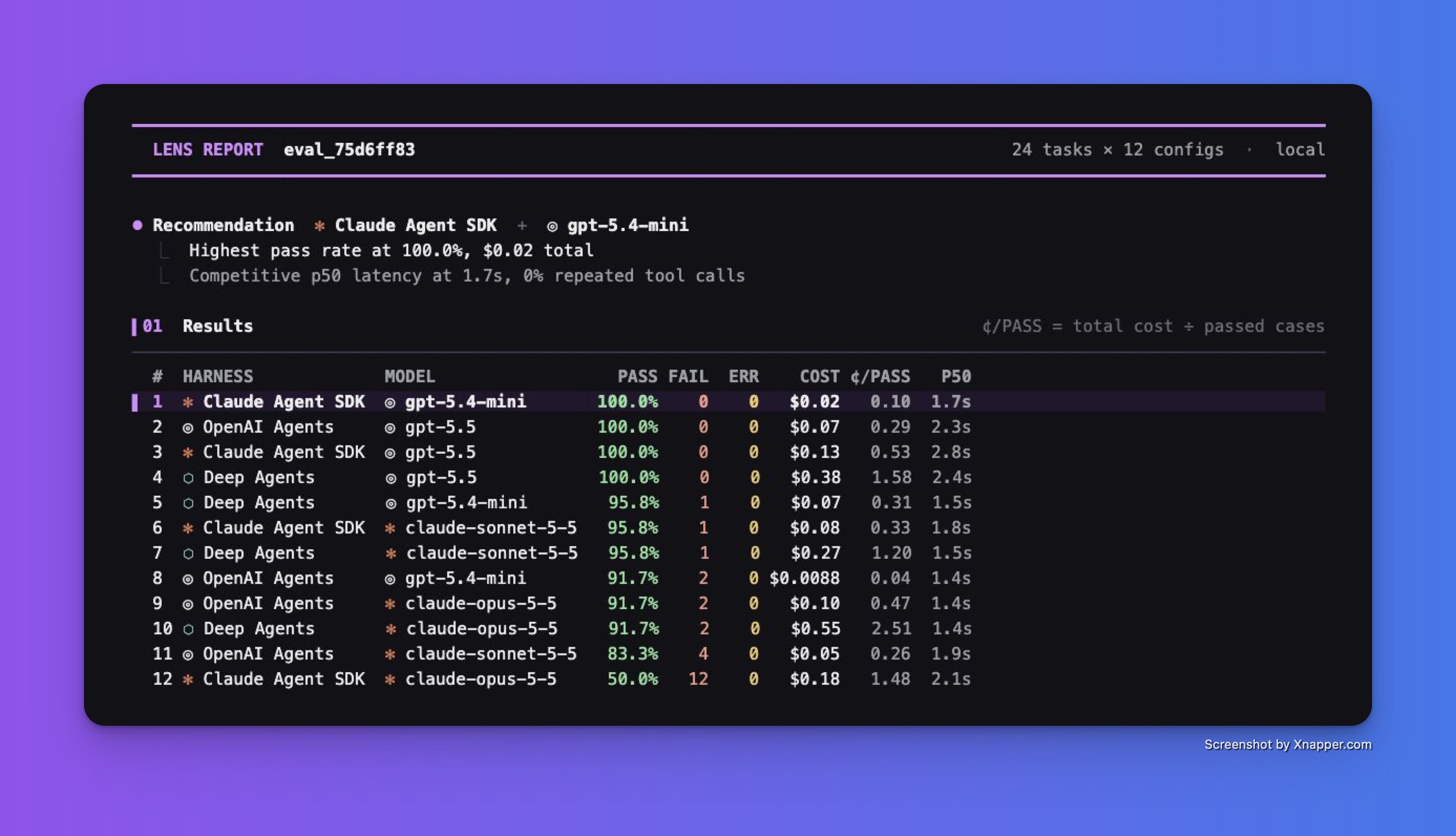
Captured preview report from a separate task set. The sample download uses the configurations above; your results depend on your tasks, models, and agent
## 3. Compare quality, cost, and failures
Read **PASS**, **FAIL**, and **ERR** before choosing by cost or latency. The recommendation chooses the lowest cost per passed case among configurations within five percentage points of the best pass rate, with complete metrics and at least one pass
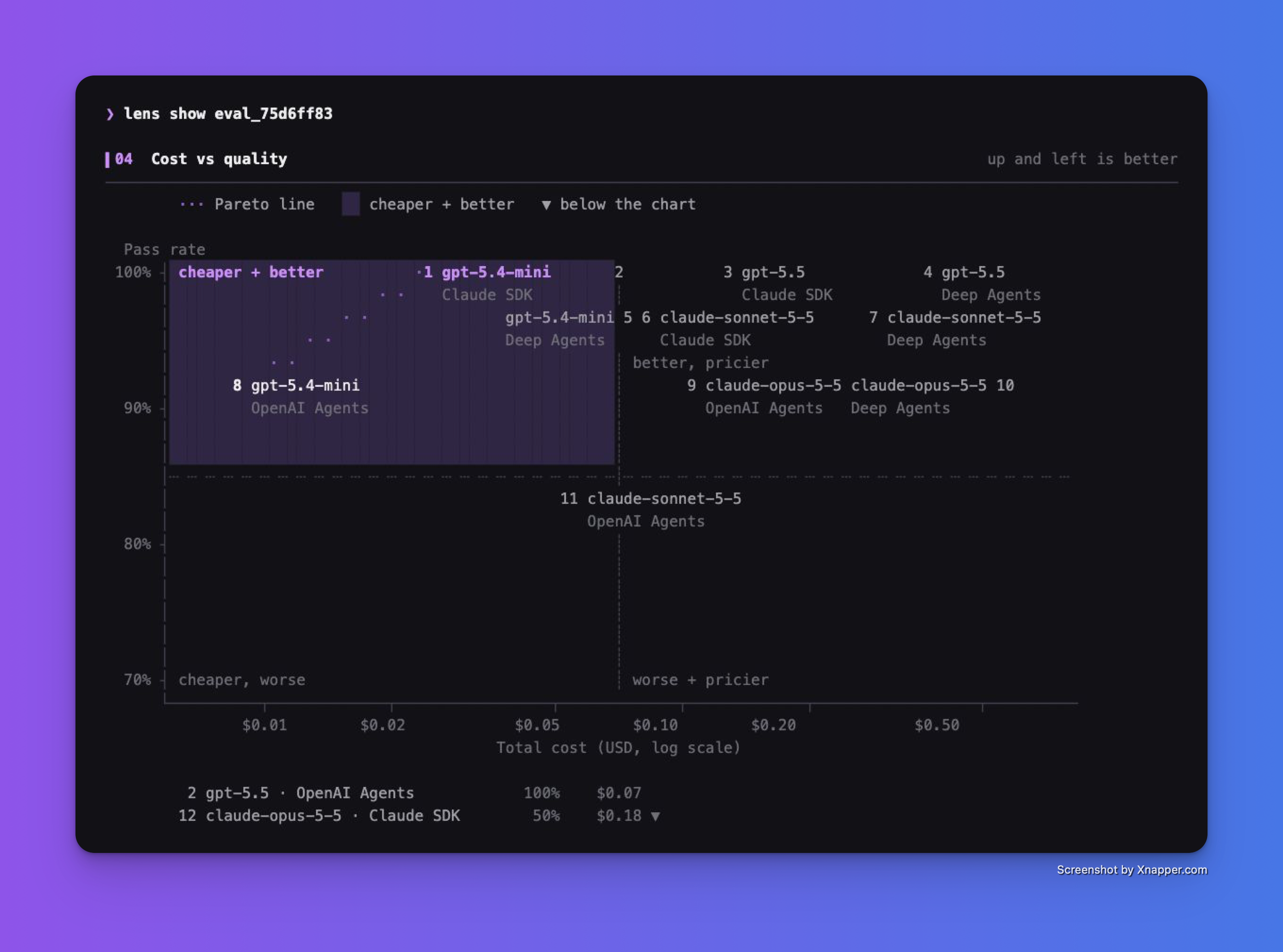
Higher and farther left means more passes for less spend. Inspect failures before changing your default. Use a larger, representative dataset to make the decision
## 4. Open the captured calls in Lens
Route the comparison through your Lens-enabled gateway to capture model calls, then open **Lens > Traces** and inspect the recent requests, prompts, responses, and spend. Full agent and tool trajectories require [agent tracing setup](./first-trace.md); the CLI keeps its report in `.lens/runs` rather than uploading it
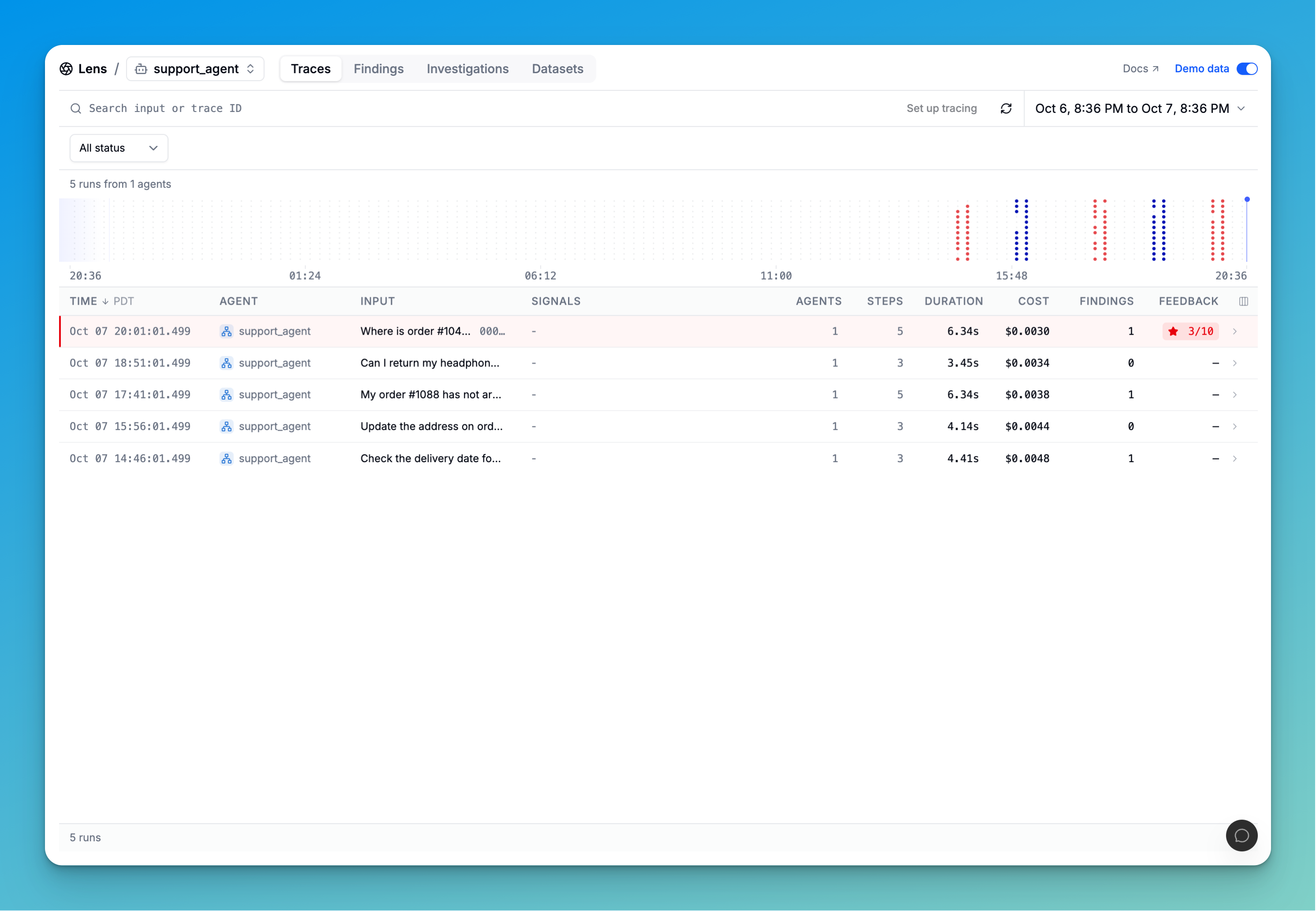
Sample Lens UI, not a trace from the comparison above
### Bring your gateway datasets into the next run
In **Lens > Datasets**, open your dataset, select a fixed revision, and click **Export JSONL**. Save it as `dataset.jsonl` beside the example files
Download dataset_to_csv.py, then run:
```bash
python dataset_to_csv.py
lens run gateway-tasks.csv --config evals.py --trials 2
```
The converter preserves messages, expected outcomes, and the complete case metadata. The configuration passes the recorded conversation into each agent and rejects ungraded cases. This sample grader expects support-ticket categories; replace its instructions and check for another task. Keep the revision fixed while comparing configurations
## Related pages
- [Send your first trace](https://docs.litellm.ai/docs/proxy/lens/first-trace.md)
- [Access control and workspace filters](https://docs.litellm.ai/docs/proxy/lens/rbac.md)