LiteLLM as resource app
Let an application exchange an ID-JAG for a LiteLLM access token, then use it to run inference or call MCP tools on behalf of an existing LiteLLM user.
LiteLLM's POST /token endpoint issues the token. Inference endpoints such as /v1/chat/completions and the MCP gateway accept it.
This feature requires an enterprise license, a database, a shared Redis, and JWT authentication. Configure Redis through litellm_settings.cache with Redis cache_params or through general_settings.coordination_redis, so each ID-JAG is redeemed once across all workers and replicas. Set PROXY_BASE_URL and allowlist at least one requesting app to enable the grant.
Get started
Select your identity provider for the full setup.
- Okta
- Other IdP
This walkthrough assumes LiteLLM is already registered in Okta. It uses Okta Cross App Access and an OIDC requesting app. Replace your-org.okta.com and litellm.example.com with your domains.
1. Register the requesting app in Okta
In Applications and Resources > Applications, create or select an OIDC Web Application for the app that will call LiteLLM.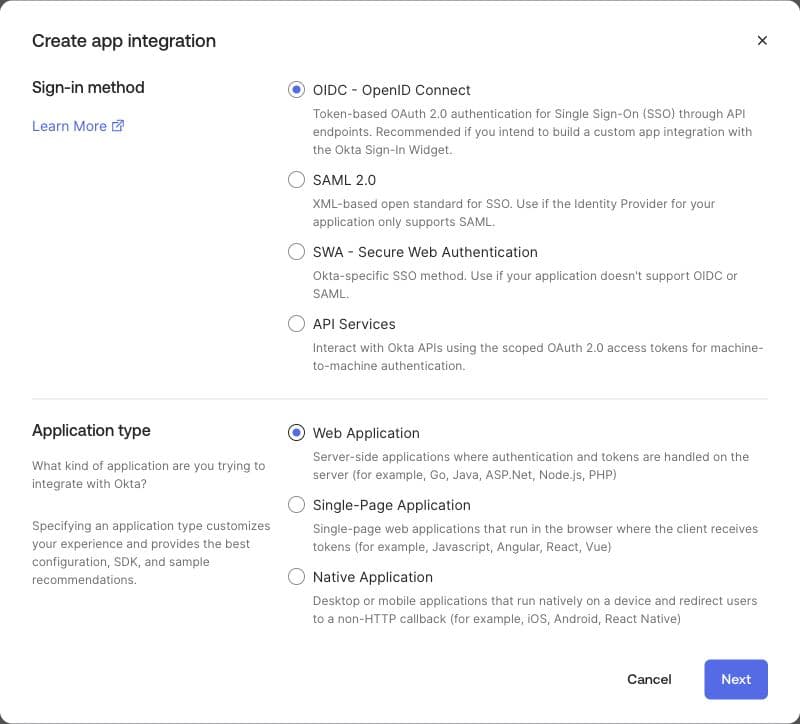
Configure the requesting app so users can sign in with Okta:
- Under Grant type, select Authorization Code.
- In Sign-in redirect URIs, enter the callback URL from the requesting app's sign-in configuration. This is where Okta returns the user after sign-in.
- Save the app. Open Assignments and assign the Okta user you'll use to test the flow.
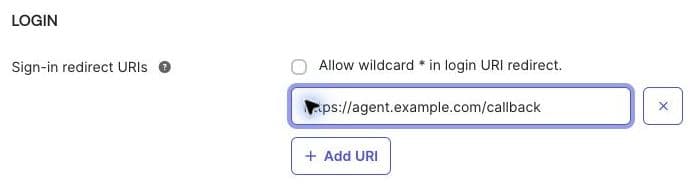
From the app's Machine Assignments > Resources tab, select Register AI agent and complete the registration.
In the agent's Client registration, use client-secret authentication. Save its client ID and secret as IDP_CLIENT_ID and IDP_CLIENT_SECRET in the requesting app. These are also its OIDC sign-in credentials. Activate the agent if it is STAGED.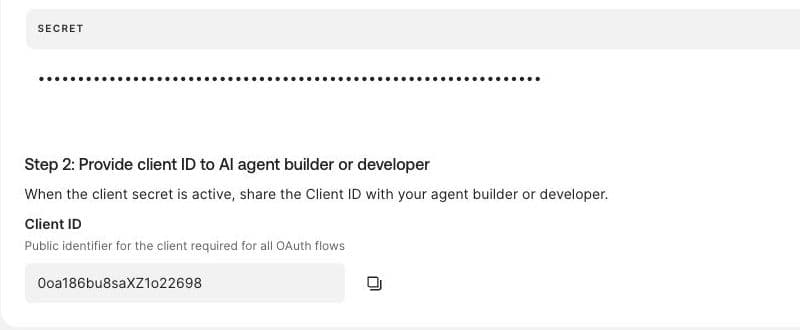
2. Connect the requesting app to LiteLLM
In Applications and Resources > Applications, open your existing LiteLLM app. Under Assignments, make sure the user from step 1 is assigned to it.
Open Machine Assignments > Callers > Cross App Access > Edit and enable XAA. Set Issuer URL to your LiteLLM URL. Define litellm:mcp and litellm:llm as the supported scopes. Leave Audience/tenant ID empty for this single-tenant example.
| Value | URL |
|---|---|
| Issuer URL / ID-JAG audience | https://litellm.example.com |
| Token endpoint | https://litellm.example.com/token |
| Authorization server metadata | https://litellm.example.com/.well-known/oauth-authorization-server |
| Native client discovery | https://litellm.example.com/.well-known/litellm-cli-auth |
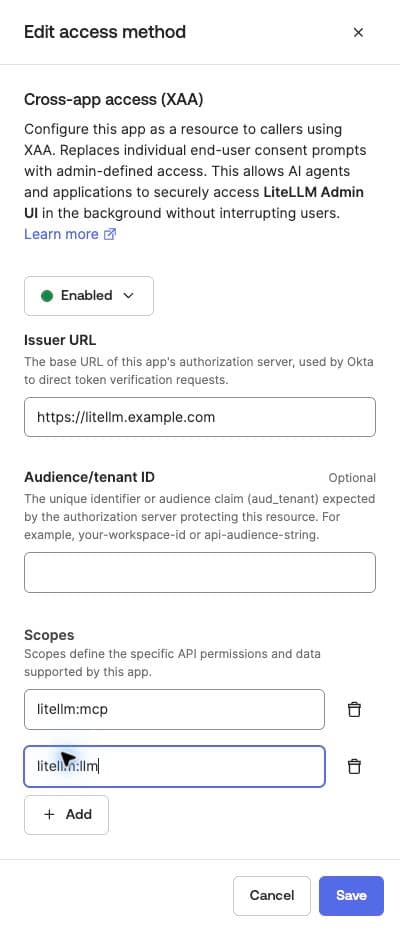
On the AI agent's Resource connections tab, select your LiteLLM app. Set the client ID registered in LiteLLM to agent-client, the Resource identifier to https://litellm.example.com, and select Allow specific scopes. Choose the scopes to allow: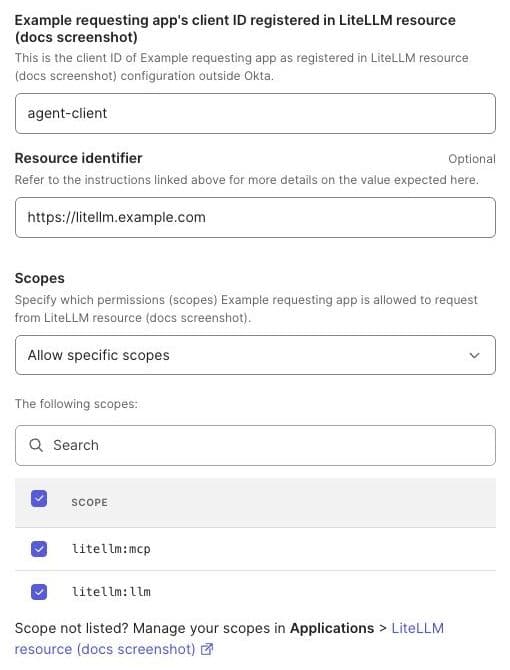
| Granted scope | Access |
|---|---|
litellm:mcp | MCP gateway routes only. |
litellm:llm | LLM API routes only. |
litellm:mcp litellm:llm | Both MCP gateway and LLM API routes. |
| No scope | Full access within the user and team permissions, as with lite login. |
3. Configure LiteLLM
Configure LiteLLM with the requesting app's client ID and existing client secret. The example uses agent-client and reads its secret from AGENT_CLIENT_SECRET.
- Helm
- Terraform
envVars:
  PROXY_BASE_URL: "https://litellm.example.com"
environmentSecrets: [litellm-id-jag]
proxy_config:
  general_settings:
    enable_jwt_auth: true
    litellm_jwtauth:
      id_jag_requesting_apps:
        - client_id: agent-client
          client_secret: os.environ/AGENT_CLIENT_SECRET
Add these inputs to your existing LiteLLM AWS or Google Cloud module. Set var.agent_client_secret_ref to the secret ARN on AWS or Secret Manager resource ID on Google Cloud.
gateway_extra_env = { PROXY_BASE_URL = "https://litellm.example.com" }
backend_extra_env = { PROXY_BASE_URL = "https://litellm.example.com" }
gateway_extra_secrets = { AGENT_CLIENT_SECRET = var.agent_client_secret_ref }
backend_extra_secrets = { AGENT_CLIENT_SECRET = var.agent_client_secret_ref }
proxy_config = {
  general_settings = {
    enable_jwt_auth = true
    litellm_jwtauth = {
      id_jag_requesting_apps = [{
        client_id     = "agent-client"
        client_secret = "os.environ/AGENT_CLIENT_SECRET"
      }]
    }
  }
}
Run terraform plan, then terraform apply.
Create or select a LiteLLM user whose email matches the IdP account. Give that user access to the models or MCP tools you want to call. After deploying, check that discovery lists urn:ietf:params:oauth:grant-type:jwt-bearer:
curl -s https://litellm.example.com/.well-known/oauth-authorization-server \
  | jq '.grant_types_supported'
In your existing JWT configuration, use Okta's org issuer (https://your-org.okta.com) and JWKS URL (https://your-org.okta.com/oauth2/v1/keys).
4. Sign in and request an ID-JAG
Configure the requesting app's OIDC login with issuer https://your-org.okta.com and scopes openid profile email. Sign in as the assigned test user and save the login response's id_token as ID_TOKEN. Set REQUESTED_SCOPES="litellm:mcp litellm:llm" to try both examples below, or request just one of the scopes allowed on the resource connection.
Use the agent's Okta credentials from step 1 to exchange the ID token:
curl -s -X POST https://your-org.okta.com/oauth2/v1/token \
  -d grant_type=urn:ietf:params:oauth:grant-type:token-exchange \
  -d requested_token_type=urn:ietf:params:oauth:token-type:id-jag \
  -d subject_token_type=urn:ietf:params:oauth:token-type:id_token \
  --data-urlencode "subject_token=$ID_TOKEN" \
  -d audience=https://litellm.example.com \
  -d resource=https://litellm.example.com \
  --data-urlencode "scope=$REQUESTED_SCOPES" \
  --data-urlencode "client_id=$IDP_CLIENT_ID" \
  --data-urlencode "client_secret=$IDP_CLIENT_SECRET"
Save the response's access_token as ID_JAG.
5. Get a LiteLLM access token
Send the ID-JAG as assertion with the jwt-bearer grant. Use the requesting app's client ID and secret at LiteLLM, as configured in id_jag_requesting_apps.
curl -s -X POST https://litellm.example.com/token \
  -d grant_type=urn:ietf:params:oauth:grant-type:jwt-bearer \
  -d client_id=agent-client \
  --data-urlencode "client_secret=$AGENT_CLIENT_SECRET" \
  --data-urlencode "assertion=$ID_JAG"
Confidential clients can also use HTTP Basic authentication (-u "agent-client:$AGENT_CLIENT_SECRET") instead of the client ID and secret form fields. Public clients send client_id without a secret.
{
  "access_token": "LneZuxEFqvemEwK6lRzgg6BN...",
  "token_type": "Bearer",
  "expires_in": 86400,
  "scope": "litellm:mcp litellm:llm",
  "user_id": "user@example.com",
  "team_id": "125eca86-fbde-44de-8cb9-cf1432933fcd"
}
Save access_token as LITELLM_ACCESS_TOKEN. scope echoes the granted scope, which limits route access. No refresh token is issued. When the credential expires, request a fresh ID-JAG and redeem it again.
6. Call LiteLLM
Use the access token for calls allowed by its scope and the user's LiteLLM permissions. Spend is attributed to their user_id and team_id.
- Inference
- MCP tools
Replace <your-model-name> with a model configured on your proxy.
curl -s https://litellm.example.com/v1/chat/completions \
  -H "Authorization: Bearer $LITELLM_ACCESS_TOKEN" \
  -H "Content-Type: application/json" \
  -d '{"model":"<your-model-name>","messages":[{"role":"user","content":"Hello"}]}'
curl -s -X POST https://litellm.example.com/mcp \
  -H "Authorization: Bearer $LITELLM_ACCESS_TOKEN" \
  -H "Content-Type: application/json" \
  -H "Accept: application/json, text/event-stream" \
  -d '{"jsonrpc":"2.0","id":1,"method":"tools/list","params":{}}'
Your IdP must support ID-JAG issuance and accept an OIDC ID token as the subject. The example uses client-secret authentication; choose your provider's supported method.
1. Register the requesting app
Create an OIDC client in your IdP. Enable Authorization Code, register the requesting app's sign-in callback URL, and assign the users who may sign in. Configure the app's OIDC login with the provider's issuer and openid profile email scopes.
Enable ID-JAG token exchange for that client. Save its credentials as IDP_CLIENT_ID and IDP_CLIENT_SECRET, and note the issuer, JWKS URL, and ID-JAG token endpoint from your provider's metadata.
2. Register LiteLLM as a resource
Register these values in your IdP:
| Setting | Value |
|---|---|
| Resource issuer / ID-JAG audience | https://litellm.example.com |
| Token endpoint | https://litellm.example.com/token |
| Authorization server metadata | https://litellm.example.com/.well-known/oauth-authorization-server |
| Native client discovery | https://litellm.example.com/.well-known/litellm-cli-auth |
| Resource identifier | https://litellm.example.com |
| Requesting app's client ID at LiteLLM | agent-client |
Allow the requesting app to access this resource for your test user. The IdP must put agent-client in the ID-JAG's client_id claim. Choose the allowed scopes:
| Granted scope | Access |
|---|---|
litellm:mcp | MCP gateway routes only. |
litellm:llm | LLM API routes only. |
litellm:mcp litellm:llm | Both MCP gateway and LLM API routes. |
| No scope | Full access within the user and team permissions, as with lite login. |
3. Configure LiteLLM
Configure LiteLLM with the requesting app's client ID and existing client secret. The example uses agent-client and reads its secret from AGENT_CLIENT_SECRET.
- Helm
- Terraform
envVars:
  PROXY_BASE_URL: "https://litellm.example.com"
environmentSecrets: [litellm-id-jag]
proxy_config:
  general_settings:
    enable_jwt_auth: true
    litellm_jwtauth:
      id_jag_requesting_apps:
        - client_id: agent-client
          client_secret: os.environ/AGENT_CLIENT_SECRET
Add these inputs to your existing LiteLLM AWS or Google Cloud module. Set var.agent_client_secret_ref to the secret ARN on AWS or Secret Manager resource ID on Google Cloud.
gateway_extra_env = { PROXY_BASE_URL = "https://litellm.example.com" }
backend_extra_env = { PROXY_BASE_URL = "https://litellm.example.com" }
gateway_extra_secrets = { AGENT_CLIENT_SECRET = var.agent_client_secret_ref }
backend_extra_secrets = { AGENT_CLIENT_SECRET = var.agent_client_secret_ref }
proxy_config = {
  general_settings = {
    enable_jwt_auth = true
    litellm_jwtauth = {
      id_jag_requesting_apps = [{
        client_id     = "agent-client"
        client_secret = "os.environ/AGENT_CLIENT_SECRET"
      }]
    }
  }
}
Run terraform plan, then terraform apply.
Create or select a LiteLLM user whose email matches the IdP account. Give that user access to the models or MCP tools you want to call. After deploying, check that discovery lists urn:ietf:params:oauth:grant-type:jwt-bearer:
curl -s https://litellm.example.com/.well-known/oauth-authorization-server \
  | jq '.grant_types_supported'
4. Sign in and request an ID-JAG
Sign in to the requesting app as the assigned user. Save the login response's id_token as ID_TOKEN, and set REQUESTED_SCOPES="litellm:mcp litellm:llm" to try both examples below. Request just one scope to limit access, as allowed by your IdP policy.
Replace the token endpoint below with your provider's ID-JAG endpoint. Use the IdP client credentials from step 1:
curl -s -X POST https://idp.example.com/oauth2/v1/token \
  -d grant_type=urn:ietf:params:oauth:grant-type:token-exchange \
  -d requested_token_type=urn:ietf:params:oauth:token-type:id-jag \
  -d subject_token_type=urn:ietf:params:oauth:token-type:id_token \
  --data-urlencode "subject_token=$ID_TOKEN" \
  -d audience=https://litellm.example.com \
  -d resource=https://litellm.example.com \
  --data-urlencode "scope=$REQUESTED_SCOPES" \
  --data-urlencode "client_id=$IDP_CLIENT_ID" \
  --data-urlencode "client_secret=$IDP_CLIENT_SECRET"
Save the response's access_token as ID_JAG.
5. Get a LiteLLM access token
Send the ID-JAG as assertion with the jwt-bearer grant. Use the requesting app's client ID and secret at LiteLLM, as configured in id_jag_requesting_apps.
curl -s -X POST https://litellm.example.com/token \
  -d grant_type=urn:ietf:params:oauth:grant-type:jwt-bearer \
  -d client_id=agent-client \
  --data-urlencode "client_secret=$AGENT_CLIENT_SECRET" \
  --data-urlencode "assertion=$ID_JAG"
Confidential clients can also use HTTP Basic authentication (-u "agent-client:$AGENT_CLIENT_SECRET") instead of the client ID and secret form fields. Public clients send client_id without a secret.
{
  "access_token": "LneZuxEFqvemEwK6lRzgg6BN...",
  "token_type": "Bearer",
  "expires_in": 86400,
  "scope": "litellm:mcp litellm:llm",
  "user_id": "user@example.com",
  "team_id": "125eca86-fbde-44de-8cb9-cf1432933fcd"
}
Save access_token as LITELLM_ACCESS_TOKEN. scope echoes the granted scope, which limits route access. No refresh token is issued. When the credential expires, request a fresh ID-JAG and redeem it again.
6. Call LiteLLM
Use the access token for calls allowed by its scope and the user's LiteLLM permissions. Spend is attributed to their user_id and team_id.
- Inference
- MCP tools
Replace <your-model-name> with a model configured on your proxy.
curl -s https://litellm.example.com/v1/chat/completions \
  -H "Authorization: Bearer $LITELLM_ACCESS_TOKEN" \
  -H "Content-Type: application/json" \
  -d '{"model":"<your-model-name>","messages":[{"role":"user","content":"Hello"}]}'
curl -s -X POST https://litellm.example.com/mcp \
  -H "Authorization: Bearer $LITELLM_ACCESS_TOKEN" \
  -H "Content-Type: application/json" \
  -H "Accept: application/json, text/event-stream" \
  -d '{"jsonrpc":"2.0","id":1,"method":"tools/list","params":{}}'
Troubleshooting
- Okta
- Other IdP
| Response or log | Cause and fix |
|---|---|
invalid_target or unauthorized_client from Okta | Under Directory > AI Agents > Resource connections, check the LiteLLM issuer URL, allowed scopes, user assignments, and agent activation. |
400 unsupported_grant_type | Check the enterprise license, database, shared Redis, JWT authentication, PROXY_BASE_URL, and nonempty requesting-app allowlist. Restart after configuration changes. Leave virtual_key_claim_field and jwt_client_id_field unset on this gateway. |
400 invalid_request: missing client_id or assertion | Send client_id in the form or HTTP Basic authentication, and the ID-JAG in the assertion form field. |
401 invalid_client | Match the allowlisted client ID and secret. Configure a secret only for a confidential client. |
400 invalid_grant: wrong typ or malformed JWT | Send the ID-JAG returned by the IdP exchange, rather than the user's login token or an ordinary bearer token. |
400 invalid_grant: assertion already redeemed | Request a new ID-JAG. Each assertion can be redeemed once. |
400 invalid_grant; log reports an audience mismatch | Set Machine Assignments > Callers > Issuer URL to the bare origin, <PROXY_BASE_URL>. Check the scheme and trailing slashes. |
400 invalid_grant; log reports an untrusted issuer or missing signing key | Use the Okta issuer https://your-org.okta.com and JWKS URL https://your-org.okta.com/oauth2/v1/keys. |
400 invalid_grant; log reports a client_id mismatch | Set AI agent's client ID registered in this app to the ID the agent sends to LiteLLM. |
400 invalid_grant; log reports that the user does not exist | Map the Okta email or sub to an existing LiteLLM user. |
400 invalid_request: team selection or membership | Send x-litellm-team-id with the ID or alias of one of the user's teams. |
503 temporarily_unavailable: user teams could not be read | Retry. The assertion has not been consumed. |
401 when using the ID-JAG on /mcp | Redeem it at /token and use the returned access_token. |
| Response or log | Cause and fix |
|---|---|
400 unsupported_grant_type | Check the enterprise license, database, shared Redis, JWT authentication, PROXY_BASE_URL, and nonempty requesting-app allowlist. Restart after configuration changes. Leave virtual_key_claim_field and jwt_client_id_field unset on this gateway. |
400 invalid_request: missing client_id or assertion | Send client_id in the form or HTTP Basic authentication, and the ID-JAG in the assertion form field. |
401 invalid_client | Match the allowlisted client ID and secret. Configure a secret only for a confidential client. |
400 invalid_grant: wrong typ or malformed JWT | Send the ID-JAG returned by the IdP exchange, rather than the user's login token or an ordinary bearer token. |
400 invalid_grant: assertion already redeemed | Request a new ID-JAG. Each assertion can be redeemed once. |
400 invalid_grant; log reports an audience mismatch | Match the IdP's resource audience to the bare origin, <PROXY_BASE_URL>. Check the scheme and trailing slashes. |
400 invalid_grant; log reports an untrusted issuer or missing signing key | Match issuers[].issuer to the assertion's iss and configure that issuer's JWKS. |
400 invalid_grant; log reports a client_id mismatch | Configure the IdP to put the app's LiteLLM client ID in the assertion. |
400 invalid_grant; log reports that the user does not exist | Create the LiteLLM user or correct the user ID/email claim mapping. |
400 invalid_request: team selection or membership | Send x-litellm-team-id with the ID or alias of one of the user's teams. |
503 temporarily_unavailable: user teams could not be read | Retry. The assertion has not been consumed. |
401 when using the ID-JAG on /mcp | Redeem it at /token and use the returned access_token. |

