Microsoft Agent 365 Guardrail
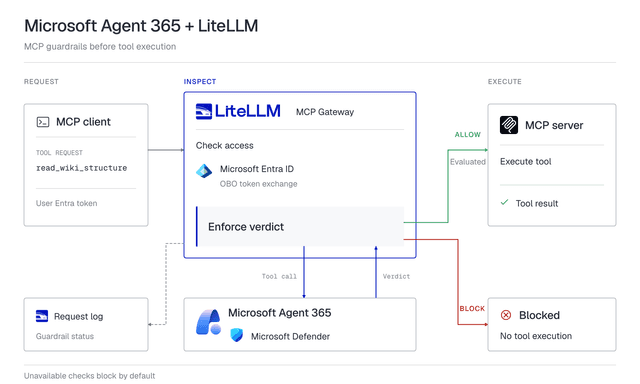
Sends every MCP tool call to the Microsoft Agent 365 evaluation API before LiteLLM runs it. Microsoft Defender returns allow or block, and the call is recorded on the Microsoft side under the signed-in user
Supported modes
| Mode | What it does |
|---|---|
pre_mcp_call | Evaluates the tool name, arguments and server with Defender before execution. Blocks on a block verdict |
The guardrail only runs on MCP tool calls. Chat completions and other LLM routes are untouched
How it works
Agent 365 evaluates in the context of a signed-in user, so every guarded tool call needs that user's Entra access token, audienced to your gateway app registration, in the Authorization header. The guardrail exchanges it On-Behalf-Of (OBO) for a delegated Agent 365 token and evaluates as that user. There is no service or agent identity mode: a call without a user token is refused
The LiteLLM key travels separately in x-litellm-api-key. On a proxy that already accepts Entra tokens through JWT auth, the Entra token is the LiteLLM credential too
Per tool call
- LiteLLM admission: key or JWT check, then the key's MCP server and tool permissions. A bad credential fails here with the usual 401 or 403
- The guardrail reads the Entra token from
Authorization. Missing or not a JWT: the call is refused - OBO exchange, cached for the token's lifetime
- The pending call goes to Agent 365: tool name, arguments, server name,
conversationId, the tool's description and input schema when LiteLLM already has them from an earlier listing of the server's tools, and the caller's key alias as the agent id when the key has one. The user's prompt is never sent - Allow with
defender.status: Evaluated: LiteLLM runs the tool. Block: the call is refused with the Defender message and correlation id, and the MCP server is never contacted. Allowed but not evaluated (Skipped,FailedOpen): treated as unscanned,unreachable_fallbackdecides (blocked by default)
How a refusal reaches the client depends on the route. /mcp-rest/tools/call answers with the HTTP status in Failure behavior and the full JSON body. On the /mcp transport the HTTP response is 200 and the tool result has isError: true with only the short error, for example Error: Blocked by Microsoft Defender. The full body, with the Defender message and correlation id, is in the error details of the call's Logs row
MCP server auth types
The guardrail does not check the server's auth_type. It always takes the user token from the client's Authorization header, so pick an auth type that keeps that header at the gateway
auth_type | With the guardrail |
|---|---|
none, api_key, bearer_token, basic, authorization, token, aws_sigv4, oauth2 with oauth2_flow: client_credentials | Works. The upstream gets the server's own credential, never the user's Entra token. Don't list Authorization under extra_headers; forwarding another client header such as x-api-key is fine |
oauth2_token_exchange | Works. The same Entra token is the subject token LiteLLM exchanges for the upstream (MCP OBO auth) |
true_passthrough, Authorization under extra_headers | Evaluated and blocked like any other server, but the user's Entra token is also forwarded to the upstream on every request, tool listing included. With JWT auth that token is also the user's LiteLLM credential. Avoid these |
oauth_delegate, or oauth2 with delegate_auth_to_upstream: true and any flow other than client_credentials | Same as true_passthrough when the call carries a LiteLLM key in x-litellm-api-key: the Entra token is forwarded upstream. For JWT-only callers LiteLLM strips it, so the upstream gets no credential at all. Avoid |
oauth2 with oauth2_flow: authorization_code | LiteLLM sends the upstream the user's stored OAuth token for that server in place of the client's Authorization, so the Entra token can stay in Authorization. The credential is stored under the caller's LiteLLM user_id, so a virtual key needs one (MCP OAuth). Until the user has a stored credential, calls fail before the guardrail runs: /mcp answers initialize with 401 and /mcp-rest/tools/call answers 500 Tool ... not found |
oauth2_id_jag | Tool listing uses the user's stored SSO assertion; without one, listing fails with 412 and the call fails with Tool ... not found (REST 500) before the guardrail runs. With one, the guardrail evaluates, then the Entra token in Authorization replaces the SSO assertion as the ID-JAG subject, sent as an id_token unless subject_token_type is set. Unless the identity provider accepts that token the exchange fails and the client gets 503 after the evaluation. Leave the guardrail off these servers or move them to oauth2_token_exchange |
Prerequisites
One-time Entra setup by a tenant administrator
- Ask your Microsoft Agent 365 contact to onboard your tenant. Until then the evaluation endpoint answers
409 BAPForbiddenTenantAccess - Register a gateway app under Microsoft Entra ID > App registrations, single tenant, no redirect URI. Record the client id and tenant id, and create a client secret under Certificates & secrets. These are the guardrail's
client_id,tenant_idandclient_secret - Under Expose an API, set the Application ID URI to
api://<client_id>and add a scope namedaccess_as_user. This is the scope your MCP clients request - Still under Expose an API, pre-authorize the client id of each application your users call from. For terminal testing, pre-authorize the Azure CLI (Microsoft's public app id
04b07795-8ddb-461a-bbee-02f9e1bf7b46) - Under API permissions > Add a permission > APIs my organization uses, add the Agent Tools API (Microsoft's public app id
ea9ffc3e-8a23-4a7d-836d-234d7c7565c1), delegated permissionThreatProtection.Evaluate.All, and grant admin consent. It must be delegated, not application: an application permission mints a token Agent 365 rejects
Check the setup before touching LiteLLM
az login --tenant <tenant_id>
az account get-access-token --tenant <tenant_id> --resource api://<gateway_client_id>
Decode the token and check aud is api://<gateway_client_id> and scp contains access_as_user. That is the token your MCP client sends
Quick Start
1. Define the guardrail in config.yaml
A database is needed for the virtual key in step 3
general_settings:
  master_key: os.environ/LITELLM_MASTER_KEY
  database_url: os.environ/DATABASE_URL

guardrails:
  - guardrail_name: agent365-mcp
    litellm_params:
      guardrail: agent_365
      mode: pre_mcp_call
      default_on: true
      tenant_id: os.environ/AGENT365_TENANT_ID
      client_id: os.environ/AGENT365_CLIENT_ID
      client_secret: os.environ/AGENT365_CLIENT_SECRET

mcp_servers:
  deepwiki:
    transport: "http"
    url: "https://mcp.deepwiki.com/mcp"
2. Start the proxy
export AGENT365_TENANT_ID="<your Entra tenant id>"
export AGENT365_CLIENT_ID="<gateway app client id>"
export AGENT365_CLIENT_SECRET="<gateway app client secret>"
export LITELLM_MASTER_KEY="sk-<your-master-key>"
export DATABASE_URL="postgresql://<user>:<password>@<host>:5432/<db>"

litellm --config config.yaml
3. Create a key for the MCP server
curl -X POST http://localhost:4000/key/generate \
  -H "Authorization: Bearer $LITELLM_MASTER_KEY" \
  -H "Content-Type: application/json" \
  -d '{"key_alias": "my-agent", "object_permission": {"mcp_servers": ["deepwiki"]}}'
The key_alias is the agent id Agent 365 records with each evaluation
4. Call an MCP tool
export LITELLM_API_KEY="<key from step 3>"
TOKEN=$(az account get-access-token --tenant <tenant_id> --resource api://<gateway_client_id> --query accessToken -o tsv)
curl -X POST http://localhost:4000/mcp-rest/tools/call \
  -H "x-litellm-api-key: Bearer $LITELLM_API_KEY" \
  -H "Authorization: Bearer $TOKEN" \
  -H "Content-Type: application/json" \
  -d '{
    "server_id": "deepwiki",
    "name": "read_wiki_structure",
    "arguments": {"repoName": "BerriAI/litellm"}
  }'
An allowed call returns the tool result. A blocked one returns HTTP 400
{
  "detail": {
    "error": "Blocked by Microsoft Defender",
    "message": "Invocation of 'read_wiki_structure' is blocked by Microsoft Threat Detection policies configured by your administrator.",
    "tool": "read_wiki_structure",
    "correlation_id": "<id to look the call up on the Microsoft side>",
    "guardrail_name": "agent365-mcp",
    "guardrail_mode": "pre_mcp_call"
  }
}
Logs
Every guarded tool call, allowed, blocked or refused, on both /mcp and /mcp-rest/tools/call, gets a row under Logs in the Admin UI (UI logs). The row always shows the guardrail name, mode and status. It shows how long the Agent 365 call took, except when Agent 365 was not called, did not answer (unreachable or timed out), or answered with a 5xx or an unparseable body. The status is success for an allowed call, guardrail_intervened for a Defender block, a refused caller or a request Agent 365 rejected, and guardrail_failed_to_respond when Agent 365 or Entra could not be asked, throttled the call, returned a 5xx or an unparseable answer, or rejected the gateway's own credentials, or when Defender did not evaluate. A refused call's error details carry the full error body, including the Defender message and correlation id of a block
The guardrail's response on the row, with the verdict (Allow, Block, Rejected, Throttled, Unavailable, Unscanned), the Defender status, the correlation id, the latency and the failure reason, is stored only when store_prompts_in_spend_logs is on. Without it the response shows as REDACTED_BY_LITELM
general_settings:
  store_prompts_in_spend_logs: true
Caller scenarios
How the user token reaches the request
A. Applications on a proxy with Entra JWT auth
With enable_jwt_auth and Entra as the issuer (OIDC JWT auth), the application's Entra bearer is both the LiteLLM credential and the OBO subject. No x-litellm-api-key is needed. The token must be issued for the gateway app (aud api://<gateway_client_id>, scp with access_as_user); a token for Microsoft Graph or another API fails JWT admission
general_settings:
  master_key: os.environ/LITELLM_MASTER_KEY
  database_url: os.environ/DATABASE_URL
  enable_jwt_auth: true
  litellm_jwtauth:
    user_id_jwt_field: oid
    user_email_jwt_field: email
    user_id_upsert: true
    team_id_default: entra-users
export JWT_PUBLIC_KEY_URL="https://login.microsoftonline.com/<tenant_id>/discovery/keys"
export JWT_AUDIENCE="api://<gateway_client_id>"
export JWT_ISSUER="https://sts.windows.net/<tenant_id>/"
team_id_default is the team whose MCP permissions JWT callers inherit. Create it with access to the MCP servers before the first call, otherwise every call gets HTTP 404 Team doesn't exist in db
curl -X POST http://localhost:4000/team/new \
  -H "Authorization: Bearer $LITELLM_MASTER_KEY" \
  -H "Content-Type: application/json" \
  -d '{"team_id": "entra-users", "team_alias": "entra-users", "object_permission": {"mcp_servers": ["<server_id>"]}}'
Take <server_id> from GET /v1/mcp/server. Use https://login.microsoftonline.com/<tenant_id>/v2.0 as the issuer if the app issues v2 tokens. These callers have no virtual key, so their evaluations carry no agent id
B. Clients that mint the token themselves
A script, or an MCP client with a static header, gets a gateway-audience token with MSAL or the Azure CLI (pre-authorized in prerequisite step 4) and sends it next to the LiteLLM key, exactly as in the Quick Start. The client owns refresh; Entra access tokens live about an hour. The same headers work on the /mcp transport and in claude mcp add ... -H "Authorization: Bearer $TOKEN". The REST facade is documented on MCP REST API
The guardrail does not send a sign-in challenge, so a call with only a LiteLLM key is refused until the client attaches the Entra token itself. /mcp-rest/tools/call answers 401 and /mcp returns an isError tool result, see Failure behavior
Two layers of authorization
LiteLLM decides which keys, users and teams reach which servers and tools (MCP permission management). What the tool may do inside the upstream system is decided by the upstream from the credential LiteLLM presents. With a shared API key the upstream sees a service identity; to have it see the signed-in user, use auth_type: oauth2_token_exchange (MCP OBO auth). The guardrail evaluates the call either way
Configuration parameters
| Parameter | Required | Description |
|---|---|---|
tenant_id | Yes | Entra tenant id. Falls back to AGENT365_TENANT_ID |
client_id | Yes | Client id of the gateway app registration. Falls back to AGENT365_CLIENT_ID |
client_secret | Yes | Client secret of that app. Also accepted as api_key. Falls back to AGENT365_CLIENT_SECRET |
timeout | No | Seconds per token exchange and evaluation request. Defaults to 10 |
unreachable_fallback | No | What happens when Agent 365 or Entra is unreachable, when Entra rejects the gateway's own credentials, or when Defender did not evaluate. fail_closed (default) blocks with HTTP 503. fail_open lets the call through unscanned and logs it at error level. Blocks, rejections, throttling and caller-side failures always block |
There is nothing else to point at. Evaluations go to https://agent365.svc.cloud.microsoft, the OBO exchange goes to https://login.microsoftonline.com and mints a token for Microsoft's Agent Tools application, and the agent id reported with an evaluation is the caller's key alias. Older api_base, resource_app_id and agent_id keys in config.yaml are ignored with a warning at startup
Failure behavior
By default the guardrail fails closed: when Agent 365 cannot be asked, the call is blocked and the MCP server is never contacted. The guardrail sits in the request path of every tool call, so a tenant that prefers availability over coverage opts in with unreachable_fallback: fail_open, and the call then runs and is recorded as unscanned
The status codes below are what /mcp-rest/tools/call returns. On the /mcp transport every refusal is an isError tool result carrying the error text, see How it works
| Situation | Fail closed | Fail open |
|---|---|---|
| Defender blocks | 400 | 400 |
| Agent 365 rejects the request (4xx other than 408 and 429) | 400 | 400 |
| Caller sent no Entra token, or Entra rejected it | 401 | 401 |
| Agent 365 or Entra throttles (408 or 429) | 503 | 503 |
| Entra rejects the gateway's own credentials | 503 | Allowed, unscanned |
| Agent 365 or Entra unreachable, timed out, 5xx or unparseable answer | 503 | Allowed, unscanned |
Defender did not evaluate (Skipped or FailedOpen) | 503 | Allowed, unscanned |
The error field tells the refusals apart. A Defender block is Blocked by Microsoft Defender and carries the Defender message and correlation id. An Agent 365 rejection is Agent 365 rejected the tool evaluation request, a refused caller is Agent 365 guardrail rejected the tool call, and every 503 is Agent 365 guardrail could not authorize the tool call with the reason in message
A caller is refused when the token is missing or not a JWT, or when Entra answers the OBO exchange with invalid_grant (expired, wrong audience, consent missing) or, for a malformed token, invalid_client. The message names only that error code, and the full AADSTS description is in the error details of the Logs row. The gateway's own credentials are rejected with invalid_client, unauthorized_client, invalid_scope or invalid_resource, and the 503 message names the setting to check. That case is never a 401, so clients do not ask the user to sign in again
Watching fail-open calls
With fail_open, every call let through unscanned is logged at error level with the reason. Its Logs row has request status Success and guardrail status guardrail_failed_to_respond, and its OpenTelemetry guardrail span carries the same guardrail_status. The Status filter on the Logs page only splits Success and Failure, so open the guardrail under Guardrails Monitor and pick Flagged in its logs list, which keeps the guardrail_failed_to_respond rows among the latest 50 calls (raise Sample to see more than 10); a steady stream there means Agent 365 is not evaluating your tool calls. Fail-closed refusals and throttled calls are flagged too, so check the verdict (Unscanned, Unavailable or Throttled) or the request status, Failure for a refusal, to tell them apart. The span always carries the verdict; on the Logs row it needs store_prompts_in_spend_logs
Conversation grouping
Agent 365 groups evaluations by conversationId. The guardrail sends the Mcp-Session-Id when the transport has one, so all calls in one MCP session land in one Defender conversation. Stateless calls (/mcp-rest/tools/call, or a streamable request without a session) use LiteLLM's request id for that call, the same id the Logs row shows

