MCP Troubleshooting Guide
When LiteLLM acts as an MCP gateway, traffic flows Client -> LiteLLM Proxy -> MCP Server, and OAuth-enabled setups add an authorization server for metadata discovery. This page is a symptom-to-fix runbook: run one diagnostic, match the symptom in the matrix, and follow the row to the fix. If you still need to escalate, collect the support bundle so nobody has to reconstruct context later
For provisioning steps and configuration fields, refer to mcp.md. For choosing endpoints, transports, and auth patterns, see the MCP Configuration Reference
Five-Minute Triage
Every command on this page uses the quickstart conventions: proxy at http://localhost:4000, LiteLLM key in x-litellm-api-key, and a server alias like deepwiki from mcp_servers in config.yaml. Substitute your own host, key, and alias
Step 1: run the diagnostic below against the named endpoint for the failing server. It keeps the HTTP status, response headers, and body, which is all the evidence you need. Do not pipe it through grep, you will throw away the part that identifies the layer
curl -sS -D - -X POST http://localhost:4000/deepwiki/mcp \
  -H "Content-Type: application/json" \
  -H "Accept: application/json, text/event-stream" \
  -H "x-litellm-api-key: Bearer $LITELLM_API_KEY" \
  -H "x-litellm-mcp-debug: true" \
  -d '{"jsonrpc":"2.0","id":1,"method":"tools/list","params":{}}'
Step 2: read the HTTP status line and body, then find your row in the matrix. The status tells you the layer: 401/403/404/405/406 come from LiteLLM before the upstream call (Client -> LiteLLM), while a 200 whose body reports "status": "unreachable" or an empty tool list means LiteLLM answered but the upstream hop failed (LiteLLM -> MCP Server)
Step 3: confirm the layer with the x-mcp-debug-* response headers (enabled by x-litellm-mcp-debug: true, see debug headers) and the matching proxy log line, then apply the fix in the row
A healthy control response looks like this. Get one first, because a working baseline is what makes every failure below interpretable:
HTTP/1.1 200 OK
content-type: text/event-stream

event: message
data: {"jsonrpc":"2.0","id":1,"result":{"_meta":{"litellm.ai/server_outcomes":{"deepwiki":{"status":"ok","tool_count":3}}},"tools":[{"name":"deepwiki-ask_question",...}]}}
Symptom Matrix
| Symptom | Likely layer | Diagnostic | Expected evidence | Fix | Escalate with |
|---|---|---|---|---|---|
401 Authentication Error, Malformed API Key | Client -> LiteLLM | Diagnostic curl without/with the key header | {"detail":"Authentication Error, Malformed API Key passed in. Ensure Key has 'Bearer ' prefix."} | Send x-litellm-api-key: Bearer <key>, prefix included | Full status + body, bundle |
401 invalid or expired key | Client -> LiteLLM | Diagnostic curl; check x-mcp-debug-inbound-auth | 401 body naming the key; debug header shows the masked key the proxy saw | Use a live virtual key or the master key; regenerate if expired | Masked key ID, key creation time |
403 key valid but not allowed | LiteLLM auth/routing | Diagnostic curl against the named endpoint | 403 body citing team/key MCP permissions | Grant the key/team access to the server or access group | Key/team config subset |
404 MCP server, toolset, or access group '<alias>' not found | LiteLLM auth/routing | Diagnostic curl to /<alias>/mcp | Exact 404 body naming the alias | Fix the alias to match mcp_servers in config.yaml, or add the server | mcp_servers config subset |
404 {"detail":"Not Found"} | Client -> LiteLLM | Compare the URL against /<alias>/mcp | Plain FastAPI 404, no alias named | Add the missing /mcp suffix or fix the path | Exact URL used |
405 Method Not Allowed | Client -> LiteLLM | curl -sS -D - -X PUT ... reproduces it | allow: GET, POST, DELETE header plus JSON-RPC error body | Use POST for JSON-RPC calls; the endpoint speaks streamable HTTP, not SSE-only or WebSocket | Method + transport client config |
406 Not Acceptable | Client -> LiteLLM | Diagnostic curl without the Accept header | Client must accept both application/json and text/event-stream | Send Accept: application/json, text/event-stream | Client HTTP config |
400 on UI OAuth Connect: {"detail":"invalid_request"} | LiteLLM auth/routing | See OAuth redirect_uri rejected | Log line MCP OAuth: rejecting redirect_uri ... | Set PROXY_BASE_URL or trust X-Forwarded-* | .well-known issuer output |
| OAuth flow sends LiteLLM key upstream | LiteLLM auth/routing | Diagnostic curl, read x-mcp-debug-oauth2-token | SAME_AS_LITELLM_KEY in the header | Move the LiteLLM key to x-litellm-api-key so Authorization stays free for the upstream token, see Debugging OAuth | Debug headers |
| Client cannot register (DCR) or discovery fails | LiteLLM auth/routing | curl -sS http://localhost:4000/.well-known/oauth-authorization-server | JSON with authorization_endpoint and token_endpoint | Verify metadata is reachable from the client; check OAuth docs for supported grants | Metadata JSON, client error verbatim |
200 but "status": "unreachable", empty tools | LiteLLM -> MCP Server | Diagnostic curl + proxy log grep for the alias | Log: httpx.ConnectError: All connection attempts failed (network) or CERTIFICATE_VERIFY_FAILED (TLS) | Fix the upstream URL, network path, firewall, or the server's certificate | Proxy log lines + MCP-server logs |
200 but tool list empty on aggregate /mcp | LiteLLM -> MCP Server | Read litellm.ai/server_outcomes in the body | Per-server status shows which upstream failed and which returned tools | Fix the failing server; aggregate absorbs per-server failures instead of failing the whole list | server_outcomes object |
Tool call fails: Tool '<name>' not found | Client -> LiteLLM | tools/call with the exact name from tools/list | {"content":[{"type":"text","text":"Error: Tool 'nonexistent_tool' not found"}],"isError":true} | Use the prefixed name (deepwiki-ask_question) on aggregate and named endpoints alike | tools/list output |
/v1/responses or /v1/chat/completions ignores MCP tools | LiteLLM auth/routing | Compare server_label to your config alias | Success shows mcp_tools_fetched and tool_execution_results output items; a wrong label produces a plain answer with no tool items | Set server_label to the exact alias and server_url to litellm_proxy | Full request body (redacted) + response |
| Timeouts mid-request | LiteLLM -> MCP Server | Time the diagnostic curl; check MCP-server logs | Curl hangs then errors; proxy log shows the timeout | Raise client timeout, check upstream latency and network path | Timestamps both sides, topology |
Endpoints and Sessions
LiteLLM exposes one aggregate endpoint and one named endpoint per server. POST /mcp lists tools from every server your key can access, with each tool prefixed by its server alias (deepwiki-ask_question) and a per-server litellm.ai/server_outcomes report in _meta. POST /<alias>/mcp scopes the call to one server and is the right target for triage, because an aggregate response can hide one failing server behind other healthy ones
The endpoints speak MCP streamable HTTP. Responses arrive as text/event-stream frames even for single JSON-RPC calls, which is why the Accept header must allow both content types. Plain tools/list and tools/call requests work without a prior initialize handshake, so curl triage needs no session setup. MCP clients that do run initialize get a session; if a client fails before listing tools, capture its very first HTTP exchange, since transport mismatches (405) and missing Accept headers (406) happen on that first request
Verified Failure Modes
Every response below was captured against a live proxy with the quickstart config and a deepwiki server, plus deliberately broken servers for the network and TLS rows
401 and 403: authentication
Missing or malformed key:
HTTP/1.1 401 Unauthorized
{"detail":"Authentication Error, Malformed API Key passed in. Ensure Key has `Bearer ` prefix."}
An unknown or deleted key also returns 401. Starting in v1.107.0, the body no longer names the rejected key:
HTTP/1.1 401 Unauthorized
{"detail":"Authentication Error, Invalid API key provided."}
Earlier versions answer the same request with Invalid proxy server token passed followed by the key's hash. An expired key returns its own Expired Key message.
A 403 means the key authenticated but lacks MCP permissions for that server; fix the key/team permission assignment rather than the credential
404: server or route
Unknown alias, LiteLLM routing rejected it:
HTTP/1.1 404 Not Found
{"detail":"MCP server, toolset, or access group 'nosuchserver' not found"}
Wrong path (missing /mcp suffix), the request never reached MCP routing:
HTTP/1.1 404 Not Found
{"detail":"Not Found"}
The two bodies look similar but mean different things: the first is a config/alias problem, the second is a URL problem
405 and 406: transport or endpoint mismatch
A non-JSON-RPC method (for example PUT) returns 405 with the allowed methods:
HTTP/1.1 405 Method Not Allowed
allow: GET, POST, DELETE
{"jsonrpc":"2.0","id":"server-error","error":{"code":-32600,"message":"Method Not Allowed"}}
Omitting the Accept header returns 406:
HTTP/1.1 406 Not Acceptable
{"jsonrpc":"2.0","id":"server-error","error":{"code":-32600,"message":"Not Acceptable: Client must accept both application/json and text/event-stream"}}
Both indicate the client's transport configuration, not the upstream server. GET on the endpoint opens a streamable HTTP event stream (you will see : ping keepalives), which is expected behavior, not an error
OAuth discovery, DCR, and redirects
Confirm the proxy publishes OAuth metadata before debugging any client flow:
curl -sS http://localhost:4000/.well-known/oauth-authorization-server
{"issuer":"http://localhost:4000","authorization_endpoint":"http://localhost:4000/v1/mcp/oauth/authorize","token_endpoint":"http://localhost:4000/v1/mcp/oauth/token","response_types_supported":["code"],"grant_types_supported":["authorization_code"],"code_challenge_methods_supported":["S256"]}
The issuer must match the origin users type into their browser. If it shows an internal hostname behind an ingress, see the redirect_uri section below. For token flow debugging, SAME_AS_LITELLM_KEY in x-mcp-debug-oauth2-token means the LiteLLM key is leaking upstream instead of an OAuth token; see Debugging OAuth
MCP OAuth: Connect returns {"detail":"invalid_request"}
Symptom. Clicking Connect on an MCP OAuth server in the LiteLLM UI returns:
HTTP/1.1 400 Bad Request
{"detail":"invalid_request"}
The proxy logs (with verbose logging) show a line like MCP OAuth: rejecting redirect_uri ... as invalid_request. Computed proxy base=...
Cause. The /v1/mcp/server/oauth/{server_id}/authorize endpoint validates that the browser-supplied redirect_uri (https://llm.example.com/ui/mcp/oauth/callback) shares scheme + host + port with the proxy's own public origin. Behind a TLS-terminating ingress (Kubernetes, ALB, nginx, Cloudflare, etc.) the proxy resolves to its internal address (http://<pod-ip>:4000) by default, so the same-origin check rejects
Diagnostic. Compare what the proxy advertises as its origin to what the browser sees:
curl -sS https://llm.example.com/.well-known/oauth-authorization-server | jq .issuer
The issuer value should equal the origin the user types into their browser (https://llm.example.com). If it returns an internal hostname or http://..., the proxy's resolved origin is wrong
Fixes, in order of preference:
-
Set
PROXY_BASE_URL(recommended). Operator declares the proxy's true public origin out of band, no header trust required:PROXY_BASE_URL=https://llm.example.comFull origin only: scheme + host (+ port if non-default), no trailing slash, no path. See Reverse proxy and ingress configuration
-
Trust
X-Forwarded-*from your ingress. Set both keys ingeneral_settings:config.yamlgeneral_settings:
use_x_forwarded_for: true
mcp_trusted_proxy_ranges:
- "10.0.0.0/8" # your ingress / load-balancer CIDR(s)use_x_forwarded_foralone is not enough. Withoutmcp_trusted_proxy_ranges, the proxy refuses to honorX-Forwarded-*because it cannot tell a trusted reverse proxy from a direct attacker. Verify that your ingress sendsX-Forwarded-Proto,X-Forwarded-Host, and (when running on a non-default port)X-Forwarded-Port -
Fix the ingress. If the ingress is stripping or rewriting
X-Forwarded-*, no proxy setting will help; restore the headers at the ingress layer
For an approved OAuth client on a separate domain, such as an internal web application, add the callback host to MCP_TRUSTED_REDIRECT_ORIGINS. See Allowing additional first-party redirect_uri origins.
For pre-registered OAuth applications, see Redirect URLs for static OAuth clients for IdP callback configuration, MCP client callback requirements, and validation errors.
For Dynamic Client Registration failures, collect the client's error response and the authorization server metadata shown above. The metadata lists the supported grant types.
Network, TLS, and timeouts
An unreachable upstream does not surface as a gateway 502. The named endpoint returns 200 with an empty tool list and a per-server status:
HTTP/1.1 200 OK
event: message
data: {"jsonrpc":"2.0","id":1,"result":{"_meta":{"litellm.ai/server_outcomes":{"brokenserver":{"status":"unreachable"}}},"tools":[]}}
The proxy log identifies which failure class it was. Connection refused or DNS:
09:00:34 - LiteLLM:WARNING: mcp_server_manager.py - Error listing tools from brokenserver: All connection attempts failed
httpx.ConnectError: All connection attempts failed
TLS failure (expired or untrusted certificate):
09:01:40 - LiteLLM:WARNING: mcp_server_manager.py - Error listing tools from tlsbroken: [SSL: CERTIFICATE_VERIFY_FAILED] certificate verify failed: certificate has expired (_ssl.c:1000)
For timeouts, time the diagnostic curl and compare timestamps between proxy and MCP-server logs to see which side stalled
Empty tool lists and tool naming
On the aggregate /mcp endpoint, one broken server does not fail the request. Healthy servers still return tools and litellm.ai/server_outcomes reports each server separately:
data: {"jsonrpc":"2.0","id":1,"result":{"_meta":{"litellm.ai/server_outcomes":{"deepwiki":{"status":"ok","tool_count":3},"brokenserver":{"status":"unreachable"}}},"tools":[{"name":"deepwiki-ask_question",...}]}}
If the whole list is empty, check server_outcomes for the failing status per server rather than guessing. Tool names are prefixed with the server alias, so call deepwiki-ask_question, not ask_question. Calling an unprefixed or wrong name fails inside the tool result, not at the HTTP layer:
HTTP/1.1 200 OK
data: {"jsonrpc":"2.0","id":3,"result":{"content":[{"type":"text","text":"Error: Tool 'nonexistent_tool' not found"}],"isError":true}}
Responses and Chat Completions failures
During /v1/responses or /v1/chat/completions, LiteLLM executes MCP tool calls mid-request when the request includes an MCP tool with server_url: "litellm_proxy". A working request shows the MCP hop explicitly in the output items:
curl -sS http://localhost:4000/v1/responses \
  -H "Content-Type: application/json" \
  -H "Authorization: Bearer $LITELLM_API_KEY" \
  -d '{
    "model": "gpt-6-luna",
    "input": "List the top-level wiki pages for BerriAI/litellm",
    "tools": [{"type": "mcp", "server_label": "deepwiki", "server_url": "litellm_proxy", "require_approval": "never"}]
  }'
Success contains mcp_tools_fetched and tool_execution_results items alongside the assistant message. If server_label does not match any configured alias, the request still returns 200 but those items are absent and the model answers without tools; that silent degradation is the symptom to look for. The same applies to /v1/chat/completions with the identical tools array. If the tool items are present but the tool result contains an error, jump to the row for that error (unknown tool name, upstream unreachable) since the embedded call goes through the same MCP path as a direct curl
Debug Headers
Add x-litellm-mcp-debug: true to any MCP request to get masked diagnostic response headers:
x-mcp-debug-inbound-auth: x-litellm-api-key=Bearer****1234
x-mcp-debug-oauth2-token: (none)
x-mcp-debug-auth-resolution: no-auth
x-mcp-debug-outbound-url: https://mcp.deepwiki.com/mcp
x-mcp-debug-server-auth-type: (none)
x-mcp-debug-auth-resolution tells you how LiteLLM resolved outbound auth: oauth2-passthrough, m2m-client-credentials, per-request-header, static-token, or no-auth. x-mcp-debug-outbound-url confirms which upstream the proxy actually called. Values are masked, so the headers are safe to include in a support bundle
For Claude Code, add the debug header to your MCP config:
claude mcp add --transport http my_server http://localhost:4000/deepwiki/mcp \
  --header "x-litellm-api-key: Bearer sk-..." \
  --header "x-litellm-mcp-debug: true"
Verify Connectivity
MCP Inspector
Use the MCP Inspector when you need to test both Client -> LiteLLM and Client -> MCP communications in one place; it makes isolating the failing hop straightforward
- Execute
npx @modelcontextprotocol/inspectoron your workstation. - Configure and connect:
- Transport Type: choose the transport the client uses (Streamable HTTP for LiteLLM).
- URL: the endpoint under test (LiteLLM MCP URL for
Client -> LiteLLM, or the MCP server URL forClient -> MCP). - Custom Headers: e.g.,
x-litellm-api-key: Bearer <LiteLLM API Key>.
- Open the Tools tab and click List Tools to verify the MCP alias responds.
curl Smoke Test
curl is ideal on servers where installing the Inspector is impractical. It replicates the MCP tool call LiteLLM would make; swap in the domain of the system under test (LiteLLM or the MCP server)
curl -sS -D - -X POST https://your-target-domain.example.com/mcp \
  -H "Content-Type: application/json" \
  -H "Accept: application/json, text/event-stream" \
  -d '{"jsonrpc":"2.0","id":1,"method":"tools/list","params":{}}'
Add -H "x-litellm-api-key: Bearer <LiteLLM API Key>" when the target is a LiteLLM endpoint that requires authentication. Matching failures between curl and LiteLLM confirm that the MCP server or network/OAuth layer is the culprit. Testing the MCP server directly from the LiteLLM host rules the network path in or out
LiteLLM UI / Playground
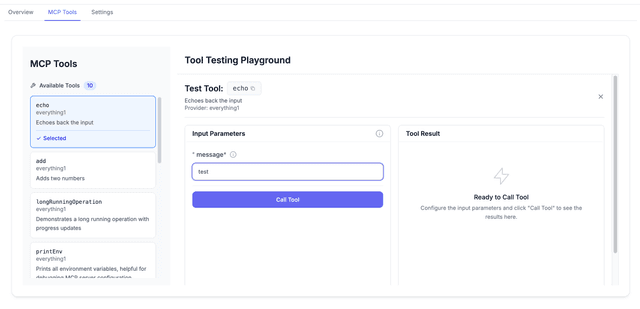
Failures shown on the MCP creation form or within the MCP Tool Testing Playground mean the LiteLLM proxy cannot reach the MCP server. Typical causes are misconfiguration (transport, headers, credentials), MCP/server outages, network/firewall blocks, or inaccessible OAuth metadata. Reproducing a client failure in the Playground confirms the problem is on the LiteLLM -> MCP hop rather than in the client
Review Logs
Well-scoped logs make it clear whether LiteLLM reached the MCP server and what happened next
Access Log Example (successful MCP call)
INFO: 127.0.0.1:57230 - "POST /deepwiki/mcp HTTP/1.1" 200 OK
Error Log Example (failed MCP call)
07:22:00 - LiteLLM:ERROR: client.py:224 - MCP client list_tools failed - Error Type: ExceptionGroup, Error: unhandled errors in a TaskGroup (1 sub-exception), Server: http://localhost:3001/mcp, Transport: MCPTransport.http
  httpcore.ConnectError: All connection attempts failed
ERROR:LiteLLM:MCP client list_tools failed - Error Type: ExceptionGroup, Error: unhandled errors in a TaskGroup (1 sub-exception)...
  httpx.ConnectError: All connection attempts failed
Support Bundle
If the matrix did not resolve the issue, collect everything below in one pass. A complete bundle replaces the discovery call where support reconstructs your setup
- LiteLLM version:
curl -sS http://localhost:4000/health/readinessoutput or the image tag. - Config subset: the
mcp_serversblock and anygeneral_settingskeys touching MCP or forwarding, with secrets removed. - The exact failing request: full curl command with the key masked (
sk-****1234). - HTTP status line, response headers, and body from the diagnostic curl (the
-D -output, unfiltered). x-mcp-debug-*headers from a run withx-litellm-mcp-debug: true(already masked).- LiteLLM proxy logs covering the failing request, started with
--detailed_debugif possible. - MCP-server logs for the same time window.
- Topology: where the client, LiteLLM, ingress/load balancer, and MCP server run, and what TLS terminates where.
- Timestamps with timezone for each captured request so logs can be correlated.
Never share: raw LiteLLM virtual keys or the master key, upstream API keys or static tokens from mcp_servers auth config, OAuth client secrets, unmasked Authorization header values, or .env contents. The masked debug headers exist so you never need to paste a live credential

