MCP Server Submissions
LiteLLM supports a submission and approval workflow for MCP servers. Team members can submit MCP servers for admin review, and the server is held in a pending_review state until an admin approves or rejects it.
This lets organizations give team members self-service MCP registration without immediately exposing unapproved servers to all users.
- MCP Overview - Adding and managing MCP servers
- MCP Permission Management - Control MCP access by key, team, or org
How It Works
Team member submits MCP server via API
        ↓
Server saved as "pending_review" (NOT loaded into registry)
        ↓
Admin reviews in the Submitted MCPs tab
        ↓
Approve → server goes "active" and is loaded into the registry
Reject  → server stays out with optional review notes
Prerequisites:
store_model_in_db: truemust be set in your proxy config (required to persist MCP servers)- The submitting user must use a team-scoped API key (admin keys bypass the workflow and use
POST /v1/mcp/serverdirectly)
general_settings:
  store_model_in_db: true
User: Submit an MCP Server
Use a team-scoped API key. Admin keys are rejected at this endpoint; admins should use POST /v1/mcp/server directly.
- curl
- Python
curl -X POST http://localhost:4000/v1/mcp/server/register \
  -H "Content-Type: application/json" \
  -H "Authorization: Bearer $TEAM_API_KEY" \
  -d '{
    "server_name": "github_mcp",
    "url": "https://api.githubcopilot.com/mcp",
    "transport": "sse",
    "description": "GitHub MCP for code search and PR management"
  }'
import requests

response = requests.post(
    "http://localhost:4000/v1/mcp/server/register",
    headers={
        "Authorization": f"Bearer {team_api_key}",
        "Content-Type": "application/json",
    },
    json={
        "server_name": "github_mcp",
        "url": "https://api.githubcopilot.com/mcp",
        "transport": "sse",
        "description": "GitHub MCP for code search and PR management",
    },
)
print(response.json())
Response. The server is created in pending_review state:
{
  "server_id": "832d6abc-7a5c-457a-a9f6-cfe4ae05f776",
  "server_name": "github_mcp",
  "url": "https://api.githubcopilot.com/mcp",
  "transport": "sse",
  "approval_status": "pending_review",
  "submitted_by": "7fd77c87-207b-4d6c-9d51-b72efb8962dc",
  "submitted_at": "2026-04-29T18:50:34Z"
}
The server is not accessible to MCP clients yet. It only becomes active after an admin approves it.
Admin: Review Submissions
Via UI
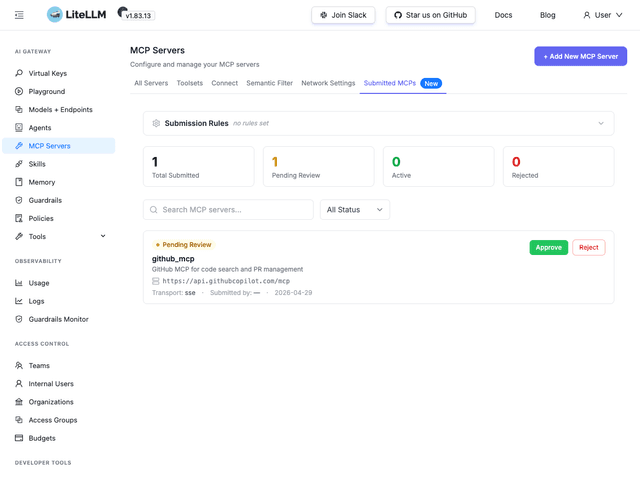
Go to MCP Servers → Submitted MCPs tab. You'll see:
- Submission counts: Total Submitted, Pending Review, Active, Rejected
- Each submission card with server name, description, URL, transport, and submission date
- Approve and Reject buttons on each card
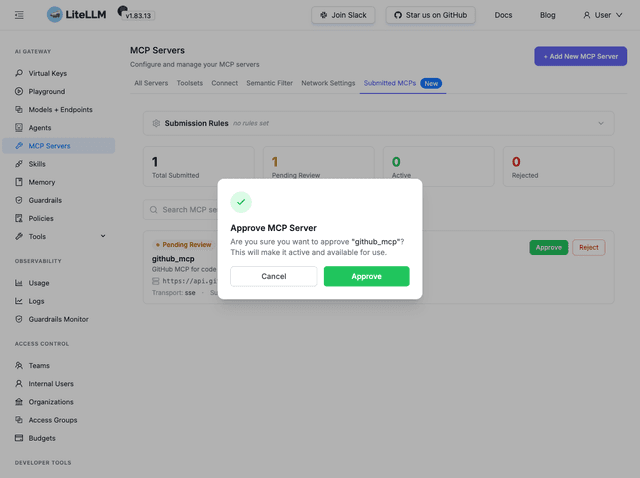
Approving a server pops a confirmation dialog. Click Approve to make it active and load it into the MCP registry immediately.
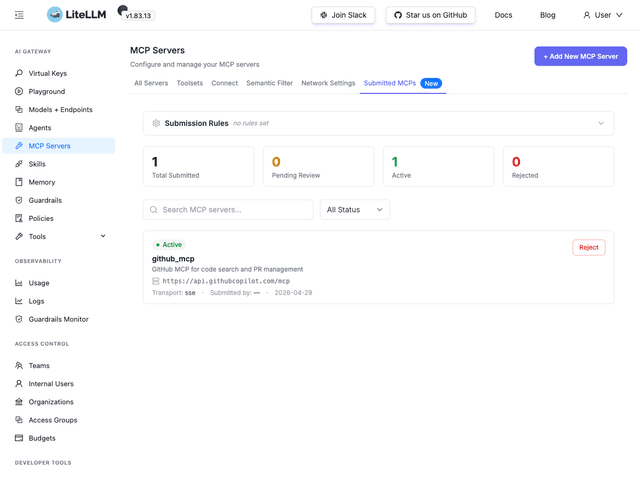
After approval, the card badge changes to Active and the counters update:
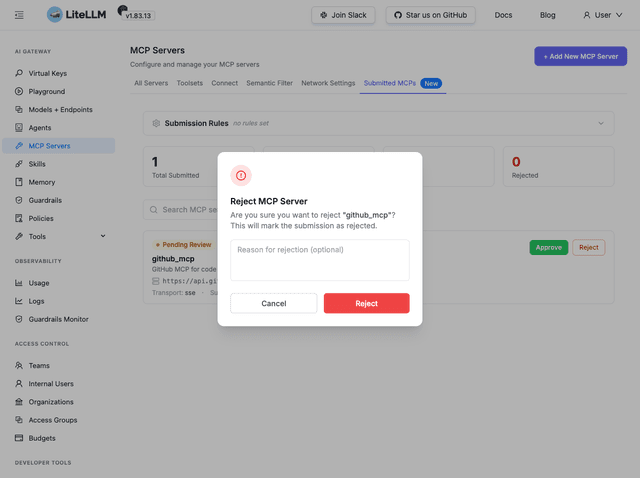
Rejecting opens a dialog with an optional review notes field, where you can explain why the submission was declined:
Via API
Admin or proxy_admin_viewer role required.
- List submissions
- Approve
- Reject
curl http://localhost:4000/v1/mcp/server/submissions \
  -H "Authorization: Bearer $ADMIN_API_KEY"
Response:
{
  "total": 1,
  "pending_review": 1,
  "active": 0,
  "rejected": 0,
  "items": [
    {
      "server_id": "832d6abc-7a5c-457a-a9f6-cfe4ae05f776",
      "server_name": "github_mcp",
      "approval_status": "pending_review",
      "submitted_by": "7fd77c87-207b-4d6c-9d51-b72efb8962dc",
      "submitted_at": "2026-04-29T18:50:34Z"
    }
  ]
}
curl -X PUT http://localhost:4000/v1/mcp/server/{server_id}/approve \
  -H "Authorization: Bearer $ADMIN_API_KEY"
The server status changes to active and it is immediately loaded into the MCP runtime registry.
curl -X PUT http://localhost:4000/v1/mcp/server/{server_id}/reject \
  -H "Content-Type: application/json" \
  -H "Authorization: Bearer $ADMIN_API_KEY" \
  -d '{"review_notes": "This URL is not on the approved vendor list."}'
review_notes is optional. The server stays out of the registry.
Approval Status Values
| Status | Meaning |
|---|---|
pending_review | Submitted, waiting for admin review. Not accessible to MCP clients. |
active | Approved. Loaded into the MCP registry and available to clients. |
rejected | Rejected by admin. Not accessible. May include review_notes. |
FAQ
Can an admin re-approve a rejected server?
Yes. Call PUT /v1/mcp/server/{id}/approve; the endpoint accepts servers in both pending_review and rejected status.
What happens if a previously-active server is rejected?
It is evicted from the runtime registry immediately, so clients will no longer see its tools.
Do I need a special config flag to enable submissions?
No. The submission endpoints are available by default as long as store_model_in_db: true is set. No additional feature flags are required.

