Allowlisting MCP Client Applications
Use an allowlist to restrict MCP gateway access to approved client applications, such as Claude Code, Cursor, or an internal CLI. LiteLLM checks the client identity after authentication and returns HTTP 403 when it is not allowed.
The allowlist applies across the gateway. Existing MCP server permissions still apply to allowed clients.
Configure the client identity
With JWT authentication configured, set mcp_client_id_jwt_field to the access-token claim that identifies the client application:
| Identity provider or token format | Client ID claim |
|---|---|
| Okta | cid |
| Microsoft Entra ID, v2 tokens | azp |
| Microsoft Entra ID, v1 tokens | appid |
| RFC 9068 access tokens | client_id |
For example, add the claim setting to your JWT configuration and restart the proxy:
general_settings:
  enable_jwt_auth: true
  litellm_jwtauth:
    mcp_client_id_jwt_field: azp
Nested claims support dot notation. When this setting is configured, JWT callers must have a matching claim; a request header cannot override a missing or unlisted claim.
Add allowed clients
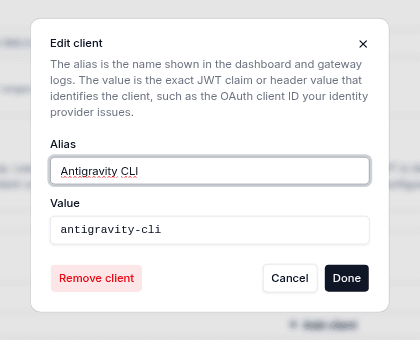
Each entry has two fields:
| Field | Purpose |
|---|---|
alias | Display name in the Admin UI and gateway logs. |
value | Client ID from the token. Matching is exact and case-sensitive. |
The examples below use antigravity-cli and claude-code as sample client IDs. Use the values issued by your identity provider.
- Admin UI
- config.yaml
- API
Open MCP Servers → Network Settings → Allowed Clients.
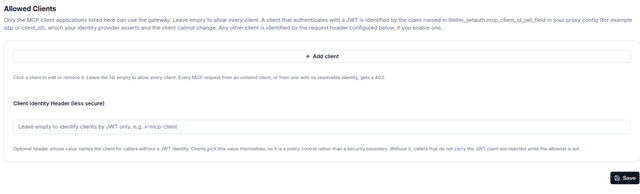
Click Add client, enter an Alias and Value, then click Add. Repeat for each approved application and click Save. Leave Client Identity Header blank for JWT-only access. Click a client card, edit its fields, click Done, then Save. To remove it, select Remove client, then Save.Edit or remove a client
Add mcp_allowed_clients under general_settings and restart the proxy:
general_settings:
  mcp_allowed_clients:
    - alias: Antigravity CLI
      value: antigravity-cli
    - alias: Claude Code
      value: claude-code
curl "$LITELLM_PROXY_URL/config/field/update" \
  -H "Authorization: Bearer $LITELLM_MASTER_KEY" \
  -H "Content-Type: application/json" \
  -d '{
    "field_name": "mcp_allowed_clients",
    "field_value": [
      {"alias": "Antigravity CLI", "value": "antigravity-cli"},
      {"alias": "Claude Code", "value": "claude-code"}
    ],
    "config_type": "general_settings"
  }'
Settings defined in config.yaml take precedence and cannot be changed through the Admin UI or API. UI and API updates are stored in the database. Enable store_model_in_db: true when using the Admin UI or API so all workers load and refresh the database settings.
Verify access
Call the MCP REST API with a valid access token for an allowed client:
curl -sS -o /dev/null -w 'HTTP %{http_code}\n' \
  "$LITELLM_PROXY_URL/mcp-rest/tools/list" \
  -H "Authorization: Bearer $ACCESS_TOKEN"
Repeat with valid tokens for an unlisted client and for a client whose token lacks the configured claim.
| Token | Expected result |
|---|---|
Client claim matches an allowed value | HTTP 200 |
| Client claim is unlisted or missing | HTTP 403 |
Rejected requests are logged as Rejected MCP request from a disallowed client application: .... Passing the client check does not grant access to additional MCP servers or tools.
Optional header identity
For callers that do not use JWT authentication, set Client Identity Header in the Admin UI and click Save, or add it to your configuration and restart the proxy:
general_settings:
  mcp_client_id_header: x-mcp-client
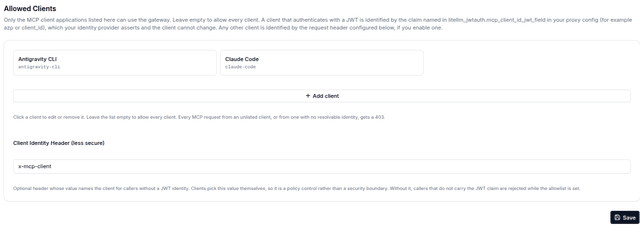
The request's x-mcp-client value must match an allowed client's value. Header identity is also used when mcp_client_id_jwt_field is not configured. With that JWT setting configured, JWT callers cannot fall back to a header.
Clients can change header values. Use JWT client claims for trusted application identity.
Scope and defaults
The check covers /mcp, /mcp/sse, /mcp-rest/tools/list, and /mcp-rest/tools/call.
mcp_allowed_clients | Behavior |
|---|---|
Unset or null | Client filtering is disabled. |
| Valid, nonempty list | Only matching client identities pass. |
[] or an invalid list | Requests subject to the allowlist are denied. Entries must contain nonempty alias and value strings. |
Dashboard session tokens are exempt, including when used outside the dashboard. Their lifetime is controlled by LITELLM_UI_SESSION_DURATION (24 hours by default). Admin UI connection-test routes are also exempt.
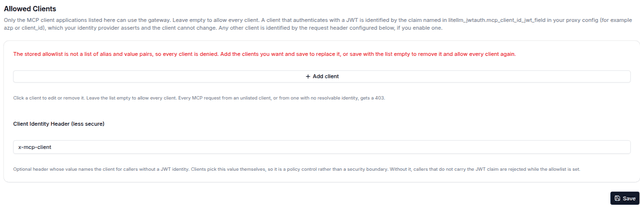
Remove or repair the allowlist
To disable client filtering in the Admin UI, remove all client cards and click Save. This deletes the setting. Saving [] through the API or configuration instead denies clients subject to the allowlist.
To remove a database-stored allowlist through the API:
curl "$LITELLM_PROXY_URL/config/field/delete" \
  -H "Authorization: Bearer $LITELLM_MASTER_KEY" \
  -H "Content-Type: application/json" \
  -d '{"field_name": "mcp_allowed_clients", "config_type": "general_settings"}'
An empty or invalid stored list displays a warning. Add valid client entries and save to restore restricted access, or save with no entries to disable filtering.