MCP - AWS SigV4 Auth
Use AWS SigV4 authentication to connect LiteLLM to MCP servers hosted on AWS Bedrock AgentCore.
Why SigV4?
AWS services authenticate requests using Signature Version 4, a per-request signing protocol that includes the request body in the cryptographic signature. This works differently from static-header auth types (api_key, bearer_token, etc.), which send the same header on every request.
LiteLLM's aws_sigv4 auth type handles this automatically: every outgoing MCP request is signed with your AWS credentials before it's sent.
Quick Start
- LiteLLM UI
- config.yaml
- Navigate to MCP Servers and click Add New MCP Server
- Set the transport to Streamable HTTP
- Select AWS SigV4 as the authentication type
- Fill in your AWS credentials:
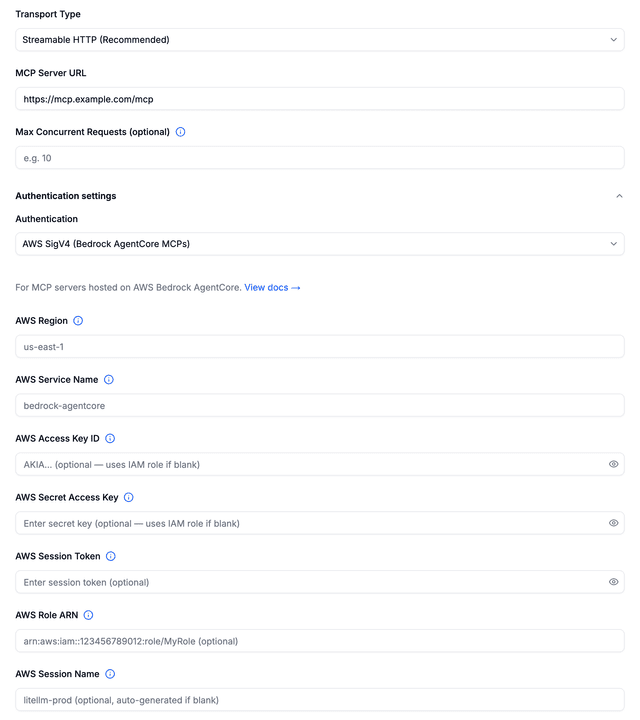
| Field | Required | Description |
|---|---|---|
| AWS Region | Yes | AWS region for SigV4 signing (e.g., us-east-1) |
| AWS Service Name | No | Defaults to bedrock-agentcore |
| AWS Access Key ID | No | Falls back to boto3 credential chain if blank |
| AWS Secret Access Key | No | Required if Access Key ID is provided |
| AWS Session Token | No | Only needed for temporary STS credentials |
| AWS Role ARN | No | IAM role ARN for STS AssumeRole (e.g., arn:aws:iam::123456789012:role/MyRole). If set, LiteLLM assumes this role before signing |
| AWS Session Name | No | Session name for the AssumeRole call — appears in CloudTrail. Auto-generated if omitted |
Once created, LiteLLM will sign every outgoing MCP request with SigV4. The server's tools appear automatically in the MCP Tools list.
Editing credentials: When editing an existing SigV4 server, leave credential fields blank to keep the current values. Only fields you fill in will be updated.
1. Set AWS credentials
export AWS_ACCESS_KEY_ID="AKIA..."
export AWS_SECRET_ACCESS_KEY="..."
export AWS_REGION_NAME="us-east-1"
2. Add your AgentCore MCP server to config.yaml
model_list:
  - model_name: gpt-5.6-terra
    litellm_params:
      model: openai/gpt-5.6-terra
      api_key: os.environ/OPENAI_API_KEY

mcp_servers:
  my_agentcore_mcp:
    url: "https://bedrock-agentcore.us-east-1.amazonaws.com/runtimes/<url-encoded-ARN>/invocations"
    transport: "http"
    auth_type: "aws_sigv4"
    aws_role_name: os.environ/AWS_ROLE_ARN          # IAM role to assume (recommended)
    aws_session_name: "litellm-prod"                 # optional — for CloudTrail auditing
    aws_region_name: "us-east-1"
    aws_service_name: "bedrock-agentcore"
The AgentCore runtime ARN must be URL-encoded in the url field. For example:
arn:aws:bedrock-agentcore:us-east-1:123456789012:runtime/my-mcp-server
becomes:
arn%3Aaws%3Abedrock-agentcore%3Aus-east-1%3A123456789012%3Aruntime%2Fmy-mcp-server
3. Start the proxy
litellm --config config.yaml
Use the MCP tools
Once configured, your AgentCore MCP tools are available through LiteLLM like any other MCP server:
curl http://localhost:4000/mcp-rest/tools/list \
  -H "Authorization: Bearer $LITELLM_API_KEY"
curl http://localhost:4000/mcp-rest/tools/call \
  -H "Content-Type: application/json" \
  -H "Authorization: Bearer $LITELLM_API_KEY" \
  -d '{
    "server_id": "my_agentcore_mcp",
    "name": "my_agentcore_mcp-your_tool_name",
    "arguments": {"key": "value"}
  }'
See MCP REST API for tool naming, server_id formats, and common mistakes.
Config Reference
| Field | Required | Description |
|---|---|---|
url | Yes | AgentCore MCP server URL (with URL-encoded ARN) |
transport | Yes | Must be "http" |
auth_type | Yes | Must be "aws_sigv4" |
aws_access_key_id | No | AWS access key. Supports os.environ/VAR_NAME. Falls back to boto3 credential chain if omitted |
aws_secret_access_key | No | AWS secret key. Supports os.environ/VAR_NAME. Falls back to boto3 credential chain if omitted |
aws_region_name | Yes | AWS region (e.g., us-east-1) |
aws_service_name | No | AWS service name for signing. Defaults to bedrock-agentcore |
aws_session_token | No | AWS session token for temporary credentials. Supports os.environ/VAR_NAME |
aws_role_name | No | IAM role ARN for STS AssumeRole. Supports os.environ/VAR_NAME. When set, LiteLLM calls sts:AssumeRole to get temporary credentials before signing |
aws_session_name | No | Session name for the AssumeRole call (appears in CloudTrail). Auto-generated if omitted. Supports os.environ/VAR_NAME |
How It Works
LiteLLM uses an httpx.Auth subclass (MCPSigV4Auth) that hooks into the HTTP request lifecycle:
- For every outgoing MCP request, the auth handler computes a SHA-256 hash of the request body
- It creates a SigV4 signature using your AWS credentials, the request URL, headers, and body hash
- The signed
Authorizationandx-amz-dateheaders are added to the request - AWS validates the signature and processes the MCP request
This happens automatically, with no manual token management.
Using Temporary Credentials (STS)
If you use AWS STS temporary credentials (e.g., from IAM roles or SSO), include the session token:
mcp_servers:
  my_agentcore_mcp:
    url: "https://bedrock-agentcore.us-east-1.amazonaws.com/runtimes/<url-encoded-ARN>/invocations"
    transport: "http"
    auth_type: "aws_sigv4"
    aws_access_key_id: os.environ/AWS_ACCESS_KEY_ID
    aws_secret_access_key: os.environ/AWS_SECRET_ACCESS_KEY
    aws_session_token: os.environ/AWS_SESSION_TOKEN
    aws_region_name: "us-east-1"
    aws_service_name: "bedrock-agentcore"
Using IAM Role Assumption (AssumeRole)
For production environments where your LiteLLM instance authenticates via an IAM role (e.g., EKS pod role, EC2 instance profile), you can configure aws_role_name to have LiteLLM call sts:AssumeRole before signing MCP requests:
mcp_servers:
  my_agentcore_mcp:
    url: "https://bedrock-agentcore.us-east-1.amazonaws.com/runtimes/<url-encoded-ARN>/invocations"
    transport: "http"
    auth_type: "aws_sigv4"
    aws_role_name: "arn:aws:iam::123456789012:role/BedrockAgentCoreRole"
    aws_session_name: "litellm-prod"    # optional
    aws_region_name: "us-east-1"
    aws_service_name: "bedrock-agentcore"
LiteLLM uses the ambient credentials (pod role, instance profile, or env vars) to call sts:AssumeRole, then signs MCP requests with the assumed role's temporary credentials.
You can also combine aws_role_name with explicit access keys. The keys are then used as the source identity for the AssumeRole call:
mcp_servers:
  my_agentcore_mcp:
    url: "https://bedrock-agentcore.us-east-1.amazonaws.com/runtimes/<url-encoded-ARN>/invocations"
    transport: "http"
    auth_type: "aws_sigv4"
    aws_role_name: os.environ/AWS_ROLE_ARN
    aws_access_key_id: os.environ/AWS_ACCESS_KEY_ID
    aws_secret_access_key: os.environ/AWS_SECRET_ACCESS_KEY
    aws_region_name: "us-east-1"
For most Kubernetes deployments, you only need aws_role_name and aws_region_name; the pod's IAM role provides the source credentials automatically.
Troubleshooting
403 Forbidden from AWS
- Verify your AWS credentials are valid and not expired
- Check that
aws_region_namematches the region in your AgentCore URL - Ensure
aws_service_nameis set tobedrock-agentcore - If using STS credentials, confirm
aws_session_tokenis set and not expired
AssumeRole AccessDenied
If you get AccessDenied when using aws_role_name:
- Verify the role ARN is correct
- Check that the trust policy on the target role allows your source identity to assume it
- If running on EKS, ensure the pod's service account is annotated with the correct IAM role
- Check CloudTrail for the failed
sts:AssumeRolecall to see the exact error
Health check errors on startup
SigV4-authenticated MCP servers skip the standard health check on proxy startup. This is expected, and the proxy will still sign requests correctly when tools are invoked.
"botocore not found" error
Install the botocore package:
uv add botocore
botocore is used for SigV4 credential handling and is required when using aws_sigv4 auth.

