Try it in the Admin UI
Add a decision model
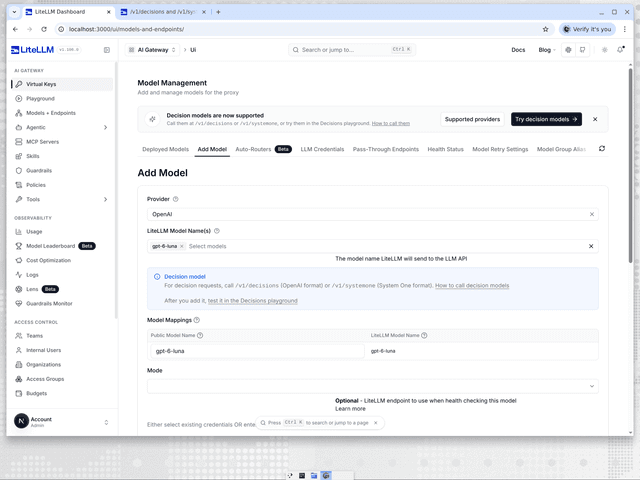
Go to Models + Endpoints, open the Add Model tab and pick the provider, for example OpenAI. Pick the decision model under LiteLLM Model Name(s), for example gpt-6-luna, and a Decision model note confirms the pick and links to the Decisions playground. Enter the provider credentials as you would for any other model, then click Add Model. The model then answers on /v1/decisions and /v1/systemone under its public model name. Providers that need an endpoint URL, such as Databricks and Microsoft Foundry, take it in the API Base field, matching the api_base in the proxy setup. The optional Mode dropdown has a Decisions - /v1/decisions entry from v1.107.0-rc.1, named Evaluation - /v1/decisions in v1.106.0, for health checking the model over /v1/decisions.
Decisions playground
The Playground Decisions tab sends requests to both routes. Open it at LITELLM_PROXY_BASE_URL/ui/?page=llm-playground&tab=system-one, or go to Playground and pick Decisions. The Endpoint selector picks /v1/decisions (OpenAI Decisions format) or /v1/systemone (System One format), and the Model selector lists the decision models in your model_list, such as jev or luna from the proxy setup; a proxy with no decision models shows an Add a decision model link instead. Both endpoints have a Form tab for building the request without JSON and a JSON tab for the raw request. Image input on /v1/decisions is edited in JSON, since the form keeps messages and image parts as they are. Virtual Key Source picks the key: Current UI Session uses your dashboard login and Virtual Key attributes the call to a key you paste. Once the call returns, each question shows its answer and probabilities, with the model the provider reported, token usage, latency and the raw JSON response under them.
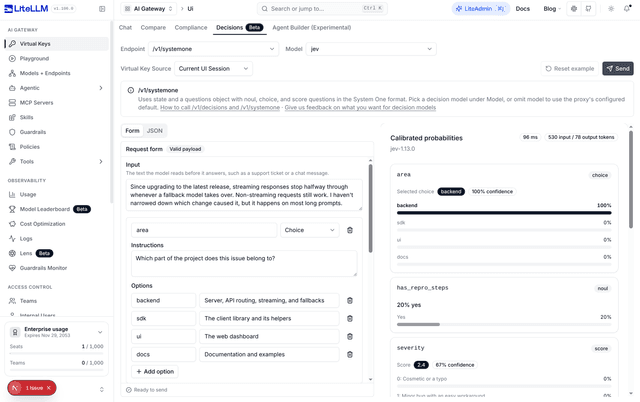
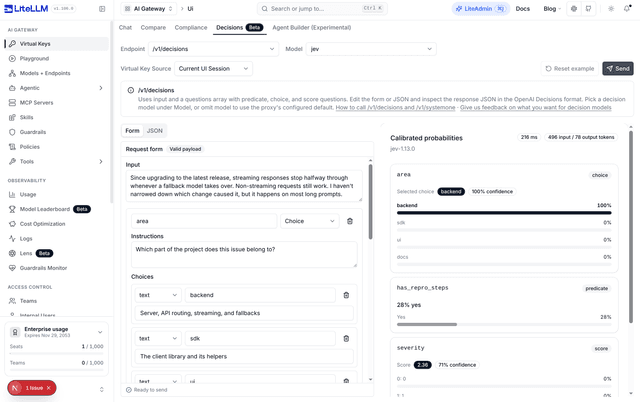
The tab is not in v1.104.2 or v1.105.0. Releases before this UI change label it System One and only send the System One format, so use curl or the SDK for /v1/decisions there. The TypeSafe page walks through the System One form, validation and answer view.

