

Get early access, work directly with the LiteLLM team, and influence the roadmap with your production traffic.
Apply to Become a Design PartnerAlready testing it? Share your results in discussion #32168.
A cheap model can get stuck mid-task: it calls the same tool with the same arguments three times, or the same call keeps erroring, while the newest message in that history still reads as a harmless follow-up like "can you try a different approach?" Read on its own, that turn classifies SIMPLE every time, so the router sends it right back to the model that was already failing. Until now, the only way out was a person noticing the loop and typing an escalation keyword.
stall_escalation_enabled: true gives the router that judgment on its own.
How it decides
- Reads the assistant's own tool calls, not the human's messages. A task counts as stalled once the newest call repeats, or errors, at least
stall_escalation_repeat_thresholdtimes across the laststall_escalation_windowcalls - Anchored on the newest call, not whichever pattern is most common in the window. A task that tried the same thing three times and then found a different path still has those calls sitting in the window for a few more turns; anchoring on the newest one keeps that history from escalating a task that already recovered
- Reads both tool-call shapes. Anthropic Messages
tool_use/tool_resultblocks, includingis_error, and chat-completionstool_calls/toolmessages, which carry no error flag, so those are judged on repetition alone - Stateless. Detection reruns on every classified turn from that request's own messages, so the bump lasts only as long as the task looks stuck and lifts on its own the moment it doesn't
Escalation records stall_escalation in routing_decision.signals, right next to escalation_keywords.
In the dashboard
Auto-Routers get an Advanced: Stalled Task Escalation section with the toggle and both knobs:
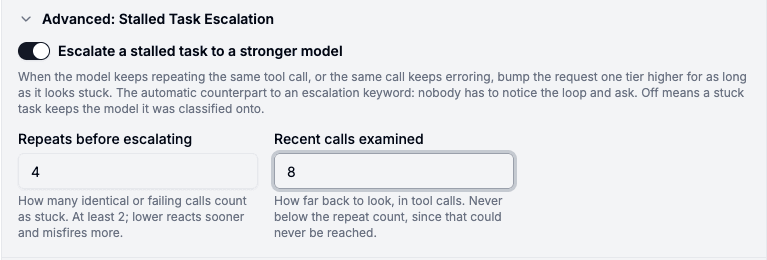
It's rejected together with session_affinity and classification_mode: user_turn. Both replay a held routing decision on most turns instead of classifying, so detection would never see the tool calls it needs, and the toggle greys out with that reason instead of letting you save a config the backend would reject.
Turning it on
model_list:
  - model_name: gpt-4o-mini
    litellm_params: {model: openai/gpt-4o-mini, api_key: os.environ/OPENAI_API_KEY}
  - model_name: gpt-4o
    litellm_params: {model: openai/gpt-4o, api_key: os.environ/OPENAI_API_KEY}

  - model_name: smart-router
    litellm_params:
      model: auto_router/complexity_router
      complexity_router_config:
        tiers:
          SIMPLE: gpt-4o-mini
          MEDIUM: gpt-4o

        # off by default: bump a stuck task one tier higher
        stall_escalation_enabled: true
        stall_escalation_window: 6
        stall_escalation_repeat_threshold: 3
Point a shadow-eval job at your busiest team, compare your current config against one with stall escalation on, and tell us what you see in discussion #32168, or
Apply to Become a Design Partner